A beautiful, interactive Flutter application featuring 7 stunning visual effects with dynamic theming and professional UI design. Created to showcase advanced Flutter animations, custom painting, and interactive touch experiences.




| Effect | Description | Icon |
|---|---|---|
| Particle Trail | Colorful particles that follow your finger movement with realistic physics | 🔴 |
| Ripple Effect | Touch creates expanding water-like ripples with inner wave details | 💧 |
| Spring Object | A ball that follows your finger with spring physics and damping | 🏀 |
| Scribble Draw | Freehand drawing with smooth paint strokes and customizable colors | 🖌️ |
| Sparkle Trail | Rainbow glitter sparkles with 6-pointed stars and glow effects | ✨ |
| Bezier Web | Curved bezier lines connecting finger paths with smooth animations | 📈 |
| Floating Blobs | Autonomous bouncing blobs that react to touch interactions | 🫧 |
- Professional App Bar: Dynamically changes color based on selected paint color
- Smart Color Detection: Automatically adjusts text/icon colors for optimal contrast
- Gradient Backgrounds: Beautiful 3-layer gradients with professional shadows
- Smooth Animations: 300ms transitions throughout the app
- Modern Typography: Premium font weights and letter spacing
- Interactive Effect Selector: Grid-based effect switcher with overlay UI
- Real-time Rendering: 60 FPS smooth animations using Flutter's CustomPainter
- Optimized Performance: Effect-specific rendering and state management
- Professional Architecture: Clean code separation with controllers, models, and widgets
- Responsive Design: Works perfectly on all screen sizes
- Material 3 Compliance: Modern design following latest Material Design guidelines
- Complete Documentation: Includes screenshots, demo video, and comprehensive guides
🔗 Read the Full Technical Article on Medium
Dive deep into the implementation details with our comprehensive Medium article: "Building Interactive Visual Effects in Flutter: A Deep Dive into Custom Painting and Animations"
- Advanced CustomPainter techniques for high-performance graphics
- Physics-based animations with realistic particle systems
- State management patterns for complex interactive apps
- Performance optimization strategies for smooth 60 FPS animations
- Common challenges and solutions when building visual effects
- Architecture patterns and best practices for Flutter animations
Perfect for developers who want to understand the technical implementation and build their own visual effects!
- Flutter SDK (>=3.0.0)
- Dart SDK (>=2.17.0)
- Android Studio / VS Code
- iOS/Android device or emulator
- Clone the repository
git clone https://github.com/Piyushhhhh/flutter-visuals.git
cd flutter-visuals- Install dependencies
flutter pub get- Run the app
flutter run- Launch the app - You'll see the default Particle Trail effect
- Touch and drag on the screen to interact with the current effect
- Tap the magic wand button (⭐) to open the effect selector
- Select any effect from the grid to switch instantly
- Use the color picker (🎨) to change effect colors
- Clear the screen (🧹) to reset all effects
- Particle Trail: Drag to create colorful particle streams
- Ripple Effect: Touch to create expanding ripples
- Spring Object: The ball follows your finger with realistic physics
- Scribble Draw: Draw freely with customizable brush colors
- Sparkle Trail: Drag to create rainbow sparkle trails
- Bezier Web: Draw to create smooth curved line connections
- Floating Blobs: Touch to interact with autonomous bouncing balls
lib/
├── main.dart                          # App entry point and main UI
├── controllers/
│   └── visual_effects_controller.dart # State management and effect logic
├── models/
│   └── visual_effects_models.dart     # Data models for all effects
├── widgets/
│   ├── interactive_canvas.dart        # Main canvas widget
│   └── effect_selector.dart          # Effect selection UI
├── painters/
│   └── visual_effects_painter.dart    # Custom painters for rendering
└── core/
    ├── constants/
    │   └── app_constants.dart         # App-wide constants
    └── extensions/
        └── offset_extensions.dart     # Utility extensions
- VisualEffectsController: Manages state and coordinates all effects
- VisualEffectsPainter: Handles rendering with effect-specific painters
- EffectSelector: Professional UI for switching between effects
- InteractiveCanvas: Touch-responsive canvas with gesture handling
- Add to EffectType enum in
visual_effects_models.dart - Create model class extending
VisualEffect - Add update logic in
VisualEffectsController - Implement painter in
VisualEffectsPainter - Add icon mapping in
_getEffectIconmethod
- Colors: Modify
_availableColorsand_rainbowColorsarrays - Physics: Adjust constants in
app_constants.dart - Animations: Update duration values in controller methods
- UI: Customize
_DynamicAppBarandEffectSelectorwidgets
- Selective Rendering: Only renders the current effect type
- Efficient State Management: Uses
ChangeNotifierfor optimal rebuilds - Memory Management: Automatic cleanup of expired effects
- Smooth Animations: 60 FPS with
AnimationController
- Flutter SDK: Core framework
- Material Icons: Professional iconography
- Custom Painting: For high-performance rendering
Contributions are welcome! Here's how to get started:
- Fork the repository
- Create a feature branch (
git checkout -b feature/amazing-effect) - Commit your changes (
git commit -m 'Add amazing effect') - Push to the branch (
git push origin feature/amazing-effect) - Open a Pull Request
- Follow Flutter best practices
- Add tests for new effects
- Update documentation
- Maintain consistent code style
- Test on multiple devices
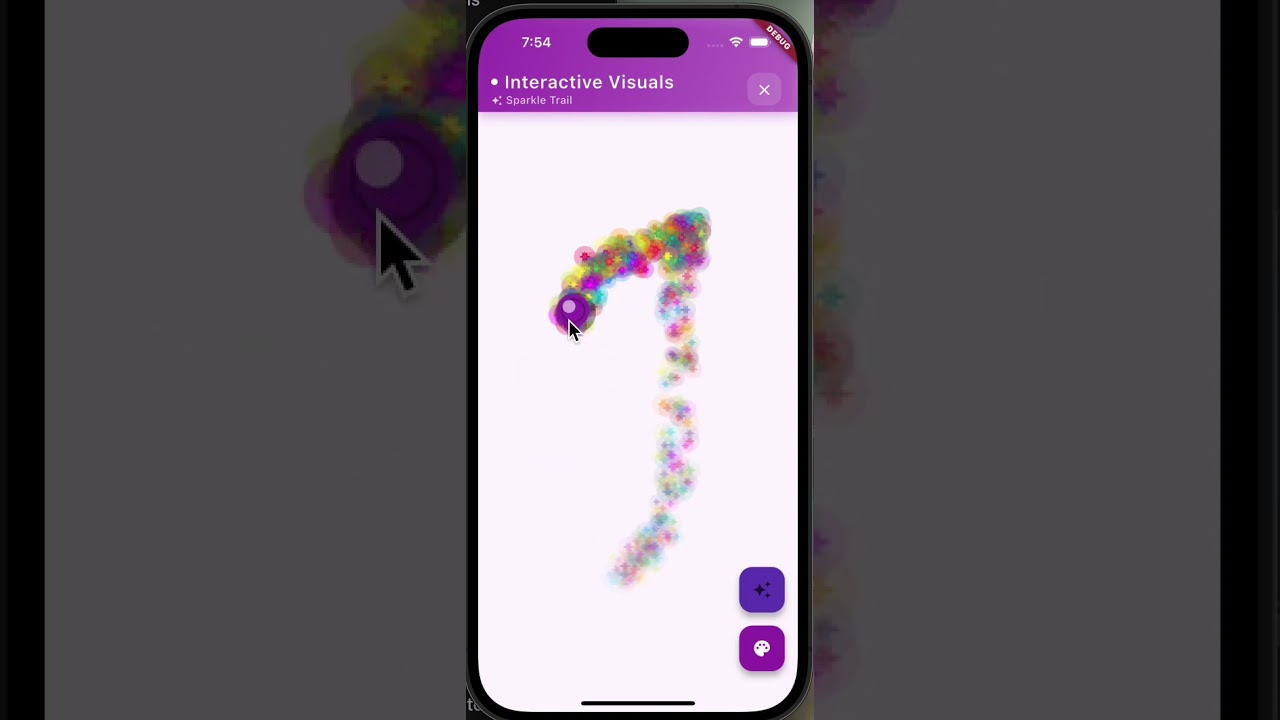
👆 Click the thumbnail above to watch the full demo on YouTube

🎬 Full working demonstration of all 7 interactive visual effects
Note: GitHub doesn't support embedded video playback, so clicking the thumbnail or button above will open the demo video on YouTube where you can watch all the interactive visual effects in action!
| Floating Blobs Effect | Particle Trail Effect | Sparkle Trail Effect |
|---|---|---|
 |
 |
 |
- Dynamic app bar with gradient background matching paint color
- Professional cross icon for clearing the frame
- Floating action buttons with effect selector and color picker
- Real-time visual effects responding to touch interactions
- Smooth animations and particle physics
- Modern UI design with clean typography and spacing
- None currently reported
- Add sound effects for interactions
- Implement effect recording/playback
- Add more color palettes
- Create effect presets
- Add haptic feedback
- 📝 Technical Blog Post - Detailed implementation guide on Medium
- Flutter CustomPainter Documentation
- Flutter Animation Documentation
- Material Design Guidelines
This project is licensed under the MIT License - see the LICENSE file for details.
- Flutter team for the amazing framework
- Material Design team for design guidelines
- Community contributors and testers
- GitHub: @Piyushhhhh
- Project Link: https://github.com/Piyushhhhh/flutter-visuals
⭐ Star this repository if you found it helpful!
Made with ❤️ and Flutter