Terms
Discord tag (optional)
Nenfal#7390
What happened?
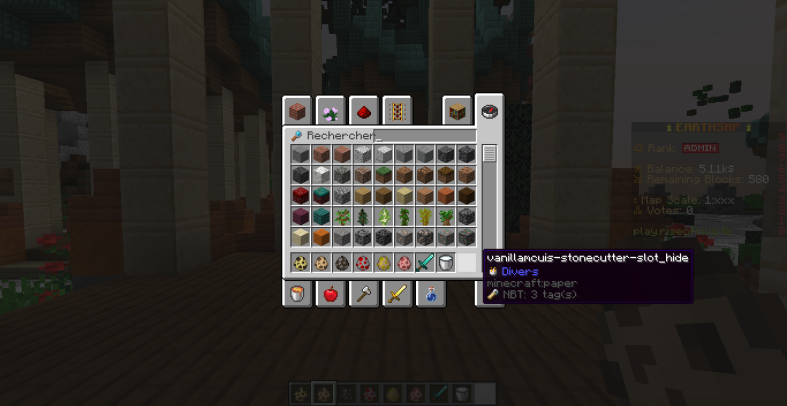
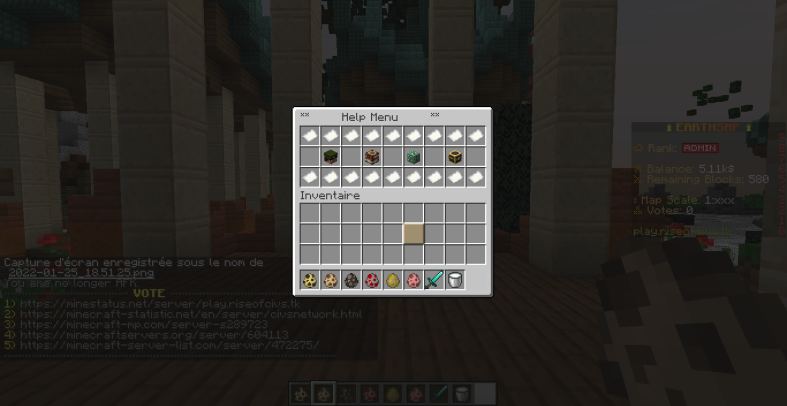
Hello! There is a lag concerning the plugin:
◌ Server version: 1.18.1-purpur
◌ Plugin version: 2.5.5
◌ Items in question: vanillamcuis-stonecutter-slot_xxxx
◌ Using CustomData on DeluxeMenus doesn't work for me on this ItemsAdder version
Note: The item displays in my inventory, just not on GUI*
Steps to reproduce the issue
◌ Add a custom item, or icon into the game
◌ Try to use it on CustomData on DeluxeMenus, with self-host enabled, and try with external-host
That will display the default material and not the item itself.
Server version
git-Purpur-1528 (MC: 1.18.1)*
ItemsAdder Version
Version 2.5.5
ProtocolLib Version
4.7.0-SNAPSHOT-b521
LoneLibs Version
1.0.16b
LightAPI Version (optional)
bukkit-5.1.0 (build SNAPSHOT)
LibsDisguises Version (optional)
No response
FULL server log
No errors ✔️
Error (optional)
ItemsAdder config.yml
metrics: true
update-checker: true
disable-plugin-loading-messages_DONT_ASK_ME_FOR_SUPPORT_IF_YOU_SET_TRUE__THANKS: false
resource-pack:
  hosting:
    no-host:
      enabled: false
    auto-external-host:
      enabled: false
    self-host:
      enabled: true
      server-ip: 185.248.33.62
      pack-port: 8163
    external-host:
      enabled: false
      url: 'https://www.dropbox.com/s/rzgl2pogetnnrxy/pack.zip?dl=0'
      skip-url-file-type-check___DONT_ASK_HELP_IF_SET_TRUE: false
  apply-on-join: true
  kick-player-on-decline: false
  kick-player-on-fail: false
  delay-ticks: 1
  notify-other-plugins-interfering: true
  title:
    enabled: true
  protect-player:
    black-screen: true
    hide-hud: true
    cancel-movement: true
    lock-player: true
  command:
    usage-cooldown-seconds: 60
  custom-font:
    enabled: false
    name: ipaexg.ttf
    shift: '[0,0]'
    size: 11.0
    oversample: 2.0
  thin-font:
    enabled: false
  zip:
    protect-file-from-unzip:
      enabled: true
      extreme: true
    compress-png-files: true
    compress-json-files: true
    overwrite-vanilla-models: false
    overwrite-vanilla-lang-json: false
    generate-custom-armors-textures:
      _: 'Available values: VANILLA_1_17 or OPTIFINE'
      enabled: true
      mode: VANILLA_1_17
    disable-overwrite-leather-armor-layers-textures: false
    fix_transparent_noteblocks__disable-for-more-performance: false
    ignore-files-ext:
    - db
    - yml
    - xcf
    - html
  items:
    CustomModelData-starting-value:
      ALL: 10000
      DIAMOND: 11000
config_files:
  lang: en
  extract-default-items: false
  dictionaries-lang: en
  extract-default-resources: false
blocks:
  light-api: true
  fix-liquids-flow: true
  fix-floating-blocks: true
  fix-glitched-blocks:
    enabled: true
    only-new-chunks: false
    search-also-in-these-biomes:
      enabled: false
      biomes:
      - BEACH
      - BIRCH_FOREST
      - BIRCH_FOREST_HILLS
      - FOREST
      - MOUNTAINS
      - MOUNTAIN_EDGE
      - GRAVELLY_MOUNTAINS
      - PLAINS
      - RIVER
  cancel-break-wrong-tool:
    enabled: true
    send-actionbar: true
  campfire:
    unlit-on-place: true
    allow-any-item: true
  disable-REAL: false
  disable-REAL_TRANSPARENT: false
  disable-REAL_NOTE: false
  disable-REAL_WIRE: true
  disable-FIRE: false
items:
  fix-show-attack-and-damage-as-lore: true
  give_death_location_maps: true
  hide-custom-durability-lore: false
liquids:
  enabled: true
huds:
  enabled: true
mobs:
  disable-MOB-behaviour__DISABLE_AT_YOUR_OWN_RISK: false
font_images:
  chat:
    enabled: true
    doublecheck-permission__disable-for-more-performance: false
    add-hover-suggestion: true
  command:
    enabled: true
    commandblocks: true
    excluded:
    - home
    - sethome
    - tpa
  sign:
    enabled: true
  book:
    enabled: true
  anvil:
    enabled: true
  inventory-title:
    enabled: true
  tab-header-footer:
    enabled: true
  vault-prefix-suffix:
    enabled: true
    update-every-ticks: 1200
  scoreboard-teams:
    enabled: false
    update-every-ticks: 3600
  player-display-name:
    enabled: true
    update-every-ticks: 1200
  replace-in-customitems-name-and-lore: true
effects:
  hide-scoreboard-numbers: false
  text-effects:
    enabled: true
    replace-in-customitems-name-and-lore: true
    chat:
      enabled: true
    sign:
      enabled: true
    book:
      enabled: true
    anvil:
      enabled: true
    tab-header-footer:
      enabled: true
entities:
  max-furniture-vehicles-per-chunk: 30
  allow-removing-old-furnitures_2_3_11: false
recipes:
  hide-vanilla-unrecognized-recipe-errors: true
  fix-packet-too-large-kick: false
  custom-recipes:
    unlock:
      all-on-join: false
      on-pickup:
        any: false
        ingredients: true
  remove-vanilla-recipes:
    enabled: true
    list:
      DIAMOND_SWORD: false
      IRON_INGOT: false
debug:
  items:
    log-files-loading: false
    log-items-loading: false
    log-items-loading-disabled: false
    log-font-images-loading: false
    log-huds-loading: false
    log-attribute-modifiers-loading: false
    log-warnings: false
    log-loots-loading: false
    log-loots-loading-disabled: false
    log-armors-loading: false
  recipes:
    log-recipes-loading: false
    log-recipes-loading-disabled: false
    log-recipes-removed-vanilla: false
    log-fix-packet-too-large: false
  resource-pack:
    log-extract-default-resources: false
    log-not-extract-default-resources-already-exist: false
  blocks:
    log-save: false
    log-save-on-unload: false
    log-mined-unknown-blocks: true
  worlds-populators:
    log-loading: false
    log-loading-disabled: false
    log-loading-no-populators: false
    log-loading-no-world: true
    log-generation: false
  trees-populators:
    log-loading: false
    log-loading-disabled: false
    log-loading-no-populators: false
    log-loading-no-world: true
    log-generation: false
  surface-decorators:
    log-loading: false
    log-loading-disabled: false
    log-loading-no-decorators: false
    log-loading-no-world: true
    log-generation: false
  player-stats:
    log-save: false
  performance:
    loading-ms: true
  huds:
    log-triggers: false
  other:
    log-dictionaries-loading: false
    log-liquids-loading: false
    log-minecraft_lang_overwrite-loading: false
  categories:
    log-total-loaded: true
    log-single-loaded: false
    log-single-loaded-overwrite: false
    log-single-skip: false
Problematic items yml configuration file (optional)
#  A DeluxeMenus basic configuration guide for beginners
#=========================================================
#
# This note will help you understand the basic functions and configuring of DeluxeMenus: commands, requirements, items and others, and from then on you can start to work with more advanced stuff. You can delete this note or any note below at any time. But if you are still here anyway, then let's move down below
#

# Open Command
#
# This setting is the command that will be used to open this menu. Supports normal String or a String List
# NOTE: Use "open_command: []" to create a menu with no commands needed
#
# open_command: <command>
# open_command:
#   - <command1>
#   - <command2>
#
open_command: help

# Size
#
# This allows you to set the size of the menu inventory. Range from 9-54.
# If this option is not present in the menu configuration, it will default to 54.
#
size: 27
# Menu title
#
# This is the title of the menu. You can change it with your custom name
# Color codes and placeholders are supported
#
menu_title: '**       Help Menu       **'

# Open requirement
#
# This setting section allows you to define requirements the menu viewer must meet
# to be allowed to open this menu in game.
#
# Any menu you want to restrict access to based on permission
# should have a basic "has permission" requirement
#
# This setting and requirements can be explained more in depth by checking out
# the requirements_menu.yml file in your menus folder.
# For full reference, check https://github.com/help-chat/DeluxeMenus/wiki/Requirements

# Item section. This is where you can start add items into menu, and add functions into each items that you did.
# For depth explanation on the functions, you can check on the note given from config.yml
# For full reference, check https://github.com/help-chat/DeluxeMenus/wiki/Item
#
items:
  # Here you need to set the name ID of the item. This name however, does not display on the menu. Every item must have a unique name ID.
  # In this example, we will call this item name ID: "teststone"
  'portal':
    #We will start to create a STONE item,
    material: 'hdb-2981'

    # with a Block data set to 1, so that you can change stone type from STONE to GRANITE. More informations about the block data can be checked through each items from Minecraft Wikipedia
    data: 1
    # Slots that you want to put the item. Starts from 0
    slot: 4
    # Here we will name this item. You can change this at anytime. PlaceholderAPI & Color codes supported
    display_name: "&e&lWhat is &6&lModern Warfare?"
    # This is the lore setting. Referrence of this same with display_name.
    # You can create multiple lines of lores like this
    lore:
      - '&8&m•••••••••••••••••••••••••••••••••••••••••••••••••••••••••'
      - "&a&lInformation"
      - '&8&m•••••••••••••••••••••••••••••••••••••••••••••••••••••••••'
      - "&7Modern Warfare &7is a &ecompetitive gamemode"
      - "&7on a real &61:924 earth map scale&7."
      - "&7You can &aclaim &7by making your own town"
      - "&7or just join one, group together to"
      - "&7form a &dnation &7and make it strong."
      - '&8&m•••••••••••••••••••••••••••••••••••••••••••••••••••••••••'
      - "&bLeft-Click&7: Link of Dynmap "

    left_click_commands:
      - '[sound] ENTITY_FIREWORK_ROCKET_BLAST'
      - '[console] portal:tp'
  'military':
    #We will start to create a STONE item,
    material: 'hdb-1979'

    # with a Block data set to 1, so that you can change stone type from STONE to GRANITE. More informations about the block data can be checked through each items from Minecraft Wikipedia
    data: 1
    # Slots that you want to put the item. Starts from 0
    slot: 10
    # Here we will name this item. You can change this at anytime. PlaceholderAPI & Color codes supported
    display_name: "&c&l◉ War System &f%img_blood%"
    # This is the lore setting. Referrence of this same with display_name.
    # You can create multiple lines of lores like this
    lore:
      - '&8&m•••••••••••••••••••••••••••••••••••••••••••••••••••••••••'
      - "&6&lInformation"
      - '&8&m•••••••••••••••••••••••••••••••••••••••••••••••••••••••••'
      - "&7Declare a nation as &cenemy &7and destroy it,"
      - "&7Form &aalliances &7to help you."
      - "&6Annex &7towns and expand your &eempire&7! &f%img_dead1%"
      - '&8&m•••••••••••••••••••••••••••••••••••••••••••••••••••••••••'
      - "&7▸ &eLeft-Click for more informations"
      - '&8&m•••••••••••••••••••••••••••••••••••••••••••••••••••••••••'

    left_click_commands:
      - '[message] &cError: The page is in maintenance...'
      - '[close]'
  'dymnap':
    material: 'hdb-23542'

    # with a Block data set to 1, so that you can change stone type from STONE to GRANITE. More informations about the block data can be checked through each items from Minecraft Wikipedia
    data: 1
    # Slots that you want to put the item. Starts from 0
    slot: 12
    # Here we will name this item. You can change this at anytime. PlaceholderAPI & Color codes supported
    display_name: "&9&l◉ What are the rules?"
    # This is the lore setting. Referrence of this same with display_name.
    # You can create multiple lines of lores like this
    lore:
      - '&8&m•••••••••••••••••••••••••••••••••••••••••••••••••••••••••'
      - "&6&lInformation"
      - '&8&m•••••••••••••••••••••••••••••••••••••••••••••••••••••••••'
      - "&7To allow a good functioning of our server,"
      - "&7there are &9rules &7to be &arespected&7."
      - "&7Any &cmisconduct &7leads to a &csanction&7."
      - '&8&m•••••••••••••••••••••••••••••••••••••••••••••••••••••••••'
      - "&7▸ &bLeft-Click&7: Link to the &6rules "
      - '&8&m•••••••••••••••••••••••••••••••••••••••••••••••••••••••••'

    left_click_commands:
      - '[message] &cError: The page is in maintenance...'
      - '[close]'
  'money':
    material: 'hdb-23056'

    # with a Block data set to 1, so that you can change stone type from STONE to GRANITE. More informations about the block data can be checked through each items from Minecraft Wikipedia
    data: 1
    # Slots that you want to put the item. Starts from 0
    slot: 14
    # Here we will name this item. You can change this at anytime. PlaceholderAPI & Color codes supported
    display_name: "&e&l◉ How to get money? &f%img_money%"
    # This is the lore setting. Referrence of this same with display_name.
    # You can create multiple lines of lores like this
    lore:
      - '&8&m•••••••••••••••••••••••••••••••••••••••••••••••••••••••••'
      - "&6&lInformation"
      - '&8&m•••••••••••••••••••••••••••••••••••••••••••••••••••••••••'
      - "&7Well, you can easily get money by farming!"
      - "&7By voting, /shop and killing mobs."
      - '&8&m•••••••••••••••••••••••••••••••••••••••••••••••••••••••••'
      - " &7 &bLeft-Click&7: For more information"
      - '&8&m•••••••••••••••••••••••••••••••••••••••••••••••••••••••••'
    left_click_commands:
     - '[message] &7Post about earning money &7: &dhttp://play.riseofcivs.tk/topic/How-To-Earn-Money.3/'
     - '[close]'
  'shop':
    material: 'hdb-13379'

    # with a Block data set to 1, so that you can change stone type from STONE to GRANITE. More informations about the block data can be checked through each items from Minecraft Wikipedia
    data: 1
    # Slots that you want to put the item. Starts from 0
    slot: 16
    # Here we will name this item. You can change this at anytime. PlaceholderAPI & Color codes supported
    display_name: "&d&l◉ Want to support us? &f%img_halo%"
    # This is the lore setting. Referrence of this same with display_name.
    # You can create multiple lines of lores like this
    lore:
      - '&8&m•••••••••••••••••••••••••••••••••••••••••••••••••••••••••'
      - "&6&lInformation"
      - '&8&m•••••••••••••••••••••••••••••••••••••••••••••••••••••••••'
      - "&7You can purchase some &eranks &7in our store."
      - '&8&m•••••••••••••••••••••••••••••••••••••••••••••••••••••••••'
      - '&bLeft-Click&7: &7Link to our &dstore'
      - '&8&m•••••••••••••••••••••••••••••••••••••••••••••••••••••••••'

    left_click_commands:
      - '[message] &7You can support us &7at &dhttp://riseofcivs.tk/store'
      - '[close]'
  'filler_item':
    material: PAPER
    nbt_int: CustomModelData:10257
    slots:
      - 0
      - 1
      - 2
      - 3
      - 4
      - 5
      - 6
      - 7
      - 8
      - 18
      - 19
      - 20
      - 21
      - 22
      - 23
      - 24
      - 25
      - 26
    display_name: ' '
# ==============================================================
#
# Random tips, tricks, and useful info below
#
# ==============================================================
#
# PER ITEM PERMISSION AND PRIORITY INFO:
#
# Per item permissions and priorities are optional.
# High priority = 1, Lowest priority = 2147483647.
# This allows you to show different items for a specific menu slot depending on the highest priority
# item permission a player has. This makes your menus very dynamic :)
#
# You CAN NOT specify a permission without a priority!
# You CAN specify a priority without a permission.
# You should always create a low priority item without a permission which will act as the no permission
# item if a player does not have permission for any of the items that require permission, otherwise
# no item will be set in the slot if a player does not have permission for any of the permission items.
#
# ==============================================================
#
# You specify the command which opens the menu. Make sure this command
# does not conflict with any existing commands on your server!
# A GUI menu without an open command specified will not be loaded!
#
# Menus configuration layout:
# menu_title: '<title of menu goes here>'
# command: <command to open this menu goes here>
# inventory_type: '<add this option if you want to create a menu of a different InventoryType aside from chest>'
# open_requirement:
#   requirements:
#     <unique name for this requirement>:
#    type: <type for this requirement>
#    <unique options per requirement type would go here>
#    deny_commands:
#    - '[message] you do not meet requirements to open this menu'
#   size: <size of this menu, increments of 9, max size is 54>
#   update_interval: <time in seconds this gui should update for a player if an item is set to uodate placeholders>
#   items:
#     <item identifier>:
#       material: <name or id>
#       material: head-<name of player>
#       material: hdb-<HeadDatabase id> (requires plugin HeadDatabase)
#       data: <integer, used for data values for wool etc>
#       amount: <amount of this item to show>
#       slot: <slot number to put this item, slots start at 0 and end at 53 for a size 54 inventory>
#       priority: <this is used if you have multiple items set for the same slot>
#       view_requirement: <see view requirement info below. The lowest priority item a player meets all view requirements for will be shown>
#       update: <true/false if this item should update placeholders on the interval set for the gui menu this item is in>
#       hide_attributes: <true/false if this item should display item attributes>
#       hide_enchantments: <true/false if this item should display item enchantment / level> (useful for 'enchantment glow' items)
#       hide_effects: <true/false if this item should display item effect attributes>
#       hide_unbreakable: <true/false if this item should display item unbreakable attributes>
#       banner_meta: (this is used if you want to display a custom banner with specific patterns)
#       - <dyecolor>;<PatternType> (more information on where to find DyeColor and PatternType names below)
#       - 'RED;BASE'
#       - 'WHITE;CREEPER'
#       display_name: <display name to show for this item>
#       lore:
#       - 'This is the lore of the itemm'
#       - 'placeholders can be used in the display_name or lore.'
#       enchantments: valid enchantment names can be found here: https://hub.spigotmc.org/javadocs/spigot/org/bukkit/enchantments/Enchantment.html
#       - '<ENCHANTMENT>;<LEVEL>'
#       - 'SILK_TOUCH;1'
#       left_click_commands:
#       right_click_commands:
#       shift_left_click_commands:
#       shift_right_click_commands:
#       middle_click_commands:
#       click_commands:
#       left_click_requirement: <Learn how to use this option in the requirements_menu.yml>
#       right_click_requirement: <Learn how to use this option in the requirements_menu.yml>
#       shift_left_click_requirement: <Learn how to use this option in the requirements_menu.yml>
#       shift_right_click_requirement: <Learn how to use this option in the requirements_menu.yml>
#       middle_click_requirement: <Learn how to use this option in the requirements_menu.yml>
#       click_requirement: <Learn how to use this option in the requirements_menu.yml>
#
#
# You can specify if a GUI menu should be loaded from another file:
#
# gui_menus:
#   <menuName>:
#     file: 'menuName.yml'
#
# This allows you to keep your config clean and not have tons of GUI menus cluttering it.
# The file format the GUI menu is loaded from must end in .yml
# GUI menus loaded from other configuration files must follow a specific format as well...
# To get started loading GUI menus from different files, simply create a GUI menu in this config and specify the file it will load from.
# After that is done, use /dm reload and DeluxeMenus will create a folder and file specific to the GUI menu you specified.
# If the file specified is created by DeluxeMenus (because it did not exist), a default GUI menu layout will be saved to that file.
# From here you can edit it to your liking and use /dm reload to update your GUI menu!
#
# This loading from external config files is only available for gui menus and will not work for click menus yet....
#
# banner_meta must be listed with a specific format:
# banner_meta:
# - <DyeColor>;<PatternType>
#
# Valid DyeColor names can be found here: https://hub.spigotmc.org/javadocs/bukkit/org/bukkit/DyeColor.html
# Valid PatternTypes can be found here: https://hub.spigotmc.org/javadocs/bukkit/org/bukkit/block/banner/PatternType.html
# ==============================================================
#
# Requirement information
#
# Requirements can be set as the following:
#
# open_requirement: This requirement is checked when a menu is opened
# view_requirement: This requirement determines if an item should be set in a menu slot
# left_click_requirement: This requirement is checked when an item is left clicked
# right_click_requirement: This requirement is checked when an item is right clicked
#
# Requirement types:
#   javascript - Evaluates a javascript expression that must return true or false
#     configuration options:
#       expression
#
#   has item - Checks if a player has a specific item
#     configuration options:
#       material
#       amount
#       data
#       name
#       lore
#
#   has money - Checks if a player has enough money (Vault required)
#     configuration options:
#       amount
#
#   has permission - Checks if a player has a specific permission
#     configuration options:
#       permission
#
#   string contains - Checks if a string contains another string
#     configuration options:
#       input
#       output
#
#   string equals - Checks if a string equals another string
#     configuration options:
#       input
#       output
#
#   stringequalsignorecase - Checks if a string equals another string ignoring case
#     configuration options:
#       input
#       output
#
#   > - Checks if a number is greater than another number
#     configuration options:
#       input
#       output
#
#   >= - Checks if a number is greater than or equal to another number
#     configuration options:
#       input
#       output
#
#   == - Checks if a number is equal to another number
#     configuration options:
#       input
#       output
#
#   <= - Checks if a number is less than or equal to another number
#     configuration options:
#       input
#       output
#
#   < - Checks if a number is less than another number
#     configuration options:
#       input
#       output
#
#   regex matches - Checks if a placeholder parsed string matches a regex pattern
#     configuration options:
#       input
#       regex
#
#
#
# So why would we want to use requirements?
# By default, DeluxeMenus does not require a player meet any conditions to open your menu.
# If you want to require a menu need a certain permission node for it to be accessed, or a certain amount of money
# for a menu to be opened, You do that with an 'open_requirement'.
# Below is an example of how you would deny opening a menu if the viewer does not have permission:
#
# menu_title: 'Menu that requires permission to open'
# open_command: testmenu
# size: 9
# open_requirement:
#   requirements:
#     this_requirement_name:
#       type: has permission
#       permission: 'testmenu.open'
#       deny_commands:
#       - '[message] you do not have permission to open testmenu'
#
# ==============================================================
#
# Every item in the items list must have a unique <item identifier>
#
# If you choose to update placeholders for a specific item, you must specify update_interval: <time>
# in the menu options for the specific menu.
#
# Every click_command must start with a specific identifier to know what to do for the execution.
# Valid click_command identifiers:
#
# [console] - Execute a command from the console
# Usage: - '[console] <command with no slash>'
#
# [player] - Execute a command for the menu viewer
# Usage: - '[player] <command with no slash>'
#
# [commandevent] - Fire a PlayerCommandPreprocessEvent for commands that do not use the bukkit command system
# Usage: - '[commandevent] <command with no slash>'
#
# [message] - Send a message to the menu viewer
# Usage: - [message] <message to send to the player
#
# [openguimenu] - Open a GUI menu (can only be used in GUI menu click_commands)
# Usage: - '[openguimenu] <guiMenuName>'
#
# [connect] - Connect to the specified bungee server
# Usage: - '[connect] <serverName>'
#
# [close] - Close the viewers open menu
# Usage: - '[close]
#
# [refresh] - Refresh items in the current menu view
# Usage: - '[refresh]
#
# [broadcastsound] - Broadcast a sound to the server
# Usage: - '[broadcastsound]
#
# [sound] - Play a sound for a the specific player
# Usage: - '[sound]
#
# [json] - Send a json message to the menu viewer
# Usage: - '[json] {"text":"message"}'
#
#
#
# You can delay any of the click command being performed by ending the command with
# <delay=(time in TICKS)>
# example:
#     - '[close]'
#     - '[message] it has been 5 seconds since the menu closed!<delay=100>'
#     - '[message] it has been 10 seconds since the menu closed!<delay=200>'
#
Other files, you can drag and drop them here to upload. (optional)
info:
namespace: vanillamcuis
items:
The slots in the stonecutter
stonecutter_slot_active:
display_name: "vanillamcuis-stonecutter-slot_active"
resource:
material: PAPER
generate: false
model_path: "item/stonecutter/slot_active"
stonecutter_slot_hide:
display_name: "vanillamcuis-stonecutter-slot_hide"
resource:
material: PAPER
generate: false
model_path: "item/stonecutter/slot_hide"
stonecutter_slot_hover:
display_name: "vanillamcuis-stonecutter-slot_hover"
resource:
material: PAPER
generate: false
model_path: "item/stonecutter/slot_hover"
stonecutter_slot_selected:
display_name: "vanillamcuis-stonecutter-slot_selected"
resource:
material: PAPER
generate: false
model_path: "item/stonecutter/slot_selected"
font_images:
stonecutter_background:
path: "font/gui/stonecutter/stonecutter_background.png"
suggest_in_command: false
y_position: 13
Screenshots/Videos (you can drag and drop files or paste links)
Terms
Discord tag (optional)
Nenfal#7390
What happened?
Hello! There is a lag concerning the plugin:
◌ Server version: 1.18.1-purpur
◌ Plugin version: 2.5.5
◌ Items in question: vanillamcuis-stonecutter-slot_xxxx
◌ Using CustomData on DeluxeMenus doesn't work for me on this ItemsAdder version
Note: The item displays in my inventory, just not on GUI*
Steps to reproduce the issue
◌ Add a custom item, or icon into the game
◌ Try to use it on CustomData on DeluxeMenus, with self-host enabled, and try with external-host
That will display the default material and not the item itself.
Server version
git-Purpur-1528 (MC: 1.18.1)*
ItemsAdder Version
Version 2.5.5
ProtocolLib Version
4.7.0-SNAPSHOT-b521
LoneLibs Version
1.0.16b
LightAPI Version (optional)
bukkit-5.1.0 (build SNAPSHOT)
LibsDisguises Version (optional)
No response
FULL server log
No errors ✔️
Error (optional)
ItemsAdder config.yml
Problematic items yml configuration file (optional)
Other files, you can drag and drop them here to upload. (optional)
info:
namespace: vanillamcuis
items:
The slots in the stonecutter
stonecutter_slot_active:
display_name: "vanillamcuis-stonecutter-slot_active"
resource:
material: PAPER
generate: false
model_path: "item/stonecutter/slot_active"
stonecutter_slot_hide:
display_name: "vanillamcuis-stonecutter-slot_hide"
resource:
material: PAPER
generate: false
model_path: "item/stonecutter/slot_hide"
stonecutter_slot_hover:
display_name: "vanillamcuis-stonecutter-slot_hover"
resource:
material: PAPER
generate: false
model_path: "item/stonecutter/slot_hover"
stonecutter_slot_selected:
display_name: "vanillamcuis-stonecutter-slot_selected"
resource:
material: PAPER
generate: false
model_path: "item/stonecutter/slot_selected"
font_images:
stonecutter_background:
path: "font/gui/stonecutter/stonecutter_background.png"
suggest_in_command: false
y_position: 13
Screenshots/Videos (you can drag and drop files or paste links)