Use dotnet strong typed resource builder#12355
Use dotnet strong typed resource builder#12355iSazonov wants to merge 8 commits intoPowerShell:masterfrom
Conversation


 iSazonov
added
the
CL-CodeCleanup
iSazonov
requested review from
SteveL-MSFT,
TravisEz13,
adityapatwardhan,
andyleejordan and
daxian-dbw
iSazonov
added
the
CL-CodeCleanup
iSazonov
requested review from
SteveL-MSFT,
TravisEz13,
adityapatwardhan,
andyleejordan and
daxian-dbw
 ghost
assigned
ghost
assigned


|
Please add ready to run in a separate PR as it needs to be back ported. |

|
@iSazonov master branch has moved to .NET 5 preview 3, do want to check if the workaround is still needed? |
|
@adityapatwardhan Yes, we need (I checked). |
iSazonov
force-pushed
the
resgen-msbuild-3
branch
from
6589e88 to
ffa0e25
Compare

build.psm1
Outdated

There was a problem hiding this comment.
We should do more clean-up or file an issue to do it
There was a problem hiding this comment.
Yes, after MSFT team confirm that the PR is good I will clean up all scripts.
|
/cc @mklement0 The PR is one step to resolve #666 |

|
@daxian-dbw Could you please merge? |


There was a problem hiding this comment.
@iSazonov Thanks for this work! I have 3 concerns:
- The strongly typed .cs files are not generated during the build, and thus reference to the resource strings like
ExtendedTypeSystem.InvalidCastExceptionWithInnerExceptionare all shown as errors in VS Code. It's likely the same in Visual Studio, but I didn't try. - Is this workaround still needed? We have moved to .NET 5 preview.4.
- Question: is this really more maintainable than using
ResGenas before? Adding targets to.csprojalways scares me. What are the benefits moving toResXFileCodeGenerator?
There was a problem hiding this comment.
Resx files are converted to cs files well for me when I run Start-PSBuild. Or I don't understand your question?
I see no activity in MSBuild and SDK. They use tricky way to compile WPF but I don't think they are going to change this now.
It seems strong typed resources are rarely used in while and in this sense it is less maintainable.
Adding targets to .csproj always scares me.
I guess you are thinking about daily enhancements. In fact, our compile workflow is stable for years. So why not solve the following:
- Localization Localization story #666
I expect we get an increase in the number of users in 10x or 100x in next dev cycle. And user will ask about localization. This change is one step to MSFT team to make this process public and save their resources. - Allow build that does not require circular dependency. #5777
The change is one step to removing dependency on PowerShell to compile the project that helps third-party distributers.
We have still to run TypeGen first. But it is a stable too and we could move the step to csproj too. As result (1) third-party distributers will be able to compile PowerShell without having to install PowerShell, (2) we will be able to compile in VS Code and VS without Start-PSBuild.
There was a problem hiding this comment.
Resx files are converted to cs files well for me when I run Start-PSBuild. Or I don't understand your question?
I checked out the resgen-msbuild-3 branch, did a clean build using Start-PSBuild -Clean with dotnet SDK 5.0.100-preview.3.20216.6.
After that, I couldn't find the .cs files generated from the resource files. The only gen folder I could find is src\Microsoft.Management.UI.Internal\gen.
The following screenshot is what I get after opening src\System.Management.Automation folder in VS Code. A lot of errors because the property references to resources don't work anymore.
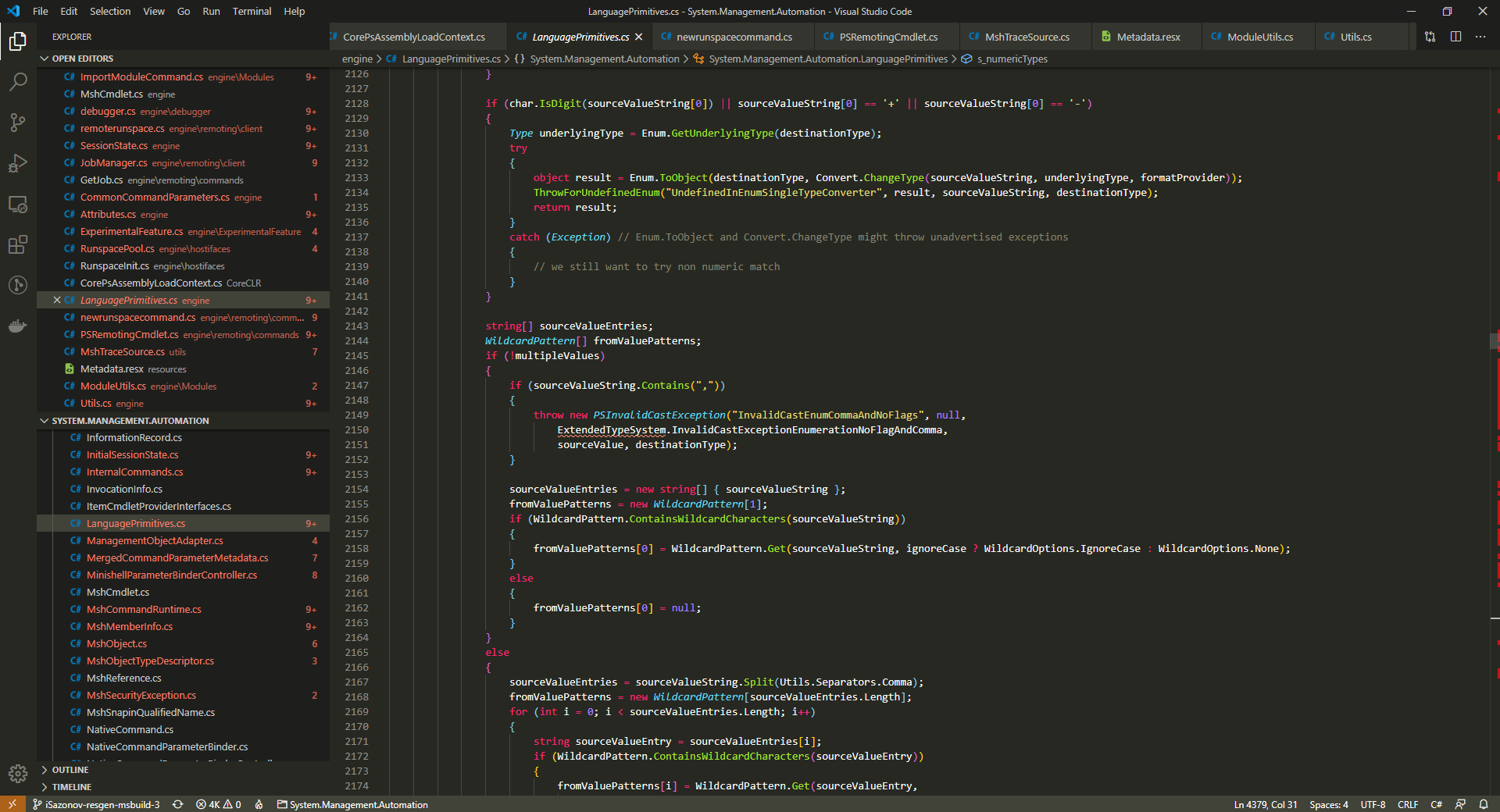
It seems strong typed resources are rarely used in while and in this sense it is less maintainable.
Just so I'm clear, you agree that the ResGen we use before this PR is more maintainable, right?
I guess you are thinking about daily enhancements.
I'm not thinking about enhancement, but purely maintenance, e.g. something changed (either dotnet sdk or the PS project itself) and we have to change this target to make it continue to work ...
So why not solve the following:
It's not clear to me how this will help solving those 2 issues,
- Localization story #666 -- we will need some people to translate the resource strings. Whether the resource strings are consumed by
ResGenorResXFileCodeGeneratordoesn't seem to matter. - Allow build that does not require circular dependency. #5777 -- this complaint is about building PowerShell using PowerShell.
ResGendoesn't use PowerShell.
There was a problem hiding this comment.
After that, I couldn't find the .cs files generated from the resource files. The only gen folder I could find is src\Microsoft.Management.UI.Internal\gen.
The files are generated in obj\ folder where *.resource are. If Start-PSBuild success you have the files.
VS Code works well for me too (after restart?).
Just so I'm clear, you agree that the ResGen we use before this PR is more maintainable, right?
I'm not thinking about enhancement, but purely maintenance
ResGen tool is not changed for years. We don't any maintenance.
.Net team is porting MSBuild step-by-step and it is not high priority for them. But if they did I think they will avoid breaking changes.
It's not clear to me how this will help solving those 2 issues,
Currently we have to use Build.psm1 module to build PowerShell. Third-party distribution maintainers have to port the module to bash shell to build PowerShell without PowerShell. If we change the module we break their process, they have to port again. If all build logic is in csproj files they get updates automatically.
With the change they should have a workaround only for TypeGen - resource generation now works with dotnet build. Additional benefits - now if we change any resx file it will be automatically compiled without needs to run Start-PSBuild -ResGen. We could make the same for TypeGen too.
There was a problem hiding this comment.
The files are generated in obj\ folder where *.resource are. If Start-PSBuild success you have the files.
VS Code works well for me too (after restart?).
Found the .cs files under obj\Debug\netcoreapp5.0, but opening in VS Code still doesn't work -- a lot errors due to the resource string references. @TravisEz13 do you see the same issue?
Currently we have to use Build.psm1 module to build PowerShell.
Additional benefits - now if we change any resx file it will be automatically compiled without needs to runStart-PSBuild -ResGen.
ResGen doesn't depend on PowerShell. Anyone wants to build without PowerShell can do it as described in our doc: https://github.com/PowerShell/PowerShell/blob/master/docs/building/internals.md#resgen
I agree that's a benefit, but personally, I don't think it's convincing ... I personally don't want to incorporate everything into msbuild, as I personally believe a script is more maintainable than black magic in msbuild 😄
There was a problem hiding this comment.
It seems I can repo. It seems it is OmniSharp issue. After I restart VS Code I see the reds. Then I run Start-PSBuild and the reds goes away.
There was a problem hiding this comment.
I did run Start-PSBuild -Clean before starting VS Code. Also, we need to make sure opening VS Code with each .csproj folder should work too, for example, opening VS Code with the src/System.Management.Automation folder.
There was a problem hiding this comment.
I see the same. Open SMA folder - I see the reds. Run dotnet build from the folder - the reds goes away.
It is OmniSharp. I can open new issue there. dotnet/vscode-csharp#3781

There was a problem hiding this comment.
@iSazonov are you running from Start-PSBuild -Clean? I'm not seeing OmniSharp pick up any of the generated classes after a clean build. 😕
There was a problem hiding this comment.
After switching to the branch I run Start-PSBuild -Clean, then run VS Code. After that I run Start-PSBuild and select a file.
iSazonov
force-pushed
the
resgen-msbuild-3
branch
from
ffa0e25 to
89955c8
Compare
iSazonov
force-pushed
the
resgen-msbuild-3
branch
from
89955c8 to
a86edd8
Compare


There was a problem hiding this comment.
I believe you should be declaring your Target's Inputs and Outputs, similar to Arcade's resource generator.

|
This pull request has been automatically marked as Review Needed because it has been there has not been any activity for 7 days. |
|
@daxian-dbw Now VS Code works well. |

Here are my thoughts on this. Generating the resource classes under a /gen folder to move them out of the /obj folder is the wrong fix. The issue seems to be that you want design time intellisense for these resource files, which is understandable. The problem is that these backing files are only generated when the Build task is run in MSBuild. Design time builds do not run the Build task, instead they run the Compile task. Since these files aren't generated during when Compile is run, they are not considered part of the compilation and not added to the open Workspace. You can add a short Target to run the resource generator before the Compile task (See dotnet/vscode-csharp#3781 (comment)). Now they will be part of the Compilation and will be part of the Workspace when working from an IDE. They will also be updated when they are changed within the IDE instead of requiring a full build. Since you likely do not want them to be regenerated constantly, defining the Inputs and Outputs for targets is the MSBuild mechanism so that targets are only run when changes have been made. |
We cannot create a "fix" in PowerShell repo. We can only create a "workaround". As I mentioned .Net explicitly moved generating strong typed resources from design time to build time - it is new standard. I don't think they will change this. So expectation is that OmniSharp will follow the new behavior too. As for workarounds, we have two ones:
I don't like adding new target because this again changes standard .Net SDK behavior - it can have |
|
This pull request has been automatically marked as Review Needed because it has been there has not been any activity for 7 days. |

PowerShell.Common.props
Outdated
There was a problem hiding this comment.
comment that this is a workaround for dotnet/msbuild#4751

|
Hey @iSazonov, today @anmenaga @TravisEz13 @adityapatwardhan and I had a offline discussion on this PR, and we agreed the built-in resgen tool in MSBuild is what we should move forward with. Here are some but not all the benefits:
However, the built-in resgen tool is not ready yet for us to depend on, and hence your workaround in the
So only the resources for |
There was a problem hiding this comment.
why do we need extra changes to CimCmdlet.csproj?
There was a problem hiding this comment.
Resx file name is in another pattern :-( My intention in the PR was to change only csproj files.
We could rename the file and use common csproj pattern.
There was a problem hiding this comment.
Got it. We talked (offline) about the names of the resource streams we used and agreed that they should be fixed if we go with this change, but should be a separate PR.
There was a problem hiding this comment.
We could rename CimCmdlet resx files before the PR so that we can remove the workaround from the PR.
There was a problem hiding this comment.
That sounds fine, but not sure if the ResGen code needs to be updated for fixing the name.
There was a problem hiding this comment.
The workaround is removed.
If it is not a priority in days I'd ask MSFT team internally communicate with SDK team (they have low public activity) - they could tell how they plan to work with WPF projects and strongly typed resources. If they have a solution or workaround we could implement this and simplify our build. |
iSazonov
force-pushed
the
resgen-msbuild-3
branch
from
2039c76 to
f859903
Compare
|
This pull request has been automatically marked as Review Needed because it has been there has not been any activity for 7 days. |
iSazonov
force-pushed
the
resgen-msbuild-3
branch
from
f859903 to
7e7cf9a
Compare

6 participants


PR Summary
Now .Net SDK brought back a strong typed resource support so we can switch from our ResGen tool.
For WPF projects (
Microsoft.Management.UI.Internal) the .Net SDK support does not work OOB so we have to implement a workaround in csproj file.(Also I discovered that now all .Net dll-s is in ReadyToRun format and PowerShell distributive doubled in size. So we could turn on the feature too. It will add ~20Mb (10%). I removed this in last commit but could bring back.)
Docs https://docs.microsoft.com/en-us/dotnet/core/compatibility/msbuild#net-core-30
PR Context
Fix #2882
Related #666
Related #5777
PR Checklist
.h,.cpp,.cs,.ps1and.psm1files have the correct copyright headerWIP:or[ WIP ]to the beginning of the title (theWIPbot will keep its status check atPendingwhile the prefix is present) and remove the prefix when the PR is ready.