Prerequisites
Summary
I have this configuration copy-pasted from your site ( https://code.visualstudio.com/docs/typescript/typescript-debugging ).
Whenever i start this configuration the UI switches to the terminal tab ( which i never wanted to begin with, why do you that? ).
Then i rightclick the tab to hide this terminal that i never wanted to see. It disappears.
I relaunch the configuration.
The tab appears again, despite me having it hidden. You can even see in the UI that i have it marked as hidden.
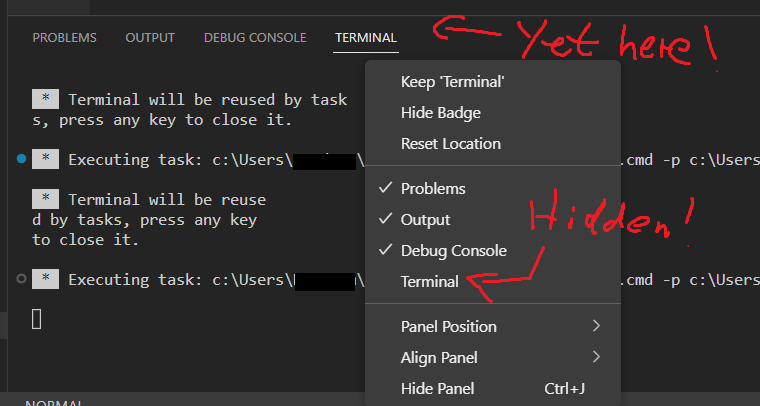
Bug A: The editor is randomly changing which tab is displayed without me saying so.
Bug B: My setting of not showing the terminal-tab is not respected.
PowerShell Version
Name                           Value
----                           -----
PSVersion                      5.1.19041.2364
PSEdition                      Desktop
PSCompatibleVersions           {1.0, 2.0, 3.0, 4.0...}
BuildVersion                   10.0.19041.2364
CLRVersion                     4.0.30319.42000
WSManStackVersion              3.0
PSRemotingProtocolVersion      2.3
SerializationVersion           1.1.0.1
Visual Studio Code Version
1.75.1
441438abd1ac652551dbe4d408dfcec8a499b8bf
x64
Extension Version
An empty string is returned, but your great interface doesn't allow me to put an empty string here, so i have to type something. Very competent.
Steps to Reproduce
I am not supporting your bureaucracy by copy pasting my description.
Visuals
No response
Logs
No response
Prerequisites
Summary
I have this configuration copy-pasted from your site ( https://code.visualstudio.com/docs/typescript/typescript-debugging ).
Whenever i start this configuration the UI switches to the terminal tab ( which i never wanted to begin with, why do you that? ).
Then i rightclick the tab to hide this terminal that i never wanted to see. It disappears.
I relaunch the configuration.
The tab appears again, despite me having it hidden. You can even see in the UI that i have it marked as hidden.
Bug A: The editor is randomly changing which tab is displayed without me saying so.
Bug B: My setting of not showing the terminal-tab is not respected.
PowerShell Version
Visual Studio Code Version
Extension Version
An empty string is returned, but your great interface doesn't allow me to put an empty string here, so i have to type something. Very competent.Steps to Reproduce
I am not supporting your bureaucracy by copy pasting my description.
Visuals
No response
Logs
No response