
In this exercise, the goal is to understand and experiment around props - using both class and functional components.
- Fork this repo
- Clone this repo
Whenever you create a first significant change, you should make your first commit.
- Follow these guidelines to add, commit and push changes.
In the end of this document, you will find guidelines on how to submit the exercise.
The task is to create a webpage which looks like the image below:

It is very important that you come to this lab -- only after you have completed the previous lab - which is -->
lab-react-jsx-boilerplate -> as this lab is a continous lab of that.
For this exercise too, you have to make a webpage which looks like the above image.
But this time, let's make some changes in the structure of our application. As you might have observed in the previous lab -- that we were creating data in both App.jsx and AppClass.jsx files. But the data used was the same for both the files. So, if the data is same for both the files, then why to create data twice.
In order to overcome this situation - we will be using props.
You can clone your previous project (lab-react-jsx-boilerplate) again, and then follow the following steps:
-
From both
App.jsxandAppClass.jsxfiles, remove the part where you were creating the data i.e:-
Remove the following code from
App.jsx:const imageData = ()=>{ let data = [ { id:1, img:elephant }, { id:2, img:elephant }, { id:3, img:elephant }, { id:4, img:elephant } ] return data; }
-
-
Remove the following code from
AppClass.jsx:imageData = ()=>{ let data = [ { id:1, img:elephant }, { id:2, img:elephant }, { id:3, img:elephant }, { id:4, img:elephant } ] return data;
```
- Now, create a folder
componentsand inside this folder create a fileDataComponent.jsx. Add your data in this file. Your file structure should look like this:
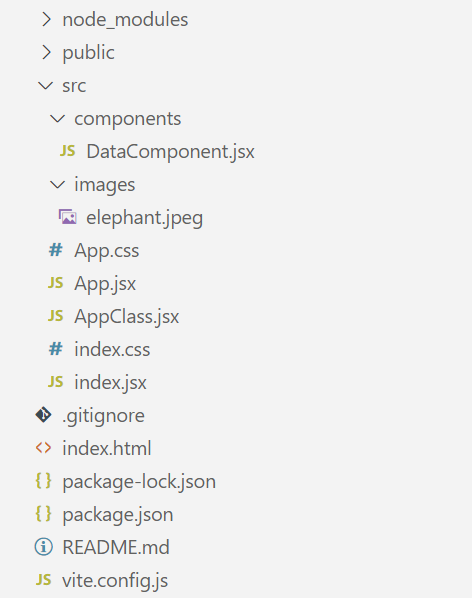
- Now use
propsto get data inside yourApp.jsxandAppClass.jsxfiles.
Happy Coding Kalvium ❤️!