Utils: Original Project Vision
The goal of the project is to develop a puzzle game inspired by the children's PC game Ovečky from the development team Špidla Data Processing. The game will prioritize simple controls, engaging mechanics, stability, and an object-oriented programming (OOP) structure of the source code. List of all of the planned features is below.
The player's objective is to guide as many Unicorns (based on sheep in Ovečky) to the goal while collecting all coins.
- The game consists of ~10 levels.
- Levels are tile-based maps.
- NPCs move constantly across the tiles.
- The player controls NPC movement using placeable Arrows.
- Collecting all coins unlocks the finish line.
- Level is completed by guiding a given minimum percentage of Unicorns to the finish.
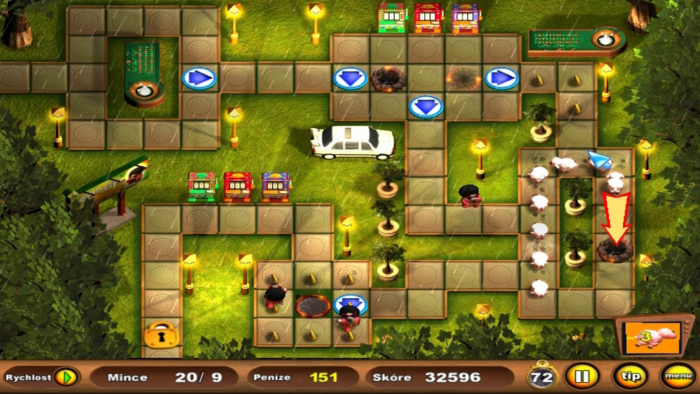
- Unless affected by arrow, moves constantly and upon hitting a wall turns left.
- The player's goal is to guide them to the finish line.
- They collect coins.
- They follow arrow directions.
- They die upon collision with Clouds.
- They move similarly to Unicorns.
- They cannot collect coins.
- They kill Unicorns on collision.
- They follow arrow directions.
- Left mouse button places an arrow on an empty tile.
- Left mouse button on an existing arrow rotates it.
- Right mouse click removes the arrow.
- Maximum 20 arrows per level.
- NPCs change direction based on arrow orientation.
The items are instantly consumed upon colliding with Unicorns and the effect lasts around 15 seconds.
- Fire - Dries Clouds, stopping their movement.
- Rainbow - Grants Unicorns the power to kill Clouds on collision (similar to Pac-Man cherries).
- Menu with Save/Load/Sound settings.
- Game screen with timer and coin counter.
- After launch user will be greeted with menu where he can select the profile or start the level editor.
- Mouse only (placing tiles, clicking GUI buttons in menu)
- Most visuals will be hand-drawn, then converted into digital form or created directly in digital format.
- This includes images of NPCs, level backgrounds, paths, objects, and decorations.
- The game will take place in the sky, with backgrounds depicting sky/space featuring rain, stars, clouds, sun, and moon as decorations.
- Most audio will be sourced from the original game Ovečky, either directly or remixed.
- Additional music and SFX will be used from non-copyrightable sources.
- Each level will be assigned a time limit based on testing playthroughs, approximately 150% of the fastest completion time.
- Estimated time duration of level will range from 30 to 120 seconds.
- Animations will be hand-drawn, with around 10 unique bone movement animations.
- Focus will be on reusing animations to minimize the number of required assets.
- Each entity will have its own movement animation.
- GUI-based screen with an object selection bar for placing tiles like paths, enemies, coins, start, and goal.
- Paths will be placed using click-and-drag, while objects will be placed by clicking.
- Objects can be removed using a Destroy Object tool.
- Settings will include the number of starting Unicorns, percentage of required Unicorns to complete the level, and time limit.
- The user can save and load custom levels.
- Pre-made levels will be created using the editor, allowing players to modify story levels.
- The editor will perform a BFS check to ensure the level is solvable before saving.

- Users can create an unlimited number of profiles.
- Each profile will display basic stats like collected coins and completed levels.
- The game will automatically save progress after each completed level.
- Data will be stored in JSON format in the game folder.
- Users can adjust the game speed to 0.5x, 1x, 2x, or 3x.
- Speed adjustments will only affect NPC movement, not the time limit clock.
- Certain levels may require faster speeds to complete.
- The player can pause the game, stopping NPC movement and the time limit clock.