
ReelBrain v0.1.1 — Final Build Week submission
ReelBrain v0.1.1 is the final OpenAI Build Week submission release of the source-available, local-first AI video-editing agent team.
Demo and submission
Final release highlights
- Four configurable editorial agents for story, retention, style, and continuity, coordinated by the Showrunner.
- Visible agent fan-out, orchestration rationale, tool activity, structured approvals, and render progress.
- Creator-controlled Like, Dislike, and Skip loops connected to inspectable Taste Profile evidence.
- Versioned, non-destructive local revisions with human approval before rendering or generated-tool deployment.
- ReelBrain Python runtime modules bundled inside the macOS app; creator state is stored under
~/.ReelBrainrather than a source checkout. - Public demo, Build Week submission, rendered Ouroboros/Codex development flow, and commercial-license contact included in the repository.
Ouroboros and Codex with GPT-5.6
Ouroboros turned the initial product idea into a validated PM Seed through interview, clarification, execution, and evaluation. Codex with GPT-5.6 then implemented and debugged the Python runtime and Tauri desktop product, fanned out bounded engineering and editorial tasks, exercised the real interface, and kept product decisions aligned with the evidence and governance model.
Primary Codex development session: 019f7e65-0f11-7333-b3fe-c3d8401e0e2a
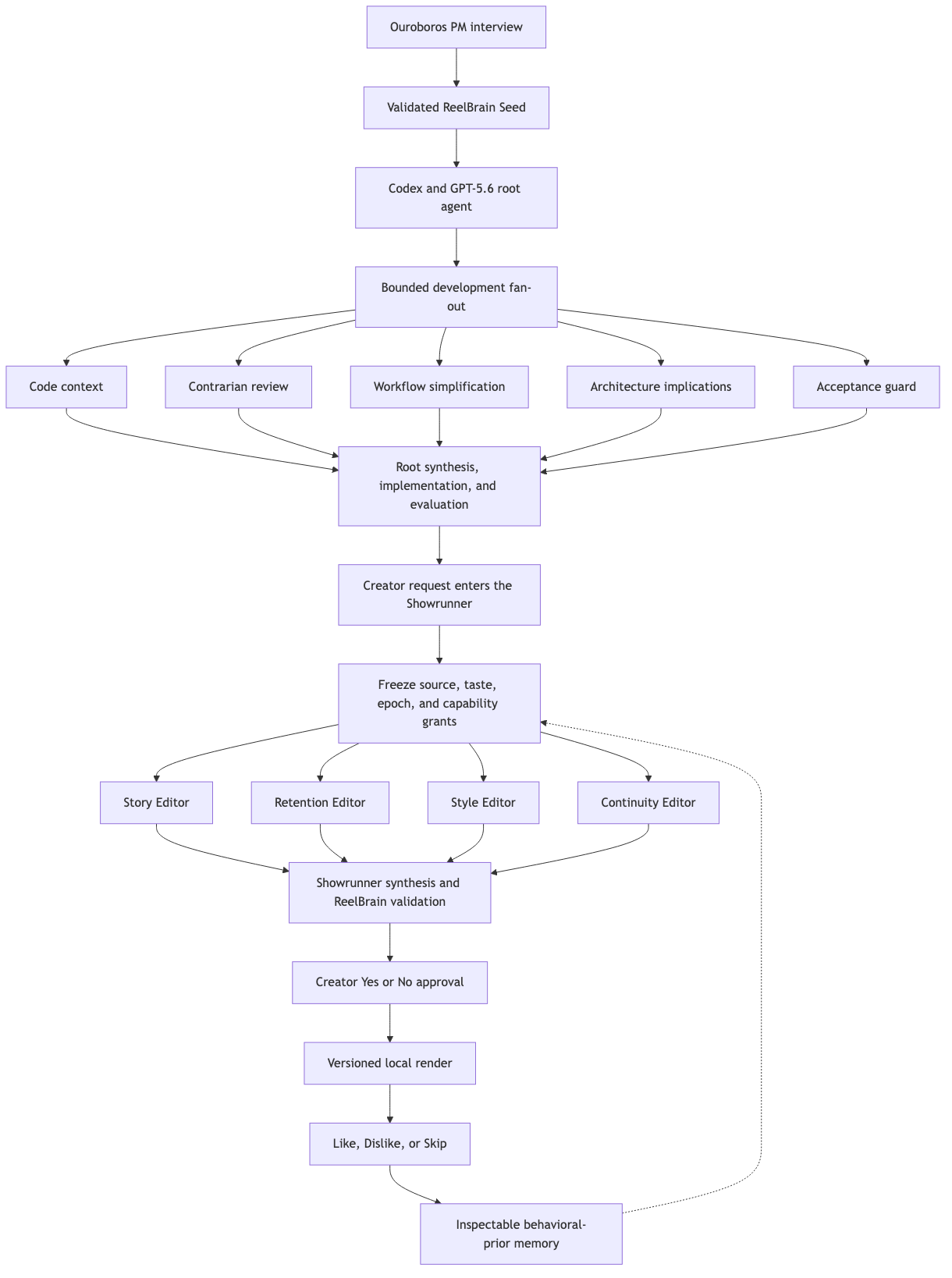
Codex owns ephemeral agent scheduling and synthesis. ReelBrain owns durable trust: source and taste snapshots, capability grants, evidence, approval, accepted plans, renders, and creator-controlled memory. Memory remains a behavioral prior, never source evidence.
Install on Apple Silicon macOS
- Installer: download
ReelBrain-v0.1.1-macos-arm64.pkgand open it to place ReelBrain in Applications. - Portable runner: download
ReelBrain-v0.1.1-macos-arm64.zip, unzip it, and openReelBrain.app.
The app bundle is ad-hoc signed with hardened runtime enabled, and strict bundle verification passed. The PKG installer is not Developer ID signed or Apple-notarized.
If macOS blocks the unsigned PKG
- Click Done on the warning. Do not move the installer to Trash.
- Open System Settings → Privacy & Security.
- Scroll to Security and find the message saying ReelBrain was blocked.
- Click Open Anyway.
- Authenticate with Touch ID or the Mac password, then confirm Open.
- Complete the normal macOS Installer steps.
Only use Open Anyway for a package downloaded from this official ReelBrain GitHub release. You can compare the package checksum below before continuing.
Host prerequisites remain Python 3.11+, FFmpeg, FFprobe, and either Codex on PATH or the Codex binary included with ChatGPT for macOS.
Portable app ZIP SHA-256: 985d4554837659218179f84e0db005102a24094cbabc775ffd0ad2b75daa9970
PKG installer SHA-256: cbca9e4f2d1e419e1220fd575bc98b36d36ff6281ca056c3104cb4c23c52b9e5
Verification
- Python: 284 tests passed.
- Rust: 14 tests passed; 2 live-account tests intentionally ignored.
- TypeScript and Vite production build passed.
- Packaged Python bridge smoke test passed from inside
ReelBrain.app/Contents/Resources. codesign --verify --deep --strictpassed forReelBrain.app.
Current limitations
- Apple Silicon macOS is the validated release target.
- The installer is unsigned and the app is not notarized.
- Python, FFmpeg/FFprobe, and Codex or ChatGPT are not yet bundled.
- Caption accuracy still requires creator correction or an independent reference.
- Arbitrary timeline edits require additional governed tool capabilities.
- Direct social publishing is not included.
License
ReelBrain is source-available under the Sustainable Use License. The repository LICENSE file is authoritative. Commercial licensing inquiries may be sent to jqyu.lee@gmail.com.