Repository navigation
App Settings
Home · Variables · Formatting
Open Better Logic Library's settings in Homey. The navigation groups related features:
The following screenshots are from the BLL users topic, post 2. They illustrate an earlier app version; the current layout may differ.

Historical screenshot: the Variables section and variable-list controls in an earlier BLL layout; current labels may differ.
| Section | Purpose |
|---|---|
| Variables | Add, inspect, edit, import, export and remove variables. See Variables. |
| Coding | Learn and try BLL coding, built-in functions and modules. |
| Locale / Timezone | Configure the locale used for formatting; the page also shows formatting examples. |
| Formats | Configure shared date/time format definitions and custom formats. |
| Functions | Create and edit reusable JavaScript functions. See BLL coding. |
| File Server | Configure temporary downloads for BLL and apps that use its file server. |
| Exports | Configure Excel date format, UTC inclusion, variable export filenames and an example Excel schema. |
| Options | Toggle live updates in the settings variable list, or export variables as Excel, CSV or JSON. |
Save changes where a Save button is shown. Shared functions and formats can affect multiple Flows or supporting apps, so test changes before relying on them.
The Auto update option only controls whether the open settings list follows live variable-change events; it does not pause variables, Flows or other app behavior. Turning it back on refreshes the list. The quick exports in this menu are separate from the import/export controls in the Variables section.
The Coding page includes examples and an eye control for viewing the format-code reference:
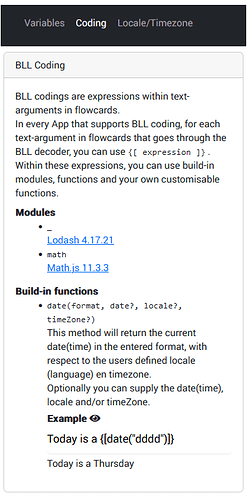
Historical screenshot: the Coding section and its example selector.

Historical screenshot: the reference panel shows an expression and its expected use; verify the syntax in your installed app.

Historical screenshot: locale and time-zone selection with a live date preview.

Historical screenshot: shared format definitions can affect any app using BLL formatting.
The file server can provide temporary downloads on the local network or
through supported Homey download mechanisms. Simple (Sys) LOG
is an example consumer. Configure the port, automatic start, automatic
shutdown, and availability duration in seconds. In the current source, the
initial defaults are port 47330, automatic start off, automatic shutdown on,
and 60 seconds availability. The auto-shutdown control is disabled when
auto-start is enabled.
Treat download URLs as sensitive: anyone who obtains one may be able to download the file while it is available. Avoid exposing the server to the internet and use an appropriate local network security policy. A link may expire; generate a new one instead of expecting permanent storage.
The Get all variables action can produce variable data in multiple formats. Format JSON as CSV and Format JSON as Excel transform JSON; their output options and the Excel schema field are shown on the respective cards. Use valid JSON as input. For Excel, settings includes a schema example with column names, types and value functions. Excel format strings are not BLL date format strings.
The 4.2.3 development source's CSV Base64 branch in Format JSON as CSV uses a different result property from the one populated by the conversion. Test that option on your installed version; ordinary CSV is a separate option.
Variable export filenames in settings support BLL coding. Consider what the export contains before sharing it or a download link.