Repository navigation
App Timey
Timey supports BLL expressions that
produce a valid time. Install BLL and use {[ ... ]} in a supported Timey
time field. For example:
{[ 7 + 0.5 ]}
The result is 7.5, which Timey interprets as 07:30. An expression returning
a string such as {[ "06:45" ]} produces 06:45.
Timey accepts H:mm, decimal hours, and whole hours within its documented
range; it also documents wildcard formats. The evaluated result must conform
to Timey's rules: a Unix timestamp or an arbitrary BLL date string is not
automatically a valid Timey time. See
Timey's expression and time-format documentation.
The Timey introduction
shows using a text variable as the trigger time. Create a BLL text variable
such as MorningTime, set it to 07:30, and select its tag in Timey's
The time is trigger. Use that same tag in the Flows that share this
schedule.

Community screenshot: a variable tag supplies Timey's trigger time instead of a fixed value.
The original screenshot illustrates the general variable mechanism; choosing a BLL variable is an adaptation. Check a controlled test time before relying on the schedule. Changing the variable is different from executing the trigger immediately.
In this tested picker Flow,
an AVD combines hour and minute picker values with the BLL calculation
$values.join(":"). Its text-field tag becomes Timey's trigger input.
The post reports that selecting 22 and 10 triggered the Flow at 22:10:
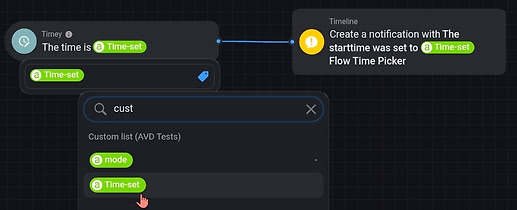
Community screenshot: the AVD text-field tag contains the picker-generated time.
See the AVD configuration
for reflection settings and screenshots. Keep hours first and minutes second,
and ensure minutes 00 through 09 retain their leading zero.
This heating-schedule request describes calculating a start time from current temperature, target temperature, heating speed and the desired ready time. The suggested workflow is to calculate with BLL, save the resulting time text, then use that variable in Timey's trigger.
A fixed-input adaptation, assuming 45 minutes of preparation before 18:00 in Amsterdam, is:
date("HH:mm", new Date("2026-11-12T18:00:00+01:00").getTime() - 45 * 60000, "en-GB", "Europe/Amsterdam")This returns 17:15. Use a variable-setting BLL expression action to save
it as text, then select that variable's tag in Timey. Recalculate for the
actual target date and inputs; the example date is only test data.
This documents the scheduling pattern, not a validated heating model.
Prefer calculating a target ahead of time over using now + ... directly
in a recurring trigger input: a moving target changes as it is evaluated.
Timey's HH:mm input contains no date. Add date/day conditions if the Flow
must run only on a particular date, and account for targets that have already
passed or cross midnight.
The current format guide documents decimal hours and wildcard patterns. Examples for supported fields:
| Input | Meaning |
|---|---|
{[ 6 + 45 / 60 ]} |
6.75, interpreted as 06:45. |
{[ "07:" + String(5).padStart(2, "0") ]} |
07:05, with correctly padded minutes. |
*:30 |
Every hour at minute 30; no BLL coding needed. |
20:4* |
Every minute from 20:40 through 20:49; no BLL coding needed. |
Wildcard support was added in Timey 1.5.0; check your version. Do not mix
BLL's {[ ... ]} syntax with Homey's separate {{ ... }} expressions.