Repository navigation
Flow Examples
Before you start: add a cloud speech device, set the JSON and default voice, and add a speaker in Homey with a card that plays an audio URL. Ensure the speaker can reach Homey on port 47333 and supports MP3. Card names for the speaker depend on its app.
- Create a Flow with When → Text-to-Speech → Url triggered.
- In Then, select your speaker's play-URL card. Insert this trigger's Url token into the speaker's URL argument. Save and enable this Flow.
- In a second Flow, choose any test trigger, then Text-to-Speech → Start TTS, with Text:
Dinner is ready.
- Run the second Flow. The first Flow receives Url, Text and Duration and asks the player to play the URL. You should hear the sentence. Duration is milliseconds, not a playback acknowledgment. If it fails, follow Troubleshooting.
Alternatively, in Advanced Flow choose the token-returning voice/speed/pitch action and connect its Url output to the player's URL argument. Do not also enable the trigger route for the same player, or it may play twice. For Non-Cloud, use its own Url triggered card and Start TTS, keeping text under 200 characters.
This pattern is based on the app author's announcement tutorial; speaker card names and interfaces can differ today. Edgar's community example routes announcements by room using separate sensors and variables; Google Services itself does not detect a person's room.
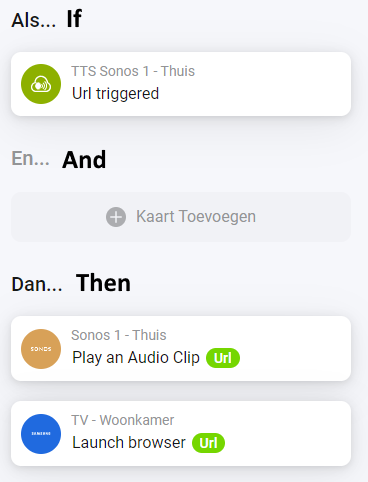
Historical screenshot by the app author from the Google Services topic: notice the green Url token passed to both outputs. Names, cards and layout may differ in current Homey; use the steps above for your own player.
Before you start: configure Cloud Translation JSON and project, and add Google Translate.
- In an Advanced Flow add the token-returning Translate action. Enter Text
Hello, select Source Language English (en) and Target Language Dutch (nl) from the suggestions. - Connect its Translation output to a notification's text argument.
- Test: the notification should contain a Dutch translation, typically “Hallo”. Wording is controlled by Google and can vary. If suggestions are empty, check the project, API and billing.
Before you start: enable YouTube Data API v3, save your key and add YouTube.
- Add the token-returning Search within YouTube action to an Advanced Flow. Enter Text
Homey smart home. - Connect YouTube link to a notification's text argument; optionally connect YouTube ID and Searched text too.
- Run it. The notification should contain a link to the first matching video; results vary. Handle the error branch for no result, invalid key or quota exhaustion. The action also fires YouTube triggered.
Configure both cloud services and the announcement route above. In Advanced Flow connect the token-returning Translate action's Translation output to the cloud Start TTS action's Text input. Select English → Dutch and input Hello; select a Dutch default voice in app settings or a Dutch voice on the speech card. Run the Flow. The player should speak the returned Dutch text. Connect an error branch or notification for translation and speech failures; do not pass an error message as speech.
Speech actions and cloud speech conditions decode Better Logic Library expressions in Text. Translation actions also decode their text; the Translate condition and YouTube search currently pass their input directly. See the Better Logic Library user discussion for syntax and prerequisites; do not put secrets in expressions.