
A native WPF component for rendering AI-generated Markdown with ChatGPT-quality visuals and smooth incremental streaming — no browser, no WebView2, no JavaScript.
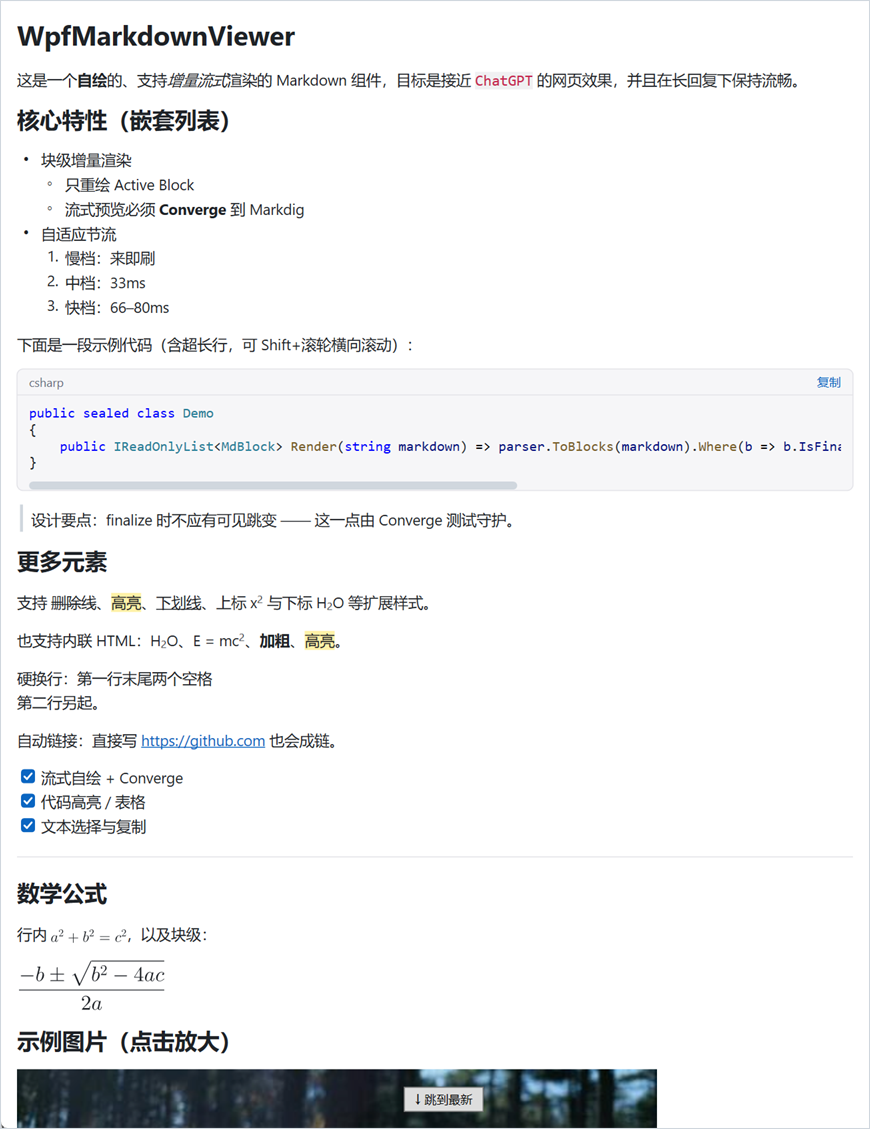
Built as long-term shared infrastructure for AI features (multiple model providers, plugin output, action docs), not a one-off viewer. The renderer is self-drawn (TextFormatter + DrawingContext), only re-renders the single trailing block as tokens arrive, and converges its streaming preview to a Markdig parse once a block is finalized.
AI token stream → AppendDelta(...) → adaptive throttle → streaming block parser
                → only the Active Block re-renders → finalize → Markdig is authoritative
- Streaming-first.
AppendDeltais thread-safe; an adaptive timer flushes on a discrete cadence and re-renders only the active block. Finalized blocks are immutable and reused. - Self-drawn, fast. No
FlowDocument, no per-token visual-tree rebuilds. Two-level + message-level virtualization keeps long transcripts responsive. - ChatGPT-style chat shell. Optional
ConversationView: user bubbles, full-width assistant turns, per-message action bar (copy / regenerate), message-level virtualization. - Rich content. Headings, emphasis, lists, task lists, tables, blockquotes, fenced code with TextMate highlighting + copy button, images (bitmap and SVG), block & inline math (LaTeX), and Mermaid diagrams — all rendered natively.
- Selection & copy. Drag-select across blocks and messages, auto-scroll at the viewport edge, copy as faithful plain-text Markdown (code fences, pipe tables, mermaid source preserved).
- Themable. Strongly-typed
MarkdownStylewith coordinated light/dark presets, runtime-swappable. - Zero-dependency core, opt-in plugins. The core assembly depends only on Markdig. Heavy capabilities — syntax highlighting, LaTeX math, SVG, Mermaid — live in separate plugin assemblies you register at startup; with a capability absent the content degrades gracefully (uncolored code, raw
$…$, alt text, a code block). Swap any capability (e.g. a remote/WebView2 Mermaid engine) without touching the core.
- .NET 10 (Windows), WPF (
net10.0-windows).
Install the all-capabilities package:
dotnet add package WpfMarkdownViewer.All --prereleaseOr select only the packages your application needs:
| Package | Contents |
|---|---|
WpfMarkdownViewer |
Core renderer |
WpfMarkdownViewer.Highlighting |
TextMate syntax highlighting |
WpfMarkdownViewer.Math |
LaTeX math |
WpfMarkdownViewer.Svg |
SVG images |
WpfMarkdownViewer.Mermaid |
Mermaid diagrams |
WpfMarkdownViewer.All |
Core and every built-in plugin |

The core renders Markdown text with only Markdig as a dependency. The heavy renderers are optional plugin assemblies; reference the ones you need and register them once at startup (before rendering):
| Capability | Plugin assembly | Registry slot | Backed by |
|---|---|---|---|
| Syntax highlighting | WpfMarkdownViewer.Highlighting |
Capabilities.Highlighting |
TextMateSharp(.Grammars) |
| LaTeX math | WpfMarkdownViewer.Math |
Capabilities.Math |
WpfMath |
| SVG images | WpfMarkdownViewer.Svg |
Capabilities.Svg |
SharpVectors.Reloaded |
| Mermaid diagrams | WpfMarkdownViewer.Mermaid |
Capabilities.Mermaid |
Mermaider + Mostlylucid.Dagre (needs the SVG plugin) |
// Pick only what you need:
WpfMarkdownViewer.Rendering.Capabilities.Highlighting = new TextMateHighlighter(); // WpfMarkdownViewer.Highlighting
WpfMarkdownViewer.Rendering.Capabilities.Math         = new WpfMathRenderer();      // WpfMarkdownViewer.Math
WpfMarkdownViewer.Rendering.Capabilities.Svg          = new SvgRenderer();          // WpfMarkdownViewer.Svg
WpfMarkdownViewer.Rendering.Capabilities.Mermaid      = new BuiltInMermaidRenderer();// WpfMarkdownViewer.Mermaid

// Or reference the WpfMarkdownViewer.All meta-package and take everything:
WpfMarkdownViewer.DefaultCapabilities.RegisterAll();
When a capability is not registered, that content degrades gracefully: code renders uncolored, math shows its raw $…$ source, SVG falls back to alt text, and Mermaid falls back to a fenced code block.
Wrap the renderer in a MarkdownScrollHost (it owns the viewport, sticky-bottom follow, and the “jump to latest” affordance), then push tokens:
<ctrl:MarkdownScrollHost xmlns:ctrl="clr-namespace:WpfMarkdownViewer.Controls;assembly=WpfMarkdownViewer"
                         x:Name="Host">
    <ctrl:MarkdownDocumentView x:Name="Viewer" />
</ctrl:MarkdownScrollHost>Viewer.LinkClicked += (_, e) => OpenInBrowser(e.Url); // the component never navigates itself
await foreach (var token in model.StreamAsync(prompt))
Viewer.AppendDelta(token); // safe from any thread
Viewer.Complete(); // finalize: Markdig becomes authoritativeOther lifecycle methods: Reset() (re-stream, e.g. “regenerate”), Abort() (cancelled stream), SetMarkdown(string) (render a complete document with no stream).
var chat = new ConversationView { MarkdownStyle = MarkdownStyle.Dark };
Host.Content = chat;
chat.LinkClicked += (_, e) => OpenInBrowser(e.Url);
chat.MessageRegenerateRequested += (_, e) => Regenerate(e.MessageIndex);

chat.AddMessage(ChatRole.User, "Explain quicksort.");

chat.StartMessage(ChatRole.Assistant);
await foreach (var token in model.StreamAsync(prompt))
    chat.AppendDelta(token);
chat.CompleteMessage();MarkdownStyle is an immutable record; derive tweaks with with:
Viewer.ApplyTheme(MarkdownStyle.Dark);

Viewer.MarkdownStyle = MarkdownStyle.Light with
{
    BaseTypeface = new Typeface("Microsoft YaHei"),
    EmSize = 17,
    ParagraphLineHeight = 1.85,
    LinkBrush = new SolidColorBrush(Color.FromRgb(0x7c, 0x3a, 0xed)),
    HeadingScales = new[] { 2.1, 1.7, 1.4, 1.2, 1.1, 1.0 },
};
Fonts, sizes, weights, line heights, margins, list indent, colors, the paired TextMate code theme, and the chat bubble color are all configurable.
| Category | Supported |
|---|---|
| Block | headings (#–######), paragraphs, nested ordered/unordered lists, task lists (- [x]), blockquotes, fenced code (horizontal scroll), tables (GFM, column alignment), thematic breaks (---), images, block math |
| Inline | bold, italic, code, links (inline, reference-style, bare-URL autolinks), ==highlight==, ++underline++, ~sub~, ^super^, inline math, hard line breaks, raw HTML (<br>, <sub>, <sup>, <b>, <i>, <u>, <mark>, <code>, …) |
| Math | $…$ / $$…$$ and \(…\) / \[…\] (LaTeX, via WpfMath) |
| Images | bitmap (PNG/JPG/…) and SVG; sources: http(s) (disk cache + ETag revalidation), local files, data: URIs, pack:///resource |
| Diagrams | Mermaid (```mermaid) — pure-.NET, rendered to vector |
| Code | TextMate syntax highlighting (many languages), language bar, copy button, live re-highlight while streaming |
Inline markup is converged to Markdig: the streaming preview of any finalized block equals Markdig’s parse of the same text (guarded by the test suite).
```mermaid blocks render natively via the WpfMarkdownViewer.Mermaid plugin — a pure-.NET engine (Mermaider) → SVG → vector, no browser. Flowchart layout is upgraded with the Mostlylucid.Dagre layered (dagre) algorithm for placement/routing closer to mermaid.js (cycles handled, edge endpoints clipped to node shapes). Swap the engine by assigning Capabilities.Mermaid:
// Disable (mermaid falls back to a code block):
WpfMarkdownViewer.Rendering.Capabilities.Mermaid = null;

// Or provide your own (remote service, WebView2, …):
Capabilities.Mermaid = new MyMermaidRenderer(); // implements IMermaidRenderer- Drag to select across blocks and (in the shell) across messages; the viewport auto-scrolls when you drag past its edge.
Ctrl+C(orCopySelection()) copies the selection as plain-text Markdown — code blocks keep their```fences, tables are rebuilt with pipes, mermaid keeps its source.SelectAll()selects everything realized.
MarkdownDocumentView (Panel) — one streamed document
AppendDelta · Complete · Reset · Abort · SetMarkdown · SelectAll · CopySelection · ApplyTheme · MarkdownStyle · ImageBasePath · VirtualizationEnabled · ShrinkToContentWidth · SelectionEnabled · events LinkClicked, DocumentChanged
MarkdownScrollHost (Grid) — viewport + autoscroll
Content · IsStickToBottom · JumpToLatest() · ScrollToTop()
ConversationView (Panel) — optional chat shell
StartMessage · AppendDelta · CompleteMessage · AddMessage · Clear · SelectAll · CopySelection · ApplyTheme · MarkdownStyle · MessageCount · VirtualizationEnabled · AlwaysShowActions · events LinkClicked, MessageCompleted, MessageRegenerateRequested
MarkdownStyle (record, namespace WpfMarkdownViewer.Rendering) — Light / Dark presets.
Capabilities (static, namespace WpfMarkdownViewer.Rendering) — registry slots for the optional plugins: Highlighting (ICodeHighlighter), Math (IMathRenderer), Svg (ISvgRenderer), Mermaid (IMermaidRenderer). DefaultCapabilities.RegisterAll() (meta-package) wires them all.
Design decisions live in docs/adr and the domain language in CONTEXT.md. Key choices:
- Self-built block renderer over FlowDocument/WebView2 (ADR-0001).
- Markdig as the source of truth, with a converging streaming parser (ADR-0002).
- Single-document core + optional conversation shell (ADR-0004); non-chat consumers use the core directly.
- Two-level virtualization enabled by immutable finalized blocks (ADR-0006).
- Flat, visible-space inline runs for self-drawn text and selection (ADR-0005/0007).
- Read-only renderer; the host owns navigation and security (ADR-0009).
- Dependency-free core + capability plugins: heavy renderers sit behind interfaces in a static
Capabilitiesregistry and ship as separate assemblies, so the core stays a thin Markdig-only DLL and consumers pay only for what they use.
dotnet build WpfMarkdownViewer.slnx
dotnet test  tests/WpfMarkdownViewer.Tests/WpfMarkdownViewer.Tests.csproj
Run the demo (samples/WpfMarkdownViewer.Demo) to see streaming playback, theme toggle, custom style, and a chat transcript; pass --conversation to open straight into the chat shell. The demo also writes reference snapshots to artifacts/.
The core assembly (WpfMarkdownViewer) has a single third-party dependency:
| Package | Used for | License |
|---|---|---|
| Markdig | authoritative Markdown parse | BSD-2 |
Everything else is isolated in opt-in plugin assemblies (see Capabilities):
| Plugin | Package | Used for | License |
|---|---|---|---|
.Highlighting |
TextMateSharp(.Grammars) | code syntax highlighting | MIT |
.Math |
WpfMath | LaTeX math rendering | MIT |
.Svg |
SharpVectors.Reloaded | SVG → WPF vector | BSD-3 |
.Mermaid |
Mermaider | pure-.NET Mermaid → SVG | MIT |
.Mermaid |
Mostlylucid.Dagre | dagre (layered) graph layout for flowcharts | MIT |
The streaming pipeline, conversation shell, math, SVG, Mermaid, and the polish items below are implemented and covered by 200+ tests. See docs/milestone-1.md and docs/milestone-3.md.
Recently added: streaming “typing” caret, horizontal scroll for long code lines, table column alignment, nested lists, raw inline-HTML passthrough (<br>, <sub>, <b>, …), bare-URL autolinks, reference-style links, hard line breaks, right-click context menu, click-to-zoom images, and bounded image/diagram caches.
Not yet implemented: footnotes and structured (per-block screen-reader) accessibility.
Contributions are welcome; see CONTRIBUTING.md. Please report vulnerabilities
privately as described in SECURITY.md. NuGet release setup and the tag-based release
process are documented in docs/releasing.md.
WpfMarkdownViewer is available under the MIT License. Third-party components retain their
respective licenses; see THIRD-PARTY-NOTICES.md.