ReorderList
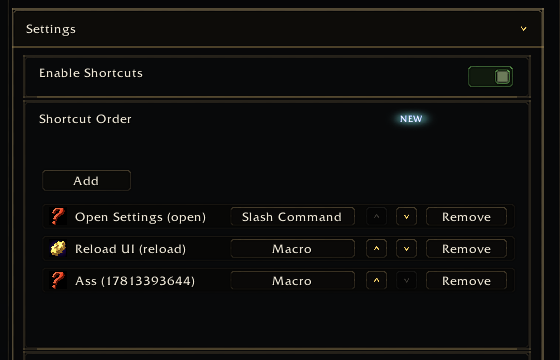
ReorderList renders an ordered list with move/remove/format controls. The consumer owns the backing table and callbacks.
| Field | Type | Description |
|---|---|---|
getEntries |
function | Returns ordered entries. |
moveEntry |
function | Moves one entry. |
addEntry |
function | Adds one entry. Add button is shown by default only when this exists. |
removeEntry |
function | Removes one entry. Remove button is shown by default only when this exists. |
showAddButton |
boolean | Explicitly show/hide the Add button. nil infers from addEntry. |
showRemoveButton |
boolean | Explicitly show/hide Remove buttons. nil infers from removeEntry. |
setEntryFormat |
function | Sets an entry format key. |
formatOptions |
table | Format key-to-label map. |
formatOrder |
table | Format display order. |
showEntryID |
boolean | Set false to avoid appending entry ids to labels. |
formatEntryLabel |
function | Custom label formatter: function(entry, index, control). |
entryToggle |
table | Optional per-entry boolean toggle with getValue/setValue. |
rowActions |
table | Optional menu actions per row. |
rowHeight |
number | Custom row height. |
emptyText |
string | Empty-list message. |
Entries can use fields such as:
{
  id = "health",
  label = "Health",
  icon = "Interface\\Icons\\INV_Potion_54",
  format = "icon",
}app:RegisterControl("bars.layout", {
id = "barOrder",
type = "reorderlist",
label = "Bar order",
rowHeight = 260,
getEntries = function()
return MyAddonDB.profile.barOrder or {}
end,
moveEntry = function(fromIndex, toIndex)
MyAddon.MoveBarOrderEntry(fromIndex, toIndex)
end,
removeEntry = function(index)
MyAddon.RemoveBarOrderEntry(index)
end,
setEntryFormat = function(index, formatKey)
MyAddon.SetBarOrderFormat(index, formatKey)
end,
formatOptions = { icon = "Icon", text = "Text" },
formatOrder = { "icon", "text" },
})Order-only lists can hide add/remove automatically by omitting addEntry and
removeEntry:
app:RegisterControl("broker.columns", {
  id = "columnOrder",
  type = "reorderlist",
  label = "Column order",
  showEntryID = false,
  getEntries = GetColumns,
  moveEntry = MoveColumn,
})
Use entryToggle when entries have visibility and order in the same row:
entryToggle = {
  getValue = function(entryID, entry)
    return entry.visible == true
  end,
  setValue = function(entryID, entry, visible)
    entry.visible = visible == true
  end,
}
Use rowActions for uncommon per-entry commands:
rowActions = {
  {
    id = "rename",
    label = "Rename",
    visibleWhen = function(entry) return entry.custom == true end,
    onClick = function(entryID, entry, row, app, control)
      MyAddon.OpenRenamePopup(entryID)
    end,
  },
}