Releases: RadnoK/router-menu
Release list
Router Menu 0.6.2

Fixed
- The popover no longer comes up blank. After connecting, the panel could render as an empty translucent rectangle — no header, no stats, not even the footer buttons. The panel sizer that caused it has been removed: on a real
MenuBarExtraits resize path never ran at all, while its side effects (a permanently transparent window and a foreign view spliced into SwiftUI's own hosting view) were enough to leave the panel with nothing drawn.MenuBarExtrasizes and styles its own panel correctly. - No more empty TRANSFER section. A device reporting neither speeds nor counters used to earn a section header with nothing underneath it.
Router Menu 0.6.1

Full Changelog: v0.6.0...v0.6.1
Router Menu 0.6.0 — iPhone Hotspot
iPhone Personal Hotspot
Router Menu now watches a tethered phone the same way it watches a modem.
Pick iPhone when adding a device and it tracks the link: how the phone is
connected, this Mac's address on the tether, and traffic since the connection
came up — with the same 24-hour chart as every other device.
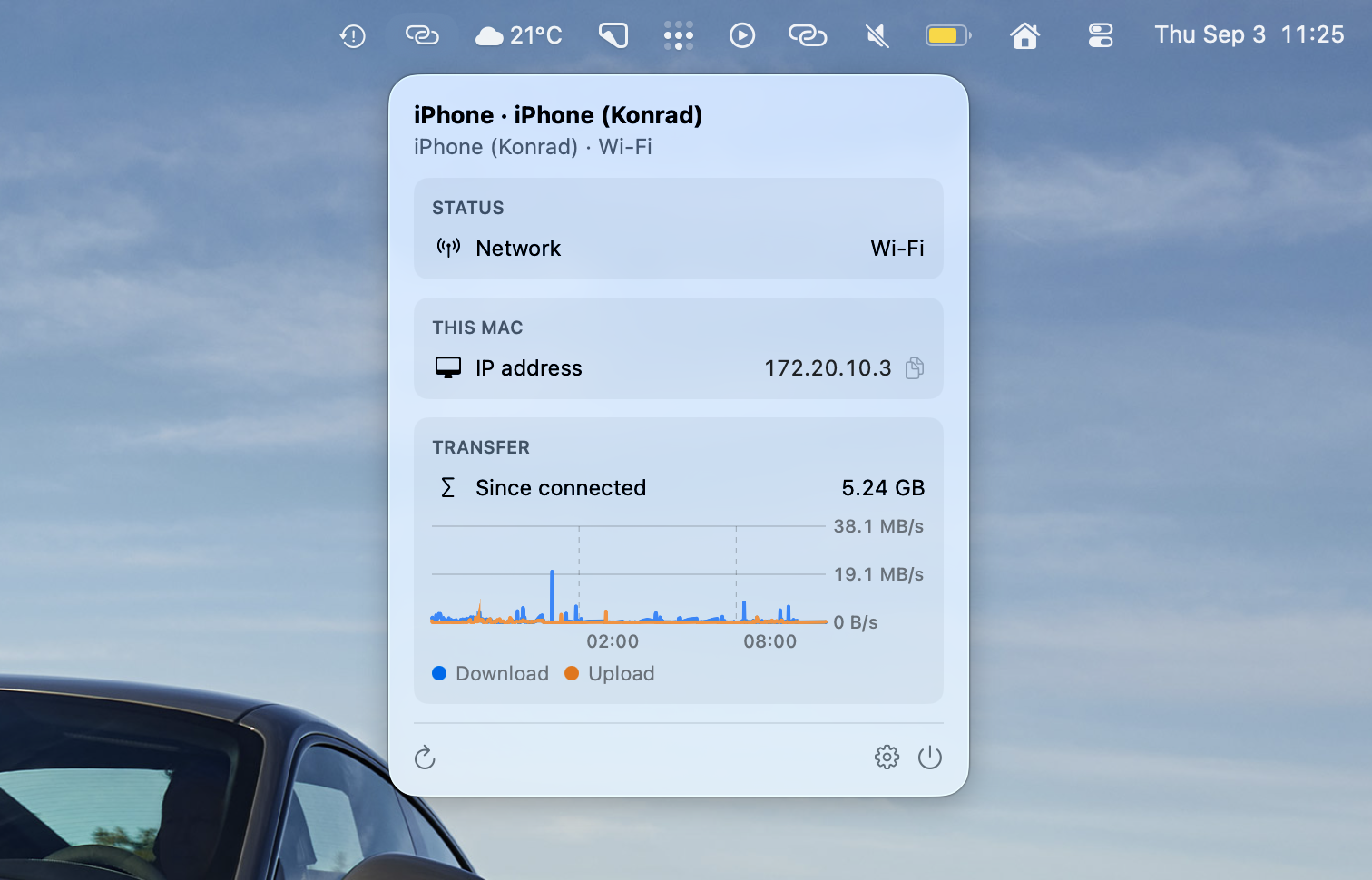
There is no setup on the phone. The Mac reads its own end of the tether, so
nothing has to be installed or enabled on iOS. Android tethering presents the
same interface and works too.
One honest limitation: the phone's battery and cellular signal are not
shown. macOS does not share them with a Mac app — they travel over Continuity,
not over the tether — so rather than display a hopeful zero, those rows are
simply absent.
Right-click to quit
Right-clicking the menu bar icon now opens a small menu with Quit. It was
always in the popover's footer, but a right click is where most people look
first.
Also in this release
- The popover panel is translucent instead of flat grey, matching the material
other menu bar apps use. - The README shows all three device flavours.
Install: brew install --cask router-menu, or grab the .zip below.
Existing installs update themselves.
Router Menu 0.5.3
Router Menu 0.5.2
Fixed
- Fixed the popover opening as a tall, mostly empty window after a disconnect: the panel now snaps back to the size of what it actually shows. Previously it kept the tallest frame it had ever had and floated the small "no connection" box in the middle.
Router Menu 0.5.1
The app is now Router Menu.
- Renamed everywhere you can see it: Finder (
Router Menu.app), the Settings window, and login items. - Updating from 0.5.0 keeps your devices, passwords, and history — Sparkle swaps the app in place under its new name.
Under the hood the code, targets, and release artifacts follow the same rename (RouterMenu-x.y.z.zip); nothing else changed since 0.5.0.
Router Menu 0.5.0
New
- Added support for ASUS routers (Asuswrt firmware) alongside ZTE modems.
- Added a device manager in Settings — keep several routers, each with its own name, credentials, and per-device options.
- Added battery alerts at thresholds you define, plus an optional battery percentage right in the menu bar.
- Added signal and transfer charts to the popover, with upload and download history tracked separately.
- Added a This Mac pane showing your local IP address with one-click copy.
- Added a launch-at-login toggle and an option to keep the menu bar icon visible while disconnected.
- Added a live connection test when editing a device.
- Added an escape hatch for a hidden icon: opening the app again while it runs brings up Settings.
Improved
- Refreshed the app with the new Router Menu icon and artwork.
- Redesigned Settings around the device manager, with a new About section.
Fixed
- Fixed the Settings window opening at partial height on some tabs.
- Fixed deleted credentials coming back and history bleeding between devices.
Upgrading from 0.4.x: this release changes the app's internal identity, so it will not arrive through automatic updates — download it once from this page or run brew upgrade --cask router-menu. Saved devices and passwords need to be entered again.
ZTE Menu 0.4.1
Full Changelog: v0.4.0...v0.4.1
ZTE Menu 0.4.0
Full Changelog: v0.3.0...v0.4.0
ZTE Menu 0.3.0
Full Changelog: v0.2.1...v0.3.0