
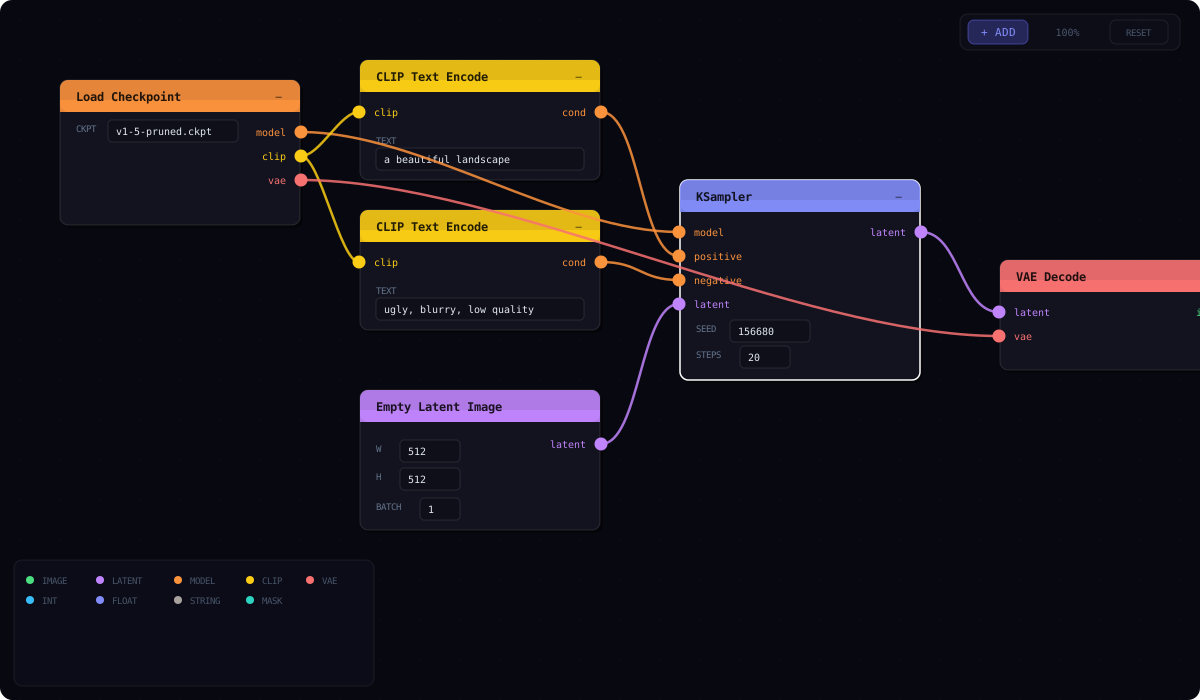
A ComfyUI / Unreal Blueprints-style node graph editor for Streamlit


streamlit-node-editor is a fully interactive node graph editor that runs inside any Streamlit application. Define typed node types in Python, let users build graphs by dragging ports and connecting wires, and get the full graph state back as structured JSON — all with zero runtime dependencies beyond Streamlit (no React Flow, no external graph library).
- Typed ports — color-coded input/output ports with data type labels; only compatible types can connect
- Drag-to-wire — click an output port, drag, and drop on a compatible input to create a connection
- Type validation — incompatible connections are silently rejected, preventing invalid graphs
- Animated wires — smooth bezier curves with flowing-dot animation connect ports visually
- Inline parameters — select dropdowns, number inputs, text inputs, and textareas rendered inside each node body
- Drag to move — reposition nodes freely on the canvas
- Collapse nodes — minimize nodes to save canvas space while preserving connections
- Delete / Backspace — removes the selected node and all its connections
- Click wire to delete — remove connections without any menu
- Pan + scroll-to-zoom — navigate large graphs with proper SVG coordinate transforms
- Animated dot-grid background — subtle grid for spatial reference
- Configurable height — set canvas height in pixels via the
heightparameter
- Searchable palette — filterable list of all registered node types grouped by category
- Right-click or toolbar — open the palette from the canvas context menu or the toolbar button
- Category grouping — nodes organized by their
categoryfield
- Consistent dark UI with color-coded node headers
- Glass-morphism panels with subtle borders
- Designed to match Streamlit's dark mode
pip install streamlit-node-editorimport streamlit as st
from streamlit_node_editor import st_node_editor
NODE_DEFS = {
"CSV Source": {
"category": "Sources",
"headerColor": "#4ade80",
"inputs": [],
"outputs": [{"name": "dataframe", "type": "DATAFRAME"}],
"params": [
{"key": "path", "label": "File path", "type": "string", "default": "data.csv"},
{"key": "sep", "label": "Separator", "type": "string", "default": ","},
],
},
"Filter Rows": {
"category": "Transform",
"headerColor": "#38bdf8",
"inputs": [{"name": "df_in", "type": "DATAFRAME"}],
"outputs": [{"name": "df_out", "type": "DATAFRAME"}],
"params": [
{"key": "query", "label": "Query expr", "type": "string", "default": "value > 0"},
],
},
"Group By": {
"category": "Transform",
"headerColor": "#818cf8",
"inputs": [{"name": "df_in", "type": "DATAFRAME"}],
"outputs": [{"name": "df_out", "type": "DATAFRAME"}],
"params": [
{"key": "column", "label": "Column", "type": "string"},
{"key": "agg", "label": "Aggregate", "type": "select",
"options": ["sum", "mean", "count", "min", "max"]},
],
},
"Bar Chart": {
"category": "Outputs",
"headerColor": "#fb923c",
"inputs": [{"name": "dataframe", "type": "DATAFRAME"}],
"outputs": [],
"params": [
{"key": "x", "label": "X column", "type": "string"},
{"key": "y", "label": "Y column", "type": "string"},
],
},
}
graph = st_node_editor(NODE_DEFS, height=600, key="pipeline")
if graph:
st.subheader("Graph state")
st.json(graph)st_node_editor(
node_defs: dict[str, dict],
initial_nodes: list[dict] | None = None,
initial_connections: list[dict] | None = None,
height: int = 700,
key: str | None = None,
) -> dict | None| Parameter | Type | Default | Description |
|---|---|---|---|
node_defs |
dict[str, dict] |
required | Node type registry. Keys are node type names, values are definition dicts. See schema below. |
initial_nodes |
list[dict] or None |
[] |
Pre-placed nodes on the canvas. |
initial_connections |
list[dict] or None |
[] |
Pre-existing wire connections. |
height |
int |
700 |
Canvas height in pixels. |
key |
str or None |
None |
An optional key that uniquely identifies this component. Required when placing multiple editors on one page. |
Returns a dict with the full graph state after any interaction, or None before any interaction.
{
    "nodes": [
        {
            "id":     str,                # unique node ID
            "type":   str,                # node type name (key from node_defs)
            "x":      float,              # canvas X position
            "y":      float,              # canvas Y position
            "params": {key: value, ...},  # current parameter values
        },
        ...
    ],
    "connections": [
        {
            "id":       str,   # unique connection ID
            "fromNode": str,   # source node ID
            "fromPort": int,   # output port index (0-based)
            "toNode":   str,   # target node ID
            "toPort":   int,   # input port index (0-based)
        },
        ...
    ]
}"Node Type Name": {
"category": str, # palette grouping (e.g. "Sources", "Transform")
"headerColor": str, # hex color for the node's title bar
"inputs": [
{"name": str, "type": str} # typed input ports
],
"outputs": [
{"name": str, "type": str} # typed output ports
],
"params": [
{
"key": str, # parameter key (returned in node params)
"label": str, # display label inside the node
"type": str, # "int" | "float" | "string" | "select" | "textarea"
"default": any, # optional default value
"options": list[str], # required when type == "select"
}
],
}| Type | Color | Typical Use |
|---|---|---|
IMAGE |
green | Pixel data |
LATENT |
purple | Latent tensors |
MODEL |
orange | Neural network weights |
CLIP |
yellow | Text encoders |
VAE |
red | Variational autoencoders |
INT |
blue | Integer values |
FLOAT |
indigo | Float values |
STRING |
stone | Text data |
MASK |
teal | Binary masks |
ANY |
gray | Accepts any type |
Define your own types freely in node_defs — any unrecognized type string uses the ANY gray color.
graph = st_node_editor(
    NODE_DEFS,
    initial_nodes=[
        {"id": "n1", "type": "CSV Source",  "x": 50,  "y": 100,
         "params": {"path": "sales.csv", "sep": ","}},
        {"id": "n2", "type": "Filter Rows", "x": 350, "y": 100,
         "params": {"query": "revenue > 1000"}},
        {"id": "n3", "type": "Bar Chart",   "x": 650, "y": 100,
         "params": {"x": "month", "y": "revenue"}},
    ],
    initial_connections=[
        {"id": "w1", "fromNode": "n1", "fromPort": 0, "toNode": "n2", "toPort": 0},
        {"id": "w2", "fromNode": "n2", "fromPort": 0, "toNode": "n3", "toPort": 0},
    ],
    height=600,
    key="pipeline",
)graph = st_node_editor(NODE_DEFS, key="pipeline")
if graph and st.button("Run Pipeline"):
nodes_by_id = {n["id"]: n for n in graph["nodes"]}
for node in graph["nodes"]:
node_type = node["type"]
params = node["params"]
if node_type == "CSV Source":
st.info(f"Loading {params.get('path', 'data.csv')}")
elif node_type == "Filter Rows":
st.info(f"Filtering: {params.get('query', '')}")
elif node_type == "Bar Chart":
st.info(f"Charting {params.get('x')} vs {params.get('y')}")
st.success(f"Executed {len(graph['nodes'])} nodes with {len(graph['connections'])} connections")IMAGE_NODES = {
"Load Image": {
"category": "Input",
"headerColor": "#4ade80",
"inputs": [],
"outputs": [{"name": "image", "type": "IMAGE"}],
"params": [
{"key": "path", "label": "Image path", "type": "string", "default": "photo.jpg"},
],
},
"Resize": {
"category": "Transform",
"headerColor": "#38bdf8",
"inputs": [{"name": "image", "type": "IMAGE"}],
"outputs": [{"name": "image", "type": "IMAGE"}],
"params": [
{"key": "width", "label": "Width", "type": "int", "default": 512},
{"key": "height", "label": "Height", "type": "int", "default": 512},
],
},
"Blur": {
"category": "Effects",
"headerColor": "#a78bfa",
"inputs": [{"name": "image", "type": "IMAGE"}],
"outputs": [{"name": "image", "type": "IMAGE"}],
"params": [
{"key": "radius", "label": "Radius", "type": "float", "default": 2.0},
],
},
"Save Image": {
"category": "Output",
"headerColor": "#fb923c",
"inputs": [{"name": "image", "type": "IMAGE"}],
"outputs": [],
"params": [
{"key": "path", "label": "Output path", "type": "string", "default": "output.png"},
{"key": "format", "label": "Format", "type": "select",
"options": ["PNG", "JPEG", "WEBP"]},
],
},
}
graph = st_node_editor(IMAGE_NODES, height=500, key="image_pipeline")The component is built with React 18 communicating with Streamlit via the bidirectional component API (streamlit-component-lib). All rendering uses inline SVG for wires and standard HTML/CSS for nodes.
┌──────────────────────────────────────────────────────────┐
│  Python (Streamlit)                                      │
│  st_node_editor(node_defs, initial_nodes, …, key)        │
│       ↓ args                   ↑ componentValue          │
├──────────────────────────────────────────────────────────┤
│  React Frontend (iframe)                                 │
│  ┌────────────────────────────────────────────────────┐  │
│  │  Toolbar: Add Node · Delete · Zoom · Fit           │  │
│  ├─────────┬──────────────────────────────────────────┤  │
│  │ Palette │  Canvas (pan + zoom)                     │  │
│  │         │  ┌──────────┐     ┌──────────┐           │  │
│  │ Sources │  │ CSV Source│────→│Filter    │           │  │
│  │ ├─CSV   │  │ path: .. │     │ query: ..│           │  │
│  │ ├─API   │  └──────────┘     └────┬─────┘           │  │
│  │         │                        │                 │  │
│  │ Transf. │               ┌────────▼──────┐          │  │
│  │ ├─Filter│               │  Bar Chart    │          │  │
│  │ ├─Group │               │  x: ..  y: .. │          │  │
│  │         │               └───────────────┘          │  │
│  │ Outputs │                                          │  │
│  │ ├─Chart │  · · · · · · · · (dot grid) · · · · ·   │  │
│  └─────────┴──────────────────────────────────────────┘  │
└──────────────────────────────────────────────────────────┘
- Wire engine — SVG bezier curves with animated flowing dots; hit-test for click-to-delete
- Port system — typed ports with color mapping; connection validation runs on drop
- Node renderer — HTML div with color-coded header, inline param editors, and port circles
- Pan / zoom — CSS transform on the canvas container with scroll-wheel zoom
- State sync — every node move, add, delete, or connection change calls
Streamlit.setComponentValue()with the full graph
| Browser | Status |
|---|---|
| Chrome / Edge 90+ | ✅ Full support |
| Firefox 90+ | ✅ Full support |
| Safari 15+ | ✅ Full support |
| Mobile browsers |
- Python 3.8+
- Streamlit ≥ 1.28.0
MIT — see LICENSE for details.