


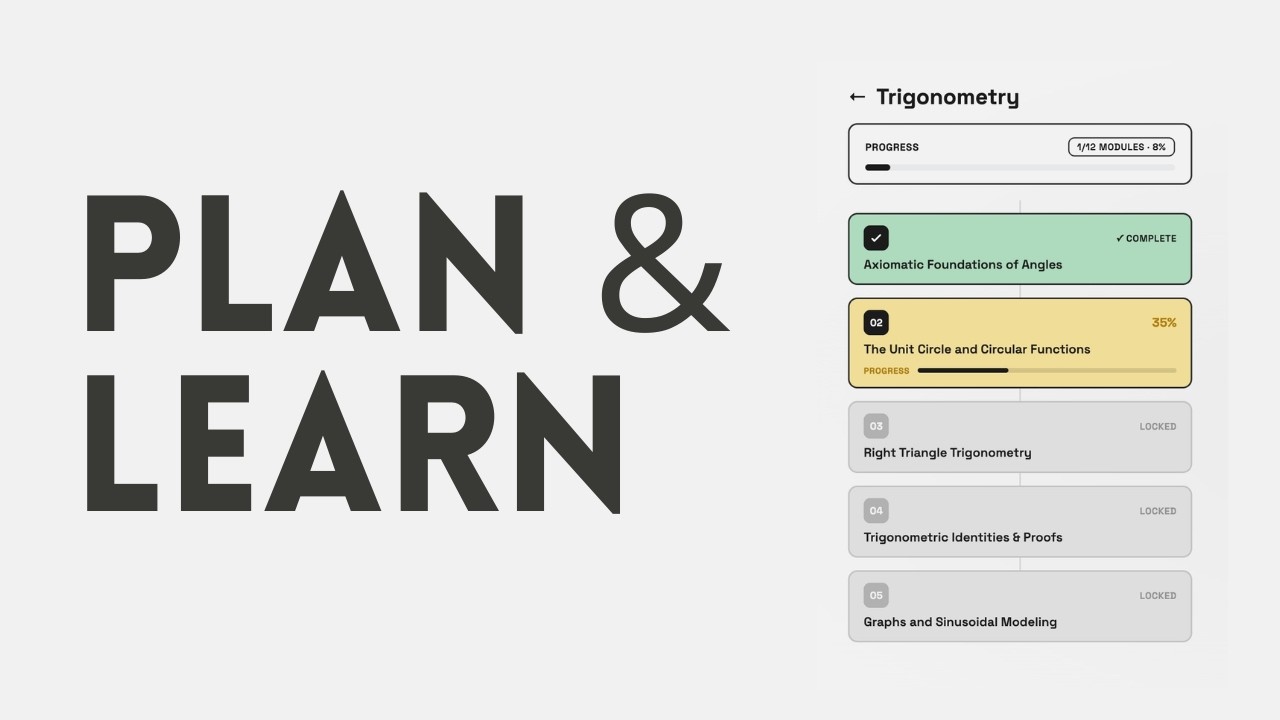
An advanced, AI-powered educational roadmap and curriculum planning application built with React Native and Expo (SDK 57). Engineered around a striking, tactile neobrutalist design system, PLAN & LEARN delivers real-time learning path generation, interactive visualizations, and adaptive curriculum tuning.
Plan & Learn was born out of frustration with the modern habit of endlessly scrolling through social media and short-form content. Realizing that many others share this struggle, the idea emerged: what if we could redirect that urge into a learning app that is visually pleasing, accessible, and highly structured?
Our motivation is to make learning new things as frictionless as possible. Not everyone wants to learn prompt engineering or wrestle with the nitty-gritty of AI just to study a new topic. Plan & Learn abstracts all of that away—serving as a personalized AI tutor that instantly breaks down any subject into an intuitive, sequential roadmap. Whether you want bite-sized insights or a highly detailed course, the app tailors the content to your chosen depth, making structured learning a delightful alternative to mindless scrolling.
- 🧠 Intelligent Two-Phase Generation & Streaming
- Phase 1 (Structure): Instantly generates a customized, node-based curriculum map from any learning topic.
- Phase 2 (Lazy Content): Generates highly comprehensive module content—including reading material, LaTeX math, diagrams, and citations—on-demand as you dive into each step.
- Live Stream Parsing: In-flight partial JSON repair algorithms automatically rebuild chunked streams to display nodes and text incrementally.
- 🗺️ Interactive Graph & Diagram Rendering
- Curriculum Maps: A bespoke visual canvas that renders the AI-generated curriculum as an interactive node graph, allowing users to intuitively navigate their learning journey and track progression.
- Material Flowcharts: Dynamic Mermaid.js graph rendering embedded directly within course material to visualize complex workflows and system flows with interactive zoom and pan support.
- 🎓 Audience-Aware Personalization
- Features a 3-step tactile onboarding workflow that adjusts complexity, tone, and practical application parameters dynamically across three levels:
- School Student: Simplified analogies, basic conceptual overviews, and low jargon.
- University Student: Technical depth, coding examples, and mathematical foundations.
- Working Professional: Architectural scaling, production-grade patterns, and systems engineering.
- Features a 3-step tactile onboarding workflow that adjusts complexity, tone, and practical application parameters dynamically across three levels:
- 📚 Textbook-Grade STEM Rendering
- KaTeX Math Expressions: Embedded display-mode mathematical expressions rendering dynamically via custom sandboxed WebViews.
- 🔗 Source & Citation Tracking
- In-app sources modal to track AI-generated references, allowing users to verify information and read external literature directly.
- ⚡ High-Performance Offline-First Architecture
- MMKV Synced Storage: Ultra-fast key-value store powered by
react-native-mmkvwith zero-flash synchronous theme initialization. - Fail-Safe Node Migrations: Automated state schema migrations that shield active roadmaps from breaking changes during app upgrades.
- Precision Viewport Tracking: Continuously monitors scroll depth to calculate, persist, and display reading progress rings around nodes.
- MMKV Synced Storage: Ultra-fast key-value store powered by
- 🎨 Neobrutalist Aesthetic & Accessibility
- Bold high-contrast borders, solid offsets, true-black pure dark mode, tactile haptic feedback (using
expo-haptics), and modern typography via Space Grotesk. - Font-zoom and dynamic text sizing for accessible reading.
- Delightful custom animations, including a Confetti Cannon on course completion and a Standing Wave Loader.
- Bold high-contrast borders, solid offsets, true-black pure dark mode, tactile haptic feedback (using
- Framework: Expo SDK 57 (React Native 0.74+) utilizing the new architecture when possible, with
expo-routerfor file-based deep linking and navigation. - Styling:
NativeWindv4 (Tailwind CSS for React Native), deeply customized for a Neobrutalist design system incorporating dynamic light/dark modes and raw CSS shadow offsets. - State Management:
zustandcombined withreact-native-mmkvfor high-speed, synchronous offline persistence of user settings and massive roadmap JSON objects. - AI & Data Streaming: Real-time generative AI pipeline utilizing HTTP streaming. Custom parsing utilities reconstruct malformed/incomplete JSON chunks on the fly to render UI before the request completes.
- WebViews & Advanced Rendering: Uses
react-native-webviewto securely sandbox and execute DOM-heavy libraries like KaTeX for mathematics and Mermaid.js for node-graph rendering, communicating with the React Native thread via injected JavaScript bridges.
Ensure you have the following installed on your machine:
- Node.js (v18 or higher recommended)
- Android Studio (for Android emulation & build tools)
- Xcode (macOS only, for iOS simulation)
-
Clone the repository to your local machine:
git clone <repository-url>
cd Planner
-
Install the project dependencies:
npm install
To launch the Metro bundler:
npm run startUse the console shortcuts to open the app on your environment:
- Press
ato open on an Android emulator or connected device. - Press
ito open on the iOS simulator (macOS only). - Press
rto force reload the Metro bundler. - Use
npx expo start --clearto clear the bundler cache if you encounter resolution issues.
PLAN & LEARN utilizes Continuous Native Generation (CNG). Do not manually commit native /android or /ios files unless specifically necessary; configure them via app.json plugins.
Ensure native dependencies are correctly configured and clean directories are generated:
npx expo prebuild --platform android --cleanTo build a local debug APK:
cd android
./gradlew assembleDebug
(On Windows, use .\gradlew.bat assembleDebug)
The generated APK will be available at:
android/app/build/outputs/apk/debug/app-debug.apk
├── app/                  # File-based routing (Expo Router SDK 57)
│   ├── (drawer)/         # Main navigation layouts (Learning Paths, Settings)
│   ├── roadmap/          # Roadmap progress flow & interactive node canvas
│   ├── material/         # Detailed course screens, font zoom menus, & reading engine
│   ├── onboarding.tsx    # Neobrutalist 3-step profile customizer
│   └── _layout.tsx       # Global themes, navigation provider, & safe area offsets
├── assets/               # Brand elements, launcher icons, and splash screens
├── src/                  # Core source code
│   ├── components/       # Reusable UI controls (KaTeX webviews, Mermaid canvas, loaders, Modals)
│   ├── store/            # Zustand state stores (MMKV storage engine & node schema migrations)
│   ├── hooks/            # Custom hooks (Stream managers, keyboard animations, UI logic)
│   ├── services/         # API clients & network endpoints
│   └── declarations.d.ts # Module declarations (e.g., resolving untyped dependencies or custom asset imports)
├── tailwind.config.js    # Utility styles, spacing tokens, and border variables
├── app.json              # Central Expo config, permissions, & build plugins
└── tsconfig.json         # TypeScript compiler configurations
Building native packages on Windows can occasionally fail due to file path limitations or environment issues:
-
Path Length Limitations (
MAX_PATHLimit): Windows enforces a 260-character path limit. C++ builds (likereact-native-vector-iconsand JSI modules) will fail if nested deeply.- Solution: We redirect CMake build staging to
C:/tmp/pl-cxxinsideandroid/app/build.gradle. Make sure your build terminal has write permissions forC:/.
- Solution: We redirect CMake build staging to
-
SDK Path Resolution (
local.properties): If yourANDROID_HOMEvariable is not globally configured, specify it explicitly insideandroid/local.properties:sdk.dir=C:/Users/<YourUsername>/AppData/Local/Android/Sdk -
Metro Bundler Clearing: For styling or SVG updates that aren't showing up:
npx expo start -c
- TypeScript Integrity: Ensure all component props and store state are strictly typed. Validate before committing:
npx tsc --noEmit
- Aesthetics Priority: Maintain neobrutalist styling norms. Use thick borders (
border-3orborder-4), heavy offset shadow transformations, and Space Grotesk typography. - Expo Standards: Refer directly to Expo v57 Documentation for native plugin structures and router hooks.