Home
WindowAutoLayout is a Windows tray app for saving and restoring real desktop workspaces. It is built for streaming and gaming setups where OBS, Discord, browsers, and dashboards need to come back to the same places with one action.
- Quick Start
- OBS And Tray Apps
- Profiles And Matching
- Layout Lock And Startup
- Troubleshooting
- Testing And Releases
| Feature | What It Means |
|---|---|
| Profile restore | Save a group of app windows and move them back later |
| App launching | Start apps that are fully closed before applying layout |
| Hidden tray apps | Pull apps back when they are minimized or hidden in the tray |
| OBS tray restore | Wake OBS through its tray icon path so it repaints before moving |
| Layout lock | Keep a profile in place after Show Desktop, minimize, or accidental drags |
| Startup restore | Restore the chosen profile after Windows login |
| Hotkey restore | Restore without opening the main app window |
| Local config | Store settings and logs locally as JSON |
Install the newest build from:
Release assets include:
WindowAutoLayout_<version>_x64-setup.exeWindowAutoLayout_<version>_x64_en-US.msi- SHA256 checksum files for both installers
For a typical streaming profile:
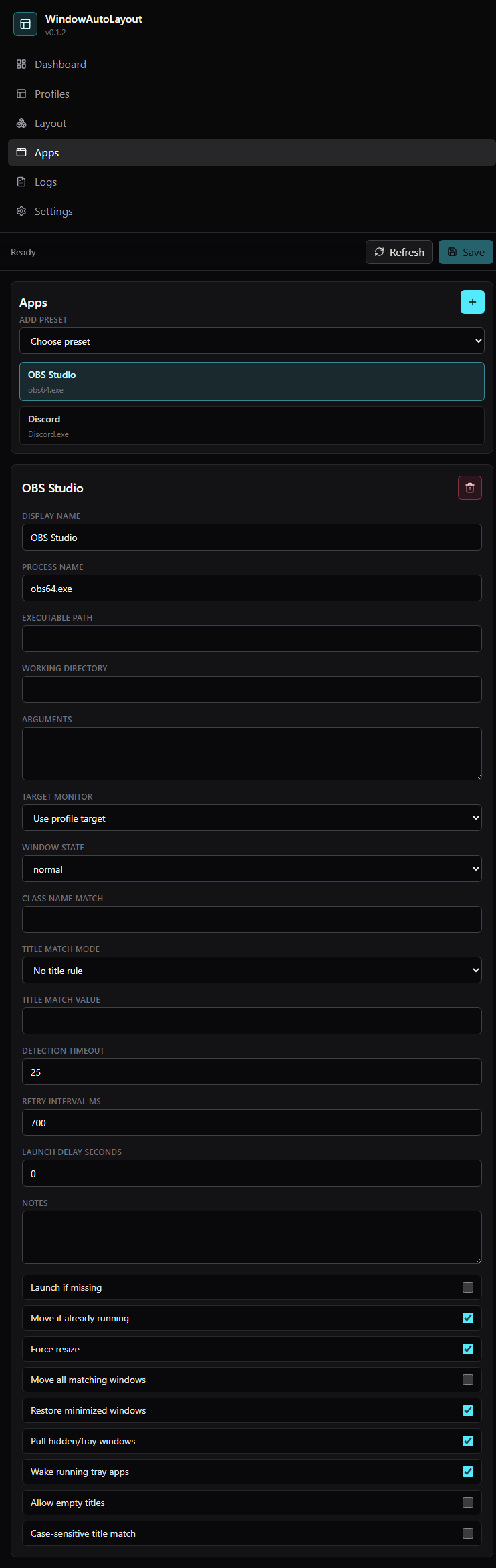
- Add OBS Studio with process name
obs64.exe. - Add Discord with process name
Discord.exe. - Add any browser or dashboard window needed for chat, moderation, or stream control.
- Arrange the windows manually.
- Save each real window from Layout.
- Enable startup restore if the profile should come back after PC launch.
- Enable layout lock when the workspace should stay pinned while live.
For OBS, keep these WindowAutoLayout app-entry settings on:
Pull hidden/tray windowsWake running tray appsRestore if minimizedLaunch if missing
That combination lets OBS stay in the tray for Replay Buffer while still coming back cleanly when the profile restores.
WindowAutoLayout stores user config and logs here:
%APPDATA%\com.rique.windowautolayout
The app does not use telemetry, analytics, accounts, or background network calls.