

-
|
How does the scratch debugger work? |
Beta Was this translation helpful? Give feedback.
Replies: 2 comments 2 replies

-
|
You mean our debugger addon? Which part of it? (It's very complicated) |
Beta Was this translation helpful? Give feedback.

-
|
Yeah, I'm just a bit confused on how to use it and how it works. |
Beta Was this translation helpful? Give feedback.

-
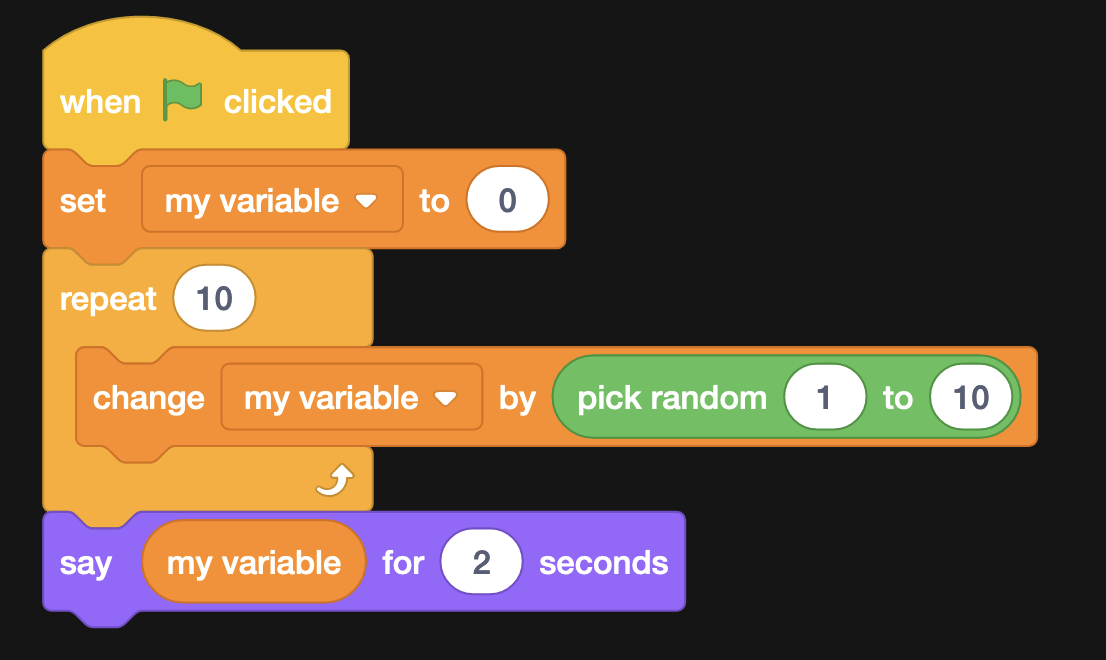
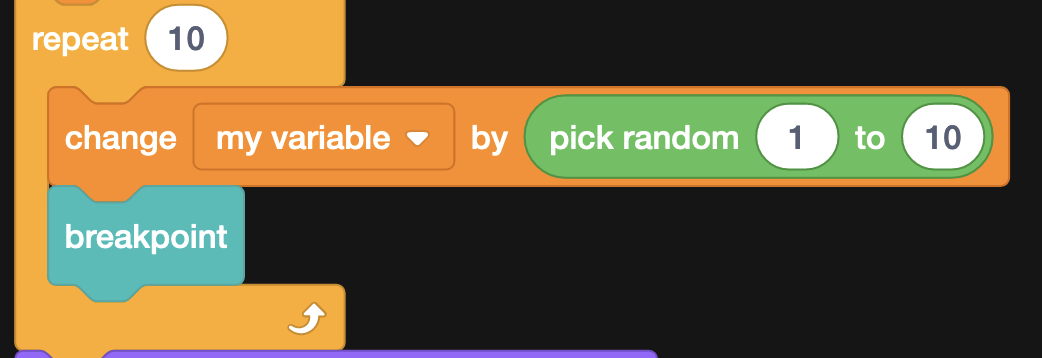
Introduction to DebuggersDebuggers are used for most programming languages, it helps programmers to find and fix bugs more easily. With the help of a debugger, you can step through individual lines of code, see the values of variables, etc, to try to find where an error/bug occurs. Scratch was meant for beginners - so adding a debugger wasn't considered by the Scratch Team, so the wonderful people at Scratch Addons decided to make one. To enable it, head over to the settings, search for "debugger" and make sure the switch is orange (click it if it isn't). Demo of the Scratch Addons DebuggerTo test it out, head over to fresh new Scratch project, and add some demo code like this — Now, if you click the green flag, everything happens so fast, that you can barely see the variable increase, here the debugger will help you! So to begin debugging, our task will be to find out what the random number is, without using any extra variable or say blocks. This can be useful if you want to see a lot of values in detail without spending too much time on it. From the "Debugger" category in the block palette, drag the "breakpoint" block and place it under the
Now if you click the green flag, you should see the debugging window appear, now look at the top section of it, right now we're only gonna focus on the |
Beta Was this translation helpful? Give feedback.

-
|
A video explaining how to use the debugger would be great for our YouTube channel |
Beta Was this translation helpful? Give feedback.


Introduction to Debuggers
Debuggers are used for most programming languages, it helps programmers to find and fix bugs more easily. With the help of a debugger, you can step through individual lines of code, see the values of variables, etc, to try to find where an error/bug occurs.
Scratch was meant for beginners - so adding a debugger wasn't considered by the Scratch Team, so the wonderful people at Scratch Addons decided to make one.
To enable it, head over to the settings, search for "debugger" and make sure the switch is orange (click it if it isn't).
Demo of the Scratch Addons Debugger
To test it out, head over to fresh new Scratch project, and add some demo code like this —
Now, i…