Repository navigation
Releases: ShadowESC95/ELI_VR
Release list
ELI VR 0.9.2

ELI VR 0.9.2 — the desktop screen asks before the headset starts
On Linux with Wayland, the desktop asks which screen to share. It used to ask after the headset had started, so the question sat unseen on the monitor and the screen in VR kept waiting. The launcher now starts the desktop helper first and, the first time, waits up to two minutes for you to choose a screen. The answer is remembered, so later sessions share at once without asking.
The screen needs no network connection: the helper and ELI VR talk to each other on the same computer. The screen now says what it is waiting for, and the install guide says the same.
Nothing else has changed since 0.9.1. The parts with ELI v3 need ELI v3 3.0.134 or newer.
ELI VR 0.9.1
ELI VR 0.9.1 — ELI is "it"
ELI is now called "it" everywhere: in the app's own words on the status line ("ELI answered, but its voice is not available"), in the room descriptions, and in every guide and note that comes with the download.
Nothing else has changed since 0.9.0; what it brought, and what has and has not been tried, is in its notes. The new parts with ELI v3 need ELI v3 3.0.134 or newer.
ELI VR 0.9.0
ELI VR 0.9.0 — ELI builds, and the rooms are ELI's own
With ELI v3 beside ELI VR, ELI now knows where it is, builds in the rooms from what you say, has a room of its own, and uses whichever model you choose. ELI VR still runs on its own, and with an older ELI v3 it still gives presence and talking.
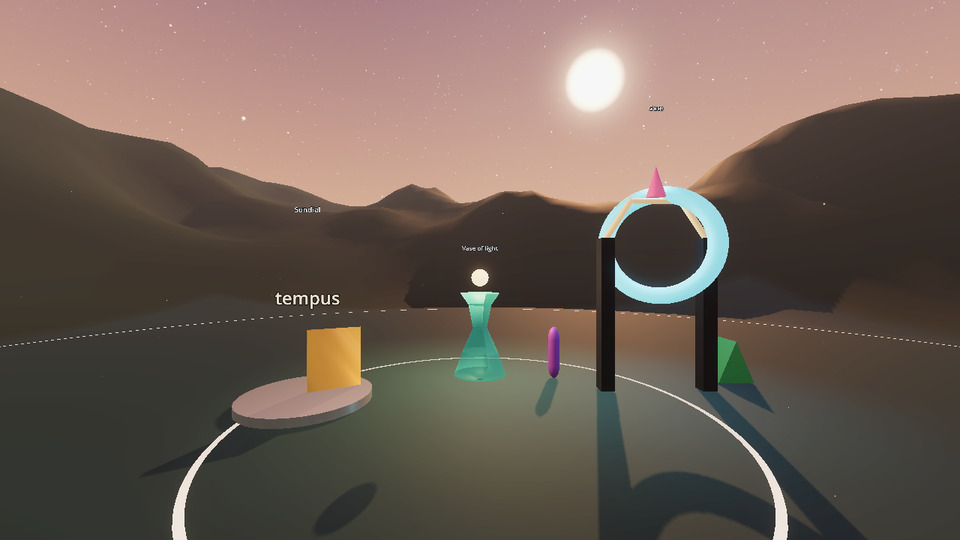
Needs for the new parts: ELI v3 3.0.134 or newer, which speaks world protocol 2. With 3.0.131 to 3.0.133, ELI VR agrees version 1 and says so.
How far it has been tried. Flat, without a headset, against ELI v3's real server: building from sentences with a real and very small model (0.6B), the mind panel, and free-form things and a painted sky drawn from edits sent by hand. ELI's room was run in a Rift CV1 at 90 frames a second before the free-form work. Not yet tried: any of the building spoken into a headset, a model large enough to be offered free-form parts, changing model from inside the room, and ELI building of its own accord with a real model. Windows and macOS builds come from CI.
ELI's mind is your choice
No model is named or assumed.
- Opened from ELI v3's window: the model already loaded there answers. Nothing is loaded twice.
- In the room: the ELI'S MIND panel lists ELI's models by name. Press one and ELI loads it.
- Before starting:
--eli-model=<name>, orpython3 tools/eli_vr.py model <name>to keep it.
The status line always says which model ELI is using.
ELI knows where it is
ELI is told the room and what the place is, where you stand, what you are looking at and which of its things are near, for as long as you are there and no longer. Ask "where are we".
ELI builds
"Build me a tall red pillar." "Put a lamp to my left." "Make the pillar green and bigger." "Move it behind me." "Undo." Things rise out of the floor where you asked, and you can grab and move them. Every change goes through ELI's world's own policy and ledger.
- With any GGUF. ELI's answer is held to an exact grammar, and what you plainly said (a colour, a size, "behind me", "the orb" when there is none) is worked out without the model. A 0.6B model manages every plain request.
- In any way ELI likes. A thing is a named shape, or anything made part by part: boxes, balls, cones, rings, a lathe, an extruded outline, a tube along a path, text, each with its own colour, metal, glow, clearness and motion. A model of three billion parameters or more is offered this; a smaller one keeps to the named shapes.
- If nothing changed, ELI says so, whatever the model claimed.
A room of its own
ELI'S ROOM on the console: open ground under an open sky, with nothing there but what ELI has made. The sky is ELI's to choose, by name or painted from two colours, stars and a sun placed wherever ELI likes. So is the ground: any colour, flat or rising into hills.
Of its own accord
Nothing is scheduled and nothing is chosen for ELI. When something happens in ELI that has words (an insight, a goal taken on or finished, an improvement ELI proposes) the moment is kept. When ELI is free it may make something of that moment in its room, from its own records: its persona, its latest insight, its goals, its recent memories. What ELI makes is tied to the record the moment came from. ELI may also make nothing. ELI: BUILD asks it now.
ELI's records in its rooms
The Memory Archive holds ELI's real recent memories as lights, each with its words. The Upgrade Bay holds the goals ELI has now.
Under it
- The world protocol has versions, agreed on connecting, with a plain refusal when there is none in common.
- A failure says which failure it is: ELI is not running, ELI has no model loaded, ELI did not catch that, ELI's voice is not available.
- What you say in the headset is your turn, in the same conversation and memory as anywhere else. ELI VR is a surface of yours, not another user.
Known gaps
- ELI is a light, not a figure.
- A very small model keeps to named shapes, says little worth hearing about what it made, and unasked often makes nothing.
- Only ELI's own room can be given a new sky.
- The Evidence Wall and Anomaly Room do not yet show ELI's real claims. ELI cannot yet paint pictures of its own, and you are not yet told on arriving what ELI made while you were away.
- The desktop screen is still view only.
- Clean shutdown of the VR runtime is Linux only. No native app for standalone headsets, no VR on macOS, builds are not code-signed.
ELI VR 0.8.0
ELI VR 0.8.0 — fifteen real places, and ELI v3 can open it
Every room has been rebuilt as somewhere to be, and ELI VR is now a bundle of ELI v3: ELI v3 lists it and opens it, the same way it does ELI Legal. It still runs on its own.
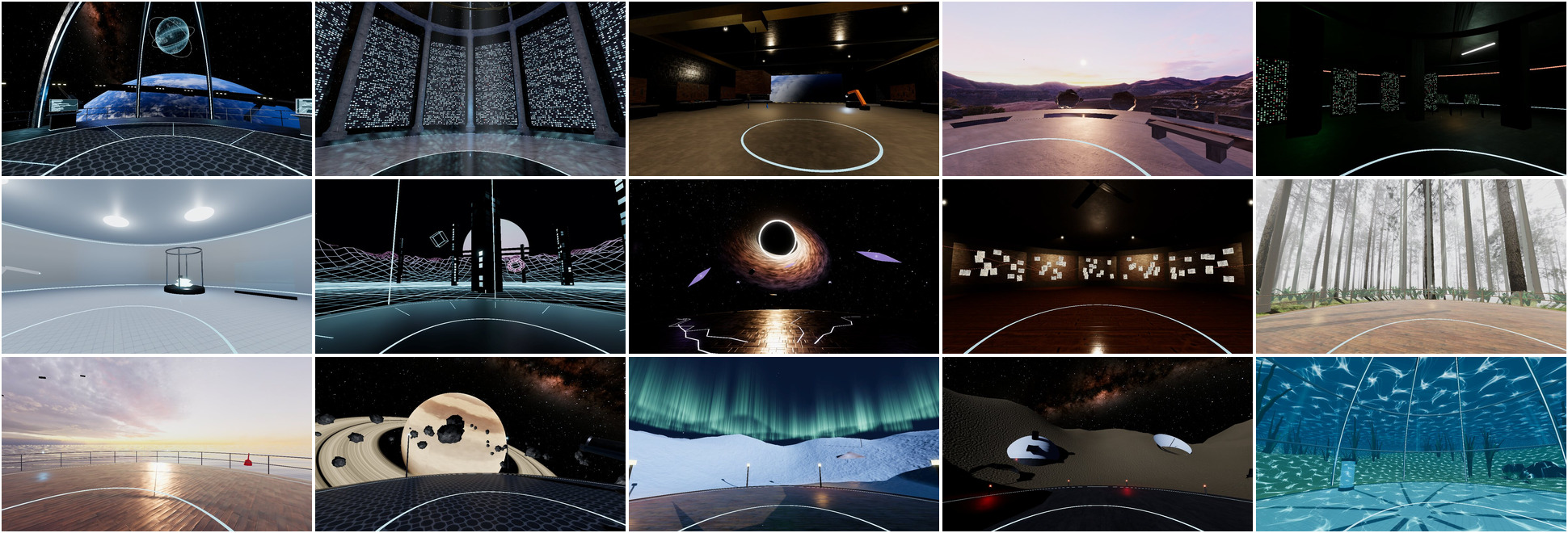
Tested on Linux with Monado and a Rift CV1: all fifteen rooms were run in the headset and hold its 90 frames a second at the ultra profile on a mid-range desktop GPU. How they look was judged from rendered pictures. The bundle link was tested with ELI v3's own launch code and a stand-in for the app. Windows and macOS builds come from CI and have not been run on real machines.
The rooms
All fifteen are new. None is a box with a sky any more, and none is still.
The nine ELI rooms:
- Core Room. An open deck on a station in orbit, Earth below, the real Milky Way overhead.
- Memory Archive. A marble hall open to the stars, walls shelved with small lights that each keep their own time.
- Workshop. A repair bay with its door open to space: a welding arm, a crane on its rails, Earth going by.
- Reflection Chamber. A stone terrace on a mountain plateau at dawn, ringed by still water.
- Debug Basement. A concrete bunker of racks, scrolling terminals and one strip light on its way out.
- Upgrade Bay. A white lab where a printer builds a part and an arm sorts crates off a belt.
- Simulation Lab. A world that is only being computed: grid, wire hills, towers of falling data.
- Anomaly Room. A cracked deck drifting towards a black hole.
- Evidence Wall. A dim studio with a long wall of pinned sheets strung with thread.
Six more workspaces: a pine forest in morning mist, a rig at sea at sunset, a glass dome on the seabed, a platform beside a ringed giant, a snowfield under the northern lights, dunes under the Milky Way.
The night sky is NASA's star map and the Earth is NASA's Blue Marble. The forest, the mountain and the sunset are photographs of real places. Stone, wood, metal, snow and sand are scanned materials. All of it is free to use and listed in assets/CREDITS.md. Themes colour the lights in every room.
Opened from ELI v3
ELI v3 lists the ELI applications installed beside it and opens them: at start-up, from its Bundles menu, or with eli --bundle vr. Tell it once where ELI VR is:
./ELI_VR-0.8.0-x86_64.AppImage --register-eli     # the AppImage
./launch/eli-vr.sh --register-eli                 # a Linux folder
python3 tools/register_eli_bundle.py              # any OS
Opened that way, ELI v3 has its local server answering first, tells ELI VR the port, and ELI VR starts with the link on. ELI v3 newer than 3.0.131 does that by itself; with 3.0.131, switch ELI's server on first. --unregister-eli takes it off the list. Everything stays on 127.0.0.1.
ELI VR names no model. Whichever one ELI v3 has loaded answers.
Also
- Quality is
autoout of the box and picks a profile from the machine; the four profiles are documented with what each one changes. --eli-shotsaves pictures of a room from a flat run, for looking at one without a headset.- The documents were brought up to date: architecture, settings (every default checked against the code), commands, platforms, roadmap.
- Every package carries the small Python side ELI v3 uses to find ELI VR.
Known gaps
- The indoor rooms are shapes built in code with scanned surfaces. They have no modelled props yet.
- The forest's near trees are bare trunks; the foliage is in the photograph behind them.
- The downloads are larger than 0.7.0: the art is real now.
- ELI's world objects arrive but are not drawn, ELI cannot build or change rooms, and his presence is a light, not a figure.
- Talking has not yet been tried with a real microphone in the headset.
- Clean shutdown of the VR runtime is Linux only.
- No native app for standalone headsets, no VR on macOS, builds are not code-signed.
- The code and textures of the old generated rooms are still in the tree, unused.
ELI VR 0.7.0
ELI VR 0.7.0 — ELI is in the rooms
ELI VR still runs on its own. With ELI v3 running beside it, ELI is now present and you can talk to him. Linux gets a one-file AppImage, and closing ELI VR now takes the VR runtime down with it.
Tested on Linux with Monado and a Rift CV1: the app, the new launcher and the clean shutdown were run in the headset. The link to ELI was tested against ELI v3's own routes without a headset, and talking has not yet been tried with a real microphone or ELI's real model. Windows and macOS builds come from CI and have not been run on real hardware.
With ELI v3
Off by default. Needs an ELI v3 that has the world feed.
- ELI's presence. A body of light in whichever room ELI's own world puts him in. The status line says where he is when it is not your room. Doubt warms the light, repair work reddens it.
- Talking. Hold A or X on a controller, or T on the keyboard, speak, let go. He answers in his own voice from where he stands. The microphone is only open while the button is held.
- He knows where you are. ELI VR tells ELI's world when a session starts and which room you enter. Nothing else.
- As a bundle.
python3 tools/register_eli_bundle.pyputs ELI VR on ELI v3's list of bundles, so ELI can start it.
Switch it on with --eli on the Linux launcher, -- --eli-link=on on a release build, or python3 tools/eli_vr.py eli on. Everything stays on 127.0.0.1. See docs/ELI_INTEGRATION.md.
Leaving cleanly
- An Exit button on the spatial console, the wrist menu and the settings dock. Press it twice: the first press arms it for four seconds, so a stray trigger pull cannot end the session.
- Nothing left holding the GPU. The Linux launcher (
launch/eli-vr.sh, and the AppImage) stops the desktop helper and every VR runtime process the session started when ELI VR closes, then says what is left and how much GPU memory is in use. A runtime that was already running before is left alone. On the reference machine, GPU memory went from about 1,500 MiB in the headset back to the desktop's own after exit, with no Monado process left.
One file on Linux
ELI_VR-0.7.0-x86_64.AppImage starts the desktop helper and the app, and cleans up on exit.
chmod +x ELI_VR-0.7.0-x86_64.AppImage
./ELI_VR-0.7.0-x86_64.AppImage                # system OpenXR runtime, flat if there is none
./ELI_VR-0.7.0-x86_64.AppImage --monado       # start native Monado first (Rift CV1 on Wayland)
./ELI_VR-0.7.0-x86_64.AppImage --eli          # with the link to ELI v3
Options you always want go on one line in ~/.config/eli-vr/launch.conf, which is how a double-click is told what to start. Monado itself and the Wayland capture pieces are not inside the AppImage; they come from your system.
Fixes
- The settings CLI was overruled by settings the app had already saved, so
theme,roomand the rest did nothing once you had changed anything in the app. Each command now applies to both. - The loopback check judged an address by how it began, so
127.0.0.1.example.comwould have passed. It now checks the host itself. - Every launcher passes extra options through to the app.
Known gaps
- ELI's world objects arrive but are not drawn, and ELI cannot build or change rooms yet.
- The presence is a light, not a figure.
- The rooms themselves are unchanged from 0.6.3.
- Clean shutdown of the runtime is Linux only. On Windows and macOS the Exit button closes ELI VR and leaves SteamVR or the vendor runtime to you.
- No native app for standalone headsets, no VR on macOS, builds are not code-signed.
ELI VR 0.6.3
ELI VR 0.6.3 — first public build
The first release with downloadable builds for Linux, Windows and macOS.
Tested on Linux with Monado and a Rift CV1. The Windows and macOS builds come from CI and have not been run on real hardware yet, and only Oculus Touch controllers have been tried in the headset. See the status table in the README.
The desktop screen works
It could not show a frame before. Three separate faults:
- the app never polled its capture socket, so it stayed on "connecting";
- it waited for a whole frame to sit in the socket buffer, which a frame is far too big to do;
- on current GStreamer the Wayland helper crashed on its first frame, and it scaled the width only, so a 4K monitor came through as a stretched 1280x2160 picture.
All three are fixed. On the reference machine the Wayland helper now delivers 1280x720 at 18 frames a second into the app's own receiver. launch/start-desktop-bridge-linux.sh starts the right helper for Wayland or X11.
Runs on more machines
- Removed a stray
\from the first line of 19 shipped files. It hid the Linux export preset from Godot and left three launchers and two tools without a valid first line. - Controller bindings for Valve Index, HTC Vive, Windows Mixed Reality and the OpenXR generic controller, next to Oculus Touch.
- No error box at start when there is no headset; it goes straight to the flat window.
- Launchers take the same
auto,xr,flatandcompatmodes on all three systems, and all honourGODOT_BIN. - A desktop helper launcher for macOS.
rooms,environmentsandthemesin the CLI list everything instead of the first entry.
Nothing personal ships
- Machine-specific paths are gone from the launchers and docs.
tools/make_release.pybuilds the source package and refuses if it finds a home folder path, a user or host name, an e-mail address, a Steam ID, a device serial or a compiled binary.tools/doctor.pyleaves the home folder name out of its report.
Install and release
- docs/INSTALL.md: full guides for Linux, Windows and macOS.
requirements.txt,requirements-linux-capture.txtandpyproject.tomlfor the Python helper tools.- A release workflow that builds all three systems from a tag. See RELEASE.md.
Known gaps
- No native app for Quest, Pico or other standalone headsets. Use a PC link.
- No VR on macOS.
- The desktop screen is view-only.
- Builds are not code-signed.