1. About
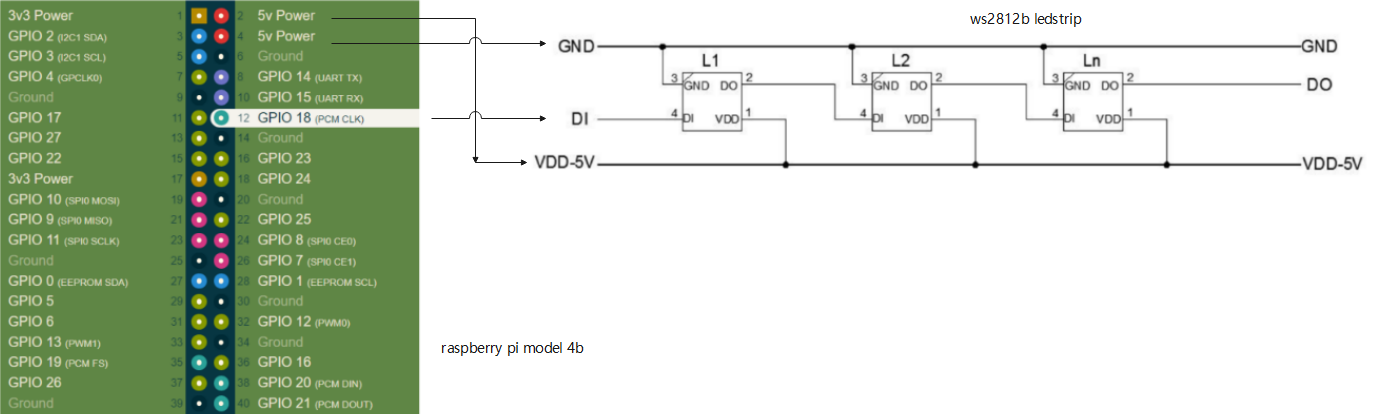
https://pinout.xyz/pinout/pin12_gpio18
- Introduction to Raspberry Pi
Raspberry Pi is a series of single-board computers (SBCs) designed and developed by the Raspberry Pi Foundation, a UK-based charity organization. The goal of the foundation is to promote the teaching of basic computer science skills in schools and developing countries.
Raspberry Pi boards are low-cost and credit card-sized computers that offer a wide range of features and capabilities. The first Raspberry Pi was launched in 2012, and since then, the foundation has released several models with different specifications and performance levels.
- Technical Specifications
The latest Raspberry Pi model, the Raspberry Pi 4, offers the following technical specifications:
Processor: Broadcom BCM2711, quad-core Cortex-A72 (ARM v8) 64-bit SoC @ 1.5GHz Memory: 2GB, 4GB, or 8GB LPDDR4-3200 SDRAM (depending on model) Connectivity: Gigabit Ethernet, 2.4 GHz and 5.0 GHz IEEE 802.11ac wireless, Bluetooth 5.0, BLE Video: 2 × micro-HDMI ports (up to 4Kp60 supported) Multimedia: H.265 (4Kp60 decode); H.264 (1080p60 decode, 1080p30 encode); OpenGL ES, 3.0 graphics Ports: 2 × USB 3.0 ports, 2 × USB 2.0 ports GPIO: Standard 40-pin GPIO header (fully backward-compatible with previous boards) Storage: MicroSD card slot for loading operating system and data storage Operating system: Boots from MicroSD card, with support for several Linux distributions, including Raspbian, Ubuntu, and others.
- Applications
Raspberry Pi boards can be used for a variety of applications, such as:
Desktop computer: Raspberry Pi boards can be used as desktop computers for basic tasks such as web browsing, word processing, and video playback. Media center: Raspberry Pi can be used as a media center for streaming videos, music, and photos to a TV. Home automation: Raspberry Pi boards can be used for home automation tasks such as controlling lights, thermostats, and security systems. Education: Raspberry Pi boards can be used for teaching programming, electronics, and robotics in schools and universities. Industrial automation: Raspberry Pi boards can be used for industrial automation tasks such as monitoring sensors and controlling equipment.
- Conclusion
Raspberry Pi boards offer a low-cost, versatile, and powerful computing platform for a wide range of applications. With the support of a large community of developers and enthusiasts, Raspberry Pi is constantly evolving, and new models and features are being added to meet the needs of different users.
Guide for WS2812B Addressable RGB LED Strip
#Qt Install
sudo apt upgrade
sudo apt update
sudo apt-get install qt5-default
sudo apt-get install qtcreator
sudo apt-get install qtdeclarative5-dev
sudo apt install qml-module-qtquick-controls2

sudo apt-get install qtmultimedia5-dev
sudo apt-get install libqt5multimedia5-plugins
sudo apt-get install libqt5charts5-dev
sudo apt-get install qml-module-qtquick2 qtdeclarative5-dev

sudo apt install lib*
sudo apt install qml*
Qt is a cross-platform application development framework that provides a set of tools and libraries for building graphical user interfaces (GUIs) and other applications. Some of the Qt related components include:
-
Qt Widgets: A set of pre-built UI elements, such as buttons, sliders, and text boxes, that can be easily integrated into an application.
-
Qt Quick: A declarative language that allows for the creation of high-performance, dynamic user interfaces.
-
Qt Core: A set of essential classes and functions for creating and managing data structures, managing events, and controlling application flow.
-
Qt Multimedia: A set of classes and functions for handling multimedia, including video and audio playback, recording, and streaming.
-
Qt Charts: A module that provides a set of easy-to-use chart components for Qt applications. It offers a variety of chart types, including line charts, bar charts, pie charts, and scatter charts
#install gtest
git clone https://github.com/google/googletest
cd googletest
mkdir build
cd build
cmake ..
make
sudo make install
Raspberry Pi PWM library for WS281X LEDs
git clone https://github.com/jgarff/rpi_ws281x.git
cd rpi_ws281x
mkdir build
cd build
cmake -D BUILD_SHARED=OFF ..
sudo make install
#install doxygen
sudo apt-get install doxygen
sudo apt-get install graphviz
#Generate configuration template files using Doxygen commands
doxygen -g Doxyfile
#After modifying the Doxygen configuration file, use the command to generate the html document:
doxygen Doxyfile
Git is a free and open source distributed version control system designed to handle everything from small to very large projects with speed and efficiency.
#install git
sudo apt-get update
sudo apt-get install git
git --version
#install cmake
sudo apt update
sudo apt install -y cmake
cmake --version
#Install the C++ compilation environment
sudo apt install build-essential