Repository navigation
Releases: ShinySoftware/ShinyNotch
Release list
Shiny Notch 0.5.0-beta

Contributors

Assets 3
Shiny Notch 0.4.0-beta
Shiny Notch 0.3.0-beta
Shiny Notch 0.2.0-beta
Shiny Notch 0.1.0-beta
The first beta of Shiny Notch: the MacBook camera notch as a live panel. Hover the notch to open it; move away and it folds back into the camera.
Install
- Download ShinyNotch-0.1.0-beta.zip below and unzip it.
- Move ShinyNotch.app to
/Applications, then open it. It's signed and notarized, so it opens without warnings. - Hover the notch. There's no Dock or menu-bar icon; open the app again from Finder or Spotlight to get to Settings.
Requires macOS 14 or later on Apple silicon.
What's in it
While it's closed, a wing either side of the camera shows what's playing, and a running timer, a meeting in the next 15 minutes or the weather.
Open, it has a tab for:
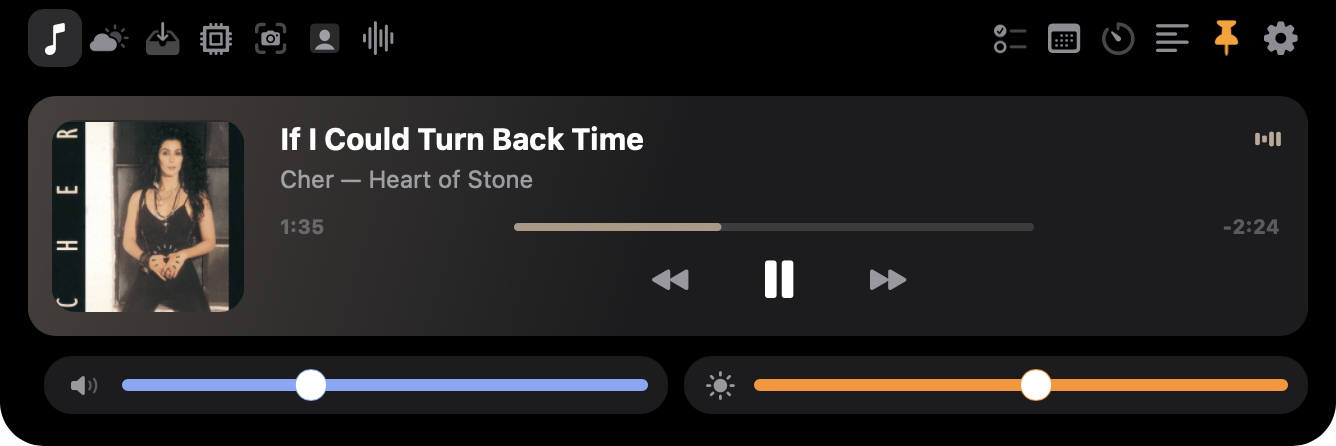
- Now Playing: artwork, scrubber and controls for Apple Music and Spotify.
- Weather: now, the next twelve hours and the week, where you are or for cities you add.
- File Tray: drop files on the notch to keep them handy; copy, AirDrop, reveal or open them later.
- System: CPU, GPU and memory, plus network and disk rates.
- Capture: one-click shortcuts into macshot, when it's installed.
- Mirror: your camera as a mirror, with looks (Mono, Noir, Sepia and more), a camera picker, brightness, and photos saved to
Pictures/Shiny Notch. Hold up a QR code with a web link and it offers to open it. - Voice Notes: record from the microphone you choose, then play, keep or delete.
- Tasks: a to-do list. Checked-off tasks are struck through and cleared away after a day.
- Calendar: the rest of today and tomorrow.
- Timer: a countdown that shows in the notch and chimes when it's done.
- Teleprompter: your script scrolls right under the camera, so you read while looking at the lens.
Under every tab: play/pause, volume and display brightness. Volume and brightness changes from the keys also flash in the notch.
In Settings: the notch's size, which tabs show, weather places and units, the teleprompter script, permissions and open at login.
Permissions
macOS asks the first time you use the feature that needs it: Automation for Music and Spotify, Location for local weather, Calendars, Camera for the Mirror, and Microphone for Voice Notes. Everything else needs nothing.
Known limits
This is a beta, so expect rough edges.
- Now Playing only sees Apple Music and Spotify.
- Brightness in the Mirror changes the camera itself only for USB webcams. On the MacBook's built-in camera it brightens the mirror alone.
- Display brightness is the built-in screen only.
- Files can't be dragged out of the tray yet; use Copy, then paste in Finder.
- Clicking a slider's track doesn't jump to that spot; drag the thumb instead. The first drag right after switching to the notch can be ignored.
- Windows and Linux versions build from the same code but aren't part of this release.
Problems and ideas are welcome in Issues.
Contributors
- Add a macshot tab, and hover/click feedback on notch buttons by @Redth in #1
- Add notch size settings by @Redth in #2
Thanks to @Redth for the first contributions.
Full Changelog: https://github.com/ShinySoftware/ShinyNotch/commits/v0.1.0-beta