I have looked at most of #215 #214 #194 #171 #162 and #216
Here is what I want to do:
In a template file I have this:
<html lang="en-US">
    <head>
        {% include head.html %}
    </head>
</html>
I like this format of indentation and I want the contents of head.html to be similarly indented so the rendered HTML looks like:
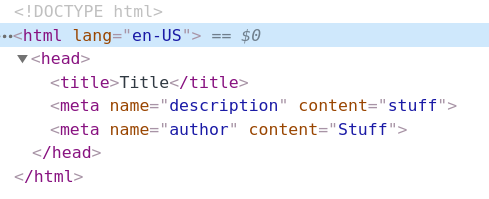
In order to achieve this my head.html has to look like:
<title>{{ site.title }}</title>
        <meta name="description" content="{{ site.description }}">
        <meta name="keywords" content="{{ site.keywords }}">
        <meta name="author" content="{{ site.author }}">
Presumably with more and more indentation for every line after the first line as the the placement of {% include head.html %} gets indented more and more.
I have tried using {%- and read this
Is there an easy way to accomplish what I want? I sort of follow why the first line in head.html has to be indented differently but this has created a pretty complicated process to get the final HTML rendered as I want.

I have looked at most of #215 #214 #194 #171 #162 and #216
Here is what I want to do:
In a template file I have this:
I like this format of indentation and I want the contents of

head.htmlto be similarly indented so the rendered HTML looks like:In order to achieve this my
head.htmlhas to look like:Presumably with more and more indentation for every line after the first line as the the placement of
{% include head.html %}gets indented more and more.I have tried using
{%-and read thisIs there an easy way to accomplish what I want? I sort of follow why the first line in
head.htmlhas to be indented differently but this has created a pretty complicated process to get the final HTML rendered as I want.