This repository implements graph neural networks (GNNs) to predict retention times of small molecules from their molecular structures. The best-performing model (AttentiveFP) achieves accurate predictions that can enhance confidence in peak annotations for untargeted metabolomics LC-MS/MS analysis. The solution includes training pipelines, model deployment via Docker, and a REST API for real-time predictions.
Key Results:
- Trained on ~5,000 molecules with 10-minute C18 HPLC retention times
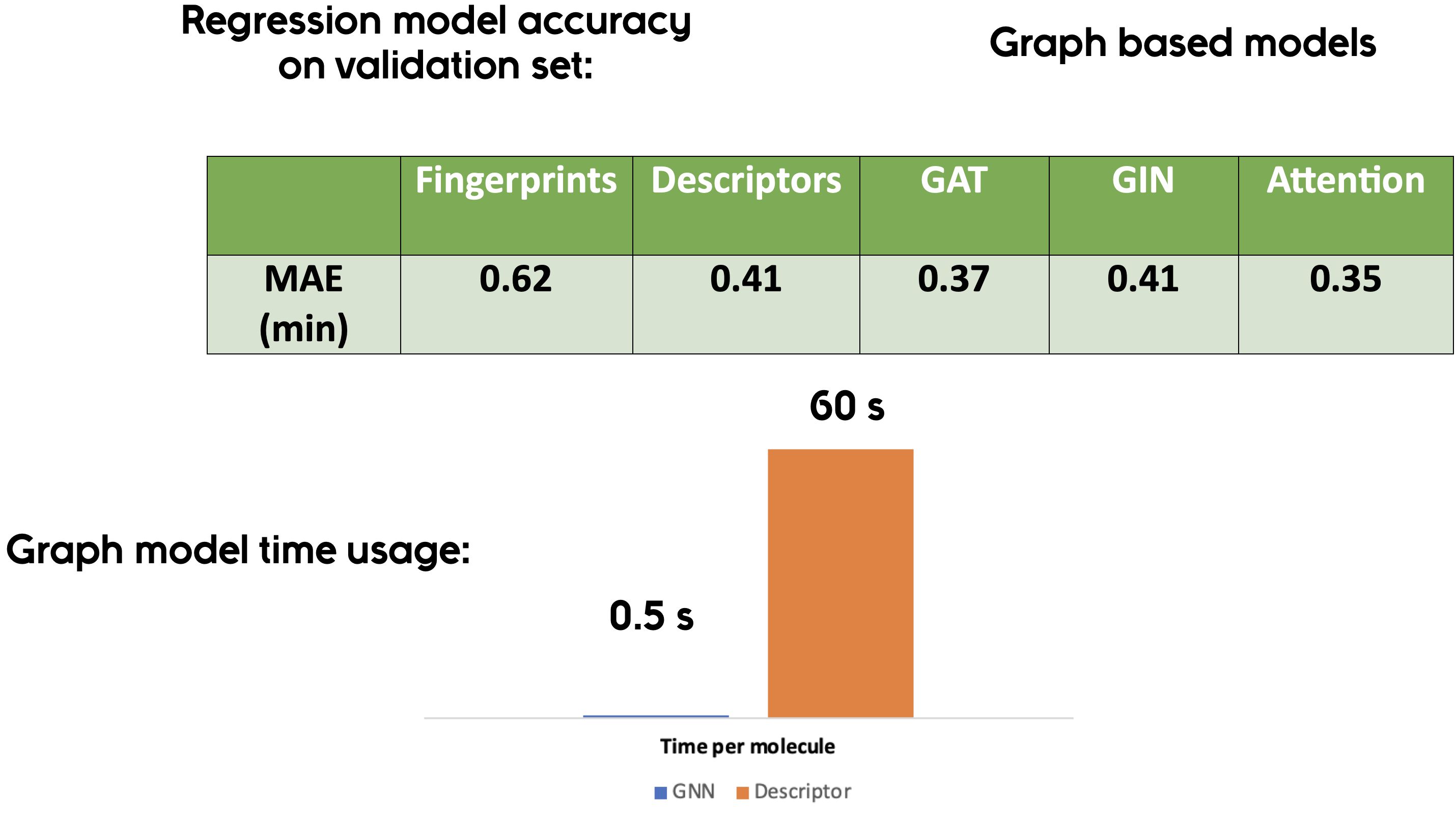
- AttentiveFP GNN model outperformed fingerprint and descriptor-based approaches
- Mean Absolute Error (MAE) used as the loss function
- Deployed as both batch processing tool and REST API
Unidentified peaks remain a significant challenge in untargeted metabolomics using LC-MS/MS. Combining MS/MS matching with retention time significantly enhances confidence in peak annotations. This project demonstrates how retention times can be accurately predicted from molecular structures using graph neural networks.
Dataset: Approximately 5,000 molecules with retention times collected using a 10-minute C18 HPLC method, split into training/validation/testing sets (8:1:1 ratio).
Approach: Three molecular embedding approaches were evaluated:
- Fingerprint-based methods
- Molecular descriptor-based methods
- Graph-based methods (GNNs)
Best Model: AttentiveFP (graph-based with attention mechanism) demonstrated superior performance. Bayesian optimization was used for hyperparameter fine-tuning.
uv is an extremely fast Python package installer written in Rust.
# Install uv if you haven't already
curl -LsSf https://astral.sh/uv/install.sh | sh

# Create a virtual environment
uv venv

# Activate the virtual environment
source .venv/bin/activate  # On macOS/Linux
# .venv\Scripts\activate   # On Windows

# Install the package and dependencies from pyproject.toml
uv pip install -e .

# Install dgl-lifesci separately (not available on PyPI)
# Option A: Using conda (recommended)
conda install -c conda-forge dgl-lifesci

# Option B: Try pip (may work depending on your system)
pip install dgl-lifesci

# Install with development dependencies
uv pip install -e ".[dev]"

# Generate/update lock file (optional, for reproducible installs)
uv lock
uv sync
Note: Some packages like dgl-lifesci are not available on PyPI and must be installed separately via conda. The uv installation will handle all PyPI packages, then you can add the conda-only packages.
# Install from requirements
pip install -r requirements.txt

# Or use pip-tools for locked dependencies
pip install pip-tools
pip-compile requirements.in  # Generates requirements.txt with pinned versions
pip install -r requirements.txt# For training pipeline
conda env create -f model_training_pipeline/environment.yml
conda activate autogluon
# For API deployment
conda env create -f GNN_api/environment.yml
conda activate autogluoncd GNN_docker
docker build -t rt-prediction-batch -f Dockerfile .
docker run -v $(pwd)/data:/data rt-prediction-batch -f /data/input.csv -sc SMILEScd GNN_api
docker build -t rt-prediction-api -f Dockerfile .
docker run -p 9002:9002 rt-prediction-apiNote: The Dockerfiles use conda environments. For production, consider optimizing the Dockerfile to reduce image size and improve build times.
# Using uv (recommended)
uv pip install -e ".[dev]"
uv sync  # Syncs dependencies from uv.lock

# Or using pip
pip install -e ".[dev]"

# Install pre-commit hooks (optional)
pre-commit installThe workflow consists of several sequential steps, each implemented as a Jupyter notebook:
- Data Cleaning & Quality Control → 2. Feature Engineering → 3. Model Training → 4. Hyperparameter Tuning → 5. Deployment
-
Step 1: Data Cleaning and Quality Control
- Import and clean raw training data
- SMILES standardization and duplicate removal
- Quality control analysis (mean difference: 0.196 min for duplicates)
-
Step 2: Baseline Model and Feature Engineering
- Build baseline regression model using molecular descriptors, fingerprints, and XGBoost
- Perform PCA for feature dimensionality reduction and visualization
- Uses Mean Absolute Error (MAE) as loss function (robust to large deviations)
-
Step 3: GNN Architecture Evaluation
- Evaluate various GNN models: GCN, GAT, MPNN, and AttentiveFP
- Uses early stopping, dropout, and best parameters from publications as defaults
-
Step 4: Hyperparameter Fine-Tuning
- Grid search hyperparameter tuning on AttentiveFP (best-performing model)
- Optimizes: layers, time steps, graph feature size, dropout
-
Deployment Options:
- Batch Processing: Command-line tool for batch predictions
- REST API: Web service for single-molecule predictions
GNN_code/
├── src/
│   └── rt_prediction/          # Main package
│       ├── gnn/                # GNN utilities (model loading, featurization)
│       ├── data/               # Data processing (standardization, QC)
│       ├── models/             # Model configurations and hyperparameters
│       └── utils/              # General utilities
├── notebooks/                  # Jupyter notebooks for workflow steps
├── scripts/                    # Executable scripts (training, prediction, API)
├── configs/                    # Model configuration files
├── output/                     # Training outputs and results (gitignored)
├── GNN_docker/                 # Docker setup for batch prediction
├── GNN_api/                    # Docker setup for API server
├── tests/                      # Unit tests
├── pyproject.toml              # Modern Python package configuration
├── requirements.in             # Dependency specifications (for pip-tools)
├── uv.lock                     # Lock file for uv (reproducible installs)
└── README.md                   # This file
python scripts/predict_batch.py \
    -f data/input.csv \
    -sc SMILES \
    -tp c18 \
-ip results/# Start server
python scripts/api_server.py
# Query API
curl "http://localhost:9002/gnn?smiles=CC(=O)OC1=CC=CC=C1C(=O)O&column=C18"This codebase includes modifications of code from Amazon's DGL-LifeSci project, adapted for retention time prediction tasks.
Original Code:
- Copyright Amazon.com, Inc. or its affiliates. All Rights Reserved.
- SPDX-License-Identifier: Apache-2.0
Modifications:
- Adapted GNN model loading and prediction utilities for retention time regression
- Added SMILES standardization and quality control pipelines
- Implemented batch processing and API deployment interfaces
- Extended hyperparameter search spaces for retention time prediction
# Run all tests
pytest tests/

# Run with coverage
pytest --cov=src/rt_prediction tests/Contributions are welcome! Please ensure:
- Code follows PEP 8 style guidelines
- Type annotations are included for new functions
- Tests are added for new functionality
- Documentation is updated
Apache-2.0 (see LICENSE file for details)
If you use this code in your research, please cite:
@software{rt_prediction_gnn,
  title = {Retention Time Prediction for Small Molecules using Graph Neural Networks},
  author = {Your Name},
  year = {2024},
  url = {https://github.com/yourusername/GNN_code}
}