A powerful SillyTavern extension for discovering, organizing, and managing your character library with a modern glassmorphic interface.
Note: This is a hobby project but things mostly work. Expect bugs, use at your own risk.
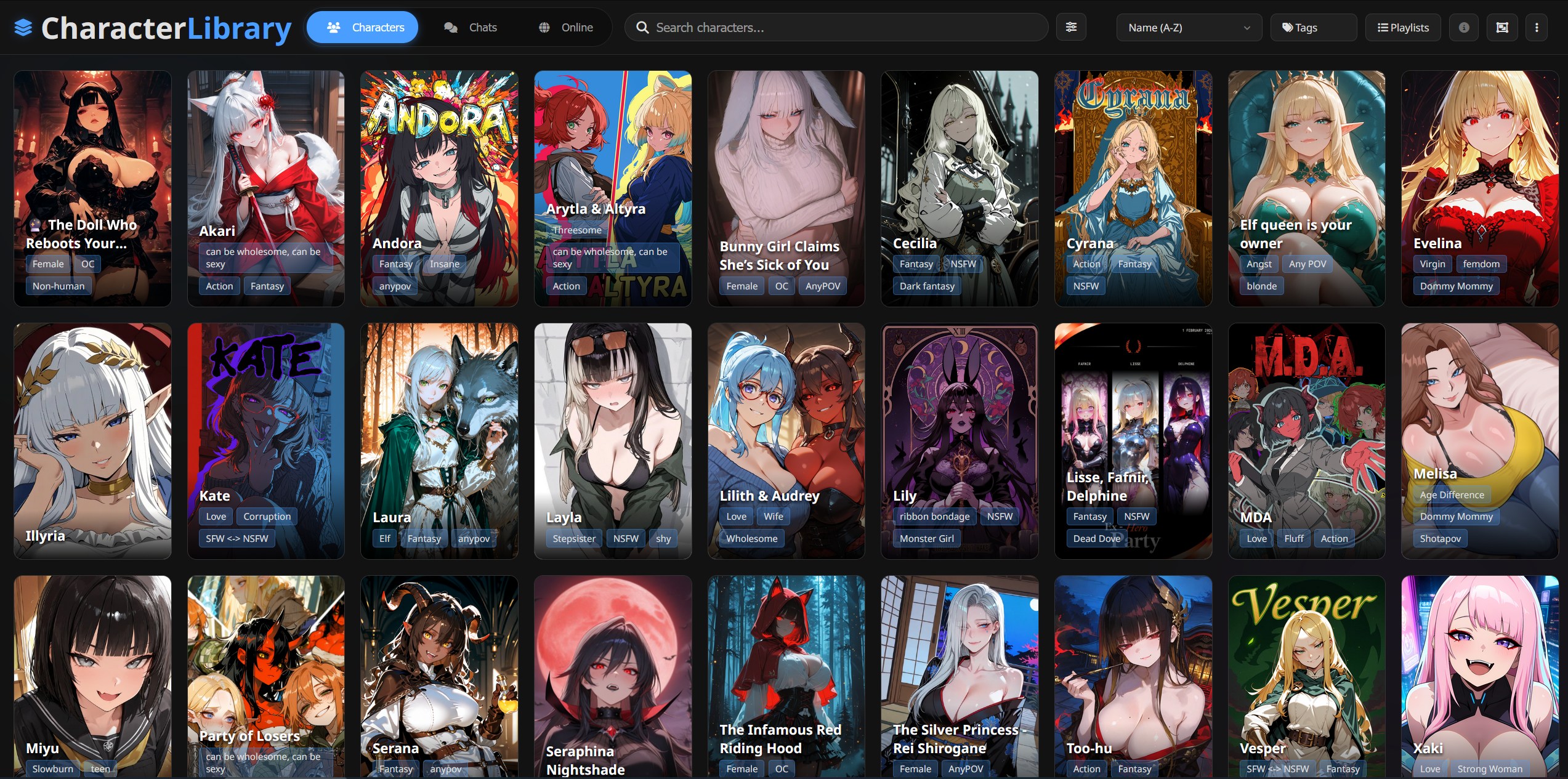 Browse your character library with search, filtering, and sorting
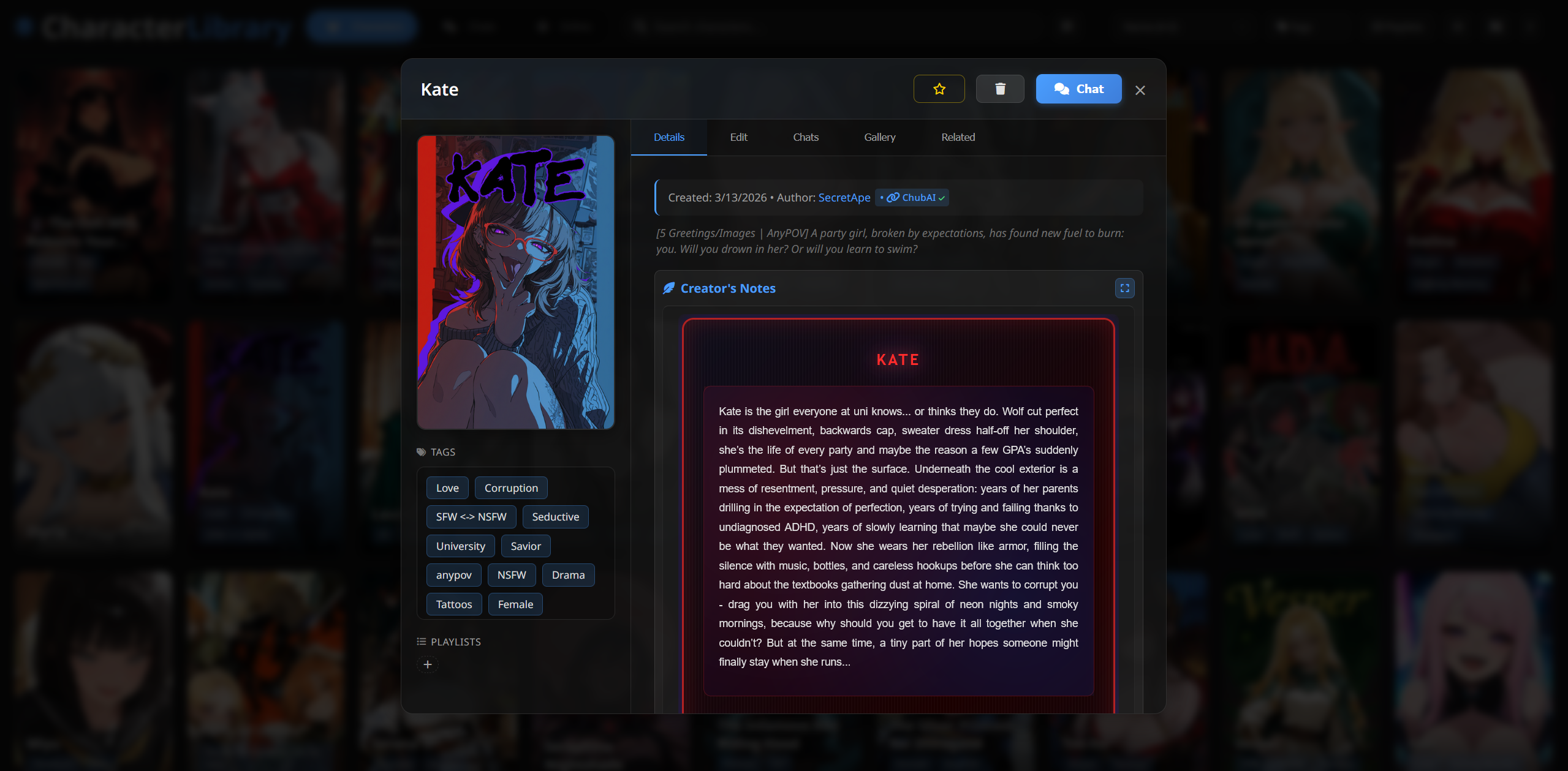 View and edit character details, chats, media, and related characters
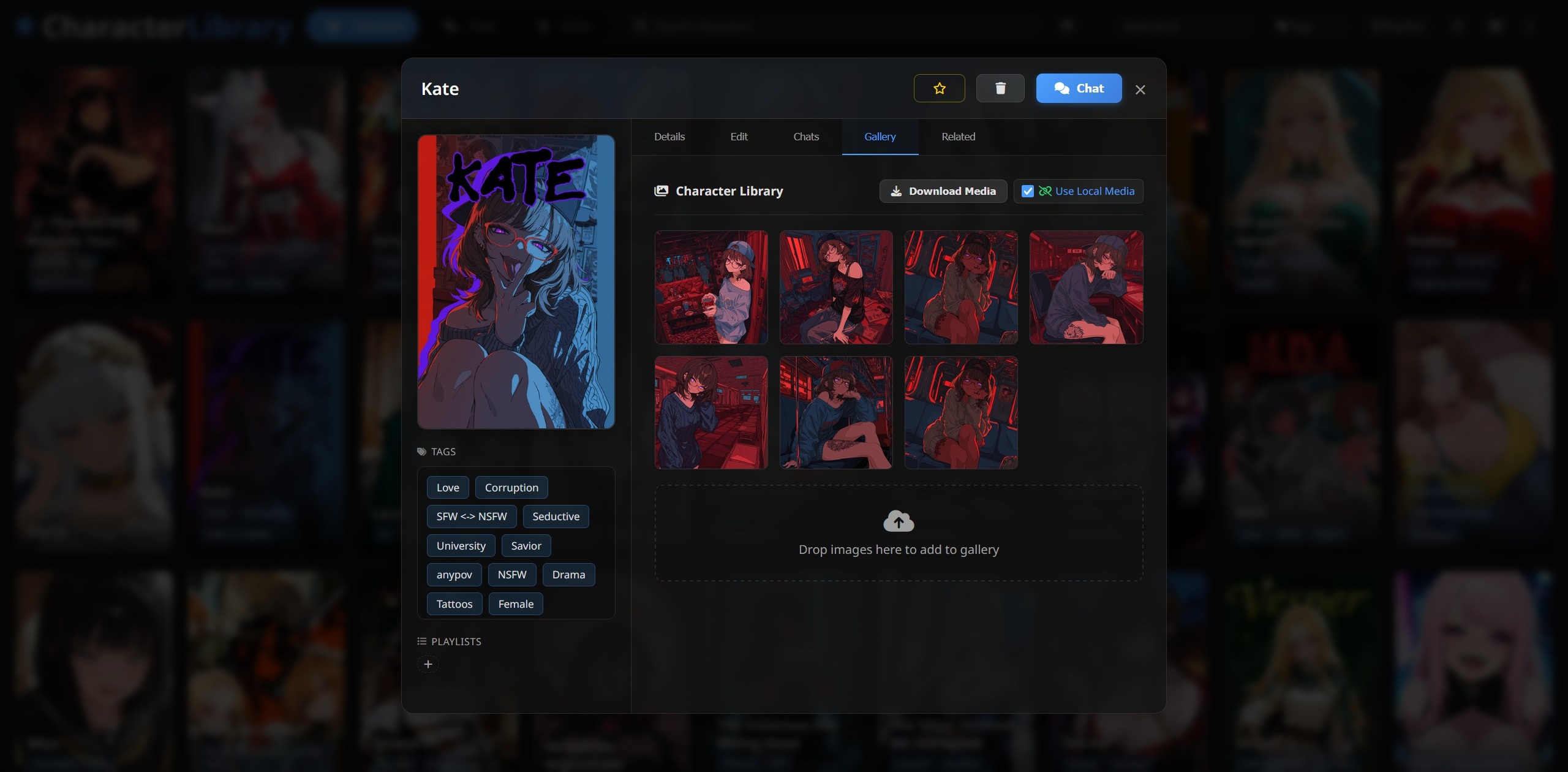 Download embedded character media
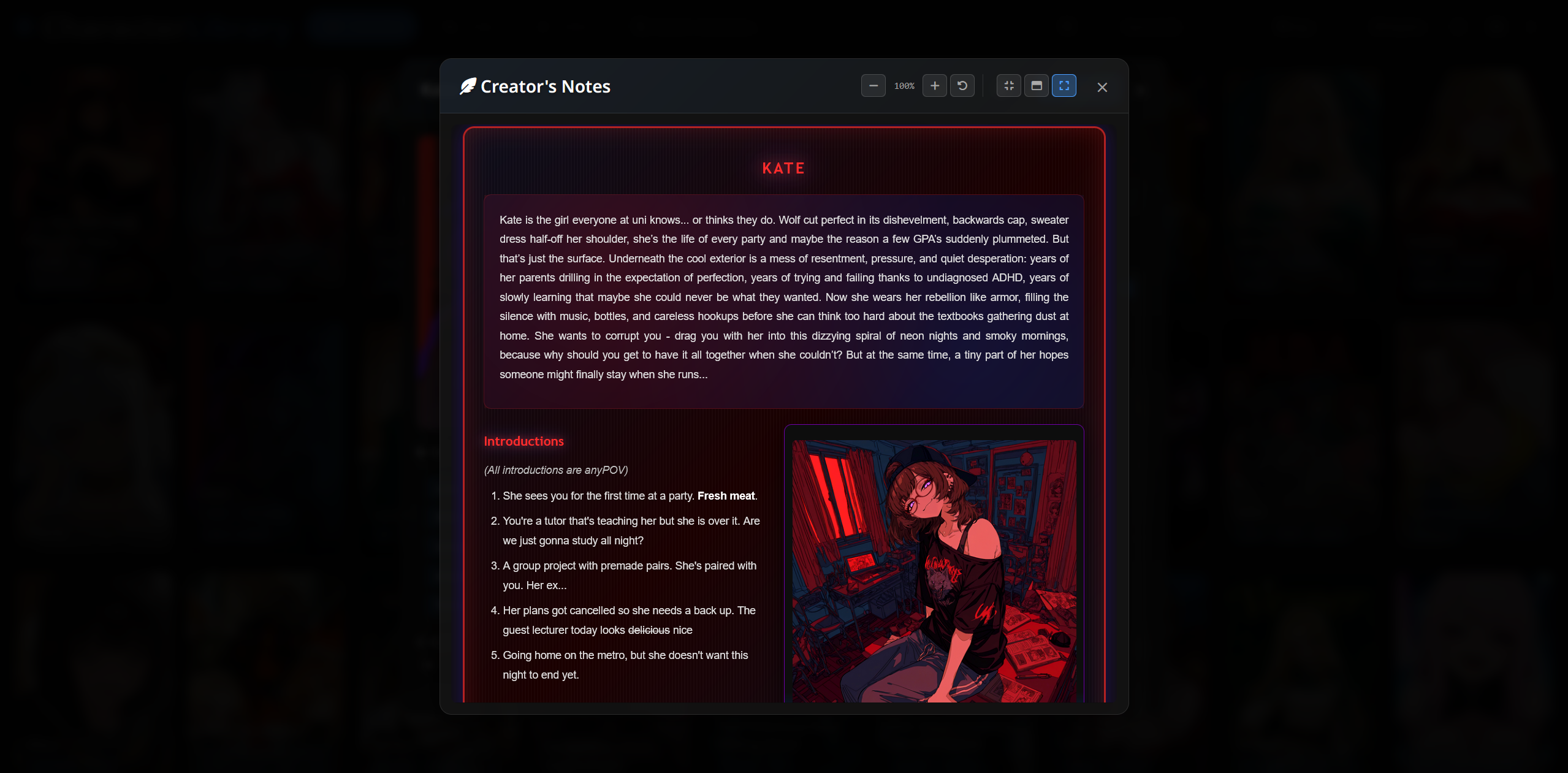 Expand separate views such as Creator's notes
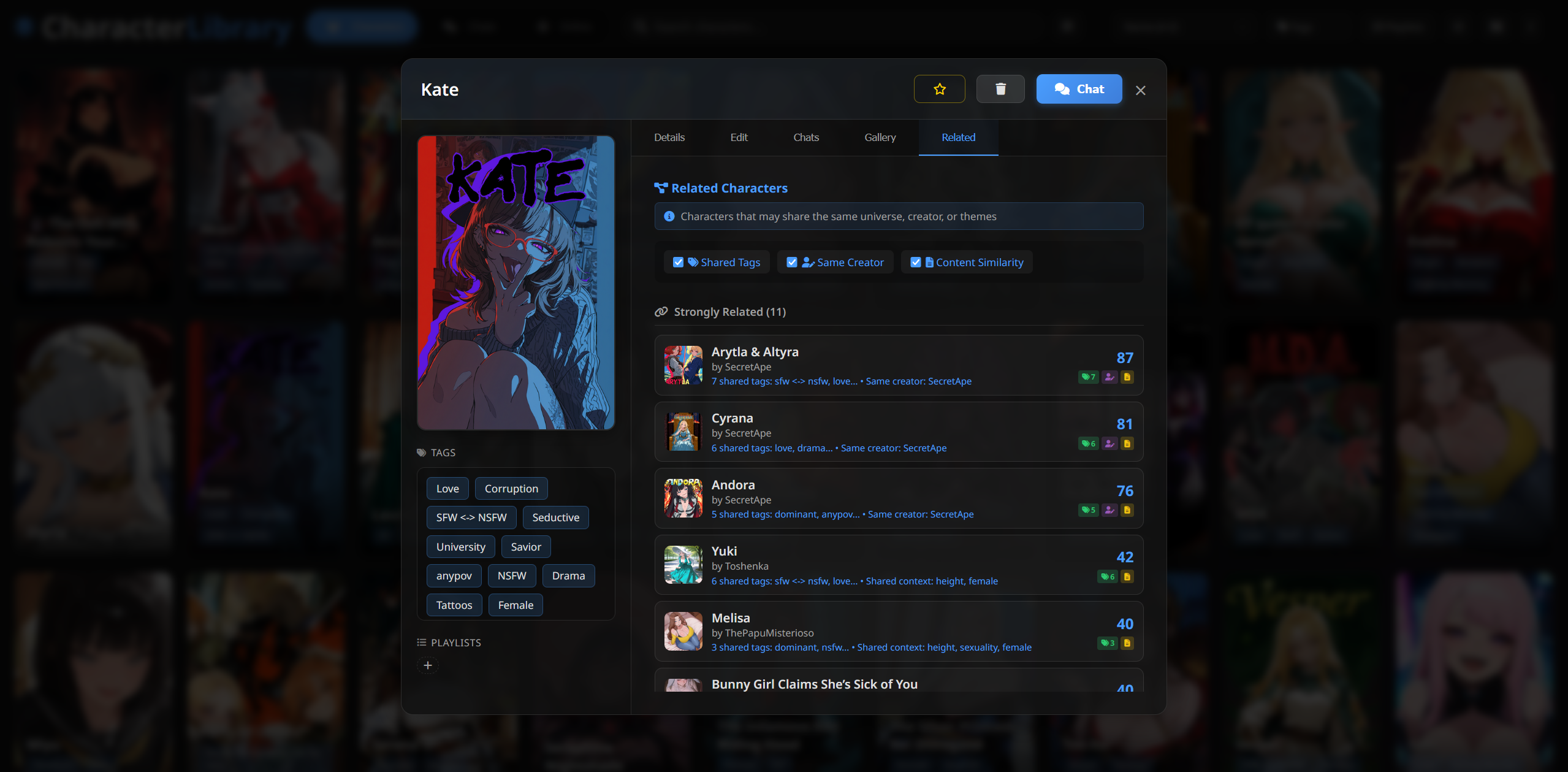 Find potentially related characters
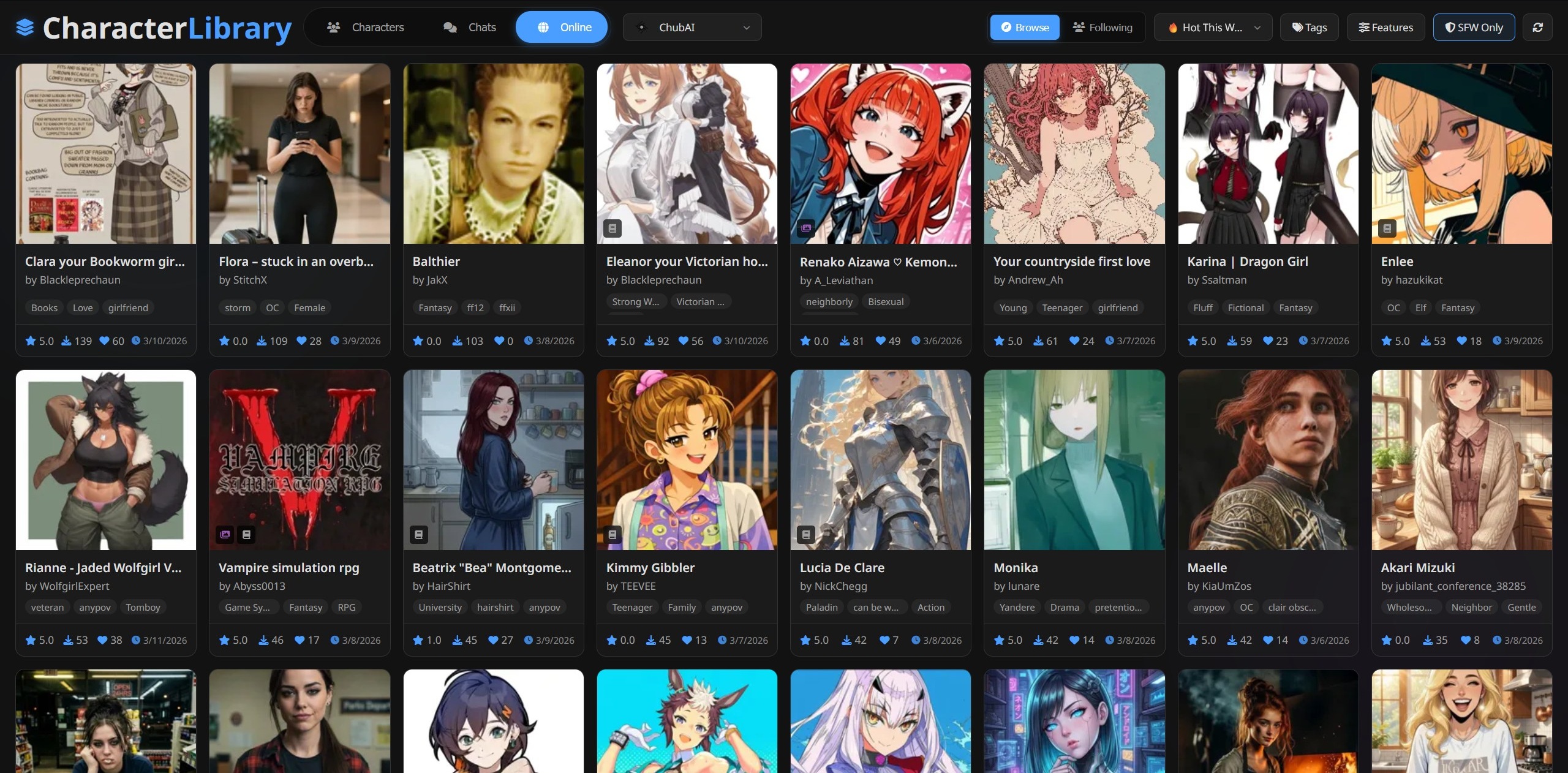 Browse and download characters from online providers
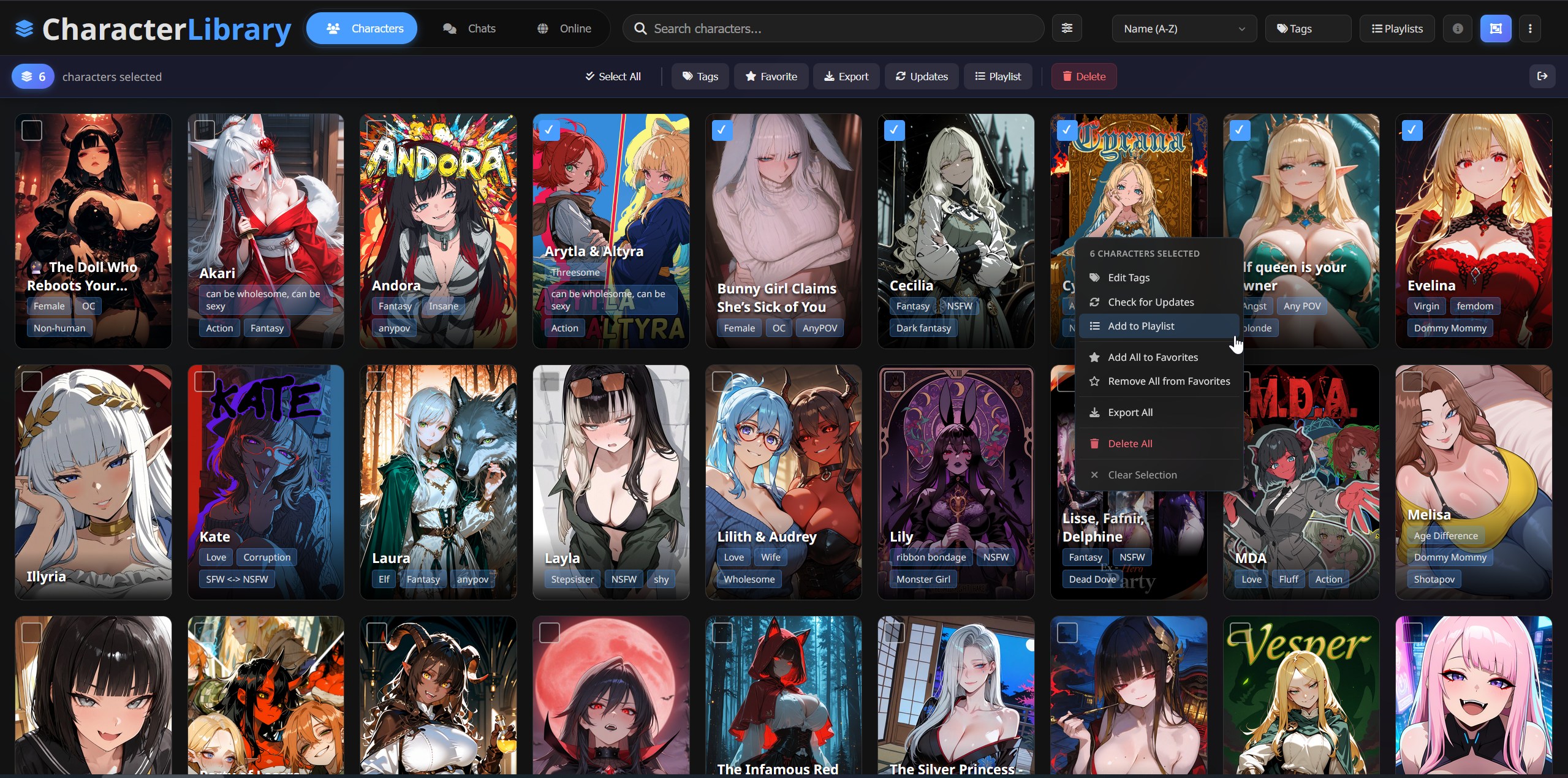 Apply changes to any number of selected characters
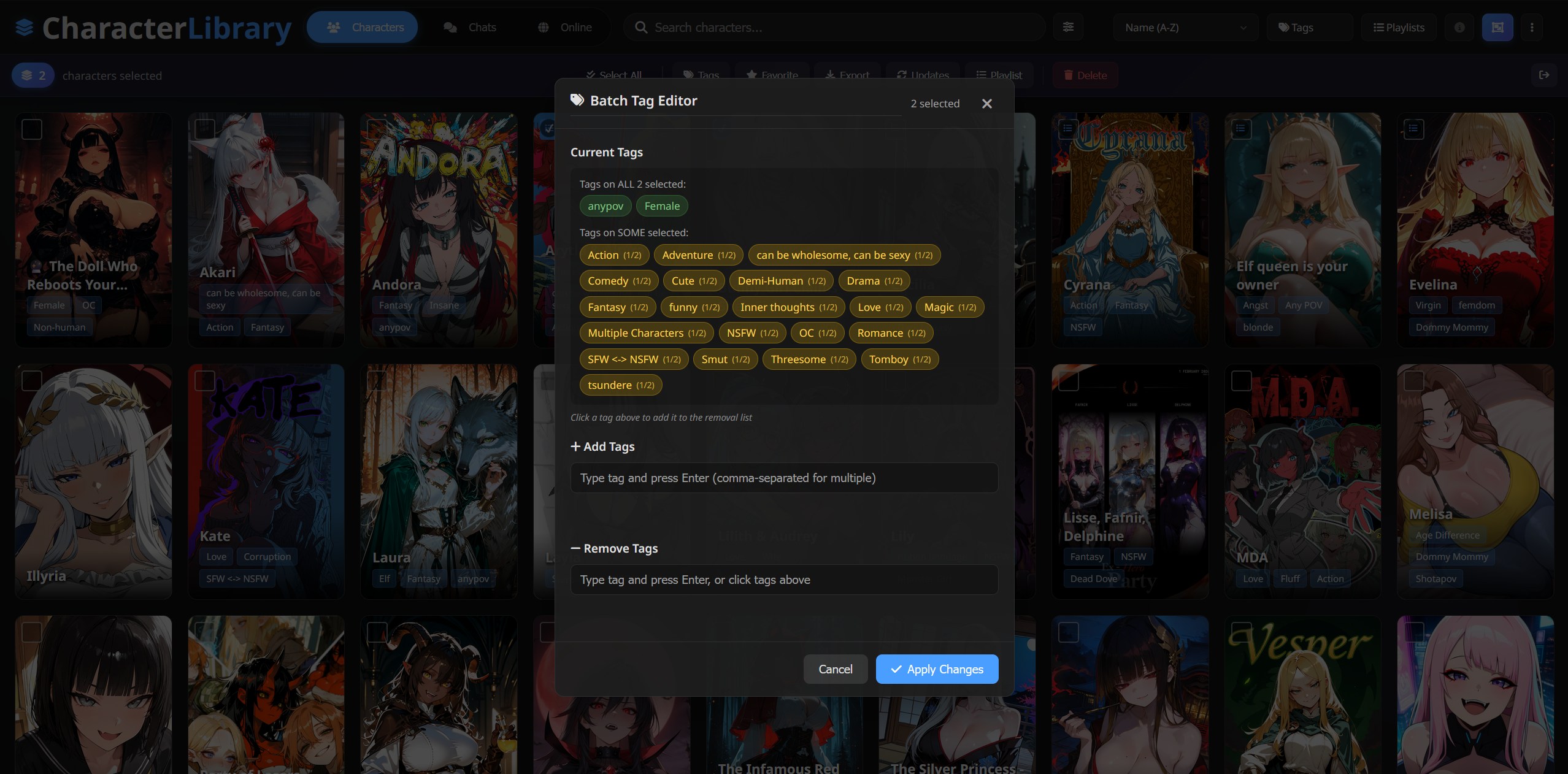 ...Such as Batch tagging
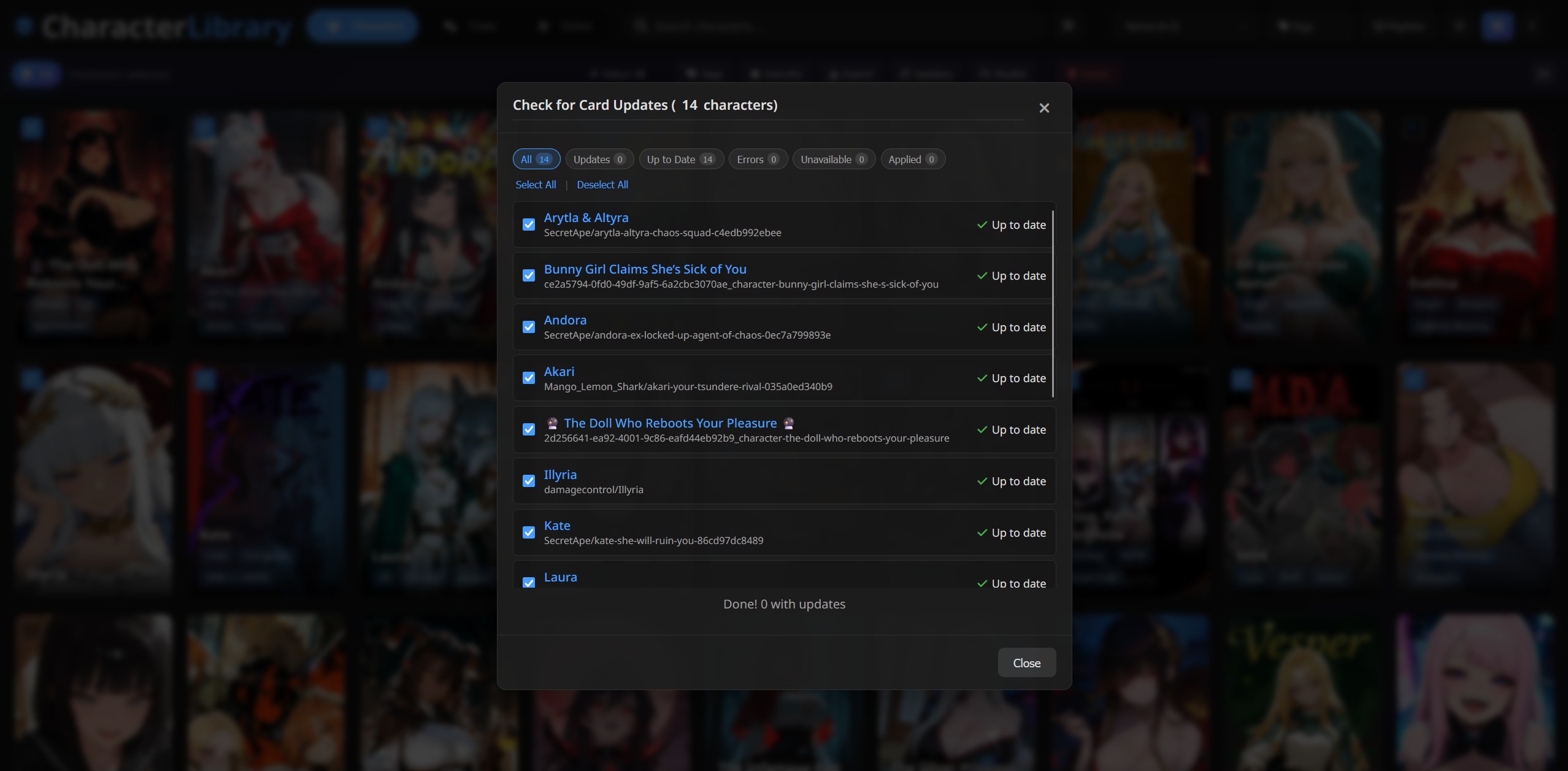 ...Batch updates
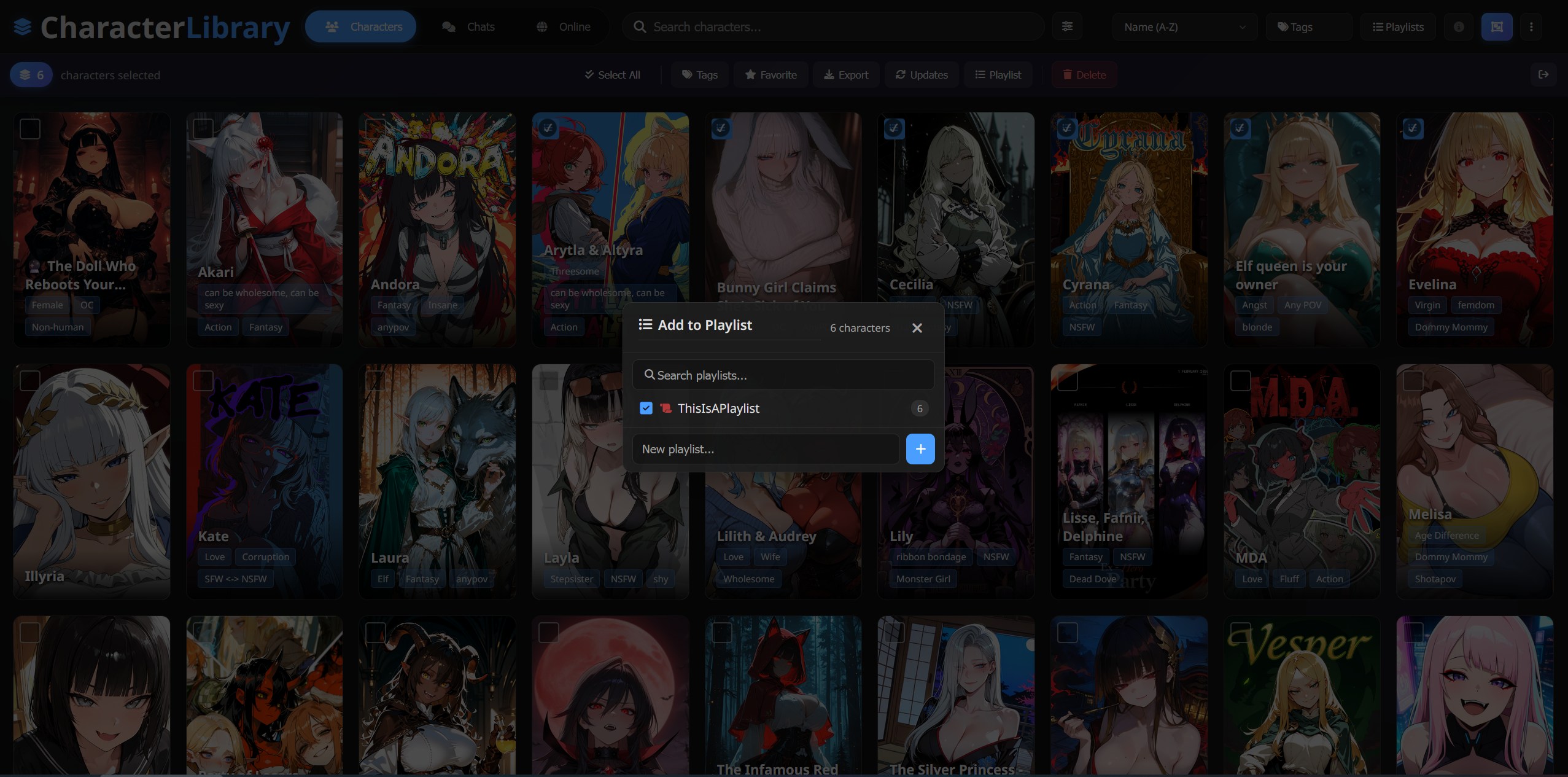 ...and much more
- Clone to your SillyTavern extensions folder:
SillyTavern/data/default-user/extensions/SillyTavern-CharacterLibrary - Refresh SillyTavern's page
- Click the new Character Library icon in SillyTavern's top bar (to the right of Character Management)
- (Optional) Switch to Embedded Panel mode in the extension settings for an integrated experience (see Display Modes)
- (Optional) For Pygmalion login, CharacterTavern NSFW access, and DataCat browsing, install the cl-helper plugin
- Grid view with virtual-scroll and progressive lazy-loading
- Search across name, tags, author, and creator's notes, plus special search filters
- Tag filtering with include/exclude/neutral tri-state logic
- Sort by name, last modified, date created, token count, or random
- Favorites filter, with SillyTavern native favorites sync
- Card updates from any linked provider with field-level diffs (single or batch)
- Batch tagging to add or remove tags across multiple characters at once
- Multi-select for batch tagging, favorites, update checks, export, or deletion
- Bundle export/import to move characters between SillyTavern instances in one .zip: cards, chats, gallery folders, and linked lorebooks. Export via multi-select; import by drag & drop into the import dialog
- Right-click context menu on any character card for quick actions
- Version history & snapshots with save/restore, remote version browsing, and full diff preview
- Playlists for organizing characters into named, ordered virtual folders with icons and colors
- Filter presets to save and restore your current filter configuration (tags, sort, search, advanced filters). Open the Presets dropdown in the Advanced Filters panel to load, save, rename, or delete presets. Type a name in the input to save the current filter state; click an existing preset to load it. Presets are also available in the Chats tab for filtering chat history.
- Default Filter Preset in Settings to auto-apply one preset every time the library opens, so you land in your most-used view without re-applying filters.
- Character Creator with built-in AI Studio for assisted card authoring, brainstorming, and iterative refinement
- Lorebook Manager for browsing, editing, creating, importing, and exporting world files, with AI-assisted entry generation
- Custom CSS theming with snippet management and an AI CSS Assistant that writes and iterates on styling for you
- Animated card info on hover with configurable visibility options
Click any character for a rich tabbed interface:
| Tab | Description |
|---|---|
| Details | Rich markdown/HTML/CSS rendering in a secure sandboxed iframe, embedded images, creator notes, alternate greetings, embedded lorebooks |
| Edit | Full character card editor with change tracking and visual diff preview |
| Chats | All conversations with message counts; resume any chat directly |
| Gallery | Images (PNG/JPG/WebP/GIF), video, and audio (MP3/WAV/OGG/M4A) with built-in players. Download embedded media and provider galleries |
| Related | Smart recommendations based on shared tags, creator, and content keywords |
| Versions | Local snapshots and remote version history with diff preview (shown when history exists) |
| Info | Debug/metadata panel for power users (enable in Settings) |
Detail modal UX:
- Edit Lock prevents accidental changes. The Edit tab opens locked; click Unlock Editing to enable field changes
- Prev/Next navigation lets you cycle through the current sort + filter view without returning to the grid. Desktop shows chevron buttons on the sides of the modal; mobile swipes left/right on the modal header. Toggle via Settings, Card Grid & Browse → Prev/Next navigation in character details (on by default)
- Unsaved-edits confirmation when you close the modal or navigate to another character with pending edits in the Edit tab. Save success and programmatic closes (e.g. after delete) skip the prompt
- Tap-to-scroll on long titles (mobile): tap a long character name in the modal header or chat preview title to scroll through the full text
Character Library can run in two modes, configurable in SillyTavern's Extensions panel under Character Library:
| Mode | Description |
|---|---|
| New Tab (default) | Opens in a separate browser tab. |
| Embedded Panel | Runs inside SillyTavern as an overlay panel. |
| Setting | Default | Description |
|---|---|---|
| Show launcher dropdown on Characters button | Off | When off, a separate Character Library icon is added to SillyTavern's top bar and the Characters button behaves normally. When on, the Characters button is hijacked: clicking it opens a small dropdown to choose between SillyTavern's native character manager and Character Library. |
These options apply when Embedded Panel mode is selected:
| Setting | Default | Description |
|---|---|---|
| Launch on startup | Off | Automatically open the embedded panel when SillyTavern loads. |
| Show SillyTavern top bar | On | Keep SillyTavern's top navigation bar visible above the panel. When off, the panel takes the full viewport height. A "Back" button inside the panel returns you to your chat. |
| Exclusive panels | On | When enabled, opening the embedded panel closes any open SillyTavern drawers, and opening an ST drawer closes the panel. Prevents panels from overlapping. |
- Gallery tab for all character images, video, and audio in one place
- Embedded media downloads for images linked in creator notes, descriptions, and greetings
- External image-host extractors for content embedded as gallery/album links (not direct image URLs). Supports Civitai, Imgchest, Mega, Pixiv, PostImg, Imgbox, ImgBB, Catbox, Dropbox, and Google Drive. The library walks each link, resolves the actual image URLs, and downloads them into the gallery folder. Pixiv and Dropbox require the cl-helper plugin; the rest work without it
- Provider gallery downloads from linked characters on ChubAI, Wyvern, or Pygmalion
- Audio & video support including MP3, WAV, OGG, M4A with built-in player; video thumbnails with inline playback
- Full-screen viewer with keyboard navigation (← → 0 Esc) and scroll-wheel zoom up to 5× with drag-to-pan
- Bulk localization across your whole library from Settings, with progress tracking, abort, and history
- Optional provider gallery inclusion in bulk localization
- Background media downloads (opt-in): set When an import has extra media to Download in the background (Settings → Media → Options) and imports finish immediately while embedded media and gallery downloads run quietly, one character at a time, in a background queue. Track progress in the notifications bell in the topbar (⋮ menu → Notifications on mobile): live per-character progress, cancel, retry for failed jobs, and a clear-finished button. The queue survives page reloads and resumes automatically
- Grid card thumbnails (opt-in) to cut decode cost and bandwidth on the characters grid. Enable in Settings → Character Library → Grid Card Thumbnails. By default thumbnails are served in the mobile layout only; toggle "Also use on desktop" to extend coverage. With the cl-helper plugin installed, cl-helper resizes via jimp and caches each thumbnail on disk at a configurable size (384 / 512 / 640 / 768px wide). Without cl-helper, ST's built-in
/thumbnailendpoint is used (fixed 96x144, can look blurry on high-DPR screens). Two cache management buttons: Populate at current size pre-generates a thumbnail for every character (skipping already-cached) and Purge cache deletes every cached thumbnail. The detail modal and gallery always use the full-resolution image
Civitai API key (optional): Required only for private or hidden Civitai posts. Public content extracts without a key. Configure in Settings → Online → Civitai API Key. Generate one at civitai.com/user/account. Using a key requires the cl-helper plugin (it attaches the key server-side); keyless public extraction works without it.
Imgchest password-protected posts: Card creators usually paste the password somewhere in the card text (creator's notes). The extractor scans these with a regex (matching common patterns like
password: ...,pw=...,pass is ...) and submits it automatically. Authentication runs through the cl-helper plugin; without cl-helper, only public posts are extractable.
Create new characters from scratch or edit existing ones with an AI-powered assistant built into the library.
Each card field (description, personality, scenario, first message, etc.) has a wand icon button that opens the AI Studio panel. Inside:
- Multi-turn conversation: Chat with the LLM to iteratively refine the field. Ask for rewrites, adjustments, or entirely new content before applying
- Suggestion chips: Quick-start prompts that appear per field (e.g. "Write a mysterious backstory", "Make them sarcastic and witty"). Click one to generate immediately
- Word target: Set a target word count for generations using the number input. The LLM will aim to match it
- Undo / Redo: History stack for the current studio session. Use the toolbar buttons or
Ctrl+Z/Ctrl+Y. Opening a different field starts a fresh history - Brainstorm mode: Generate description text from scratch using only the character's existing metadata as context
- Apply to card: When satisfied, click Apply to Card to write the generated text into the card field
Select (highlight) any portion of text in the AI Studio content area. The studio locks the selection, highlights it visually, and switches to revision mode: your next prompt targets only the highlighted section. The LLM rewrites just that segment and splices it back into the surrounding text automatically. Clear the selection to return to full-field mode.
Each field has a Settings panel (gear icon) where you can:
- Override the system prompt: Replace the built-in instruction for that field with your own
- Toggle context inclusion: Choose which other card fields are sent as context when generating (e.g. exclude personality when generating a description)
- Save presets: Save your custom prompt as a named preset, load it later, or delete it. Presets are saved per-field and persist across sessions
A dot indicator appears on the gear icon when a field has active overrides.
If you have multiple Chat Completion sources configured in SillyTavern, a Connection Profile dropdown appears in the sidebar under AI Assist. This lets you use a different model for character creation than your chat model.
Click Import from Library to load an existing character's data into the creator form. This fully hydrates the character (fetching all card fields) and populates every form field including tags, avatar, alternate greetings, and lorebook. You can then modify and save as a new character or overwrite the original.
- Create Character: Saves as a brand-new character in your library
- Save as Existing: When you imported from library, this option appears. Opens a stacked diff review (old on top, new below) showing exactly what changed before overwriting the original card. An automatic snapshot is saved before the overwrite so you can always undo
- Creator's Notes: Live preview with zoom and resize controls, supporting rich HTML/CSS content
- Avatar: Upload from file, or import from the library character's existing avatar
- Field expand/collapse: Toggle all text fields between compact and expanded view
- AI tag suggestions: Generate relevant tags from the character's existing card fields
Access via the ⋮ menu → Create a Character.
Many character cards embed images from external hosts (Imgur, Catbox, etc.) which can be slow, unreliable, or go offline. Media Localization downloads these images locally and swaps the URLs at display time only. Your original character cards are never modified.
- Download embedded media via the Gallery tab → "Download Embedded Media"
- Enable "Media Localization" in Settings (globally or per-character)
- Remote URLs are transparently replaced with local copies in:
- Character Library detail views (creator notes, greetings, descriptions)
- SillyTavern chat messages and Creator's Notes, live in your conversations
Note: Some image hosts block direct downloads due to CORS restrictions. SillyTavern's built-in CORS proxy handles this automatically, but it must be enabled. See Troubleshooting if downloads fail.
Keep provider-linked characters in sync with their online source:
- Run Check for Updates (single character or batch)
- Review side-by-side diffs for each field
- Apply selected fields or apply all in batch
Updates are fetched from the provider's API and only change the fields you choose. Works with all linked providers.
Review fields carefully before applying. If you manually tag your characters, skip the tags field during sync.
Track changes and restore previous versions of your character cards.
- View the full published version history from ChubAI's Git API
- Field-by-field diff preview comparing any version to your local card
- Restore any remote version with one click
- Save snapshots of any character's current state at any time
- Restore, rename, or delete individual snapshots
- Auto-backup before every restore, edit, or card update, with one-click undo
- Auto-backups are deduped and capped at a configurable max (default 10) per character
- Side-by-side comparison for every card field
- Tags shown as pill badges with added/removed/kept highlighting
- Alternate greetings displayed as numbered expandable blocks with change badges
- Long text fields use LCS-based line diff with added/removed highlighting
- Small diffs (≤8 lines) auto-expand for quick review
- Avatar thumbnail with apply button to update the character's image
Snapshots are stored as JSON files via SillyTavern's Files API (user/files/), using a per-character file with a master index for fast lookups. Each character gets a stable version_uid that travels with the card PNG, so snapshots survive renames and reimports.
- Name similarity and creator matching with fuzzy scoring
- Creator notes comparison alongside name, creator, and content fields
- Jaccard similarity for content comparison
- Content divergence penalty to reduce false positives when name/creator match but card content clearly differs (e.g. male/female character variants)
- Duplicate media detection via file hashing
- Match confidence & reasoning for each result
- Exact mode: Slide the sensitivity to maximum for strict duplicate detection, showing only pairs with identical content across all card fields
- Playlist integration: In Exact mode, collect the newest or oldest card from each duplicate group into a playlist for batch cleanup
- Delete duplicates directly from the interface with gallery transfer options
- Pre-import warnings when downloading potential duplicates
Set a per-character display name that overrides the card's original name in the library grid and detail modal. The original name is always preserved in the card data.
- Per-character override: Click the name type toggle in the character details header to switch between the card name and your custom display name
- SillyTavern integration: Optionally push the display name into SillyTavern's chat and character panel (toggleable in Settings)
- Search and filter: Find characters with overrides using the Advanced Filters panel
- Useful for: Listing names from providers, translations, personal nicknames, or any scenario where you want a different display name without modifying the card
Automatically finds similar characters via:
- Shared tags with rarity weighting (rare tags = stronger signal)
- Same creator
- Content keywords (shared universes, franchises, themes)
Shows relationship strength and reasoning for each suggestion.
An AI-powered recommendation engine that uses your connected LLM to discover characters from your library based on natural-language prompts.
- Describe what you want. "Cozy fantasy girls," "dark horror villains," "sci-fi androids with deep lore," etc.
- Characters are sampled from your library and their metadata (name, tags, creator, creator notes, tagline) is sent to your LLM.
- The model evaluates each character against your prompt and returns a ranked list with reasons.
- Results appear as clickable cards with expandable reasoning.
- Use Add all to playlist to save the entire result set to a playlist in one click.
- Reroll to re-run the same prompt with the same settings. Previously picked characters are excluded so each reroll surfaces fresh suggestions from the remaining pool.
For larger libraries, Batch Mode splits your sample pool across multiple parallel batches:
- Map phase. The pool is divided into N batches (configurable, 3-7) and all batches are evaluated simultaneously via parallel API calls.
- Reduce phase. All picks from every batch are collected, deduplicated, and sent to a final ranking pass that selects the best overall matches.
- Wall-clock time stays roughly the same as a single call thanks to parallelism, but library coverage scales with the batch count (e.g. 5 batches = 5x more characters evaluated).
The Sample Pool controls which characters are eligible for recommendation. Apply pre-sampling filters to narrow the pool, and the "characters in pool" count updates in real time as you adjust them:
- Has Chats / Favorite tri-state filters (Yes / Any / No)
- Date Created range
- Include / Exclude tags with autocomplete
If the pool is larger than your configured Sample Size, characters are randomly selected from the filtered pool to fit. For example, with 2,000 characters matching your filters and a sample size of 600, a random subset of 600 is drawn each time you generate.
Controls which card metadata fields are included when sending characters to the LLM. Toggle any combination of: tags, creator notes, tagline, creator name, source provider, and description (opt-in, off by default). A live token estimate updates as you change these, helping you stay within model context limits.
- SillyTavern mode uses your active Chat Completion connection (OpenAI, Claude, OpenRouter, etc.). If you have Connection Profiles configured, a dropdown lets you pick which profile to use. Large, RP heavy presets not recommended.
- Custom API mode lets you point to any OpenAI-compatible endpoint with optional API key and model.
| Setting | Description |
|---|---|
| Sample Size | Characters per batch (10-500) |
| Batches | Parallel batch count in Batch Mode (3-7) |
| Temperature | LLM sampling temperature (Custom API only, ST mode uses your preset) |
| Max Results | Maximum recommendations to return |
| LLM Context | Toggle which metadata fields to include (tags, creator notes, tagline, creator, source, opt-in description) with live token estimate |
Access via the ⋮ menu → Card Recommender.
Requirements: Chat Completion APIs only (not Text Completion). The model must be capable of returning structured JSON, so budget/nano models may produce unparseable results. Models like GPT-4o-mini, Claude Haiku, Gemini Flash, or equivalent work well.
Non-deterministic. LLMs are inherently probabilistic, so running the same prompt twice may yield different recommendations.
Token usage. Each generation sends your sample pool's metadata to the model. The live token estimate in Settings helps you gauge cost before generating, but it is a rough approximation based on loose averages, not an actual token count. Enabling more context fields (creator notes, tagline) increases token usage per character. In Batch Mode, tokens scale linearly with the batch count, plus a smaller reduce pass.
- Browse all conversations across all characters
- Sort by date, character name, message count, chat length, or most active character
- Group by character or view flat list
- Card density presets (Spacious / Comfortable / Compact / Minimal) to control how much detail each chat card shows
- AI model badges showing which model was used for each conversation
- Message previews before opening
- Jump into any chat without returning to SillyTavern
Move characters between SillyTavern instances with everything attached, not just the card PNG.
- Export via multi-select: pick characters, hit Export, and choose between three modes: a full bundle (.zip with cards, all chats, and gallery folders), character cards (each card as a separate PNG), or provider links (copy the source URLs of linked characters to the clipboard)
- Include linked lorebooks toggle adds each character's linked world files to the full bundle
- Import by dragging the bundle .zip into the import dialog on the target instance. Cards, chats, gallery folders, and lorebooks are restored, along with metadata that a plain PNG import loses (favorite status, creation date, active chat)
- A progress log reports exactly what was exported or restored, with per-item warnings on failures
A full manager for SillyTavern world files, opened from More Options (⋮) → Lorebooks.
- Browse all lorebooks with entry counts and a "used by" view showing which characters link each file (primary links) and which chats have it chat-bound
- Create, import (.json), duplicate, export, and delete world files
- Edit entries inline: keywords, content, insertion settings, per-entry enable/disable
- AI entry generation: describe what you want and let the LLM draft lorebook entries
- Link lorebooks to characters from the manager or from the character detail modal's Linked Lorebook box, with a playlist filter for bulk linking. This covers the character's primary lorebook; additional lorebooks (ST's charLore) are not manageable from here, as they live in SillyTavern's settings with no clean external access
- Bind lorebooks to chats (chat lore) from the manager or directly from a chat card in the Chats view; group chats are read-only
Theme or tweak the UI with your own CSS, managed as snippets. Open from Settings → Theme & Layout → Open Custom CSS Editor.
- Snippets can be individually enabled, disabled, renamed, reordered, and deleted; styles persist across reloads
- AI CSS Assistant: every snippet row has a wand button that opens a chat-style assistant. Describe the look you want ("dim the card grid", "make the accent purple") and it writes the CSS; iterate with follow-ups and save the result as a new snippet or update the one you started from
- The assistant knows the app's component classes and theme tokens, so its snippets target the real UI instead of guessing selectors
- Class names may change between versions, so treat custom CSS as power-user territory
⚠️ Experimental Feature. Enable in Settings, Gallery Folders.
SillyTavern stores gallery images in folders named after the character (e.g., /user/images/Nami/). Multiple characters with the same name share the same folder, mixing all their images together.
Each character gets a unique gallery folder using a 12-character ID:
/user/images/Nami_aB3xY9kLmN2p/
/user/images/Nami_7Fk2mPqR4sXw/
A gallery_id is stored in the character's data.extensions and SillyTavern's gallery extension is configured to use the unique folder.
- Assign Gallery IDs to characters that don't have one
- Migrate All Images from old folders to new unique folders (uses content hashing for shared-name disambiguation)
- Browse Orphaned Folders to find and redistribute images from legacy folders
When disabled, you can choose to move images back to default folders, keep them in place, or cancel.
Gallery IDs in character data are preserved when disabled, so re-enabling uses the same IDs.
⚠️ Why Experimental?
- Changes ST's default behavior by overriding how SillyTavern resolves gallery folders
- Modifies character data by adding
gallery_idto character extensions - Migration complexity for large libraries with many same-name characters
- The character card ecosystem has barely enforced standards, so media URLs, CDN behaviors, and creator practices vary wildly
Back up your ST user folder before enabling this feature.
When Unique Gallery Folders is enabled, each character's gallery depends on a gallery_id stored in the card and a matching folder override registered with SillyTavern. If either gets out of sync (e.g., importing a card directly through SillyTavern, or after a backup restore), images can end up in the wrong folder or become invisible.
- Status indicator in the topbar notifications bell (shared with background media downloads): the bell switches to a warning icon with a count when characters are missing a
gallery_id - Integrity checks for missing
gallery_ids, orphaned mappings, and unregistered overrides - Cleanup tools to assign or remove orphaned mappings safely
- ST import warning + 1-click fix when a card is added directly in SillyTavern
The Online tab lets you browse, search, and import characters from multiple online sources. Switch between providers using the provider selector dropdown.
All providers share a common set of capabilities:
- Browse & search with filtering and sorting
- Infinite scroll with automatic page loading as you scroll (toggleable per provider)
- In-app character preview with full card details, gallery images, and stats
- One-click import to your local library
- "In Library" badges on characters you already own
- "Hide Owned" filter to only show characters not in your library
- NSFW toggle to show or hide NSFW content
- Character linking to link local characters to their online source for updates
- Bulk link scanner to automatically scan your library and match unlinked characters
- Auto-link on import for characters imported from any provider
- Per-provider browse defaults in Settings → Online: pick the default view mode, sort order, and Hide Owned / Hide Possible states each provider starts with
Providers with Following support include a Followed Creators Manager panel for browsing, searching, adding, and removing followed creators directly from the Following tab.
| Feature | ChubAI | JanitorAI | JannyAI | CharacterTavern | Pygmalion | Wyvern | DataCat | Botbooru | Saucepan |
|---|---|---|---|---|---|---|---|---|---|
| Browse & Search | ✅ | ✅ | ✅ | ✅ | ✅ | ✅ | ✅ | ✅ | ✅ |
| Card Updates | ✅ | ✅ | ✅ | ✅ | ✅ | ✅ | ✅ | ✅ | ✅ |
| Character Linking | ✅ | ✅ | ✅ | ✅ | ✅ | ✅ | ✅ | ✅ | ✅ |
| Gallery Downloads | ✅ | -- | -- | -- | ✅ | ✅ | ✅ | ✅ | -- |
| Remote Version History | ✅ | -- | -- | -- | -- | -- | -- | -- | -- |
| Following / Timeline | ✅ | ✅ | -- | -- | ✅ | ✅ | ✅ | ✅ | -- |
| Favorites | ✅ | -- | -- | -- | -- | -- | -- | ✅ | -- |
| Auth Required | Optional | Browser required | Userscript required (no account) | Optional | Optional | Optional | None | Optional | Required |
Auth: Optional URQL token (from browser DevTools → Local Storage → URQL_TOKEN)
- Browse and search public characters
- Full filtering by tags, token count, content features
- Discovery presets: Popular (week/month/all), Top Rated, Newest, Recently Updated, Random, and more
- In-app character preview with metadata and download stats
- Timeline with new releases from followed authors
- Favorites filtering to show only your saved favorites
- Toggle favorites to add/remove from your ChubAI favorites list
- Follow/Unfollow authors to track creators you like
- Restricted content access
- Gallery downloads from linked characters
- Remote version history showing the full Git commit history of any linked character
- V4 Git API (optional setting) for fetching card data directly from ChubAI's Git repository
- Linked lorebook resolution for lorebooks linked to a character (not just embedded ones)
- Log into chub.ai
- Open DevTools (F12) → Application tab → Local Storage →
https://chub.ai - Copy the
URQL_TOKENvalue - Paste in Character Library Settings
Auth: No account needed to browse, but this provider needs a real browser to work at all (see below). Sign in for more than the first page of results. Beta, and off by default.
- Browse and search janitorai.com directly, with its own sort orders (Latest, Trending, Trending 24h, Popular, Relevance)
- Filter by tags, NSFW toggle
- In-app character preview with card details, alternate greetings, and lorebook
- Recovers hidden definitions. Around half of all JanitorAI characters withhold their definition, and the field is simply absent from the API. Character Library can recover one by letting JanitorAI build a chat prompt and reading it back
- Character linking, card updates, and a Following tab with a followed-creators manager
janitorai.com puts Cloudflare in front of everything. Passing that challenge earns a cf_clearance cookie that only a real browser can hold, so no server-side request gets through on its own, no matter how it is dressed up.
If SillyTavern runs on a Windows or Mac desktop with Chrome or Edge installed (or desktop Linux with Chrome), open Settings → Online → JanitorAI, press Start now, then Test. For most people that is the entire setup: Windows needs nothing extra since Edge counts, the browser runs invisibly, and it stops itself when idle. This needs the cl-helper plugin.
The endpoint test measures everything the Cloudflare challenge actually cares about (hardware GPU rendering, desktop-class WebGL, H.264/AAC codecs, the challenge itself) and explains each result separately. That makes the support boundary simple:
- Any check red: the problem is your browser environment, and getting it green is your side of the contract. The requirements below say what a passing environment looks like; how you produce one on your platform is your own research. We do not troubleshoot browser installs, GPU passthrough, Docker, Termux, or distro quirks; there are too many combinations for that to ever work.
- All checks green and the provider still misbehaves: that is a Character Library bug, and we genuinely want the report.
Everything below desktop-with-a-GPU is yours to assemble. What the browser must have:
- A Chromium-family binary cl-helper can find: Chrome, Edge, or Chromium, or set
CL_BROWSERto a path - Real GPU rendering. This is Cloudflare's gate, not ours. Software rendering (headless servers, VMs without GPU passthrough, SwiftShader/llvmpipe fallbacks) sits on "Just a moment..." forever rather than failing with an error. Headless itself is fine; only the rendering matters
- H.264 and AAC codecs. This mostly bites Linux ARM, where the common Chromium builds ship without them; Google publishes real Chrome packages for arm64, use those
- A synced system clock
- Known not to work regardless: Mali-class mobile GPUs (tested on an Orange Pi 5 Plus) stall even with everything else correct
Run the browser on one that has a GPU and point Character Library at it:
node extras/janitorai-browser/run-browser.mjsIt prints a URL to paste into the Browser Endpoint field in Settings. Node 22+, no dependencies, leave it running. BIND=127.0.0.1 keeps it off the LAN. Note this port is unauthenticated: anyone who can reach it has full control of that browser, so keep it local unless you have a reason not to.
A phone-side browser can also qualify (Android Chrome renders on the phone's real GPU) by exposing its debugging socket through Android's developer facilities, but wiring that up is exactly the kind of setup you research yourself.
Sign in under Settings → Online → JanitorAI, not in the browser itself. Character Library sends that session with each request. Without it JanitorAI serves only the first page of results.
No gallery downloads or version history (JanitorAI doesn't expose these APIs).
Auth: No account required, but the companion userscript effectively is: JannyAI now sits behind Cloudflare and without the userscript you cannot get a character's definition or greeting (see below).
A mirror of JanitorAI content. It needs no browser endpoint, which makes it lighter to set up than the first-party JanitorAI provider above, but it serves no alternate greetings and has no following.
- Browse and search the JannyAI character catalog
- Filter by tags, token count, NSFW toggle
- In-app character preview with card details
- Character linking and card updates
No gallery downloads, version history, or alternate greetings.
JannyAI Cloudflare-gates its card pages, and the card page is where the character actually lives. Browsing and searching still work without anything extra, but an import without the userscript gets you the name, avatar, tags, and the site blurb as creator's notes, with no description, no greeting, no scenario, and no example dialogue. That is a stub, not a character. Treat the userscript as required:
- Install a userscript manager (Tampermonkey or Violentmonkey)
- Add
extras/cl-janitor-bridge.user.jsfrom this repository - Reload the Character Library tab
The userscript makes the gated request from your own browser and hands back only the result. The DataCat provider uses the same userscript for its Hampter sorts, so one install covers both. It has nothing to do with the JanitorAI provider, which uses a real browser instead. If definitions stop loading even with it installed, your Cloudflare pass has probably expired: open jannyai.com in the same browser, let it load, then reopen the preview.
Auth: Optional session cookie (for NSFW access). Requires the cl-helper plugin.
- Browse and search the CharacterTavern catalog
- Filter by tags, token count, has-lorebook, is-OC (original character)
- In-app character preview with card details
- Character linking and card updates
CharacterTavern requires a session cookie for NSFW content. To set it up:
- Ensure the cl-helper plugin is installed and detected
- Log into character-tavern.com in your browser
- Open DevTools (F12) → Application tab → Cookies →
character-tavern.com - Copy the
sessioncookie value - Paste it in the login modal (appears when you enable NSFW) or in Settings
Auth: Optional email/password login. Requires the cl-helper plugin.
- Browse and search the Pygmalion character catalog
- Filter by tags, NSFW toggle
- Sort by downloads, stars, views, chat count, or newest
- In-app character preview with card details
- Character linking and card updates
- Following timeline with characters from users you follow
- Follow/Unfollow users from within the app
- Gallery downloads including alt avatars, alt images, and chat backgrounds
- "Remember credentials" for automatic token refresh
- Ensure the cl-helper plugin is installed and detected
- When you enable NSFW or access a login-required feature, a login modal will appear
- Enter your Pygmalion email and password (or set them in Settings)
- (Optional) Check "Remember credentials" for auto-refresh
Auth: Optional email/password login (Firebase). No plugin required.
- Browse and search the Wyvern character catalog
- Discovery-focused sorting: popularity, recommended, newest, most likes, and most messages
- Filter by tags and NSFW state
- In-app character preview before import
- Gallery downloads from linked Wyvern characters
- Following timeline from creators you follow
- Follow/Unfollow users directly from the preview modal
- Link local cards to Wyvern for update checks and sync
- Auto-link on import when importing directly from Wyvern
- When you enable NSFW or access a login-required feature, a login modal will appear
- Enter your Wyvern email and password (or set them in Settings)
- (Optional) Check "Remember credentials" for auto-refresh
Auth: None required. An anonymous session is created automatically via the cl-helper plugin.
This provider is experimental and disabled by default. Enable it in Settings > Online > Providers. Expect rough edges: the API is barebones and some features may return incomplete results.
DataCat aggregates JanitorAI characters with its own REST API and AI-powered character scoring.
- Browse recent and popular characters
- Sort by newest, trending, popular, and Hampter algorithm modes
- Hampter sort orders (Latest, Trending, Trending 24h, Popular, Relevance) sit behind Cloudflare bot protection. A direct browser load is hit-or-miss (Cloudflare usually blocks it), so the companion userscript (
extras/cl-janitor-bridge.user.js, installed in Tampermonkey or Violentmonkey) is the reliable path; it makes the Cloudflare-gated request from your own browser. JanitorAI serves only the first page of these sorts anonymously; paste your JanitorAIsb-auth-auth-tokencookie under Settings > Online > DataCat to page further (the session then refreshes itself). Other DataCat and MeiliSearch sort orders need neither - Filter by tags and NSFW toggle
- In-app character preview with card details
- Character linking and card updates
- Creator search to find characters by a specific creator
- JanitorAI search via MeiliSearch integration (searches JanitorAI's full catalog through DataCat)
- Following tab to browse characters from creators you follow
- Inline extraction in the preview modal when viewing a JanitorAI character not yet on DataCat
- Re-extraction for updates to ensure the latest character definition is compared during update checks
DataCat can extract character definitions from JanitorAI URLs, including private/hidden definitions that aren't available via JanitorAI's public API:
- Paste a JanitorAI character URL in the DataCat search bar
- If the character is already on DataCat, the preview opens directly
- If not, an extraction panel appears. Click Extract to queue the request
- DataCat runs a cloud browser instance to retrieve the character definition
- Once complete, the character is available for preview and import
Extraction is handled entirely by DataCat's servers. The appearOnPublicFeed option in Settings controls whether extracted characters appear on DataCat's public feed.
- Ensure the cl-helper plugin is installed and detected (required for session proxying)
- Enable DataCat in Settings > Online > Providers
- The session initializes automatically on first browse
- (Optional, for the Hampter sort orders) Install the companion userscript
extras/cl-janitor-bridge.user.jsin a userscript manager like Tampermonkey or Violentmonkey, and add your JanitorAI login in Settings > Online > DataCat to page past the first page
Auth: Optional username/password login. The login handshake goes through the cl-helper plugin; without the plugin you can paste an API token manually instead. Anonymous browsing is SFW-only: the server filters NSFW regardless of client settings.
- Browse and search the Botbooru card catalog (tag-driven: include tags, exclude with
-tag) - Sort by latest, curated, or random, plus a full popularity matrix: most favorited, most viewed, and most downloaded, each over day, week, month, or all time
- Curated extras: a New uploads only toggle excludes bumped/updated cards from the Curated feed; weighted-tag accounts also pick between Recent, Tag Score, and Only Followed orderings
- Advanced Options (Tags dropdown): a Min Tokens threshold with an optional Count lorebook tokens switch, plus an uploaded after/before date range
- Hide AI-generated content filter (Features dropdown)
- In-app character preview with card details and tag list
- Imports the full V2 card (PNG with embedded data, JSON also available)
- Character linking and card updates
- Gallery downloads from linked Botbooru posts
- Writer credit on cards: the Writer tag is shown as the creator; the uploader has its own entry point to browse everything they've posted
- NSFW browsing - Character Library syncs your account's NSFW visibility switches automatically the first time you enable the NSFW toggle (a separate NSFL checkbox is available; NSFL cards carry their own badge, distinct from NSFW)
- Following timeline built from uploaders you follow (follow by profile URL or numeric user id), with its own sort options (newest, oldest, name, favorites, views, downloads, random); uploader banners reflect your account's live follow state
- Post favorites (heart) synced with your account
- Favorite tags - starred tags act as boosters for the Curated sort and are stored on your account, manageable from Settings > Online > Botbooru (the tag inputs autocomplete from Botbooru's tag list; a
category:prefix likechar:narrows matches) - Weighted tag mode (experimental) - account-side switch in Settings > Online > Botbooru that replaces the simple favorite-tags list with per-tag weights (-1000 to 1000) plus always-follow / always-block flags, and unlocks the extra Curated orderings. While it's on, the site ignores the simple list (Character Library disables it with a warning) and the browse Tags-dropdown stars manage weight entries (+100) instead
- Your account's tag blacklist applies server-side to browse results
- When you enable NSFW or use a login-required feature, the login modal appears (also reachable from the filter bar's account button)
- Enter your Botbooru username and password (requires the cl-helper plugin)
- Without the plugin, paste a token manually in the same modal; tokens are long-lived (~90 days) and a copied
Bearerprefix is stripped automatically
Auth: Browsing needs no account, importing does. Requires the cl-helper plugin for everything, including browsing. Beta, and off by default.
- Browse and search saucepan.ai, sorted by New, Trending, or Popular
- Filter by tags, NSFW toggle, and by fandom, a separate dimension from tags covering source material and franchise
- Creator mode for browsing one creator's companions, sorted by message count or age
- In-app character preview with card details
- Character linking and card updates
Definitions are extracted natively rather than downloaded as a card file. Some companions have a locked definition that is not publicly available, and the preview says so; extraction may return an incomplete character body for those.
- Install the cl-helper plugin. Saucepan sends no CORS headers at all, so every request goes through it, browsing included
- Go to Settings → Online → Saucepan and log in, or paste a bearer token from your own Saucepan session
Opening a character that needs authentication turns the preview's import button into Configure Token, which takes you to the same place.
The token is held in memory by cl-helper and pushed back to it automatically after a SillyTavern restart, so you should not need to log in again.
Link your local characters to their online source for updates, gallery downloads, and version history:
- Manual linking via the provider indicator in character details
- Bulk link scanner to auto-match unlinked characters (accessible from the ⋮ menu)
- Auto-link on import for characters downloaded from any provider
- View on provider to jump to the source site or open an in-app preview
- Paste multiple URLs from any supported provider (one per line)
- Direct URL downloads: check Import unrecognized URLs as direct downloads (URL mode) to fetch links that don't match any provider as plain PNG cards. Catbox, Discord CDN, and raw GitHub links work out of the box; allow other hosts via
whitelistImportDomainsin SillyTavern'sconfig.yaml. Downloaded cards ride the normal import pipeline: duplicate check, provider auto-link, and the auto-download options - Drag & drop or browse local PNG character card files
- Progress tracking and error logging
- Pre-import duplicate detection
- Auto-download options to download gallery and embedded media during import
Type these prefixes in the search bar for targeted filtering:
| Filter | Example | Description |
|---|---|---|
creator: |
creator:AuthorName |
Creator/author contains match (case-insensitive) |
fav: |
fav:yes or fav:no |
Filter by favorites status (also favorite:) |
linked: |
linked:yes or linked:no |
Any provider link |
chub: |
chub:yes or chub:no |
ChubAI link specifically |
janny: |
janny:yes or janny:no |
JanitorAI link specifically |
ct: |
ct:yes or ct:no |
CharacterTavern link specifically (also charactertavern:) |
pygmalion: |
pygmalion:yes or pygmalion:no |
Pygmalion link specifically |
wyvern: |
wyvern:yes or wyvern:no |
Wyvern link specifically |
datacat: |
datacat:yes or datacat:no |
DataCat link specifically (also dc:) |
botbooru: |
botbooru:yes or botbooru:no |
Botbooru link specifically (also bb:) |
version: |
version:1.0 or version:none |
Match character version string (or none for unversioned) |
gallery: |
gallery:aB3x or gallery:none |
Match gallery ID (or none for unassigned) |
uid: |
uid:abc123 or uid:none |
Match version UID (or none for unassigned) |
playlist: |
playlist:backlog or playlist:none |
Match playlist name (or none/any for membership) |
Regular search matches across name, tags, author, and creator's notes (toggleable via checkboxes).
Prefixes can be combined with each other and with free text. For example, creator:john linked:yes dark elf finds linked characters by "john" matching "dark elf" in the enabled search fields.
| Key | Action |
|---|---|
Escape |
Close modals, overlays, exit multi-select mode |
Space |
Toggle multi-select mode (when not in a text field) |
Enter |
Add tag (when tag input is focused) |
Arrow Down |
Focus first tag suggestion |
← / → |
Navigate images in gallery viewer |
0 |
Reset zoom in gallery viewer |
Scroll wheel |
Zoom in/out in gallery viewer |
The full app is optimized for mobile with:
- Touch-optimized tap targets and swipe gestures throughout
- View swipe: swipe left/right on the main screen to switch between Characters, Chats, and Online views
- Tab swipe: swipe left/right on character detail tabs to navigate between them
- Greetings swipe: swipe left/right to cycle alternate greetings
- Card swipe gestures: swipe right on a card to toggle favorite, swipe left to open the context menu. Card swipes are suppressed in the outer 12% of each card and the bottom 25%, so view-swipe and tab-swipe gestures starting near card edges aren't hijacked. Toggle the whole feature in Settings if you find swipes triggering accidentally
- Prev/Next character navigation: swipe left/right on the character detail modal header to step through the current sort + filter view (toggleable in Settings)
- Mobile search overlay: bottom-pinned and keyboard-aware. The search box opens above the bottom nav when the keyboard is closed, and lifts above the keyboard when it opens, so the whole flow stays in the thumb zone
- Title scroll-reveal: tap a long character name in the modal header, or a long chat title in the chat preview header, to scroll through the full text
- Bottom sheets for context menus, tag editor, filters, settings, and confirm dialogs (replacing desktop dropdowns)
- Full-viewport modals for character details and previews
- Top-bias face crop on avatar thumbs across chat list rows, group composites, message bubbles, and the mobile detail-modal header thumb, so faces survive the circular and square crops
- Gallery viewer with pinch / scroll-wheel zoom, drag pan, and swipe navigation
- Haptic feedback on swipe actions, toggles, and destructive confirms (requires device support)
- Back button handling for modal navigation: Android back closes the top overlay in tier order before exiting the app
cl-helper is Character Library's companion plugin. It runs inside the SillyTavern server and handles the few things a browser tab cannot do on its own (login handshakes, cookie sessions, cached thumbnails). If the app sent you here, the feature you just tried needs it. The plugin ships with Character Library in the extras/cl-helper/ folder; installing it is one copy plus one config line.
One-command install (Linux, macOS, Termux): open a terminal (in Termux, the same one you start SillyTavern from), then run:
bash "$(find ~ -maxdepth 8 -type d -name SillyTavern-CharacterLibrary 2>/dev/null | head -n 1)/extras/install-cl-helper.sh"Or, if you know where the extension folder is, just run bash <extension folder>/extras/install-cl-helper.sh directly. The script copies the plugin into place, enables enableServerPlugins in config.yaml, and tells you what it did. When it finishes, restart SillyTavern and reload the Character Library tab. On Windows, use the manual steps below instead.
Manual install:
- Copy (or symlink) the
extras/cl-helperfolder into your SillyTavern plugins directory:SillyTavern/plugins/cl-helper/ - Open your SillyTavern config.yaml (in your ST root folder) and set
enableServerPluginstotrue:enableServerPlugins: true
- Restart SillyTavern (plugins only load at startup)
- Reload the Character Library tab and open Settings → Info: the cl-helper section should show the running version with a green check
The plugin only talks to the specific provider APIs through hostname-pinned, path-allowlisted proxies; most are read-only GET proxies, plus a handful of dedicated POST routes for login handshakes and extraction. See the plugin source for details.
Some image hosts (Imgur, Catbox, etc.) block direct browser requests due to CORS restrictions. Character Library automatically falls back to SillyTavern's built-in CORS proxy, but it must be enabled. This is a server-side setting; there is no toggle for it in SillyTavern's UI:
- Open
config.yamlin your SillyTavern root folder - Set
enableCorsProxy: true - Restart the SillyTavern server
- Retry the download in Character Library
This affects embedded media downloads, provider gallery downloads, bulk localization, and provider browsing (CharacterTavern in particular can only be reached through the proxy).
When a browse grid fails, the error banner explains the cause and offers Retry plus a Copy error report button. When asking for help (Discord, GitHub), click Copy error report and paste the result; it contains the exact failure, response details, and the relevant settings as on/off flags (never your tokens). Common messages:
- "CORS proxy is disabled. Set enableCorsProxy: true...": SillyTavern ships with its CORS proxy off. Follow the steps in the section above.
- "Cloudflare blocked this request from your SillyTavern server": the provider's Cloudflare rejected the request coming from your ST server. Common when ST runs on a VPS or behind a VPN (datacenter IPs get blocked), or during bulk operations (rate rules); waiting a few minutes usually clears the rate case.
- "Your SillyTavern server could not reach <site>": your browser is fine, but the ST server itself has no route to the provider (server-side network, DNS, or VPN problem). Remember the browser's connection and the server's connection are separate things. (Rarely, a provider outage that returns a bare 500 looks identical; if other providers load fine from the same server, suspect that provider instead.)
- "Could not reach your SillyTavern server": the ST server is down or your connection to it dropped.
- "The provider returned an error page instead of data": something between your ST server and the provider intercepted the request and answered with a web page (ISP block page, captive portal, gateway login). The error report's body snippet shows the start of that page, which usually identifies the culprit.
Older versions surfaced these as raw parser noise like "Search failed: JSON.parse: unexpected character at line 1 column 1 of the JSON data"; if you see that exact message, update Character Library and retry for a readable error.
JanitorAI's Hampter sort orders (Latest, Trending, and the rest, on the DataCat provider) sit behind Cloudflare bot protection. A direct load usually gets blocked (it occasionally slips through, but you can't rely on it). Install the companion userscript for dependable access:
- Install a userscript manager (Tampermonkey or Violentmonkey)
- Add
extras/cl-janitor-bridge.user.jsfrom this repository - Reload the Character Library tab and retry the sort
The userscript makes the Cloudflare-gated request from your own browser and hands only the results to Character Library. Without it these sorts are unreliable (Cloudflare usually blocks the direct fetch, though it occasionally gets through); every other DataCat and JannyAI sort order works without it. To page past the first page, also add your JanitorAI login under Settings > Online > DataCat. Tested on desktop; on mobile, a userscript-capable browser such as Firefox for Android, or a mobile-specific solution that routes the request through a webview, works too.
The userscript serves exactly two things: these DataCat Hampter sorts, and JannyAI card definitions. The JanitorAI provider never uses it. That provider needs a real browser, which Character Library runs for you, and no userscript can substitute for it.
If SillyTavern is behind HTTP Basic authentication (ST's basicAuthMode, or an upstream reverse proxy that asks for a username and password), loading a character's heavy data can be noticeably slower than on an instance without it.
To keep memory low on large libraries, Character Library holds only lightweight data in memory and fetches each character's full content (description, greetings, embedded lorebook, etc.) on demand, one request per character. Basic auth adds overhead to each request, so it is paid on every per-character load: the detail view opens instantly but its text fills in a moment later, and update or version checks run slower. The character grid loads in one bulk request and is unaffected. This happens regardless of ST's lazyLoadCharacters setting (it comes from Character Library's own memory optimization, not ST shallow loading); enabling ST lazy loading only makes it more noticeable.
The delay is in how Basic auth is handled per request between your browser and SillyTavern, not processing time in either, so there is no extension setting to speed it up. If it is bothersome, reach SillyTavern over a trusted local network or a tunnel/VPN that authenticates the connection rather than each HTTP request.
Anything in Character Library that reaches an external service rides on third-party APIs we neither own nor control: the online provider browsers (ChubAI, JanitorAI, CharacterTavern, Pygmalion, Wyvern, DataCat, Botbooru) and their imports, plus embedded media and gallery downloads. Those services change without warning. Endpoints get renamed or removed, response shapes shift, access is tightened, rate limits change, and Cloudflare-style protections start challenging automated requests. When one of them changes, the feature that relied on it can break or start misbehaving, and there is frequently nothing the extension can do from its side until the new behavior is understood.
We treat these as bugs and fix them as they come, but this kind of breakage is inevitable over time and largely outside our hands. The fastest path to a fix is a report. If a provider stops working or starts acting strangely, please open an issue describing what you did and what happened.
Right now this project isn't really set up to take contributions. Development happens outside GitHub and this repo is a release mirror, so pull requests aren't the main path. The bigger problem is that a lot of what makes this codebase work isn't written down anywhere. The conventions, the invariants, the reasons things are shaped the way they are, most of that only exists in my head. That's on me to fix, and until I do, contributing here is harder than it should be.
Issues are a different story and they're genuinely welcome. Bug reports, provider breakage, feature ideas, all of it helps, and it costs you a lot less than a patch that turns out not to fit.
If you do want to write code, open an issue first and say what you're planning. What usually sinks a patch isn't the feature, it's the dozen other places that have to change with it. That's the part the missing docs would have warned you about.
I'd rather be upfront about the bar than have you run into it in review. I take this project seriously, and code that mostly works isn't good enough. Two things especially:
- Know where the code came from. Anything borrowed from another project needs a license compatible with AGPL-3.0. A repo with no license file isn't permissive by default, it's all rights reserved. If part of what you send came from somewhere else, just say so and link it. That's normal, and a lot easier than it coming out later.
- Send code you understand and have run. I use assistants here too, so this isn't a rule against them. The bar is the same either way. Expect to be asked why something is shaped the way it is, and to have run the feature end to end first, including the empty, expired and failure states. Code that reads well but has only been down the happy path takes the longest to review.
None of this is meant to put you off. It's meant to stop you sinking real time into something I'd then have to turn down. If you're serious about it, I'd genuinely like to see it.
Licensed under the GNU Affero General Public License v3.
- DOMPurify 3.0.6 (
app/vendor/dompurify/), dual-licensed Apache License 2.0 / Mozilla Public License 2.0; the license banner is retained in the file. - Font Awesome Free 6.5.2 regular webfont (
app/vendor/fontawesome/), font under the SIL Open Font License 1.1, icons under CC BY 4.0. The Font Awesome stylesheets and the solid/brands webfonts load from SillyTavern's own bundled copy; only the regular face (which SillyTavern does not ship) is vendored here.