Repository navigation
Releases: Simorss/OldGamesFixes
Release list
Emergency 4 Simple Mod Launcher

Bonus release · Version 1.0
EM4SMD is a small CMD file that scans the game's Mods folder, displays its
subfolders as a numbered list and launches the selected mod directly.
Usage
- Download EM4SMD.cmd and put it beside Em4Deluxe.exe (or in a direct subfolder such as
Lancia). - Double-click the file, type a mod number and press Enter.
- Enter 0 to close the launcher.
The command used is Em4Deluxe.exe -game -mod "Selected mod folder".
The list refreshes on every run. Windows PowerShell is required; no separate
scripts, ASI plugin or installation are needed. Game files remain unchanged.
100% of the work on this launcher was done through GPT-6.1 Sol.
Emergency 4 Widescreen Fix ASI 1.0
Official release 1.0 · Windows · ASI
Fixes
- Resolution — choose a custom display resolution, including widescreen and ultrawide modes supported by the game and graphics driver.
- Aspect Ratio — correct the gameplay camera for the selected display proportions.
- Field of View — expand the horizontal view on wider displays while preserving the original vertical view.
- Menu and HUD — choose a centered interface with original proportions or full-screen stretched scaling. This setting affects menu and HUD together.
- Mouse Alignment — adjust interface coordinates, hit testing and clipping alongside proportional menu/HUD scaling.
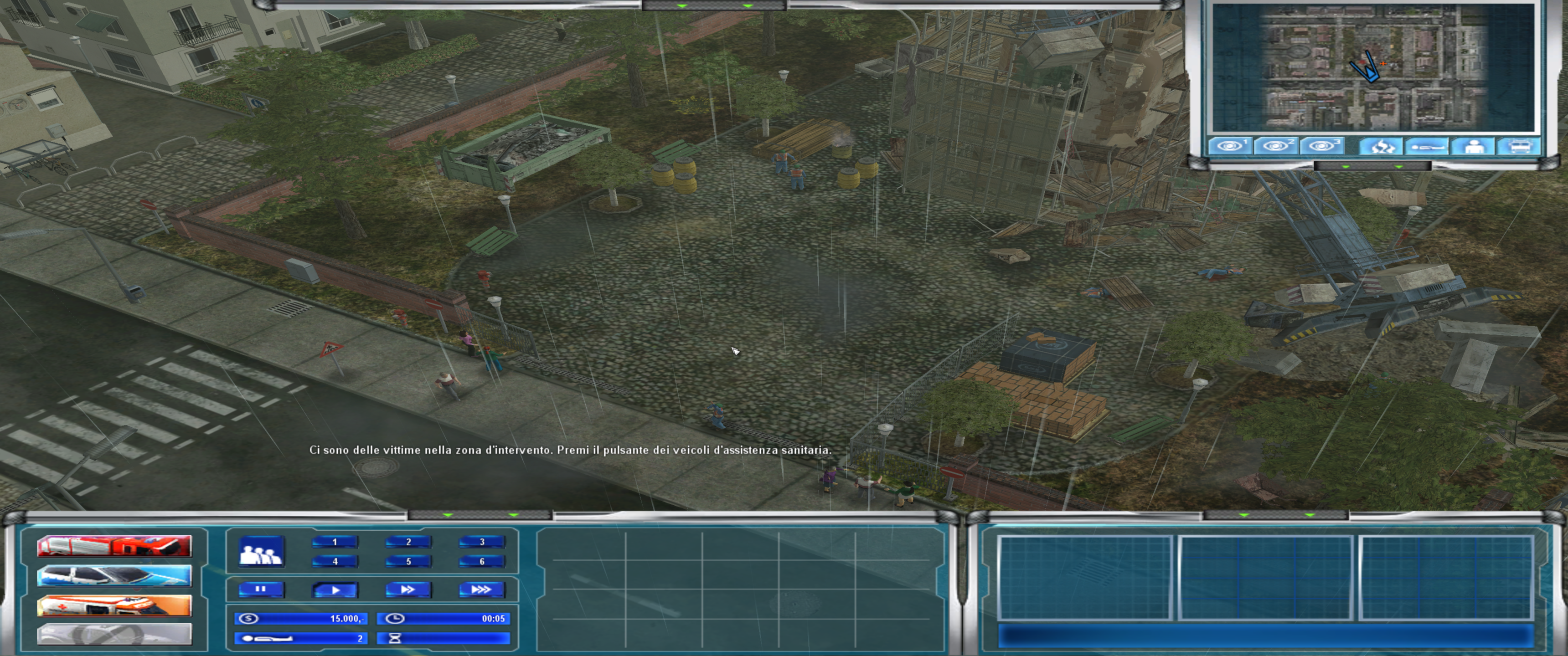
Before / After
Open the interactive comparison ↔
— drag left or right to compare the original screenshots at 3440×1440.
Without fix
With fix
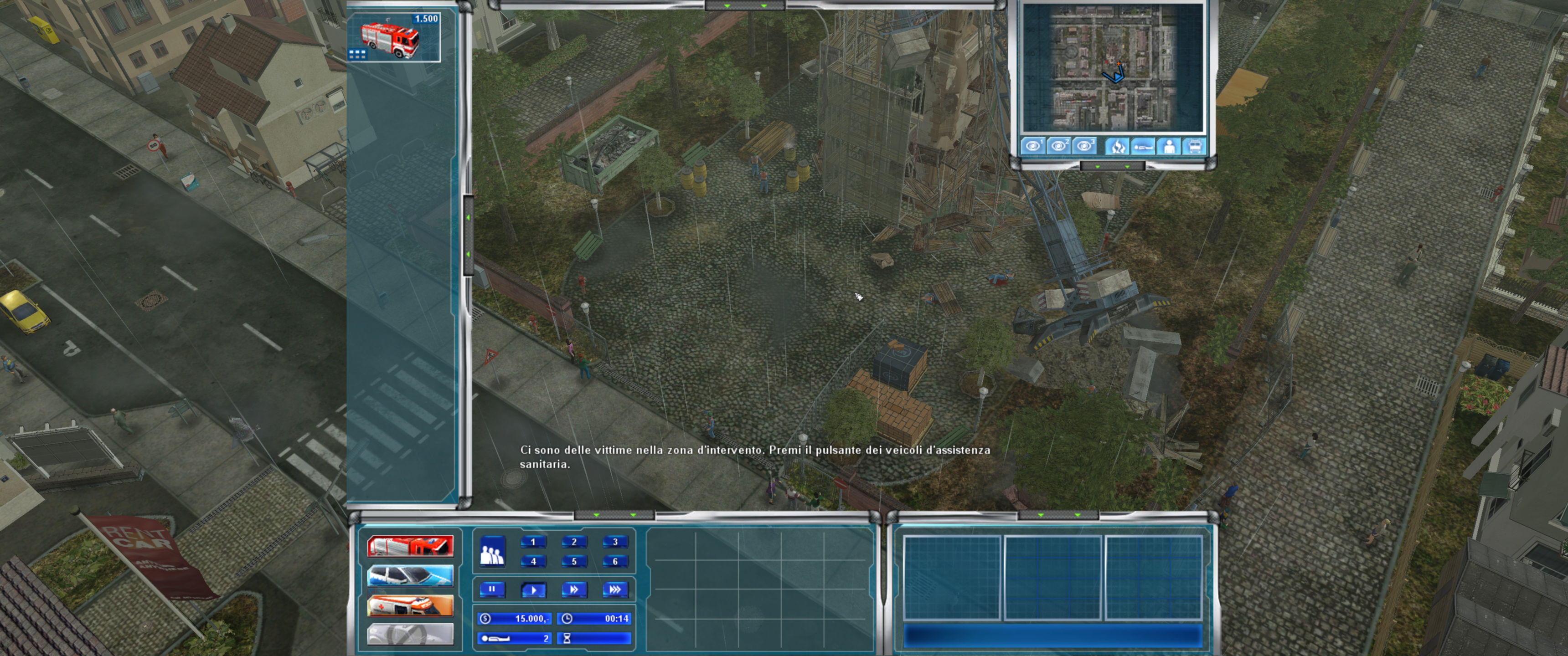
The captures were taken at different moments. Screenshots and the comparison
page are hosted separately; the game ZIP still contains only the three runtime files.
Options and Tools
-
Windowed Mode — set
Windowed=1in the INI for windowed mode;0selects fullscreen. -
Resolution — automatic desktop detection or explicit
ResX/ResYin the INI. -
Interface Mode —
KeepUIAspectRatio=1keeps original menu/HUD proportions;0stretches the interface across the screen. -
FOV — automatic correction of the game's configured focal parameter; optional
BaseFOVoverride. -
Runtime Patches — the ASI applies changes in memory without writing the game EXE or CFG.
-
Diagnostics — English configuration comments and an initialization log beside the ASI.
Release contents
The ZIP contains only dinput8.dll, scripts/Emergency4.WidescreenFix.asi
and scripts/Emergency4.WidescreenFix.ini. Documentation, changelogs and
validation reports are maintained on GitHub. The required loader notice is
preserved inside the INI comments.
Installation
- Download Emergency4.WidescreenFix-v1.0.zip from this release.
- Close the game. If upgrading from an earlier on-disk patch, restore your original game files from their saved backups first.
- Extract the archive into the folder containing the actual game executable, preserving the
scriptsfolder. - Optionally edit
scripts/Emergency4.WidescreenFix.inito set resolution, menu/HUD scaling and FOV. - Launch the game normally. Restart after changing the INI.
The archive includes x86 Ultimate ASI Loader v9.7.4 (dinput8.dll) with its required license notice embedded in the INI comments. Preserve an existing loader/mod DLL and follow the README if one is
already installed. PowerShell, Python and a compiler are not required for normal ASI use.
Uninstallation
Close the game and remove this plugin's ASI and INI from scripts.
Remove dinput8.dll only if other mods do not use it. Earlier on-disk patches
remain until separately restored; the ASI itself does not write the EXE or CFG.
Compatibility
Intended for Emergency 4, Emergency 4 Deluxe and 911: First Responders,
regardless of language. Recognition uses engine instruction signatures rather
than executable filenames or a whole-file checksum allowlist. Builds with
unrecognized or ambiguous instructions are left unchanged.
One actual executable and additional synthetic variants
were tested; support for every regional, retail, digital or protected build is
not established. Full engine startup and visual appearance need further in-game validation.
Movies, embedded 3D views and custom mod interfaces may require separate fixes.
Links
Instructions and configuration ·
Source ·
Changelog ·
Report an issue
Development credits
100% of the work on this Emergency 4 fix was done through GPT-6.1 Sol.
Ultimate ASI Loader is a separate third-party component by ThirteenAG.