Repository navigation
Releases: SirRanjid/analog-key-mapper
Release list
Analog Key Mapper 1.0.0-rc.12

Analog Key Mapper 1.0.0-rc.12
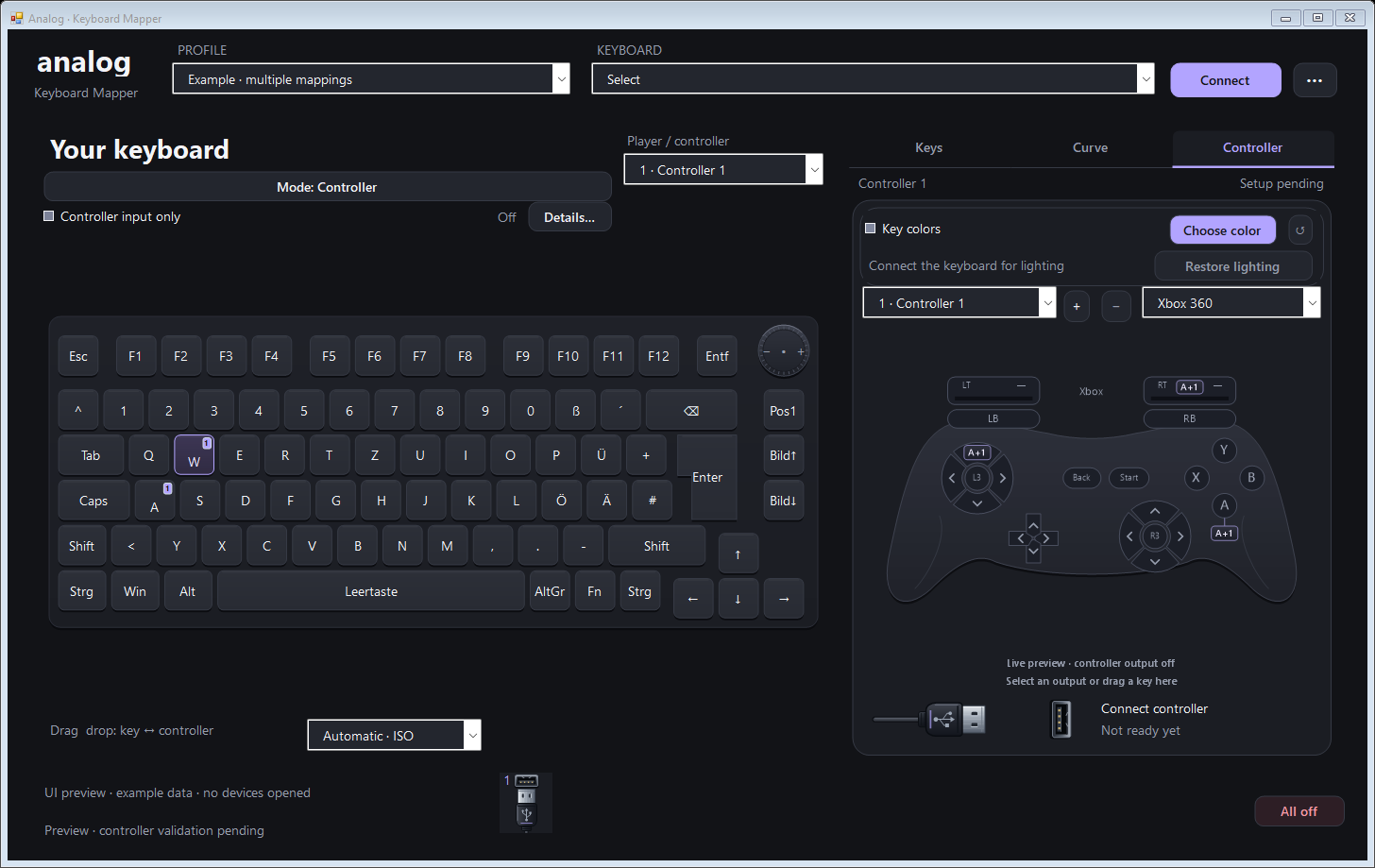
Remap a supported Xbox or PlayStation controller through the same visual editor used for keyboard input. This release includes the controller input mode and the automatic controller connection update in both the Windows download and the source package.
Controller inputs
Choose Keyboard, Xbox or PlayStation below the left-hand picture. Controller modes show a selectable controller with its buttons, sticks and triggers. Each source mode keeps its own profile; returning to keyboard input restores its mappings and pressure calibration.
- Assign any of the 24 common inputs to any supported virtual output. Select multiple controls with Ctrl+click, drag in either direction, or edit the output list.
- Swap stick X/Y axes, invert directions, move stick half-axes onto triggers, or use buttons as exact 0/1 inputs for digital stick or trigger control.
- Apply the existing response curves, deadzones, output ranges and filters. New profiles start with matching one-to-one mappings; remove the old assignment when replacing an action.
- Choose the virtual output type independently: Xbox input can drive DualSense output, and PlayStation input can drive Xbox output. Existing multiple-controller slots and undo/redo remain available.
- Select a physical device explicitly. Saved routes retain its identity, reject recognized virtual-device ancestry and invalidate input values when the device is lost. Keyboard-only calibration, lighting and input suppression controls are hidden in controller mode.
The controller input guide includes setup instructions, three screenshots, mapping examples and the precise supported-device scope.
Automatic controller connections
Configured virtual controllers connect once input is ready. The preference defaults to on when no preference has been saved, while an existing off setting remains respected. Lost or failed connections retry with a delay.
Mapping, curve, calibration and profile changes preserve matching controller connections. Manual disconnect keeps the selected slot off for the session; Turn all controllers off suspends automatic connection for the session. New connections start neutral and require held inputs to be released before rearming. See background startup and the connection validation record.
Downloads and updating
Use the Windows x64 package or complete source package. The Windows ZIP includes the application and controller helper; the separate compatible USB/IP driver is still required for virtual output. Close the mapper and its helpers, preserve your existing data/ folder, then update the application files. Verify the included checksums. Installation and verification.
Validation and remaining limits
The integrated controller-input source passed 68 offline suites in the GitHub workflow for commit 40520fb72051bd9f51a411743f7a18ac05113f48, before the rc.12 version and documentation update. Targeted local runs passed 4,836 profile, 175 routing, 237 backend, 80 source-lifecycle and 355 controller UI checks, including screenshot export; the publication checkout also passed 16,920 application UI checks. The release workflow builds the Windows application and controller helper, tests the helper and verifies both packages against the source manifest. See validation status for recorded evidence and build boundaries.
This remains an unsigned release candidate. Physical controller input, game compatibility and full hardware acceptance remain open. Xbox input supports the implemented XUSB 1.1 path, not Bluetooth-only HID, legacy XUSB 1.0 or additional Xbox 360 controllers sharing one receiver. Sony input covers the implemented DualShock 4 and DualSense-family USB/Bluetooth report formats. Guide/PS, touchpad, gyro, vibration and adaptive-trigger effects are outside the common mapping surface.
The physical controller remains visible to Windows, so a game can see both the physical and virtual devices. Xbox outputs also share Windows' four-XInput-controller limit with physical controllers. The screenshots use synthetic profiles and disconnected devices; they demonstrate the interface rather than hardware or game acceptance.
Analog Key Mapper 1.0.0-rc.11 — stable key selection and scrollbar drawing

Analog Key Mapper 1.0.0-rc.11
Selecting another key now keeps your current tab and scroll position while its settings update. Scrollbars keep their themed appearance while hovered, dragged or held, including inside tables and open drop-down lists.
Switch keys without losing your place
Clicking a key leaves the Keys, Curve or Controller tab you are using open. The settings change to the new selection without clearing and rebuilding the lists. Switching away from a tab and returning also preserves its scroll position.
Mapping rows, setting cells and existing choices are reused; rows are added or removed only when the number of mappings changes. Hints update to their complete new text once, avoiding intermediate layout changes. Titles, mapping summaries, pressure ranges and live values still follow the selected keys.
Pending edits retain their original key scope. An unfinished gesture or capture cannot carry its changes into the next selection. When an input source disconnects, obsolete raw values are cleared from the key list.
Shared scrollbar handling
The app now handles scrollbar mouse input through one shared component. The previous approach repainted after Windows processed an input message; during native scrollbar tracking, that repaint could not run until the mouse was released. Complete buffered drawing now prevents partially erased tracks and thumbs, and content changes are redrawn together with their frames.
The update covers the editor's scrolling panels, both table directions, lists, text fields and combo-box popups. Wheel and keyboard scrolling use the same redraw coordination. It retains 32-bit positions beyond 65,535, existing item selections, scroll events and the native controls' keyboard focus behavior.
Held arrow and page clicks repeat until released or cancelled. Losing capture, disabling a control, changing its range, recreating its handle or closing a window from a scroll callback ends or rebases the gesture safely. An open combo list retains its existing capture instead of closing when its thumb is pressed.
The public screenshots have been regenerated from the current English interface with the official application logo and synthetic example data.
Validation and downloads
The combined update passed 16,993 local UI checks, including 230 key-selection checks, 2,373 scrollbar checks, 354 redraw checks and 778 native theme checks. The new selection tests compare actual control, handle, row and cell identity, then verify updated values, precisely scoped edits, undo and redo. The scrollbar checks inspect existing control pixels while the mouse remains held and verify actual content movement; they also confirm that scrollbar mouse messages do not reach the competing native tracking procedure.
The local run used Windows' live content dragging option enabled. A separate isolated build exercised deferred content scrolling and passed 2,375 checks, without changing Windows preferences or moving the pointer. See the validation record for the exact setup and the scope of background/tray and shutdown checks.
The release workflow runs 62 offline suites, builds the Windows application and controller helper, tests the helper and verifies the source and binary packages. Its release page records the completed workflow for the downloadable files. The Windows package includes its source-manifest receipt and checksums.
This remains an unsigned release candidate. These checks use synthetic controls and inputs; they do not establish every Windows desktop theme or add physical keyboard/controller, reboot or game acceptance. See validation status and build/update instructions.
Verified release build
Windows build and offline checks passed for commit 11ead89fbfc8236a3fe1948e022668110338b08a: 62 offline suites, controller-helper tests and verified packaging. The Windows runner passed 17,009 UI assertions, including 230 key-selection and 2,389 scrollbar interaction checks, with its actual Show window contents while dragging setting disabled. The local UI run above used the enabled setting. No Windows preferences were changed.
These downloads are the packages produced by that successful workflow. Their archive and internal checksums, source manifest, build receipt and executable release versions were verified again before upload.
Analog Key Mapper 1.0.0-rc.10 — lighting cleanup and status at a glance

This update adds the official app logo, readable tray status, and a startup check for leftover mode-switch and controller colors.
- Review old key colors before cleanup. The app checks configured colors even when their options or controllers are off. It shows the affected keys and replacement colors before changing them.
- Allow future automatic cleanup if you want. The confirmation can remember your choice, and the app/tray menus can disable it again. Automation starts off. Matching colors must be confined to their configured keys, and replacement colors must be known.
- Keep external color changes. A changed uniform background is preserved. Ambiguous backgrounds stay untouched, and a change while the question is open blocks the outdated cleanup. An externally identical pattern remains indistinguishable from app markings.
- Finish cleanup when exiting. Normal exit and Windows shutdown wait for actual keyboard-reader/helper cleanup. Delayed controller cleanup can no longer interfere with a newer session, and outstanding removals are included.
- See the current state. The official logo is embedded in the executable and relevant windows. Tray badges distinguish connecting, controllers off, keyboard mode, controller mode and attention. Six current UI screenshots, the cleanup dialog and a status comparison are included in the documentation.
The Windows validation run passed all 62 offline suites, controller-helper tests, and version-checked packaging for the published source commit. The checks use synthetic inputs; physical reboot/shutdown and game acceptance of this revision remain open. Screenshots also use synthetic example data.
Download AnalogKeyMapper-1.0.0-rc.10-windows-x64.zip to run the app, or the separate source ZIP to build it. Both packages include checksums, and SHA256SUMS.txt verifies the downloads. This remains an unsigned release candidate; see the setup and update guide.
Analog Key Mapper 1.0.0-rc.9 — learn unknown inputs
Select unresolved keys, right-click Learn unknown inputs…, and work through the selection with a guided assistant. Review the assignments once and apply them together.
- Standard keyboard positions are identified automatically. Supported HID buttons, axes, hats and relative controls can fill unknown inputs; supported analog keyboard channels retain their pressure values.
- Back, skip, retry and cancel keep the sequence reversible. Applying the selection creates one undoable profile change. Existing assignments and curves are preserved.
- Saved routes reconnect only to matching device/control identities. Missing devices cannot silently become different inputs, and unsuccessful reconnect attempts leave working controller sessions alone.
- Normal mapping uses the saved interpretation. Gesture analysis runs only while learning.
Input learning guide · User guide · Build instructions
Downloads
- windows-x64.zip: extract, run
Verify-Checksums.bat, then openAnalogKeyMapper.exe. - source.zip: complete source and build scripts, including
Build.bat. - SHA256SUMS.txt: checksums for both ZIP downloads. Individual file manifests are also included inside them.
This is an unsigned release candidate. Analog keyboard pressure still requires a supported protocol; ordinary keyboard on/off events do not contain pressure. The new HID and Raw Input backends have not yet completed physical hardware or game acceptance. Virtual-controller output requires the separate compatible USB/IP driver described in the build guide.
Validation
Final Windows build and checks: application/helper build, 59 offline suites, real dialog and MainForm tests with synthetic input, helper tests, and version-checked packaging. Downloaded artifacts are checked against the reviewed source manifest before publication.
Reviewed source: 8bf9c65c7bc0ab431211ff68410e9824a1a13b20.
Analog Key Mapper 1.0.0-rc.8 — more room and finer control
More room and finer control
- The square curve fills the available width beside the vertical actuation and release controls. Compact rows below show more settings at once.
- Move the pointer away from a slider at a right angle while dragging to adjust more finely. Returning to the track does not make the value jump. This works for the horizontal settings, pressure range, vertical thresholds and graph range rails.
- Built-in response shapes open as matching, editable Bézier curves. Editing creates your custom shape for the selected mappings, with undo; preset definitions stay intact.
- Repress uses the actuation amount. Its separate control is removed; existing profiles remain readable.
- Hover help is shorter and delayed, with no tooltips on the graph. The Response button has more space above the plot.
- App-owned scrollbars use theme colors during hover, focus changes and native redraws.
Per-key pressure ranges, the keyboard-wide scale, calibration, connection controls and lighting restoration remain available. Shape conversion runs only in the editor; it adds no background polling or animation loop.
Download
- Windows x64 ZIP: extract the complete folder, run
Verify-Checksums.bat, then openAnalogKeyMapper.exe. - Source ZIP: complete sources and vendored controller-helper dependencies. Use
Build.batto compile locally. - SHA256SUMS.txt: checksums for both downloads. Each ZIP includes a file manifest.
Exit through the tray menu before updating and back up the app folder. Preserve your data folder when replacing the program files.
Validation
The completed editor validation passed all 54 offline suites, including 13,806 application UI assertions, 778 native theme checks and 1,253 real-control precision-drag checks. Controller-helper checks and verified packaging also passed. The packages come from the final verified Windows build, with the current screenshots and documentation included. Automated checks use synthetic inputs and do not replace physical keyboard, game or Windows shutdown acceptance.
This is a free, unsigned release candidate. Checksums verify integrity; they are not a code signature. Virtual-controller output needs the compatible USB/IP setup described in the build guide.
Created with assistance from ChatGPT and refined through testing and user feedback.
Analog Key Mapper 1.0.0-rc.7 — see what each setting changes
See what each setting changes
- Keys focuses on pressure ranges, output assignments and opposite-key capture. Curve brings advanced actuation and Rapid Trigger controls beside a compact square response graph, with a Calibrate button for each threshold.
- IN/OUT range rails provide vertical, draggable deadzone and output-range handles at the graph edges.
- One shape selector replaces the duplicate curve-shape entry. Complete response presets remain available in Presets.
- The response graph includes deadzones, gain, output limits and hysteresis. Edit shape exposes actual draggable points; response guides no longer imitate editable handles.
- Actuation, relative Rapid Trigger movement and smoothing get distinct visual explanations. Previews update on changes without adding a background animation loop.
- Numeric edits update existing table rows instead of rebuilding them during a cell transition. This fixes the
SetCurrentCellAddressCoreerror and preserves the current cell and scroll position. - Dropdowns, number fields and scrollbar updates use the app theme, including intermediate native repaints.
- Compact, faded keycap labels cover configured keys across all controllers, including keys with an individual pressure range. Tooltips explain the exact thresholds and output settings.
- Opposite-key choices apply immediately, and leaving the calibration view cancels an unfinished recording.
The existing per-key Min/Max ranges, global keyboard scale, selected-key calibration, lighting restoration and closing-progress behavior are retained.
Download
- Windows x64 ZIP: ready-to-run app and helpers. Extract the complete folder, run
Verify-Checksums.bat, then openAnalogKeyMapper.exe. - Source ZIP: complete sources and vendored controller-helper dependencies. Use
Build.batto compile locally. - SHA256SUMS.txt: checksums for both downloads. The ZIPs include their own file manifests.
Before updating, exit through the tray menu and back up the existing app folder. Keep your data folder when replacing the program files.
Validation
This release is built and packaged by the completed Windows validation run. All 52 offline suites pass, including 12,421 application UI assertions, along with the controller-helper tests and verified release packaging. It includes real-control UI checks with synthetic data, direct native-scrollbar pixel checks, pure response comparisons and the existing lifecycle suites. These do not replace physical keyboard, game or Windows shutdown acceptance.
This is a free, unsigned release candidate. Checksums verify integrity; they are not a code signature. The virtual-controller backend still requires the compatible USB/IP setup described in the build guide.
Created with assistance from ChatGPT and refined through testing and user feedback.
Analog Key Mapper 1.0.0-rc.6 — calibrate by feel
Changes in rc.6
- Calibrate the point by feel. Actuation, release movement and repress movement each have a Calibrate button. Press a selected key to the desired depth and release to apply that one setting to every selected key. The measured peak appears on the vertical slider. A completed capture is one undo step; selection changes, disconnection or stale input cancel unfinished capture.
- Individual pressure ranges, one keyboard scale. Min/Max edits and one-press range calibration affect the selected keys. Unselected keys retain their ranges. Scale max belongs to the whole physical keyboard and can expand when range calibration exceeds it. Existing saved calibration remains compatible.
- Clearer controls and feedback. Vertical threshold controls stay inside the existing Keys tab. Curve options have sliders alongside their numbers, with point markers and explanatory tooltips. Subtle keycap annotations show configured thresholds in percent. Dropdowns, number controls and scrollbars follow the dark theme; live calibration text keeps its layout stable.
- Visible, bounded cleanup. A closing window shows profile saving, controller cleanup, original keyboard lighting restoration and helper cleanup. A committed Windows shutdown waits for cleanup for up to 25 seconds. Canceling shutdown leaves the app usable. Forced termination, power loss or a disconnected keyboard cannot be guaranteed to restore lighting; recovery records are retained when cleanup is incomplete.
- Less delay during lighting changes. Known-state verification uses fewer read requests while still checking every lighting byte and preserving the original backup, transaction journal and full write sequence. The calculated color-only settling budget falls from 940 ms to 620 ms; this is not a measured physical LED transition. Pressure reports continue to be serviced during RGB settling. Opening the shortcut editor no longer temporarily removes its lighting marker. See the RGB research and remaining hardware limits.
Downloads
- windows-x64.zip: application and helpers, licenses and checksum verification scripts.
- source.zip: source, vendored helper dependencies, tests, documentation and Build.bat.
- SHA256SUMS.txt: SHA-256 hashes of both ZIP downloads.
Extract the Windows ZIP and open AnalogKeyMapper.exe. Preserve your existing data folder when updating. Verify-Checksums.bat checks the packaged files.
This remains a free, unsigned release candidate. Mapper code is MIT licensed; bundled components retain their own licenses.
Verification
All 51 offline suites passed for the exact release commit, including 7,956 application UI assertions and 307 checks of per-option capture through the real reader/editor path with synthetic samples. Checks cover selected-key scope, unchanged calibration files, one-step undo, cancellation, stable live layout, native control interaction and themed scrollbar geometry. Shutdown and RGB recovery checks use synthetic endpoints; no physical keyboard or real Windows shutdown was exercised.
The controller helper's protocol and report-pacing checks passed. Downloaded source and Windows archives, executable receipts and all packaged files were checked against their SHA-256 manifests. Generated previews were inspected at normal and minimum window sizes.
Acknowledgements: developed with assistance from ChatGPT and user feedback.
1.0.0-rc.5 · Clear calibration and steady pressure feedback
Changes in rc.5
- A visible Calibrate button. The shared pressure range now has a normal styled button beside Scale max. Select a key, click Calibrate, press fully and release once to measure the range for the whole keyboard. During measurement the button becomes Cancel.
- Steadier live feedback in Keys. The changing pressure readout no longer recalculates the surrounding panel layout on every text update. Moving pressure ticks redraw only their old and new positions. Changes smaller than a screen pixel do not redraw the marker. Live controller-output values use buffered drawing to avoid exposing an intermediate background repaint.
The global min/max range, scale limit and one-press calibration behavior are retained. Existing settings and profiles remain compatible.
Downloads
- windows-x64.zip: ready-to-run application and helpers, licenses and checksum verification scripts.
- source.zip: complete source, vendored helper dependencies, tests, documentation and Build.bat.
- SHA256SUMS.txt: SHA-256 hashes of both ZIP downloads.
Extract the Windows ZIP and open AnalogKeyMapper.exe. Keep your existing data folder when updating. Verify-Checksums.bat verifies the packaged files.
This remains a free, unsigned release candidate. Developed with ChatGPT and iterative user feedback. Mapper code is MIT licensed; bundled components retain their own licenses.
Verification
All 48 offline suites passed for the exact release commit. The live-pressure regression checks repeated press/release updates for stable control geometry, zero ancestor layout/redraw requests and unchanged key/binding selection. Partial marker redraws are compared pixel-for-pixel with complete redraws. The compact Calibrate/Cancel button is checked in English and German. Synthetic input and output only; physical keyboard/game acceptance remains a separate check.
The downloaded Windows/source packages and executable build receipts were verified against their SHA-256 manifests.
1.0.0-rc.4 · Shared calibration, SOCD capture and lighting cleanup
Changes in rc.4
- One pressure range for the keyboard. The Keys tab now has Min and Max slider handles instead of a calibration dialog. The shared scale can be changed for keyboards that need a different raw-value limit.
- Calibrate with one press. Select a key, choose Calibrate, press it fully and release. The measured range is saved automatically for every key. Higher readings expand the scale; no second pass or confirmation checkbox is required.
- Capture the opposite key. In Keys → Behavior, click Capture and then click the desired opposite key on the keyboard illustration. Dragging still takes you straight to Controller for output mapping.
- Close to tray when enabled. Minimize to tray is now a saved checkbox. Enabling it leaves the window open; clicking X then hides the editor and keeps controller output running. Tray Exit and Windows shutdown still close the app.
- Restore original keyboard lighting on exit. The keyboard helper also retains the startup lighting snapshot and attempts restoration when the app connection ends. A pending restore is no longer cancelled just because the Windows shutdown interface reaches its short waiting limit. One transient failure during normal exit is retried with fresh readback.
Existing profiles and earlier calibration measurements remain available. The new shared range is stored separately for each physical keyboard. Unusable legacy endpoints are retained on disk and excluded from the shared range.
Downloads
- windows-x64.zip: ready-to-run app, keyboard monitor, diagnostic tool, controller helper, licenses and checksum verification scripts.
- source.zip: complete sources, vendored controller-helper dependencies, tests, documentation and Build.bat for compiling locally.
- SHA256SUMS.txt: SHA-256 hashes of the two downloadable ZIP files.
Extract the Windows ZIP and open AnalogKeyMapper.exe. Keep the existing data folder when updating. The included Verify-Checksums.bat checks the package contents.
This is a free, unsigned release candidate. Code signing remains a later step. Hardware, Windows shutdown and game acceptance for this exact binary remain to be checked on a physical setup; automated tests use synthetic input and output. A disconnected keyboard, forced termination or power loss can prevent immediate lighting restoration; the saved original remains available for recovery.
Developed with ChatGPT, with iterative testing and user feedback. Mapper code: MIT; bundled components retain their own licenses.
Verification
The exact release commit passed all 48 offline suites and controller-helper tests on GitHub, including 7,188 app UI checks, 77 opposite-key capture checks, 141 background UI checks and 243 lighting lifecycle checks. The downloaded packages were checked against their SHA-256 manifests and build receipts.
v1.0.0-rc.3 — Clearer mappings and SOCD drag-and-drop
Clearer mappings and consistent drag-and-drop, developed with ChatGPT and user feedback.
Download Windows x64 · Complete source + Build.bat · SHA-256 checksums
What changed since rc.1
- The controller shows assigned keyboard keys. Shift, Ctrl/Strg and Alt/AltGr are readable, with explicit left/right labels and complete key lists on hover.
- The selected output row has a persistent outline, including when it is the only row. Response summarizes each output's curve and customized settings; shared physical-key behavior appears separately below.
- Pair opposite keys for SOCD by dragging: select the original key, open Behavior, drag its opposite, hover Keys, and drop into the labelled field. Undo restores the previous pairings and actuation settings are preserved.
- A short keyboard click opens Keys; dragging opens Controller. Aborted or outdated drags cannot apply stale SOCD edits.
- Updated English screenshots and instructions show the new controls. The keyboard keeps its size and the curve panel stays square.
Download and update
Extract the entire Windows ZIP, run Verify-Checksums.bat, then open AnalogKeyMapper.exe. When updating, exit the old mapper through its tray menu, back up its entire folder, and preserve data/ for profiles, calibration and lighting restoration records. See the update and setup guide.
The source ZIP includes application and controller-helper sources, vendored Go dependencies, tests and Build.bat. Use Build.bat --with-controller to build the helper as well; Go is required for that component. Both ZIPs have published SHA-256 hashes and internal file manifests.
Validation and scope
The GitHub Windows build passed all 47 offline test suites, including 6,970 UI assertions, 1,407 visual-keyboard checks and 113 background UI checks. The helper protocol tests and exact-version packaging checks also passed. The downloads below are the packages produced by that run.
A separate development check covered 200 deterministic label-placement configurations. These checks use synthetic data; they do not constitute live keyboard/controller or game acceptance. No hardware or native OLE drag was used in the UI runs.
This is an unsigned release candidate for Windows x64, not stable 1.0. Windows may block the application or its helpers; checksums verify integrity and do not provide a trusted-publisher signature. Signing remains a later step.
Profiles allow up to 32 Xbox 360/DualSense slots, subject to Windows' limit of four XInput controllers system-wide. The earlier live test used two Xbox plus two DualSense outputs on a preceding helper build. The current helper still needs final live and game acceptance. See compatibility and test status.
Original mapper code: MIT. The VIIPER-derived helper and bundled dependencies retain their own licenses; complete corresponding source and notices are included.