Repository navigation
Verified Publishers
Coming in 1.8.0 (on
main, not released yet). Certified results rest on the roots SmithSoft publishes, which are built into the libraries and the viewer before 1.8.0 is released. Until then every signed file shows as signed by an unknown key.
To give every document a further layer of trust and security, a file can carry a publisher signature: proof of which company or sole trader published it, checked against certificates SmithSoft issues after verifying who the publisher is. A certified result can't be forged, and anyone can check it, offline and free:
- who published it: the verified name, registration number, country and domain, and any co-signers;
- that not one byte changed since it was signed;
- the facts signed with it (for a payslip: the period, gross and net pay), shown by your own interface, not by the document's pages, which could draw anything;
- the document code (
JZ-XXXXX-XXXXX), short enough to type in; - whether the publisher has since withdrawn or replaced it.
import { verifyPublisher, write } from '@smithsoft-studios/jazmin';

write('notes.jzm', [{ id: 1, note: 'Not signed' }]);
const result = verifyPublisher('notes.jzm'); // a path or a Buffer; { password } or { key } adds an encrypted file's facts
console.log(result.status, result.name, result.facts);
none null null
// fragment
var result = JazminFile.VerifyPublisher("payslip.jzm", new JazminPublisherOptions { Password = password });
if (result.Status == JazminPublisherStatus.Certified)
    Console.WriteLine($"{result.Name} ({result.Registration}), {result.DocumentKind} {result.Code}");
In a browser: await JazminBrowser.verifyPublisher(file, { password }) (jazmin-browser-publisher.js, or the full
jazmin-browser.js). A file is never loaded whole: its end is read and the rest is hashed in slices.
status |
Meaning | Show |
|---|---|---|
certified |
Signed by a publisher SmithSoft certified; nothing changed | The name, kind, code and facts |
signed |
Signed with a key no trusted root certifies | Only "signed by an unknown key". Never a name: anyone can write any name in their own certificate |
withdrawn, superseded
|
Validly signed, but taken back or replaced | That it was withdrawn or replaced |
changed |
Changed after signing (reason: digest or coverage) |
Not valid |
invalid |
The signature doesn't hold (reason says why) |
Not valid |
none |
No publisher signature | Nothing; a failure if you expected one |
not-verified |
Not a valid JAZMIN file | Not valid |
timestamp is when the signature was made, as an independent time-stamp proves; a certificate that has expired since
still verifies documents signed while it was valid. checkedAt says how fresh the revocation check is; pass
revocationList or an online statusAnswer for a fresher one.
The viewer checks every file and shows the result in a bar of its own, above the document's tabs. These pictures are from a test build, so they say TEST; a SmithSoft-certified file shows the same bar in green without it.

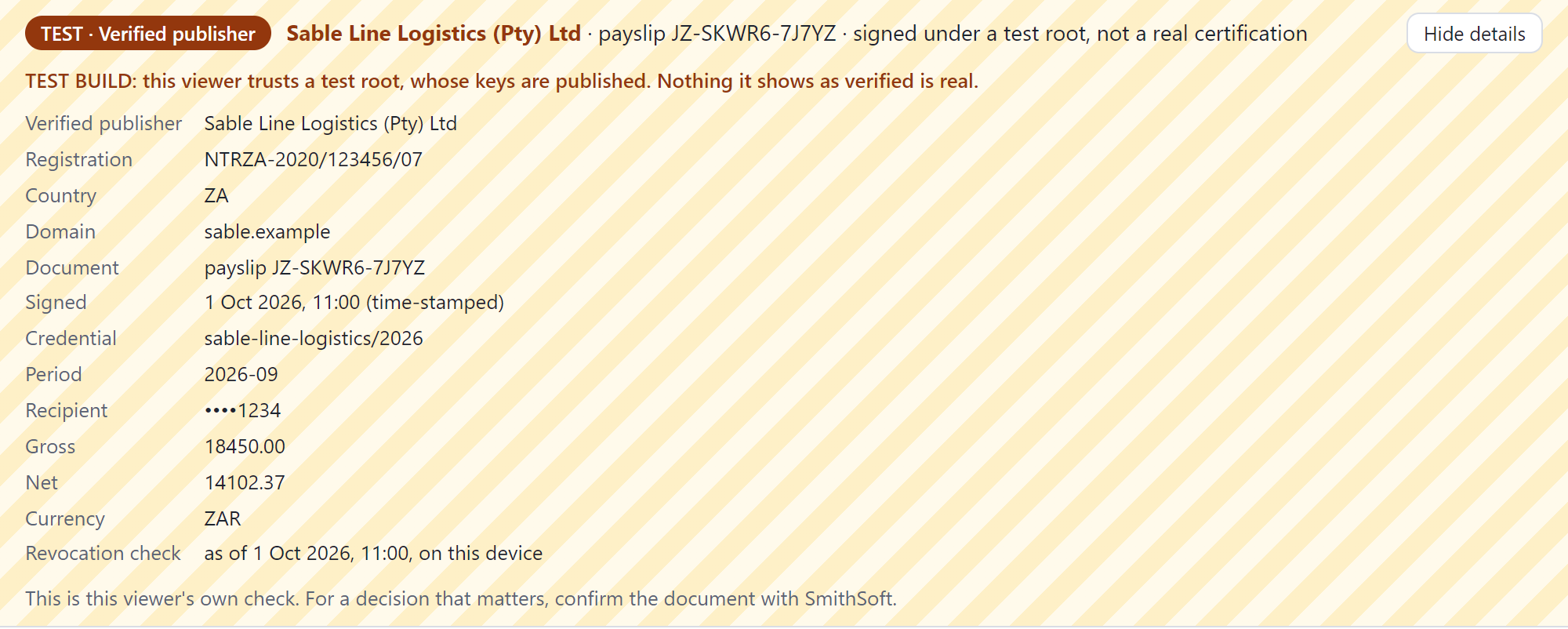


- A certified document is sealed: shown without the internet, so what it shows can't change.
- Embedded in another site's page, the viewer shows no name, only that the file is signed.
- The demo gallery's
signatures.htmlshows every result in the test build.
- Show them in your app's own interface, never inside the document.
- Never show a name for
signed. - For a decision that matters (a loan, a lease), confirm the document with SmithSoft rather than relying only on a check made on the applicant's device.
-
A signature confirms one exact version. Appending, updating, re-granting access or compacting writes a new
version, which shows as
none: it never borrows the old signature. The publisher signs the new version and marks the old one replaced. - Readers of 1.0 to 1.7 read signed files as before: the signature block sits before the header, where they see unused bytes.
- A signature adds about 5 KB to a file.
-
Test files, signed under a test root that no release trusts, with the result each must give:
spec/fixtures/publisherin the repository. - Specification: section 6.9 of the format; User Guide §26.