Optional Dependencies
All of these dependencies are OPTIONAL. You can run DeathHolgrams on its own, without needing to use any other plugins. However everything listed here will give you extra features, if you choose to use them.
Plugin page: www.spigotmc.org/resources/placeholderapi
You can use any PAPI placeholder in side the hologram designs. Just make sure you register the pack where appropriate (/papi ecloud download <pack_name>)
KDR ratio
Use /papi ecloud download statistics to register this pack.

hologram_groups:
  kdr:
    priority: 5
    design:
      - "&e%player% died"
      - "&7KDR -> &a%statistic_player_kills%&7/&c%statistic_deaths%"
Rainbow placeholder
Use /papi ecloud download RainbowColor to register this pack.

hologram_groups:
  rainbow:
    priority: 4
    design:
      - "%RainbowColor_-------------%"
      - "%RainbowColor_%player% died here%"
      - "%RainbowColor_-------------%"
If you are using versions 1.16 - 1.19.3, it is highly recommended that you use this dependency so it controls your holograms.
TLDR; If you have alot of death holograms spawned at once, then you may get performance issues when not using this dependency on those versions.DecentHolograms uses packets to spawn holograms on all server versions. DeathHolograms only uses packets to spawn holograms above 1.19.4, in the versions below, it uses invisble armor stands (which are classed as entities). Packets > Entities. When you have alot of entities it can impact server performance.
Plugin page: https://www.spigotmc.org/resources/decentholograms
You cannot use the "Actions" and "Pages" features of DecentHolograms.
It gives you the ability to place entities, player heads, skull textures, animations, hex gradients, animations and more(see their Wiki) inside the hologram designs.
Entity Hologram
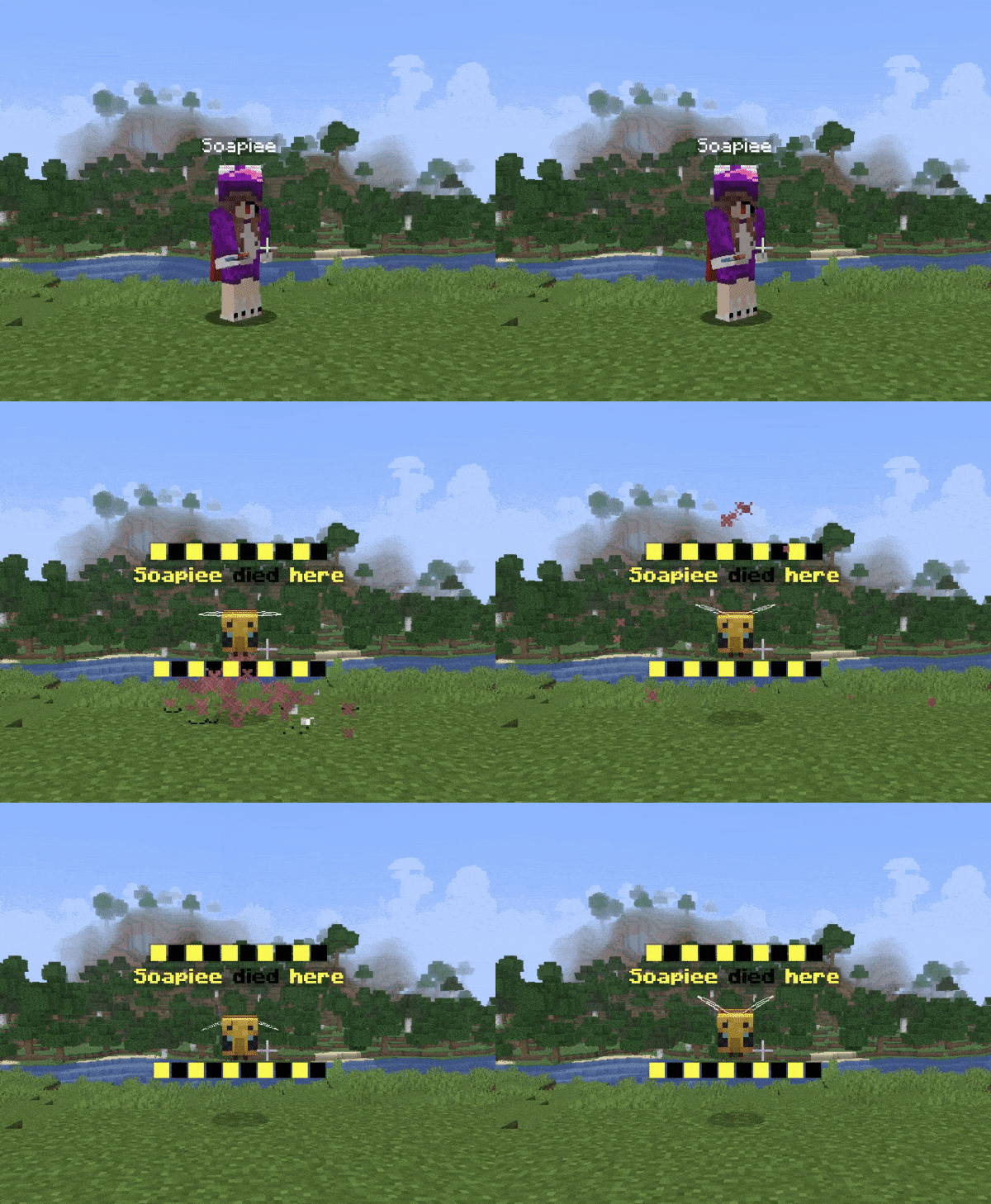
hologram_groups:
  entity:
    priority: 10
    design:
      - "&e█&0█&e█&0█&e█&0█&e█&0█&e█&0█"
      - "&e&l%player% &0&ldied &e&lhere"
      - "#ENTITY: BEE"
      - " "
      - "&e█&0█&e█&0█&e█&0█&e█&0█&e█&0█"
Hex gradient Hologram

hologram_groups:
  gradient:
    priority: 5
    design:
      - "<#B22AFE>Gradient Text</#ff8157>"
      - "<#6CF5F3>&nMade possible with the</#1FBF37>"
      - "<#FF7F1C>&lDECENT HOLOGRAMS dependency</#ED7BDB>"
      - "<RAINBOW1>Rainbow Text</RAINBOW>"
      - "<RAINBOW1>-----------</RAINBOW>"
Heads

hologram_groups:
   heads:
    priority: 30
    design:
    - "&c%player%"
    - "#HEAD: PLAYER_HEAD (%player%)"
    - "&cdied to %killer%"
    - "#HEAD: PLAYER_HEAD (%killer%)"
Animations
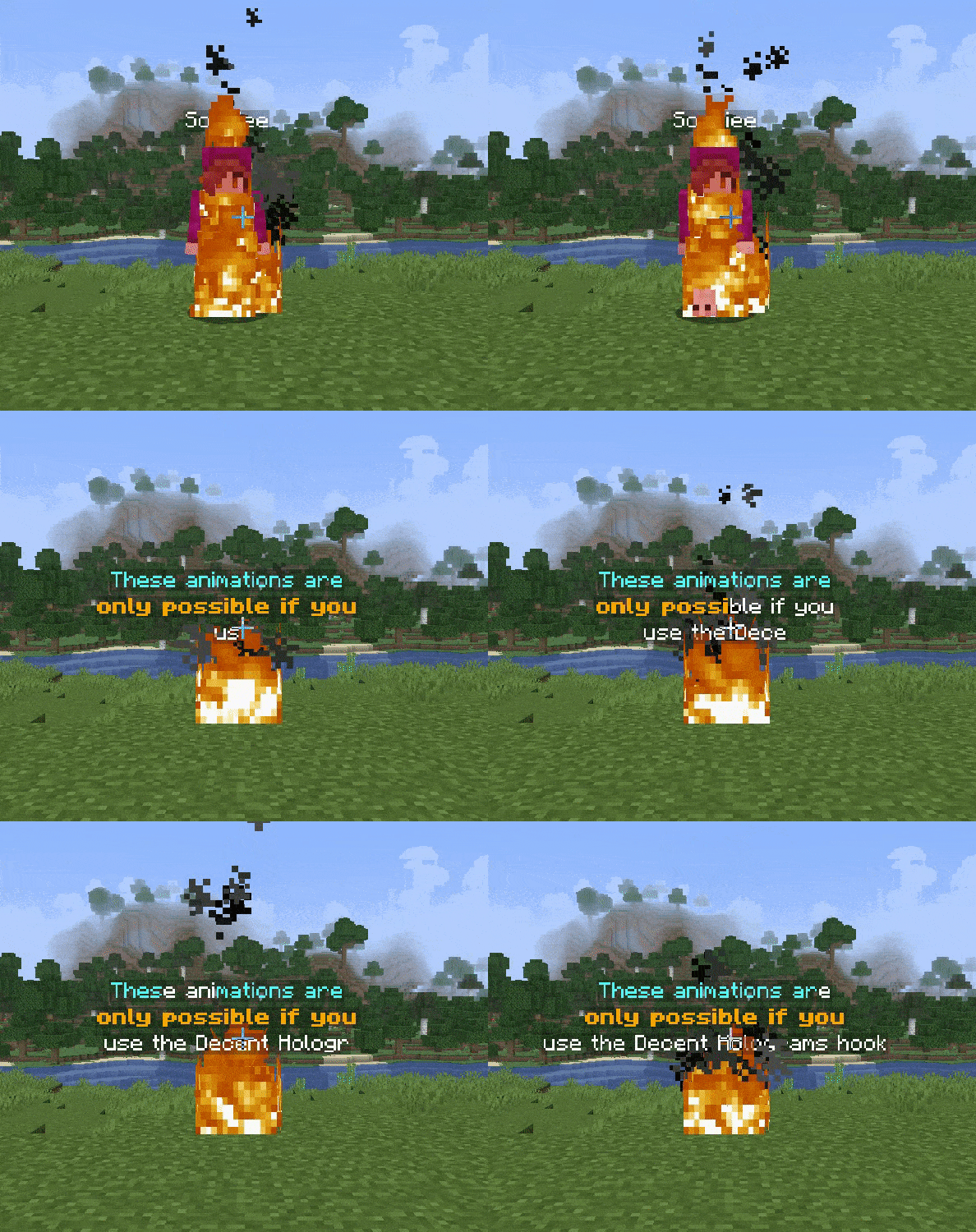
hologram_groups:
  animation:
    priority: 4
    design:
    - "<ANIM:wave:&b,&f>These animations are</ANIM>"
    - "<#ANIM:burn:&f,&6&l>only possible if you</#ANIM>"
    - "<#ANIM:typewriter>use the Decent Holograms hook</#ANIM>"
Use this plugin if you want to use MiniMessages in your holograms
If you are using Paper (Not Spigot) and 1.19.4 or above, then you can hook DeathHolograms with FancyHolograms to take advantage of their MiniMessage support.
Plugin page: https://modrinth.com/plugin/fancyholograms
You cannot use the "Click", "Hover", "Keybind", "Insersion", or "Selector" features of MiniMessages/FancyHolograms.
It gives you the ability to use MiniMesasges inside your holograms. This means you can use things like shadows, player heads, gradients, new fonts (when using custom texture packs), NBT data and more (see the MiniMessages Wiki) inside the hologram designs.
Hex Hologram

hologram_groups:
  fancyHoloHexcolour:
    priority: 10
    design:
      - "<#ff8e1c>%killer%%cause%"
      - "<#db162a>killed"
      - "<#6632ab>%player% here"
Shadow Hologram

hologram_groups:
  fancyHoloShadow:
    priority: 5
    design:
      - "<shadow:red>This is <shadow:aqua:0.5>a shadow</shadow>!"
      - "<yellow><shadow:white>%player% died here</shadow>!"
Heads

hologram_groups:
   heads:
    priority: 30
    design:
      - "&r<head:%killer%> %killer%"
      - "killed"
      - "&r<head:%player%> %player%"