Repository navigation
Releases: Somnius/CrossInk-Indic
Release list
v1.6.0-indic.1 – Hindi built in (all devices)

First CrossInk-Indic release: CrossInk 1.6.0 with Hindi built into the firmware. Flash it and Hindi books and Hindi menus just work, nothing to copy to the SD card.
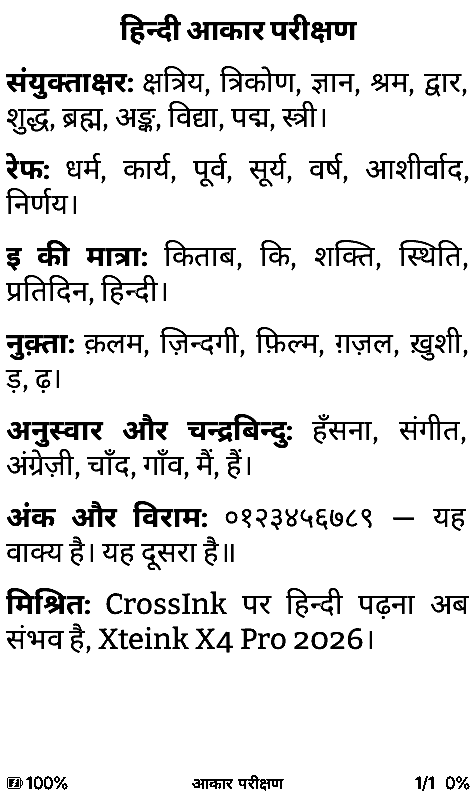
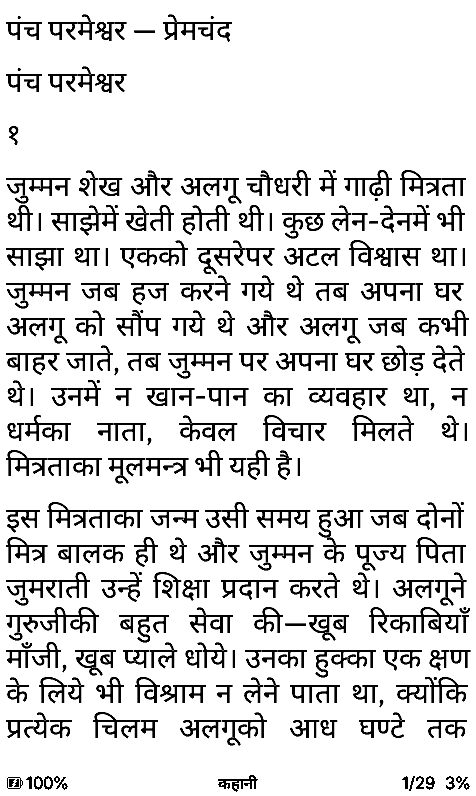
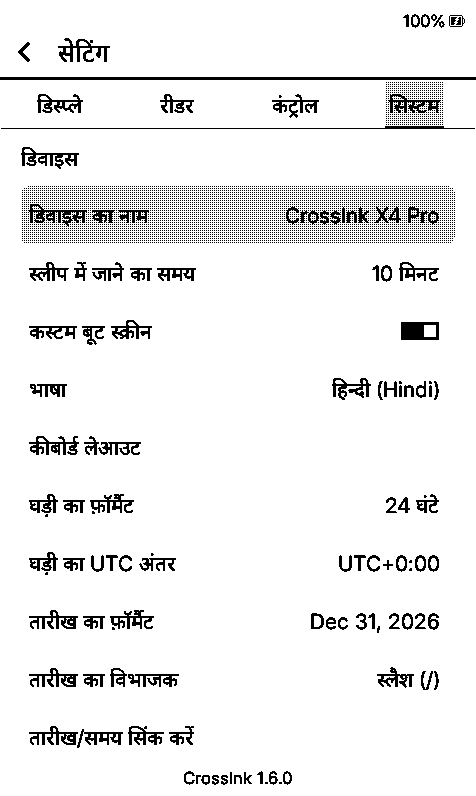
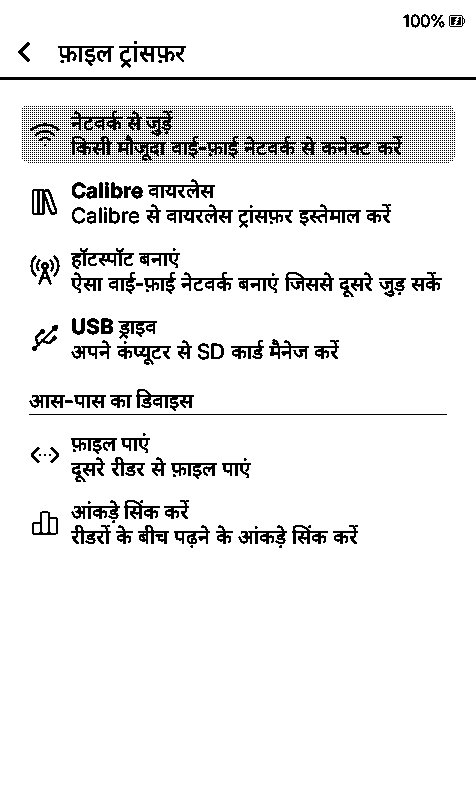
How it differs from the Hindi builds with SD-card fonts (v1.6.0-hindi*):
- Fonts in the firmware. Noto Sans Devanagari (regular + bold, every reading size) is shared by Bitter and Lexend Deca, and the UI fonts have it too. The shaping tables are read straight from flash, so they don't eat RAM, which matters on the X3/X4.
- All menus Hindi, all 845 strings, and they stay Hindi on Wi-Fi and dictionary screens too (the SD-font build has to drop to English there). Proofread twice by blind back-translation plus a grammar/terminology pass against Android's Hindi.
- Only English and Hindi in the language list. The space the other 27 languages took is where the fonts live. If you build it yourself, one line in
platformio.inibrings languages back. - Wi-Fi updates come from this repo, so an update never swaps you back to a CrossInk without Hindi.
The SD-card fonts still work if you want a serif Devanagari (Bitter Hindi) or a different look, the zips are attached.
Install
-
Put the bin for your reader on the SD card:
Device File Size Xteink X4 Pro firmware-x4-pro-v1.6.0-indic.1.bin6,224,144 bytes Xteink X3 / X4 firmware-x3-x4-v1.6.0-indic.1.bin6,264,848 bytes Xteink X4 Classic firmware-x4-classic-v1.6.0-indic.1.bin6,056,720 bytes Seeed Sticky firmware-sticky-v1.6.0-indic.1.bin6,131,472 bytes -
Settings > System > SD Card Firmware Update, pick it. The updater checks chip, board tag, checksum and SHA-256 before it writes anything.
-
Settings > System > Device > Language > हिन्दी (Hindi).
Still on the stock Xteink firmware? Install CrossInk first with https://inky.crossink.dev/#flash-tools. Books you already opened get laid out again once (cache v80).
Testing, honestly
No real device yet, so it's a pre-release. What was tested:
- Simulator, every device profile (X3, X4, X4 Pro, X4 Classic, Sticky): Hindi books in both built-in fonts at 10–16 pt, bold/italic/superscript, every Settings tab, the reader menu, file browser, Home, File Transfer. English screens are pixel-identical to stock (36/36).
- Host tests: the built-in fonts shape exactly what HarfBuzz does.
- X3/X4 (ESP32-C3) in an emulator. Espressif's QEMU runs the real shaping code with CrossInk's partition table and no PSRAM. Both ways Hindi gets shaped there match HarfBuzz word for word: built-in fonts straight from flash, and SD fonts copied into flash and mapped. The flash copy is reused after a reboot, all glyph bitmaps load, and free RAM stays above 266 KB. Log and test firmware:
test/qemu/c3_shaping.
Screenshots with what each one shows: indic-screenshots.zip or the assets branch.
Credits
CrossInk by @uxjulia, CrossPoint Reader, and the OpenType shaper by @ssafayet from CrossPoint #3787. Noto fonts under the SIL OFL 1.1. SHA-256 for every file in SHA256SUMS.txt.
Contributors


Assets 10
v1.6.0-hindi.2 – Hindi menus proofread (all devices)
Same as v1.6.0-hindi with the Hindi menus proofread. Replaces it.
I'm not a Hindi speaker, so I checked the translation the long way: every string was translated back to English blind (without the original next to it), twice, and the menu wording was compared word by word against how Android and KOReader say the same thing in Hindi. 52 strings changed. Some were plain wrong: Home said "start reading from the bottom" instead of "pick a book below", and the Nearby sync screens talked about a "place" as if it were a location on a map. The rest is consistency: फिर से कोशिश करें, दबाकर रखें, वर्शन everywhere.
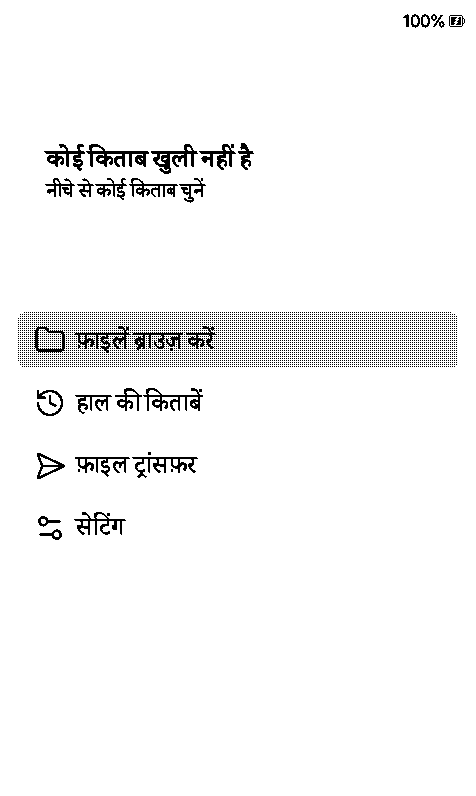
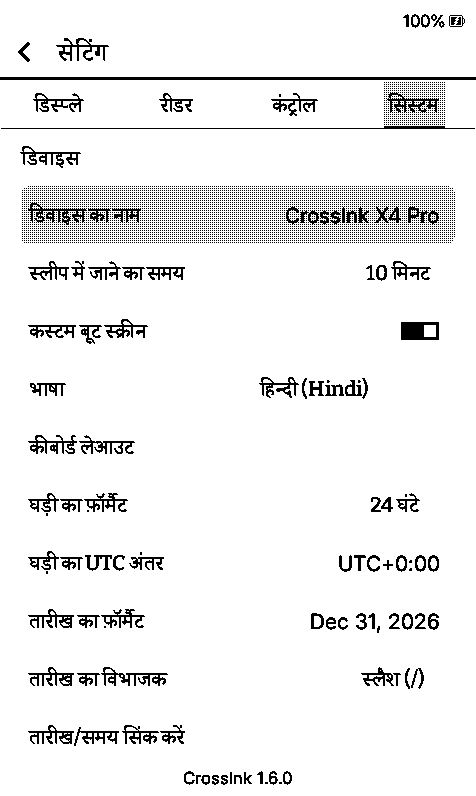
A native speaker going over it is still the best check, corrections welcome.
Install is the same as before: a Hindi font zip into /.fonts/, the bin for your device through Settings > System > SD Card Firmware Update, pick Bitter Hindi or Lexend Hindi, then हिन्दी in the language list. Simulator only, still a pre-release.
| Device | File |
|---|---|
| Xteink X4 Pro | firmware-x4-pro-v1.6.0-hindi.2.bin |
| Xteink X3 / X4 | firmware-x3-x4-v1.6.0-hindi.2.bin |
| Xteink X4 Classic | firmware-x4-classic-v1.6.0-hindi.2.bin |
| Seeed Sticky | firmware-sticky-v1.6.0-hindi.2.bin |
If you'd rather not deal with font zips at all: CrossInk-Indic has Hindi built into the firmware.
SHA-256 in SHA256SUMS.txt.
v1.6.0-hindi-reading – Hindi reading (all devices)
CrossInk 1.6.0 that can read Hindi (and other Devanagari text). Built from feat/hindi-reading, a separate branch from the Greek one. The menus stay in English here; a full Hindi UI build comes next as its own release.
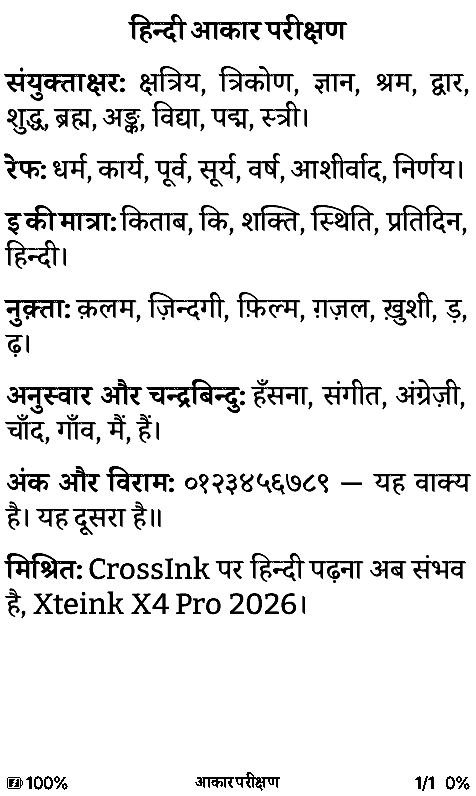
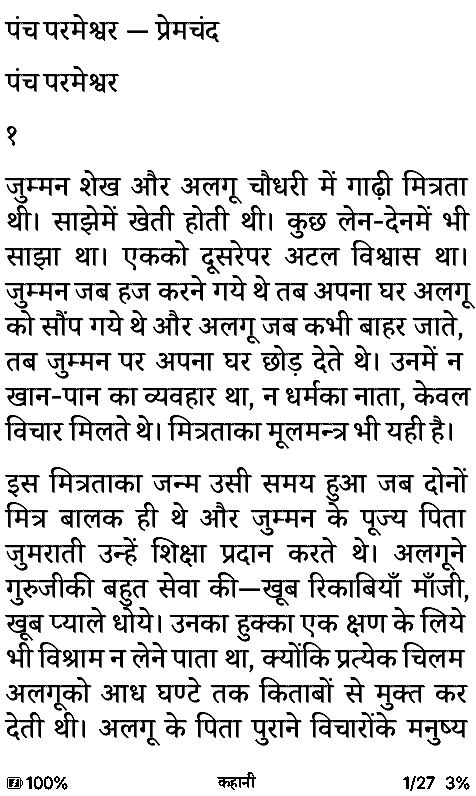
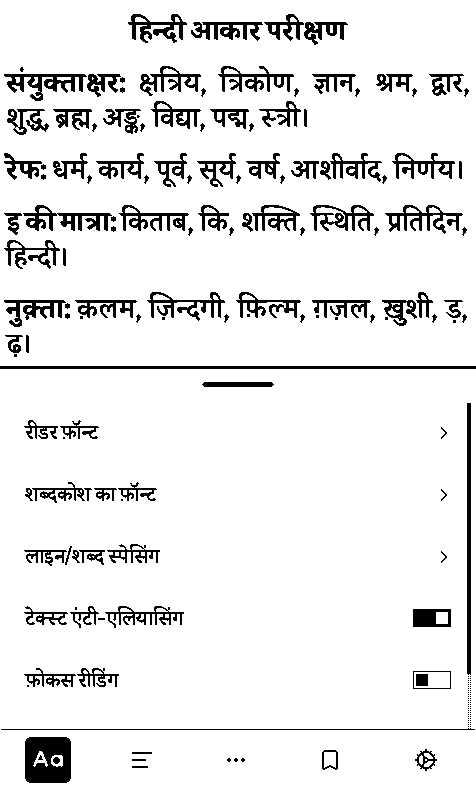
Hindi needs more than a font. Letters join into conjuncts (क्ष, त्र, ज्ञ), र् turns into a little hook above the next letter (धर्म), and the ि sign is written before the letter it belongs to (कि). Stock CrossInk draws boxes, and even with a Devanagari font installed every one of those comes out wrong. This build shapes the text properly, using the OpenType shaper from CrossPoint Reader #3787 by @ssafayet, ported over to CrossInk.
- Conjuncts, reph, vowel signs, nukta, chandrabindu, all from the font's own OpenType tables
- Works whatever the book says its language is (
hi, wronglyen, or nothing) - Lines never break inside a syllable, and long titles get cut at a whole syllable
- Book titles, file names, the TOC and the status bar show Devanagari too
- Two fonts for the SD card: Bitter Hindi (Bitter + Noto Serif Devanagari) and Lexend Hindi (Lexend Deca + Noto Sans Devanagari), 8–20 pt
- English and every other language render exactly as before (pixel-identical to stock in 46 simulator screens)
Install
-
Unzip
BitterHindi-sd-font.zipand/orLexendHindi-sd-font.zipinto/.fonts/on the SD card (you get/.fonts/Bitter Hindi/…) -
Put the firmware for your device anywhere on the SD card:
Device File Size Xteink X4 Pro firmware-x4-pro-v1.6.0-hindi-reading.bin6,125,440 bytes Xteink X3 / X4 firmware-x3-x4-v1.6.0-hindi-reading.bin6,166,080 bytes Xteink X4 Classic firmware-x4-classic-v1.6.0-hindi-reading.bin5,958,096 bytes Seeed Sticky firmware-sticky-v1.6.0-hindi-reading.bin6,032,832 bytes -
Settings > System > SD Card Firmware Update, pick the file. The updater checks chip, board tag, checksum and SHA-256 before writing to the spare slot, so a file for the wrong device gets refused instead of flashed.
-
Settings > Reader > Font Family > Bitter Hindi or Lexend Hindi
If the reader is still on the stock Xteink firmware, install the official CrossInk from https://inky.crossink.dev/#flash-tools first. To go back, flash the official 1.6.0 bin the same way. Version shows as 1.6.0-hindi-reading (with the device name after it on the S3 boards). Books already opened get laid out again once (section cache v79), nothing to clear by hand.
About 50–60 KB bigger than the official 1.6.0 on each device, all well inside the 6.25 MB app slot.
Not tested on a real device yet
Simulator only, like the Greek builds, so it's a pre-release. Every device profile (X3, X4, X4 Pro, X4 Classic, Sticky) renders the same in its simulator. On the X3/X4 (no PSRAM) the shaping tables get copied once into the unused spiffs flash area and read from there; the simulator can't do that part, and the upstream PR hasn't been on hardware either. Worst case there is unshaped text, it can't touch the firmware. If the X3/X4 runs low on memory while laying out a chapter, that chapter shows unshaped words for the session and gets redone next time you open the book.
Screenshots with what each one shows: hindi-reading-screenshots.zip, or the assets branch.
Fonts are SIL OFL 1.1, licenses are inside the zips.
SHA-256 for every file is in SHA256SUMS.txt.
Contributors
Assets 10
v1.6.0-hindi – superseded by v1.6.0-hindi.2
CrossInk 1.6.0 with Hindi menus on top of Hindi reading. Same as v1.6.0-hindi-reading, plus हिन्दी in the language list. Built from feat/hindi.
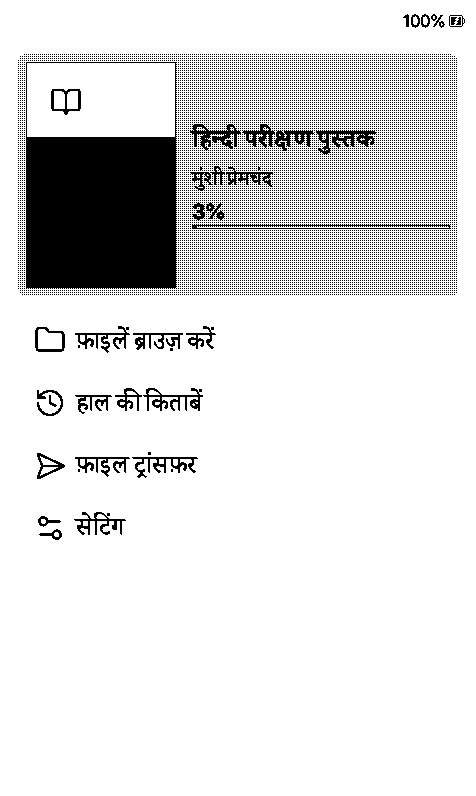
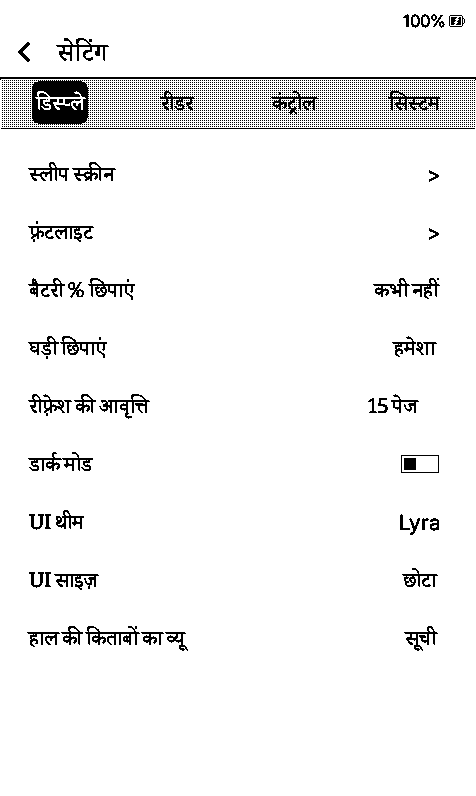
- Home, Settings, the reader menu, pop-ups and button labels in Hindi (781 of 845 strings)
- Hindi in the menus is shaped the same way as in books (conjuncts, matras, all of it)
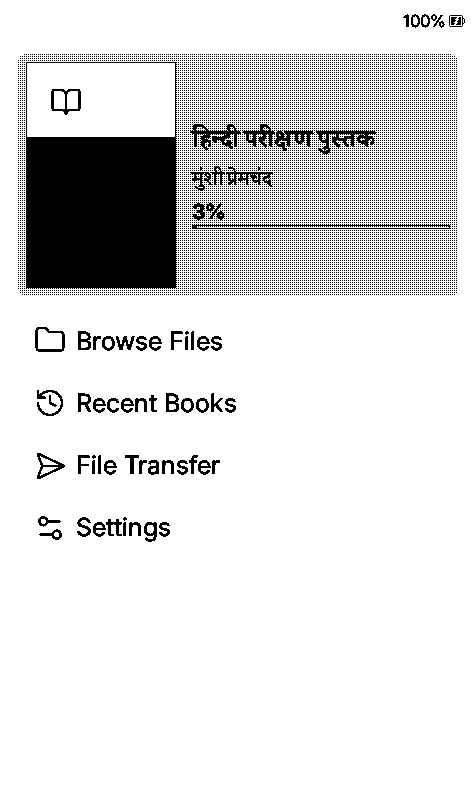
- The translation is mine, machine-assisted, in the Android Hindi wording (सेटिंग, फ़ाइलें ब्राउज़ करें, पढ़ना जारी रखें…). It needs a native speaker to go over it, corrections are very welcome
- 64 long technical messages stay in English (sync server errors, firmware update and crash screens, keyboard tips, Calibre setup steps). CrossInk keeps each language's text in 32 KB and Devanagari takes 3 bytes a letter, so they didn't fit
- Everything else, English menus included, looks exactly like stock (pixel-identical in the simulator)
Install
-
Unzip
BitterHindi-sd-font.zipand/orLexendHindi-sd-font.zipinto/.fonts/on the SD card. The menus need one of these, the built-in fonts have no Devanagari -
Put the firmware for your device on the SD card:
Device File Size Xteink X4 Pro firmware-x4-pro-v1.6.0-hindi.bin6,158,384 bytes Xteink X3 / X4 firmware-x3-x4-v1.6.0-hindi.bin6,199,040 bytes Xteink X4 Classic firmware-x4-classic-v1.6.0-hindi.bin5,990,960 bytes Seeed Sticky firmware-sticky-v1.6.0-hindi.bin6,065,712 bytes -
Settings > System > SD Card Firmware Update, pick the file (the updater checks chip, board tag, checksum and SHA-256 first)
-
Settings > Reader > Font Family > Bitter Hindi or Lexend Hindi
-
Settings > System > Device > Language > हिन्दी (Hindi)
If you pick Hindi before installing a Hindi font, the menus stay in English and a note tells you what to install, so you never end up with a screen full of boxes. Version shows as 1.6.0-hindi (with the device name on the S3 boards).
Known rough edges
- Screens that free the SD fonts to make room (Wi-Fi transfers, the dictionary using its own font) show English until the fonts are back; going Home brings Hindi back
- Simulator only, not on a real device yet, so it's a pre-release. On the X3/X4 the shaping tables sit in the unused
spiffsflash area, which the simulator can't do; worst case is unshaped text, it can't touch the firmware
Screenshots with what each one shows: hindi-ui-screenshots.zip or the assets branch. Fonts are SIL OFL 1.1, licenses inside the zips. SHA-256 for every file is in SHA256SUMS.txt.