Repository navigation
Releases: SouravBeraAkaSpeed/xiryn
Release list
Xiryn 0.4.1 — the open-source personal agent

xiryn.mp4
Xiryn is the open-source personal agent. It does everything Muse, Grok Bot and Dots do — on your own computer. Each agent gets its own Linux desktop in Docker, so it works in the background and never interrupts what you're doing; your data stays on your disk, you bring any model, and you can control it from anywhere through Telegram.
Changed
- The project is now called Xiryn — xiryn.com, github.com/SouravBeraAkaSpeed/xiryn. Everything carries the new name: the app, the
XIRYN_*settings, the database (data/xiryn.db), the vault, the agents' Docker machines and volumes, and the setup scripts.
Fixed
- The update button shows on the next page load after a push. Xiryn now asks GitHub once each time the page loads, instead of when the server starts and then every few hours.
- Settings → System showed
[object Promise]instead of the number of agents, squads, threads, messages and memories. - Next's error badge no longer appears in the corner, and attributes that browser extensions add to the page no longer cause hydration warnings.
- An agent clearing
/tmpon its desktop no longer shuts that desktop down or locks you out of watching it. - A thread open in the app now follows turns started from Telegram (or by answering a payment or detail request) as they happen, instead of staying blank until you reload.
- Tables in Telegram messages arrive as readable lines (a header, then one bullet per row) instead of raw
|pipes — including the notice when a task started at the computer finishes, which used to run the whole reply into one line.
Install
# macOS / Linux
curl -fsSL https://raw.githubusercontent.com/SouravBeraAkaSpeed/xiryn/main/setup.sh | bash
# Windows (PowerShell)
irm https://raw.githubusercontent.com/SouravBeraAkaSpeed/xiryn/main/setup.ps1 | iexOr paste one prompt into Claude Code, Codex or Cursor and it sets everything up for you.
Update
cd xiryn && git pull && ./setup.sh # Windows: setup.cmdXiryn 0.4.0 — voice typing, a phone take-over page, and update notices
Added
-
Voice typing: a mic button in the composer. Speech is recognised by the browser — on the device where the browser supports it — and lands in the box to review before sending.
-
A phone take-over page: Telegram hand-off links open a page made for phones, with a keyboard button that types on the agent's desktop, a key bar (Enter, Backspace, Tab, Esc, arrows, Ctrl), Paste text, a countdown and Done. On an upright phone the desktop sits above the keys, clear of the keyboard.
-
Update button: when GitHub has commits (or a release) newer than your copy, an update button next to the logo links to the README's new Updating section. The project's star count shows there too once it's past 20. Off with
XIRYN_UPDATE_CHECK=offor in Settings → System.
Changed
- The desktop's password in a phone link travels after the
#, so it never reaches the tunnel's logs, and links are sent only once their address answers.
Update
cd xiryn && git pull && ./setup.sh # Windows: setup.cmd
From now on, Xiryn shows an update button next to its logo whenever there's something new.
Xiryn 0.3.0 — the vault: sign in and pay, with your approval
Agents can now sign in and pay for you — with your approval every time, and without ever seeing your details.
Added
-
Vault: logins, cards, UPI IDs and personal details, encrypted with AES-256-GCM. The key is held by the operating system (macOS Keychain, Windows DPAPI, the Linux Secret Service). Manage it in Settings → Vault.
-
Agents fill without seeing:
vault_filltypes a saved value into the page and shows the field as dots; agents only ever get masked hints. Logins fill only on their own site. -
Payment approvals: before paying, an agent asks with the merchant, the amount and the site. Approve with a saved card or UPI ID, pay yourself by taking over, or decline — in the chat or with one tap on Telegram. A card only fills on the site you approved, for 20 minutes.
-
Secure requests: when an agent needs a login, a card or a one-time code, a form appears in the chat; what you enter goes into the vault, saved or for one task. Codes can be replied to the Telegram bot; the message is deleted and the code used once.
-
Set up with a coding agent: a prompt in the README for Claude Code, Codex or Cursor that installs everything and asks for your keys.
-
Expand the live desktop inside Xiryn, watching only, with Fullscreen and Take over.
Fixed
-
Workstations that had stopped wouldn't start again: stale X server locks are now cleared at boot.
-
macOS setup: Homebrew renamed the Docker Desktop cask; setup now installs Docker Desktop, Node.js and Git without Homebrew or a password.
-
Linux setup as root, and when Docker can't be started without a password.
-
Chromium no longer asks to "restore pages" after a workstation restarts.
Update
cd xiryn && git pull && ./setup.sh # Windows: setup.cmd
The setup rebuilds the agents' desktop image once. Agents' machines move to it the next time they start; their files are kept.
Xiryn 0.2.0 — agents' desktops on your own machine
Agents' machines now run on your own computer, in Docker. Nothing to sign up for, nothing in the cloud, and sites see your own connection.
Changed — breaking
- Workstations run locally in Docker. Each agent gets its own container — a Debian desktop with Chromium, a shell,
sudo, Node.js and Python — built on your computer fromworkstation/and fully separate from your own files and screen. Daytona is no longer used andDAYTONA_*settings are ignored; newXIRYN_WORKSTATION_*settings set CPU, memory, auto-stop and auto-delete.
Added
-
One-command setup for every OS:
setup.sh(macOS, Linux) andsetup.ps1/setup.cmd(Windows) install Git, Node.js and Docker if they're missing, build the agents' desktop image and start Xiryn.npm run setupinstalls and starts Docker when asked to, andnpm run workstation:buildrebuilds the image. -
Settings → Workstations: Docker status with a Start button, the image build with live progress, per-agent CPU and memory limits, auto-stop, auto-delete and phone links.
-
Notifications: a chime and a desktop notification when an agent finishes, fails or needs you, even with Xiryn in the background. Toggle them from the status bar.
-
Telegram finish notices for tasks started at the computer that take a minute or more (
XIRYN_TELEGRAM_NOTIFY=long|all|off). Reply to carry on. -
Phone take-over links through a temporary Cloudflare quick tunnel to that one desktop, closed after 30 minutes.
-
Workstations stop themselves when idle even while Xiryn is closed, and machines of deleted agents are cleaned up automatically.
-
Take over: pause the agent at any moment and use its desktop yourself, then hand it back with an optional note. The agent re-reads the screen and continues from where you left it.
-
Hand-offs: a
request_takeovertool lets the agent stop at logins, payments, one-time codes and CAPTCHAs and explain what's left. The take-over view opens automatically. -
Telegram hand-off notices with a short-lived live-desktop link that works from a phone, plus a link that opens the thread in the app. Reply to continue.
-
Delete threads from the sidebar (hover → trash) and from the thread menu, with proper rename and delete dialogs.
-
XIRYN_URLsetting for links back into the app.
Changed
-
Agents always write their findings into the reply — every option with its details — instead of pointing at the screen, which you may not be watching.
-
Every desktop action returns a screenshot of its result, so browser tasks take about half the steps.
-
The last step a turn is allowed answers instead of acting, so a long task always ends with what was found and what's left.
-
The desktop is 1280×800, and its browser never saves passwords or cards.
-
Agents browse like a person: they open a site's home page and use its own forms instead of guessing deep links.
-
Context compaction inside a turn (two screenshots and six full tool outputs kept), cutting the cost of long desktop sessions by an order of magnitude.
-
web_fetchreturns up to 12,000 characters per page.
Fixed
- Opening the thread menu on a new thread crashed with "MenuGroupContext is missing".
Removed
- Daytona and its SDK. Sandboxes already in a Daytona account are no longer touched; delete them from its dashboard if you like.
Set it up in one command
macOS / Linux
curl -fsSL https://raw.githubusercontent.com/SouravBeraAkaSpeed/xiryn/main/setup.sh | bash
Windows (PowerShell)
irm https://raw.githubusercontent.com/SouravBeraAkaSpeed/xiryn/main/setup.ps1 | iex
Upgrading from 0.1.0: pull, then run ./setup.sh (or setup.cmd) — it builds the agents' desktop image once. Daytona keys are no longer used.
Xiryn v0.1.0 — the open-source Muse, Grok Bot & Dots
The open-source Muse, Grok Bot & Dots — on your machine, with your keys.
Xiryn is a self-hosted agent workspace. Every agent gets its own sandboxed Linux computer, a long-term memory and the model you choose — and it never touches yours. Your data stays on your disk, and you can text your agents from anywhere through Telegram.
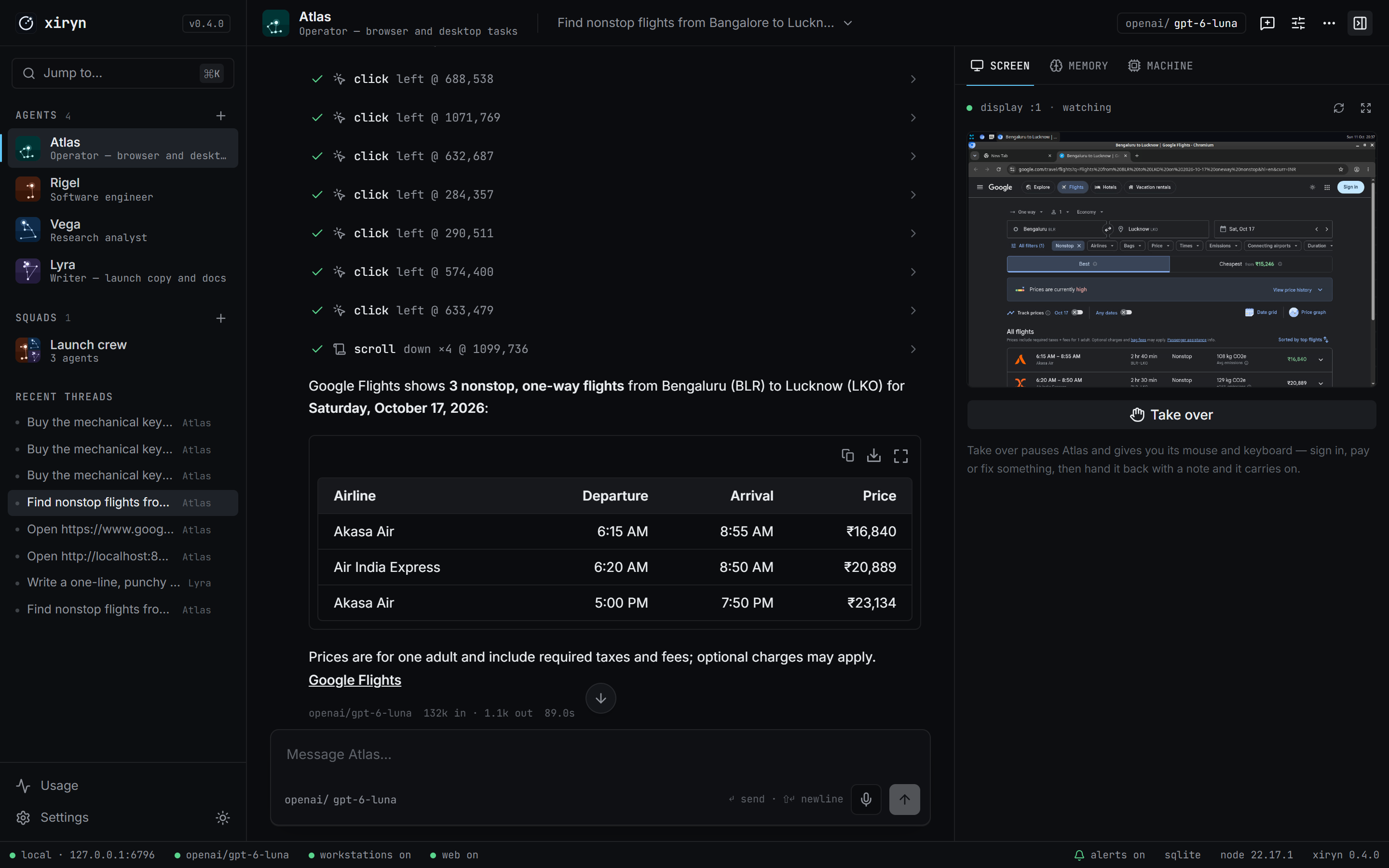
Highlights
- Private by design — no account, no payment details, no telemetry. Conversations, memory and keys live in one SQLite file on your computer.
- Never touches your computer — agents work in their own Daytona sandboxes: shell, files, browser and a full desktop you can watch live or take over.
- Control from anywhere — pair Telegram with a QR code. No public URL, no tunnel.
- Any model — OpenAI, Anthropic, Google, xAI, Groq, Mistral, DeepSeek, OpenRouter, Ollama, LM Studio and any OpenAI-compatible API. Per-agent models, live model lists.
- Squads — agents delegate to whichever teammate fits the job, each on its own model and machine.
- Durable turns — close the tab mid-task; the agent keeps going and you re-attach on reload.
- Disposable machines — reset or delete an agent and its sandbox is destroyed; optional auto-delete.
Get started
git clone https://github.com/SouravBeraAkaSpeed/xiryn.git && cd xiryn
npm install && npm run setup     # add your keys to .env
npm run dev                      # → http://127.0.0.1:6796
Or with Docker: docker compose up -d.
Full changelog: CHANGELOG.md