Repository navigation
Releases: Specops13/cml-lab-builder
Release list
CML Lab Builder 3.3.2

Fixed
- "Your resource pool allows 1 nodes" on CML Personal. 3.3.1 read
user_quota/user_startedfrom CML's
licensing diagnostics as a per-user node limit. They are not: on a CML 2.9.1 Personal serveruser_quotais 1
while 0 of 20 node licenses are in use, so every lab was won't fit even though memory and the 20 node licenses
were fine. Those numbers are no longer used. A per-user limit is now taken only from the login's assigned CML
resource pool when its limit has a number of node licenses (GET /users/{id}->resource_pool, then
GET /resource_pool_usage/{pool}); no pool,licenses: null(unlimited) or an unreadable pool never blocks. The
node line shows the pool (your resource pool: n of m) when one applies.
Added
- Copy diagnostics button in the Build box and
cmllab resource-diagnostics [-o file]: the raw licensing,
licensing-diagnostics, system-stats and resource-pool JSON the check used plus the app's view of it, with
passwords, tokens, serials / UDI, accounts, ids, host names, user names, URLs and IP addresses removed, for bug
reports. Read-only.
Verify: sha256sum -c SHA256SUMS.txt; SHA256SUMS.txt.sig and cml-lab-builder-patch-3.3.2.zip.sig are Ed25519 signatures (key id f1edfadc5fa19aa1). Existing installs (3.3.1) can update in-app or with cml-lab-builder update-install.
CML Lab Builder 3.3.1
Fix release: the resource check before Build now reads the CML node license correctly (included nodes + expansion nodes, not the base license's 1 of 1) and says which limit failed (memory or node licenses). NX-OS consoles wait out quiet boots and explain loader>. Plus a collapsible lab list on the Labs page.
Update from 3.3.0: the app offers the small signed patch (Update now), or download the full bundle / .deb below. Every asset is listed in SHA256SUMS.txt; SHA256SUMS.txt.sig and cml-lab-builder-patch-3.3.1.zip.sig are Ed25519 signatures by the release key (see SECURITY.md).
Fixed
- Resource check read the wrong license. 3.3.0 added up
max/in_useof every CML license feature, so on a
CML Enterprise server it showed the base license (1 of 1) as the node count and every lab as won't fit. The
capacity is now the nodes included with the license (from its description, e.g. "20 nodes capacity included", or
the product: Personal 20, Personal Plus 40, Enterprise 20, Free 5) plus the Expansion Nodes in use (not its 300
maximum); nodes in use come from CML's licensing diagnostics, else from the running labs. When the license can't be
read or isn't clear, the node check says can't tell instead of won't fit. - "Won't fit" with enough RAM. The memory bar and summary took their colour and wording from the overall verdict,
so a node-license failure looked like a memory problem. Memory and node licenses are now separate lines (fits /
tight / won't fit / can't tell) and the summary names the limit that failed. Free memory now counts reclaimable
page cache (total - usedwhen that is more than free), and memory reported in KiB is recognised. - Unmanaged switches and external connectors no longer count toward licensed nodes (lab and running labs).
- The CML resource-pool node quota is checked when CML reports it.
- NX-OS consoles (lab 21-23 switches boot but the console did not work): a quiet NX-OS boot phase is no longer
taken for an unrecognised prompt (an unchanged last line is waited out for about 5 minutes on NX-OS, 1 minute on
IOS);loader>is recognised with a clear error (wipe and start the node, or Reset the lab); Test console now
tries the same logins as a check, including Settings > NX-OS login, and waits up to 10 minutes on NX-OS.
Added
- Collapsible lab list on the Labs page: Hide lab list / Show lab list gives the directions the full width.
Keyboard and screen-reader friendly (aria-expanded,aria-controls, visible focus), light and dark, remembered
in the browser; folds away by itself in narrow windows (900 px or less) once a lab is open unless you chose
otherwise; / reopens it.
CML Lab Builder 3.3.0
Highlights: signed updates and a security audit, a resource check before Build (fits / tight / won't fit, stop or wipe running labs), and a design refresh aimed at WCAG 2.2 AA.
Update from 3.2.0: the app offers the small patch (Update now), or download the full bundle / .deb below. Each release asset is listed in SHA256SUMS.txt; SHA256SUMS.txt.sig and cml-lab-builder-patch-3.3.0.zip.sig are Ed25519 signatures by the release key (see SECURITY.md to verify by hand).
Security
- Security audit and hardening (details in the new SECURITY.md):
- Signed updates: releases carry Ed25519 signatures of
SHA256SUMS.txtand of the patch (*.sig); the
public release key is built into the app. From this version on, unsigned or wrongly signed updates are refused
(online and Install update from file). Up to 3.2.0 apps keep checkingSHA256SUMS.txtas before. - Web UI guards: Host allowlist against DNS rebinding (421), CSRF protection (
Origin/Sec-Fetch-Site
checks plus a requiredX-CMLLab-Requestheader), CORS preflights refused, path traversal guard. - Per-launch access token in the desktop app (HttpOnly SameSite=Strict cookie after the first open), so
other local users or programs cannot drive the UI.CMLLAB_ACCESS_TOKEN=0turns it off.cmllab web --token. cmllab web --hostwith a non-loopback address prints a loud warning and always requires a token.- Strict Content-Security-Policy (no inline script or event handlers any more),
nosniff,
X-Frame-Options: DENY,frame-ancestors 'none',Referrer-Policy: no-referrer, COOP/CORP. Links built from
lab or library data only allow http(s). - Secrets: device passwords are now remembered too (OS keyring) when Remember passwords is ticked; without a
keyring, secrets go tosecrets.json(0600) instead of being dropped, and move into the keyring once there is
one. A password found insettings.jsonis moved out at start;settings.jsonis written 0600. - Secrets are redacted from job output, errors, tracebacks and startup errors; the access log is off.
- TLS: new TLS verification > On, with my own CA certificate (PEM path, checked in Settings); Off is
labelled insecure and shows a warning in Settings and in the log. - Zip member checks also reject
\and NUL; ids used as file names are checked. - CI: security lint (ruff
Srules) andpip-audit; the deb test checks file ownership and permissions.
- Signed updates: releases carry Ed25519 signatures of
- Known limitation: a report saved as HTML by the CLI and opened from disk keeps working, but its Print button
needs the app (Ctrl+Pworks everywhere).
Added
- Resource check before Build: the Build box reads free memory, licensed nodes and running labs from CML and says
Fits, Tight, Won't fit or Can't tell, with a memory bar and the running labs (nodes, RAM). Stop a lab, or
stop & wipe one this app built, from there (with confirmation), then build, Build anyway or cancel. A running
copy of the same lab counts as free. Library cards show fits now? tags (cached 30 s). New settings Check free
CML memory before Build and Keep this much CML memory free (CMLLAB_RESOURCE_CHECK,
CMLLAB_RESOURCE_HEADROOM_GB, default 4 GB). Errors (no admin rights for system stats, CML down) show Can't
tell and never block a build. New API:GET /api/resources,GET /api/labs/{id}/precheck,
POST /api/cml/labs/{id}/stop. - New library lab
21-nxos-ospf-multiarea: NX-OS study path 1/3: OSPF multi-area on a super-spine Clos, with deep
debug inspection (walkthrough, 12 steps). Six Nexus 9000v in a 5-stage Clos (SS1/SS2, one spine and one leaf per
pod) plus four IOL hosts, 10 nodes, about 76 GB of CML RAM. Area 0 on the super-spine layer, one area per pod with
the spines as ABRs, a DR/BDR segment,area rangesummarization, an NSSA with a translated external and a stub
area. Each step explains what NX-OS does under the hood and lists the show, event-history and debug commands
(debug logfile,debug-filter,undebug all) to inspect it. Library only:library/21-nxos-ospf-multiarea.cmllab
(andlabs/21-nxos-ospf-multiarea.encorlab). Expected outputs are synthesized from Cisco documentation. - New library lab
22-nxos-bgp-over-ospf: NX-OS study path 2/3: iBGP over OSPF with super-spine route reflectors,
with deep debug inspection (walkthrough, 12 steps, same 10-node / 76 GB topology). Boots from its own baseline:
lab 21's day-0 plus lab 21's required steps. SS1/SS2 as route reflectors with peer templates, loopback peering,
the BGP FSM withevent-historyand filtered debugs, next-hop tracking, best-path selection between reflected
copies, the BGP-free-core problem, optional community/local-preference policy, eBGP and BFD design discussions
(BFD is not supported on Nexus 9000v).packaging/nxos_study_baseline.pyregenerates the study-path baselines; a
test fails if one drifts. - New library lab
23-nxos-evpn-vxlan: NX-OS study path 3/3: BGP EVPN VXLAN over iBGP and OSPF (L2VNI, L3VNI,
anycast gateway), with deep debug inspection (walkthrough, 16 steps, same 10-node / 76 GB topology). Boots
from its own baseline: lab 22's day-0 plus lab 22's required steps. L2VPN EVPN on the existing RR sessions,
VLAN-to-VNI mapping, NVE with BGP ingress replication (multicast underlay explained), cross-pod bridging,
L3VNI with anycast gateway and symmetric IRB, type-5 prefixes, optional ARP suppression and break/fix. - New course
nxos-study-path: NX-OS study path: OSPF → BGP → BGP EVPN VXLAN (labs 21, 22, 23 in order;
library/nxos-study-path.cmlcourse,labs/nxos-study-path.encorcourse).
Changed
- Design refresh following common design-system practice: design tokens (8 px spacing grid, a type scale,
semantic colors) for both themes; consistent buttons (36 px), inputs, tags, chips, cards, tables and callouts;
inline SVG icons instead of emoji (CSP-safe, no CDN); header with a brand mark and a sun/moon theme toggle;
loading spinners, empty and error states styled the same everywhere. - Accessibility (WCAG 2.2 AA): contrast fixed in both themes (muted text, the walkthrough tag, primary buttons in
dark mode, library topic names), a visible focus ring on every control, a Skip to content link, labelled progress
bars,aria-expandedon the More menu,prefers-reduced-motionhonored (also for scrolling), forced-colors mode
support, a layout that reflows to phone width without horizontal scrolling. axe-core reports 0 violations on Labs, a
walkthrough step, Library, Settings and the resource check, light and dark (3.2.0: 94).
CML Lab Builder 3.2.0
Downloads
- Already on 3.0.0 or 3.1.0: the app offers this update by itself (small patch,
cml-lab-builder-patch-3.2.0.zip, sha256-checked against SHA256SUMS.txt). - New install:
CMLLabBuilder-3.2.0-windows-x64.zip,CMLLabBuilder-3.2.0-linux-x64.tar.gz, orsudo apt install ./cml-lab-builder_3.2.0_amd64.deb. - ENCOR Lab Builder 1.7 - 2.1: the app shows "full download"; the
ENCORLab-*/encorlab_*files are the same builds under the old names.
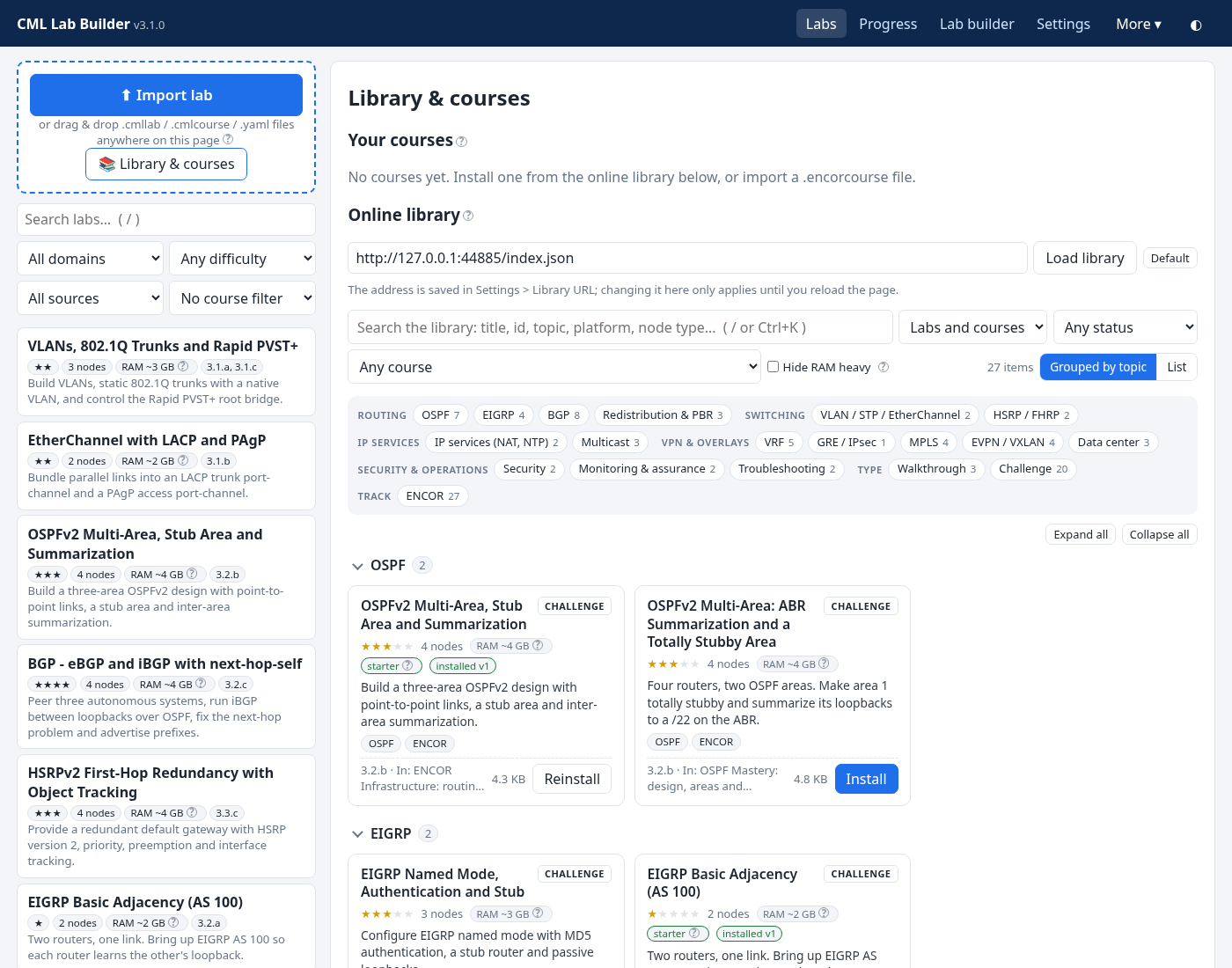
Library sorted by topic. A patch for 3.0.0 and 3.1.0 (same runtime 2): they offer it by themselves and install it
with Install update. ENCOR Lab Builder 1.7 - 2.1 still get the full download banner.
Added
- Topic tags for every library lab and course, from one controlled list (
cmllab/topics.py): OSPF, EIGRP, BGP,
Redistribution & PBR, VLAN / STP / EtherChannel, HSRP / FHRP, IP services (NAT, NTP), Multicast, VRF, GRE / IPsec,
MPLS, EVPN / VXLAN, Data center, Security, QoS, Monitoring & assurance, Automation, Troubleshooting, Other, plus
Walkthrough / Challenge and the track (ENCOR). The library labs get theirs inlabsrc/library.yaml(topics:;
build_library.pyrefuses unknown topics and labs without any), and bothlibrary/index.jsonand
labs/index.jsoncarry them. Courses get the most common topics of their labs. Labs from an index without topics
(other libraries) get derived ones: ENCOR blueprint items, keywords in the id, title, domain and description, and
node types (nxosv9000= Data center)./api/libraryalso returns the topic list (topics). - New library layout: a row of topic chips with counts (multi-select: any of the topics picked in one area, all
of the areas), labs grouped under collapsible topic headings (Expand all / Collapse all) or one flat list
(Grouped by topic / List), and compact cards instead of the table: title, Walkthrough / Challenge, difficulty,
node count, RAM with the red RAM heavy tag, starter / installed / update status, and topic chips that filter
when clicked. Works in light and dark mode and on narrow windows (one column). - Search knows the topics: the 3.1.0 fuzzy search also matches topic names (
monitoring,data center,gre ipsec), and search, topics and the other filters combine. Still client-side and about 1 ms per keystroke for
300 labs. - The library remembers the view, the selected topics and the collapsed groups (browser
localStorage). - Keyboard and screen readers: chips are toggle buttons (
aria-pressed, arrow keys move between them), the topic
headings are buttons witharia-expanded, and the chip row and the lists are labelled.
Compatibility
- The lab packs are unchanged (the topics are only in the index, the lab format rejects unknown fields), so no lab
versions changed and no Update available shows up. Apps 2.0 - 3.1 ignore the new index field (checked with the
2.0.0, 2.1.0, 3.0.0 and 3.1.0 builds: they load the new index and install from it), and 1.7 - 1.9 parse it too.
CML Lab Builder 3.1.0
Downloads
- Already on 3.0.0: the app offers this update by itself (small patch,
cml-lab-builder-patch-3.1.0.zip, sha256-checked against SHA256SUMS.txt). - New install:
CMLLabBuilder-3.1.0-windows-x64.zip,CMLLabBuilder-3.1.0-linux-x64.tar.gz, orsudo apt install ./cml-lab-builder_3.1.0_amd64.deb. - ENCOR Lab Builder 1.7 - 2.1: the app shows "full download"; the
ENCORLab-*/encorlab_*files are the same builds under the old names.
Fuzzy search in the library, plus the library updates below. A patch for 3.0.0 (same runtime 2): 3.0.0 offers it
by itself and installs it with Install update. ENCOR Lab Builder 1.7 - 2.1 still get the full download banner.
Added
- Search bar in Library & courses. Filters the online library as you type and ranks the results, best first,
with the matched letters highlighted. It searches titles, lab ids, descriptions, topics (blueprint items and
domains), the courses a lab is in, platforms and node types (iol-xe,nxosv9000, or nexus, nx-os, ios-xe).
The matching is fuzzy: it tolerates typos (mutlicast,redistrbution; 1 edit for 4-7 letters, 2 for longer
words) and accepts abbreviations and partial words (vrf lit,ospf stb,mcast,evpn mpls). Each word must
match. It works together with new filters for labs/courses, installed / not installed / update available, one
course, and Hide RAM heavy./orCtrl+Kjumps to the box,Escclears it, and a message with Clear search
and filters appears when nothing matches. It all runs in the page over the index that is already loaded
(static/fuzzy.js, no dependencies): no server calls while typing, the text is normalized once per load, and only
the word being typed is re-scored. About 1 ms per keystroke for 300 labs. The lab list's Search labs box now uses
the same fuzzy, ranked and highlighted matching. - Library index search fields: lab entries in
library/index.json(andlabs/index.json) now carrydomain,
track,platformsandnode_types, and/api/labsreportstrackandnode_types. Older apps ignore the new
fields, and older indexes still load; search then simply has less to match. - New library lab
19-evpn-mpls: Walkthrough: BGP EVPN over MPLS (IOS-XE, IOL). 8iol-xenodes (about 8 GB
RAM): OSPF + LDP core, iBGPl2vpn evpnthrough a route reflector, VLAN-based EVIs 10/20 with bridge domains and
service instances stretching two VLANs across three sites, route type 2/3 and MAC verification, same-VLAN pings,
and an optional EVPN-VPWS step. Published aslibrary/19-evpn-mpls.cmllab(andlabs/19-evpn-mpls.encorlabfor
2.x). Expected outputs come from Cisco documentation and are not yet verified on CML. - New library lab
20-evpn-vxlan-superspine: Walkthrough: BGP EVPN VXLAN across two data centers with super spines
(5-stage Clos). 12 nodes (4nxosv9000leaves, 4iol-xespines/super spines, 4 IOL hosts; about 56 GB RAM, RAM
heavy): OSPF underlay through leaf - spine - super spine - spine - leaf, iBGPl2vpn evpnwith the super spines as
route reflectors, VLANs 10/20 as L2VNIs 10010/10020 on NVE VTEPs with BGP ingress replication, same-VLAN pings from
DC1 to DC2, and an optional L3VNI VRF with a distributed anycast gateway. Published as
library/20-evpn-vxlan-superspine.cmllab(andlabs/20-evpn-vxlan-superspine.encorlabfor 2.x). Expected outputs
come from Cisco documentation and are not yet verified on CML.
Fixed
- Library labs
19-evpn-mplsand20-evpn-vxlan-superspine(now version 2): the routers booted with no day-0
config on CML (no hostname, unconfigured CEs/hosts, IOL setup dialog). Cisco'siol-xenode definition requires
every Ethernet port to have some IP configuration in the day-0 config, or IOL ignores the whole config and starts the
initial configuration dialog; the hostname-only core routers and the CEs/hosts (only their cabled ports) did not.
Every IOL node now lists all four ports (description,no ip address, cabled linksno shutdown, unused ports
shutdown), so the hostname,no ip domain lookupand the CE/host configs apply, and the step 1 CDP check sees
its neighbors. The Nexus leaves in lab 20 also get port descriptions and their links enabled. Update both labs in
the library, then destroy and rebuild them in CML. - Library lab
08-vrf-lite(now version 2): PE booted with no day-0 config on IOL (no hostname, setup dialog):
its two ports had descriptions but no IP configuration, the same IOL trigger as above. Every IOL node (PE, CEA, CEB)
now lists all four ports (no ip addresson the PE links, descriptions on the CE links, unused ports shut); the
customer configs are unchanged. An audit of every library lab found no otheriol-xenode without IP configuration
on an Ethernet port (IOL L2 switches have no such requirement), and a test now checks the whole library. Update
the lab in the library, then destroy and rebuild it in CML. - Library lab
19-evpn-mpls: Apply this step on the BGP EVPN step no longer sends a stray
exit-address-familyin router configuration mode (where IOS rejects it) on the RR and PE1-PE3. The line was removed
from the step config. Installed copies show Update available in the library. - CI: the Debian package check (
deb-test) failed on 3.0.0 although the package was fine. The workflow ended with
test -d ~/.config/cml-lab-builder/app, but the smoke test removes its test patches (<data>/app) when it
finishes, so that line could never pass; it failed silently because the plaintestlines printed nothing. The
job now runspackaging/deb_docker_test.sh: the same checks as the localdeb_chroot_test.sh(install with
dependencies, menu launch, single instance, smoke test with patch + auto-update as a normal user,/optand
dpkg --verifyunchanged, upgrades over a user patch, remove + purge keep the data), in adebian:12container
pinned by digest. Each check prints PASS/FAIL, and a failure lists the failed checks plus the log tails. The test
waits for the server port and for the app to stop, polls state files instead of sleeping, and retries apt.
CML Lab Builder 3.0.0
CML Lab Builder 3.0.0: the full rename. The program, downloads, Debian package, Python package, data folder and the labs it creates in CML are all CML Lab Builder now. ENCOR stays as a track and course name.
This is a one-time full download (new runtime 2), not a patch. ENCOR Lab Builder 1.7 - 2.1 find this release by themselves and show "a full download is needed" with a link to the right file. After 3.0.0, updates are small patches again.
Upgrade
Windows 11: download CMLLabBuilder-3.0.0-windows-x64.zip (the banner's ENCORLab-3.0.0-windows-x64.zip is the same file), close ENCOR Lab Builder, unzip anywhere (e.g. Documents\CMLLabBuilder) and run CMLLabBuilder.exe. Your data moves on the first start. Then delete the old ENCORLab-... folder and shortcuts. SmartScreen: More info > Run anyway (unsigned).
Debian / Ubuntu: close the app, then sudo apt install ./cml-lab-builder_3.0.0_amd64.deb (or the banner's ./encorlab_3.0.0_amd64.deb, the same file). apt replaces the encorlab package; start it from the menu (CML Lab Builder) or with cml-lab-builder / cmllab (encorlab still works until 4.0).
Linux tar.gz: unpack CMLLabBuilder-3.0.0-linux-x64.tar.gz and run ./cml-lab-builder.
What changed
CMLLabBuilder.exe/cml-lab-builder; downloadsCMLLabBuilder-<v>-windows-x64.zip,CMLLabBuilder-<v>-linux-x64.tar.gz,cml-lab-builder_<v>_amd64.deb; patchescml-lab-builder-patch-<v>.zip.- Debian package
cml-lab-builderin/opt/cml-lab-builder(Replaces/Breaks/Conflicts/Providesencorlab). - Python package
cmllab; env varsCMLLAB_*(ENCOR_*still read); labs in CML are created asCML-<lab>(your existingENCOR-<lab>labs still work: Check, Reset, consoles, snapshots, Destroy; Rebuild replaces them). - Installed updates now live in the
cml-lab-builderdata folder (app/).
Your data
From 2.1: already in cml-lab-builder, nothing copied again. From 1.7 - 2.0: copied from encorlab with a SHA-256 check, the keyring entry copied, MOVED.txt left in the old folder (nothing deleted). From 1.x the former built-in labs are restored from the online library with scores linked.
Compatibility files
ENCORLab-3.0.0-*, encorlab_3.0.0_amd64.deb (byte-identical copies under the old names) and the manifest-only encorlab-patch-3.0.0.zip exist only so 1.7 - 2.1 can show the banner. They install nothing.
Tests: 635 unit tests; Linux and Wine smoke tests; real 1.7/1.9/2.0/2.1 builds upgraded to 3.0.0 on Linux and Windows (Wine) with a 3.0.1 patch round trip; Debian 12 chroot install, upgrade from the encorlab 2.1.0 package, downgrade and purge.
CML Lab Builder 2.1.0
CML Lab Builder 2.1.0 (formerly ENCOR Lab Builder)
The app has a new name, because not every lab is for ENCOR any more. The repo is now Specops13/cml-lab-builder. Old encore-lab-app links redirect.
How to get it
- 1.7 to 2.0 users: this is a normal in-app update. The app shows CML Lab Builder 2.1.0 is ready: click Update now. From the command line, run
ENCORLab update-install. The program and runtime are unchanged. - New users: download the Windows zip, the Linux tar.gz or the
.deb(sudo apt install ./encorlab_2.1.0_amd64.deb). The.debupgrades a 2.0.0 package in place.
Your data moves by itself
On the first start of 2.1.0 your data is copied:
- From:
%APPDATA%\encorlabor~/.config/encorlab - To:
%APPDATA%\cml-lab-builderor~/.config/cml-lab-builder
Every file is checked by SHA-256. The saved keyring password is copied to the new name. A one-time note says Your data moved to ….
Nothing is deleted. The old folder stays, with a MOVED.txt note. Installed app updates (app/) also stay there, because the installed boot loader looks for them in that folder. Patches and rollback keep working.
If you roll back to 2.0, it still finds its data in the old folder. Files the old version writes there later are copied over on the next 2.1 start.
Changed
- New name: CML Lab Builder appears in the UI, window title, help, reports, CLI and menu entry.
- New file types:
.cmllab(labs) and.cmlcourse(courses)..encorlaband.encorcoursefiles still import. - Library: now published in
library/. The oldlabs/folder is kept for 2.0 and older. - New command:
cmllab(pip/source, and/usr/bin/cmllabin the .deb).encorlabstill works. - Environment variables:
CMLLAB_*variables are accepted.ENCOR_*still works. - Progress per track: a lab can set
track:(the default is ENCOR). The ENCOR exam-domain view counts only ENCOR labs.
Fixed: NX-OS (nxosv9000) consoles, e.g. EVPN-VXLAN
- Commands timing out after login: NX-OS puts a bare
\rbefore its prompt (\r\r\nline endings). The prompt matcher needed a line start, so every command timed out after login. - Other fixes:
- Escape codes are now stripped.
- The console server's own
consoles>prompt is no longer taken for a device prompt. - The app sends
terminal width 511(NX-OS rejectswidth 0). - It answers
--More--, waits for slow output and answers the POAP and admin-password setup dialogs. - After the console exec-timeout it logs in again, trying the new NX-OS login setting first, then the device login, then admin/cisco and admin/admin.
- Clear errors: a node that is not running says so. Every console error shows the reason and the last 20 console lines.
- SSH host key: the
UserWarning: Unknown ssh-rsa host keymessage is gone. The console server's key is now trusted on first use and stored in<data>/known_hosts. Settings shows its fingerprint and has a Forget host key button. If the key changes, you get a clear error. - New: Test console. In the lab view, test each node's console. It shows each stage (SSH, open node, prompt, login, command) and the raw last console lines.
Not renamed yet (comes with a later full release)
These keep their old names because 1.7–2.0 updaters depend on them:
- the program file
ENCORLab(.exe) - the asset names
- the
.debpackageencorlaband/opt/encorlab encorlab-patch-*.zip- the
ENCOR-<lab>lab titles in CML
See CHANGELOG.md. Verify downloads with SHA256SUMS.
v2.0.0: labs from the online library, clean first start, labs kept on update
Updating from 1.7.x-1.9.x: Settings > Updates > Install update (patch, 180 KB). Your labs, results, walkthrough
progress, snapshots and faults are kept; the formerly built-in labs are copied from the old program files on the first
start (no network needed). After a full download they are restored from the lab library automatically.
New installs start with no labs and a short welcome screen: one click installs the recommended starter set.
The app now ships without labs; every lab comes from the online lab library. This is a behaviour change for new
installs (a first start has no labs), hence 2.0.0. Existing users keep everything, and the runtime is unchanged, so
1.7.x-1.9.x installs update in place with the small patch.
Changed
- No labs in the downloads. The 19 former built-in labs (including the EVPN walkthrough) moved from
encorlab/labs/tolabsrc/and are published as packs in the lab library (labs/, with sha256, size, version, RAM
estimate and a recommended starter set inlabs/index.json). The Windows zip, Linux tar.gz, .deb and patch contain no
labs, and the example packs folder (example-packs/) is gone from the downloads too.- Honest numbers (1.9.0 -> 2.0.0, bytes): Windows zip 26,577,567 -> 26,489,377 (-86 KB, -0.3%), Linux tar.gz
33,453,768 -> 33,398,858 (-54 KB, -0.2%), .deb 27,876,152 -> 27,824,844 (-50 KB, -0.2%), patch 276,109 -> 184,693
(-89 KB, -33%). The labs were only ~300 KB uncompressed; the downloads are dominated by the Python runtime and
libraries. The big win is a clean start: a new user picks what they want instead of facing 19 labs at once.
- Honest numbers (1.9.0 -> 2.0.0, bytes): Windows zip 26,577,567 -> 26,489,377 (-86 KB, -0.3%), Linux tar.gz
- Courses list library labs instead of relying on built-in ones. Install all (library) installs a course plus every lab
it lists that you don't have; importing a course file does the same when online. - Delete lab keeps the lab's results history by default (it links up again when you re-install the lab); the UI asks
whether to delete the history too (DELETE /api/user-labs/<id>?clear_history=true). - The library accepts plain http only for a library on localhost (for local mirrors and testing); https elsewhere.
Added
- A clean welcome screen on the first start (no labs yet): three choices side by side. Start with the basics
(recommended) lists the six starter labs with their RAM estimate and total download size, and installs them in one
click with Install recommended starter set. Follow a course opens Browse library & courses, and Got a lab
file? imports a .encorlab file. Empty filters are hidden, and a hint points to Settings while no CML server is set.
When the library can't be reached, a plain "can't be reached right now" note offers Try again (technical details below
it); everything else keeps working offline. - Library view: sizes, RAM estimates (red RAM heavy tag), starter and installed vN tags, Install starter set,
per-course Install all (N labs), and Update available / Update to vN / Update all when the library has a newer
lab version (version:in lab.yaml, compared numerically). The lab list and lab page show update available too. - Settings > Library URL (
library_url,ENCOR_LIBRARY_URL); empty means this repository. - Keeping the labs 1.x bundled (
encorlab/migrate.py): on the first start of 2.x an existing installation gets
every formerly bundled lab back under the same id.- Updated by patch: copied from the old program files still on disk (the runtime's bundled 1.x app code or an
installed 1.x patch, newest copy wins). Works offline. - Updated by full download: installed from the library in the background. Until then a banner offers Restore now /
Dismiss (CLI:encorlab library restore). - History, reports, walkthrough progress, snapshots, faults and exams are never touched, and an existing lab folder is
never overwritten. Fresh installs are detected and skip all of this.
- Updated by patch: copied from the old program files still on disk (the runtime's bundled 1.x app code or an
- CLI:
library install --starter | --all | --updates,library restore;library listshows size, RAM, installed /
update and the starter set;liston an empty install explains how to get labs. - API:
POST /api/library/install-set(starter / ids / updates),GET /api/migration,POST /api/migration/restore,
POST /api/migration/dismiss;/api/labsaddsversion,library,update_availableandmigration. packaging/build_library.pyvalidates every lab strictly, writes versions and the starter set (labsrc/library.yaml)
and refuses a changed lab pack whoseversion:was not raised.- Tests: first run, starter set, course Install all, offline, updates, version ordering, delete-keeps-history, every
library pack installs and validates, and migration (patch, bundled runtime copy, full download, offline, broken
source lab, never overwriting, background restore, dismiss). The smoke test now starts with no labs and installs the
starter set and a course from a library served on 127.0.0.1. A newpackaging/migration_test.pyruns both update
paths against the real 1.9.0 and 2.0.0 builds (passed on Linux and on Windows under Wine). - Developers:
ENCOR_BUILTIN_LABS_DIR=labsrcuses the lab sources in place (the test suite does this).
Docs
- README (first start, library, updating from 1.x), lab authoring guide (
version:, publishing in the library, courses
with library labs), AI prompt (version:guidance) and the JSON Schema (versiondescription).
ENCOR Lab Builder 1.9.0: EVPN walkthrough + RAM heavy tag
ENCOR Lab Builder 1.9.0
New: walkthrough labs, a BGP EVPN VXLAN spine-and-leaf walkthrough, and a red "RAM heavy" tag.
- Walkthrough lab type: a guided build in ordered steps. Each step has an explanation, the config per device with copy buttons, verification commands with expected output, Check this step and an optional Apply this step for me. There's a progress bar, free back/forward movement and a final summary. Walkthroughs have no Break my lab or exam mode, and they are tracked separately on the Progress page. CLI:
encorlab step. - 18-evpn-vxlan: BGP EVPN VXLAN on Nexus 9000v (
nxosv9000). It has 2 spines as route reflectors, 2 leaves and 4 light IOS hosts.- Steps cover the OSPF underlay, the loopbacks/VTEPs and the iBGP l2vpn evpn overlay.
- The data plane is NVE with ingress replication.
- VLAN 10 and VLAN 20 are extended as VNI 10010 and 10020.
- You verify type-2 and type-3 routes, NVE peers and MAC learning, and finish with an optional L3VNI/anycast gateway step.
- It needs about 52 GB of CML RAM and 12 vCPUs.
- It is also available as the standalone pack
evpn-vxlan-walkthrough.encorlab(the same lab; only needed on older installs or to share) and in the new Data center course.
- RAM estimate on every lab, plus a red RAM heavy · ~N GB tag at or above 16 GB (configurable in Settings). The tag shows in the lab list, on the lab page, in courses, in the library and in the new Build confirmation.
The runtime is unchanged, so existing 1.7/1.8 installs update in place with the patch. See CHANGELOG.md for the full list.
Assets: Windows zip, Linux tar.gz, Debian package, patch zip, EVPN pack, SHA256SUMS.
ENCOR Lab Builder 1.8.1
ENCOR Lab Builder 1.8.1: MIT license
ENCOR Lab Builder is now open source under the MIT License, Copyright (c) 2026 Dylan Vaughan (Specops13).
- Every download now includes
LICENSE.txtandTHIRD-PARTY-NOTICES.txt. The .deb puts them in/usr/share/doc/encorlab/.- The notices list every bundled component with its version, license, project page and full license text: CPython, FastAPI, paramiko, virl2_client and the rest.
- They are generated from what PyInstaller actually bundled, and the build fails on an unknown or strong-copyleft license.
- The .deb's
copyrightfile is now in DEP-5 format and declares MIT. - The runtime is unchanged, so 1.7.x and 1.8.0 get this as a small patch through the normal update prompt.
| File | For |
|---|---|
ENCORLab-1.8.1-windows-x64.zip |
Windows 10/11 x64 |
ENCORLab-1.8.1-linux-x64.tar.gz |
Any Linux with glibc 2.28+ |
encorlab_1.8.1_amd64.deb |
Debian / Ubuntu: sudo apt install ./encorlab_1.8.1_amd64.deb |
encorlab-patch-1.8.1.zip |
The in-app updater (app code only) |
SHA256SUMS.txt |
Checksums |
See CHANGELOG.md.