-
Notifications
You must be signed in to change notification settings - Fork 0
Pine64 Star64 Projects
This wiki page is dedicated to document several Star64
Quoting the wiki, the Star64 single board computer, made by Pine64 is based on the StarFive JH7110 Quad-Core SiFive U74 64-Bit CPU.
| Component | Specs | Comment (if applicable) |
|---|---|---|
| CPU | Quad Core riscv64 CPU, @ 1.5GHz (without overclocking) | |
| RAM | 6 or 8Gb | |
| SD Slot | up to 256Gb | Consider choosing a microSD card with a high capacity class (e.g. Class 10 or higher) - i bought this one. I rarely use it. |
| eMMC slot | up to 128Gb | eMMC chips sold by Pine64 - I don't need it. |
| PCIe 2.0 ×1 lane | no further specs needed | I used it to mount a 500Gb nvme drive, with an adapter. I reckon this is the drive i use. Scale it to your needs. This is the adapter I use. |
I believe the RiscV architecture and instruction set is the future.
I am convinced its modular nature will eventually make it a standard for both embedded (so a stripped-down ISA) and general-purpose computing (such as desktop computers), at least until we find a proper replacement to the fundamental semiconductor technology used in all the CPUs.
And it would be quite hypocritical of me to claim this and then not even dive in and trying it myself.
Software is a complicated topic here, because of the recent nature of riscv64, at least on the consumer market (shall i say, honestly it's still a juvenile architecture, too recent to consider it out of the "tech-savvy / developer" field).
One tricky part can be that the Star64 mainly makes use of U-Boot as boot-loader, and has a simple OpenSBI interface that allows to interact with boot-loaders.
To access that boot-loader you must use a UART to USB 4 pins console adapter, and use a a software such as picocom or minicom (i prefer the later one). For the Adapter i used this one, it's dirt cheap and does the trick.
This guide explain in a very simple manner how to connect and use the UART cable.
To access the OpenSBI interface, you have to basically Connect the 4 pins to the UART part of the GPIO, then run a console program such as minicom or picocom at a baud of 115200.
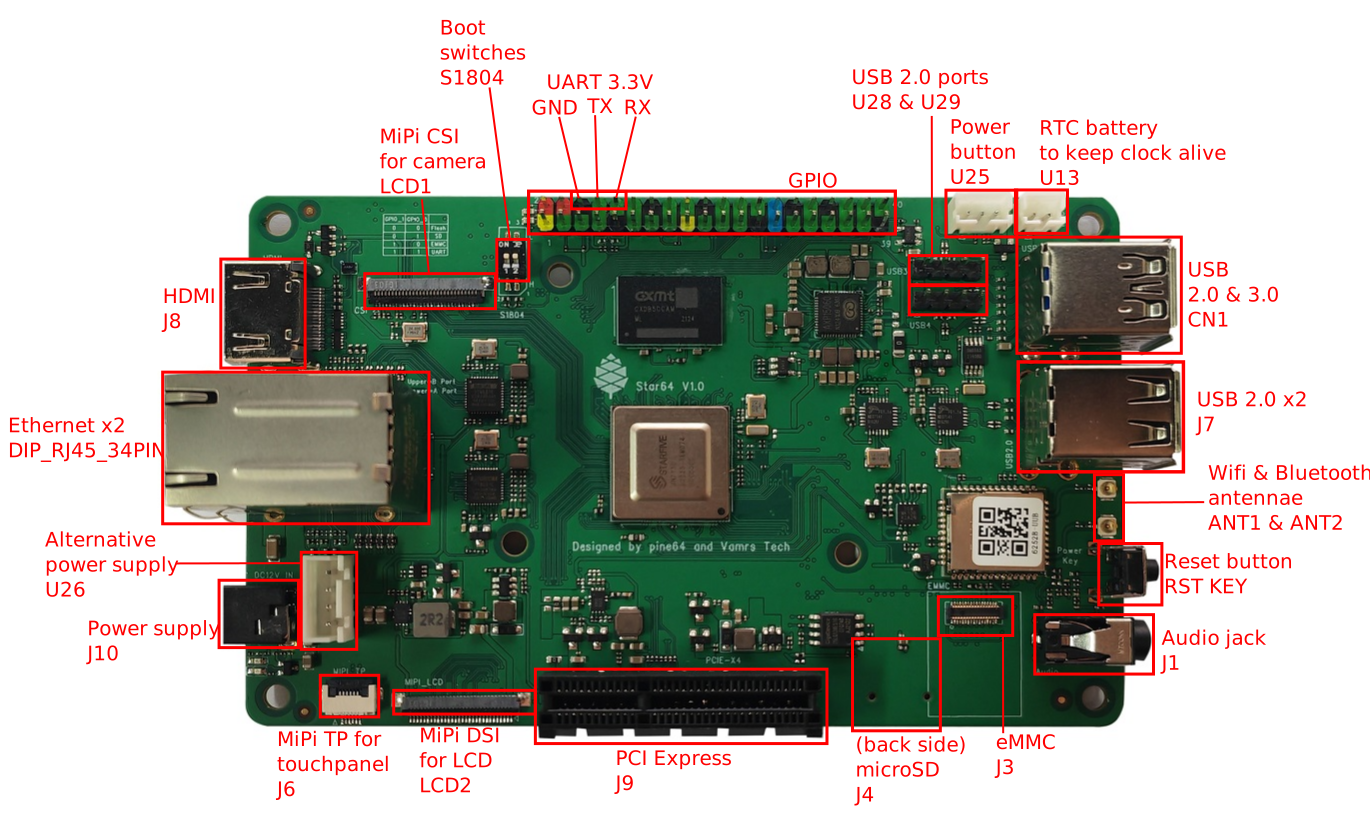
You can interrupt the boot sequence by hitting enter in the process. From there you'll end up in a shell that'll allow you to configure the boot sequence or settings.
Knowing that we can proceed to the OS.
As recommended by the Pine64 wiki page, there is indeed a NixOS-Hardware section dedicated to the Star64.
I want to thank fgaz for the reliable source repo he published.
Don't get me wrong, it is a very good project. As a matter of fact, i tried it, made a github repo that contains most of my research into getting it to work.
This experience to me was very rough, it was the first time for me diving into both how the star64 works on the hardware and how NixOS works. Thus explaining why this repo can be such a mess of a flake, though it granted me valuable skills to handle my production flake.
The downside though, that was an instant turndown for me, was the severe lack of official - up to date - riscv64 package cache (at least at the time).
I did received a lot of help from kind people, both from the NixOS community and people privately reaching out, like Humaid Alqasimi (thanks a lot, if you pass by !). People who proposed me neat additions, custom binary caches to make use of.
But the truth is that such setup would be to complex to setup, i did use a VM with 24 CPU Cores on my proxmox, a NixOS builder, to remotely cross-compile packages, to offload the SBC.
At some point i either encountered errors because of cross-compiling issues, or i would get compilation errors because the patched packages are no longer maintained or straight up broken.
Like they say "the right project, at the wrong time", there were too few binary caches, and thus, i needed to switch to another distro that had some. Even if it meant sacrificing the immutable aspect i appreciate about NixOS.
So based on the wiki, still, i switched to another distro.
DietPi is a modified Debian, with backports activated by default and patches for several Single-board computers. Like its name suggests, it supports a wide variety of SBCs, including Raspberry Pies but other vendor's as well, such as our Pine64 Star64.
Honestly, if i could recommend a distro to install on this device, DietPi would be the one. Since it's debian-based, it's very versatile, while being incredibly stable, even with the backports.
And on top of all this, the distro comes with a few tools to help you monitor and maintain your install.
That's about it for what i gotta say about this distro. And honestly, it's a good point, considering the usage experience could be summed up in "flashing dietpi into an sd card and boot".
Though at this point, having a completely functional system, maintained by active developers on Github, patient and kind people, that provided me and to several others, reliable help, i still wanted to "optimize my install more".
So my quest of distro-hop seemed like over, at least according to the wiki. But i was wrong. There was one distro left. The one many people praise for being lightweight, secure and having so many packages.
I'm of course mentioning...
But this will be a topic that i will cover in its dedicated wiki page, as it's the most up to date entry for that project.
Please check: The Alpine Star64 Wiki page.