
Now introducing VibeServer
Your phone is now the receiver — and anyone can listen to it in a browser.
Turn an Android phone with an RTL-SDR into a receiver anyone on your network can use, from a web browser or from VibeSDR on another phone. Point a browser at the phone and the full client is there — no install, no app.
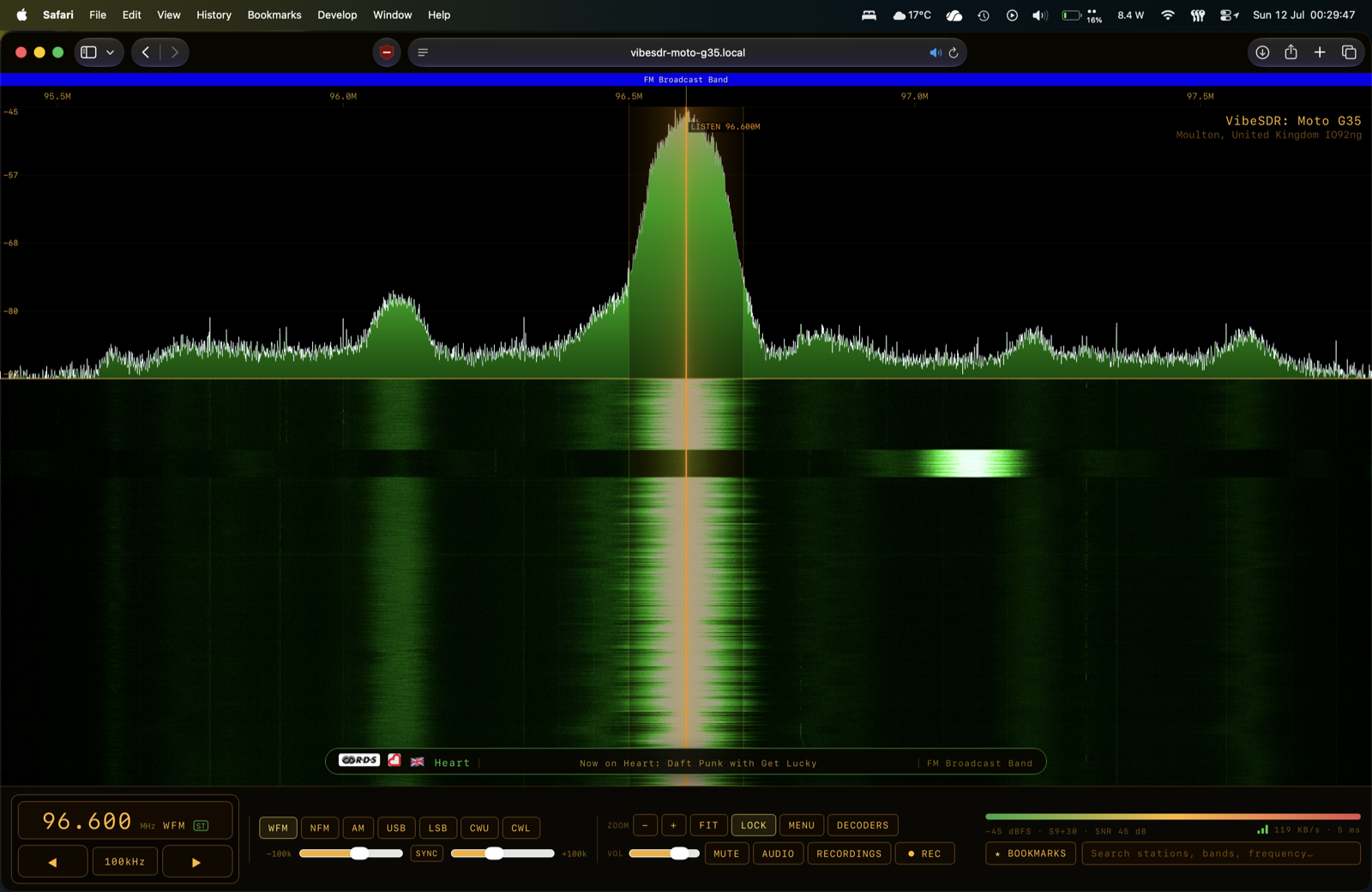
The serving phone does all the DSP and sends compressed audio plus a ready-made waterfall — roughly 25× lighter on the network than raw rtl_tcp — so it works comfortably over Wi-Fi, and over a phone hotspot.
The web client is the real thing, not a cut-down view: the same waterfall and palettes, click-to-tune, panning and cursor zoom, audio with recording, the decoders (RTTY, NAVTEX, WEFAX, SSTV, and FT8 with its map), station search, exportable bookmarks, the band plan, and OS media controls with artwork on the lock screen. Decoders run on the server, as in OpenWebRX, so a browser does no DSP.
- PIN protected by HMAC challenge-response — the PIN never crosses the network. Or run it open on a trusted LAN.
- Turn the web client off entirely and only the VibeSDR app can connect.
- Bandwidth left to the client, or pinned by the server.
vibesdr.local— no IP address to remember. A second phone serving on the same network renames itself.- Survives a crash: if the app is killed while serving, the server rebuilds itself and carries on.
Station bookmarks that learn themselves
The receiver names the stations it can hear. When a station announces itself over RDS, VibeSDR remembers it against the frequency — so the search bar fills itself in with what this aerial actually receives, rather than a schedule of what merely exists.
It keeps itself honest. The PI code identifies the station, so if you move and a different broadcaster is on that frequency, the change is spotted immediately. If a frequency goes quiet, the bookmark expires after 30 days unheard, rather than sitting on top of static forever. And the name is reconstructed by majority vote across repetitions — "H%art", "He%rt" and "H**r%" all vote for Heart — so it recovers names no single transmission ever delivered cleanly, and declines to guess when the signal is too poor to be sure.
Save stations to the receiver (shared with everyone) or to your own browser, and import an existing list — including an UberSDR YAML export — to either.
Custom server — one box reaches every backend
Type any address and VibeSDR works out what's listening: VibeServer, OpenWebRX, KiwiSDR, UberSDR, FM-DX Webserver, rtl_tcp or SpyServer. Local hardware is now RTL-SDR, with Listen and Use as server side by side.
Station logos and flags
Logos and country flags now actually appear — across every backend, and on AM and shortwave too, not only FM. Where the country genuinely can't be known (a station arriving on sporadic-E, say), VibeSDR declines to show a flag rather than showing your own country's.
Fixes
- Entering a frequency in another band now switches the demodulator and span to match — jumping from medium wave to FM used to leave you in AM with a 5 kHz filter.
- The waterfall no longer shows half a minute of stale history after a big jump.
- The lower sample rates (0.96 and 1.2 MHz) no longer break up, and rtl_tcp no longer plays chipmunks.
- Dragging the gain slider no longer breaks up the audio.
- Panning past the tuned station no longer drops audio or crawls.
- Auto-contrast now defaults to 5 (10 was too dark).
Android: install the .apk.
iPhone: the .ipa needs signing — see Installing on iPhone.
Free software under the GNU GPL-3.0.