Repository navigation
NetMeter 1.1.3 preview
Pre-release
NetMeter 1.1.3 preview
NetMeter puts live download and upload speeds in the macOS menu bar. The readout stays aligned as rates change, and you can choose up to three metrics. Settings includes separate font styles for download and upload, usage history, a 14-day chart, and CSV export.
Explore NetMeter and see screenshots.
Download
NetMeter-1.1.3-macOS-unnotarized.zip contains a universal macOS app for Apple silicon and Intel Macs running macOS 15 or later. Unzip it to get NetMeter.app.
Preview build: The app is ad hoc signed and is not notarized. macOS Gatekeeper may block opening a downloaded copy. A Developer ID certificate and Apple notarization are required for a normal public installer; they are not available for this build. If you want to run it now, build from source with the commands in the README.
Highlights
- Transparent, fixed-position menu bar speeds with configurable units, precision, and metric order
- Settings tabs for Font Style and Usage Statistics
- Local daily usage tracking, retention controls, 14-day chart, and CSV export
- Launch at Login, automatic interface selection, and sleep/wake handling
See the app
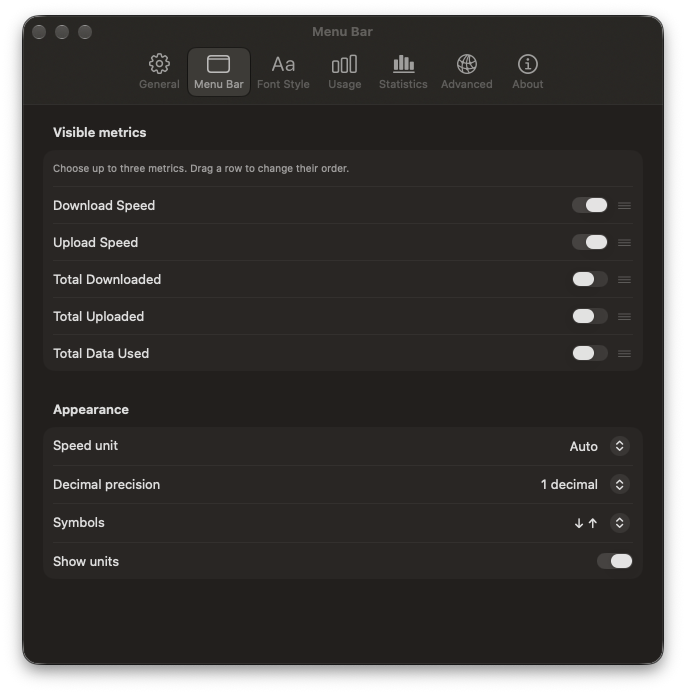
Choose up to three menu bar metrics, then set their units, precision, and order.
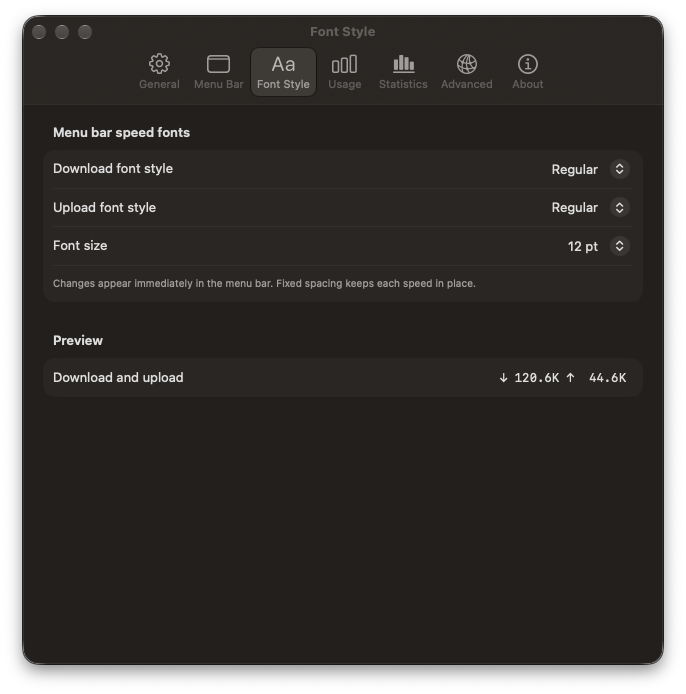
Set separate download and upload font styles and check the live preview. More screenshots show General and Usage settings.
SHA-256 (NetMeter-1.1.3-macOS-unnotarized.zip): 7f4d25a8fbe52c3981c7aa35779dbc3fe0a343922f52988ef96c23005c497d49
The Release build completed successfully, and all 40 core tests passed on macOS.