Releases: SuperWalrus01/LaTeX-Squiggly
Release list
LaTeX Squiggly 0.3.0

The renderer release, for macOS and Windows. The Chrome extension's 0.3.0 is on the Chrome Web Store.
The Windows executable was added on 27 September, after it had run on real Windows in CI.
Try it in the browser first: https://superwalrus01.github.io/LaTeX-Squiggly/
New to it? The guide walks through setup and the renderer: https://superwalrus01.github.io/LaTeX-Squiggly/guide.html
latex_squigglydemo.mp4
Download
| Platform | File | Needs |
|---|---|---|
| macOS 13+ | LaTeX-Squiggly-0.3.0.dmg |
nothing |
| Windows 10+ (beta) | LaTeX-Squiggly-0.3.0-windows-x64.exe |
the WebView2 Runtime, for the renderer only |
| Chrome, Edge, Brave | add it from the Chrome Web Store | nothing |
On macOS, open the .dmg and drag LaTeX Squiggly onto Applications. On Windows, double-click the .exe: there is no installer and it needs no admin rights.
Render LaTeX as an image
Some maths has no Unicode form: a fraction, a matrix, a sum with limits. The new renderer turns it into a picture you can paste anywhere, for the places that do not understand LaTeX.
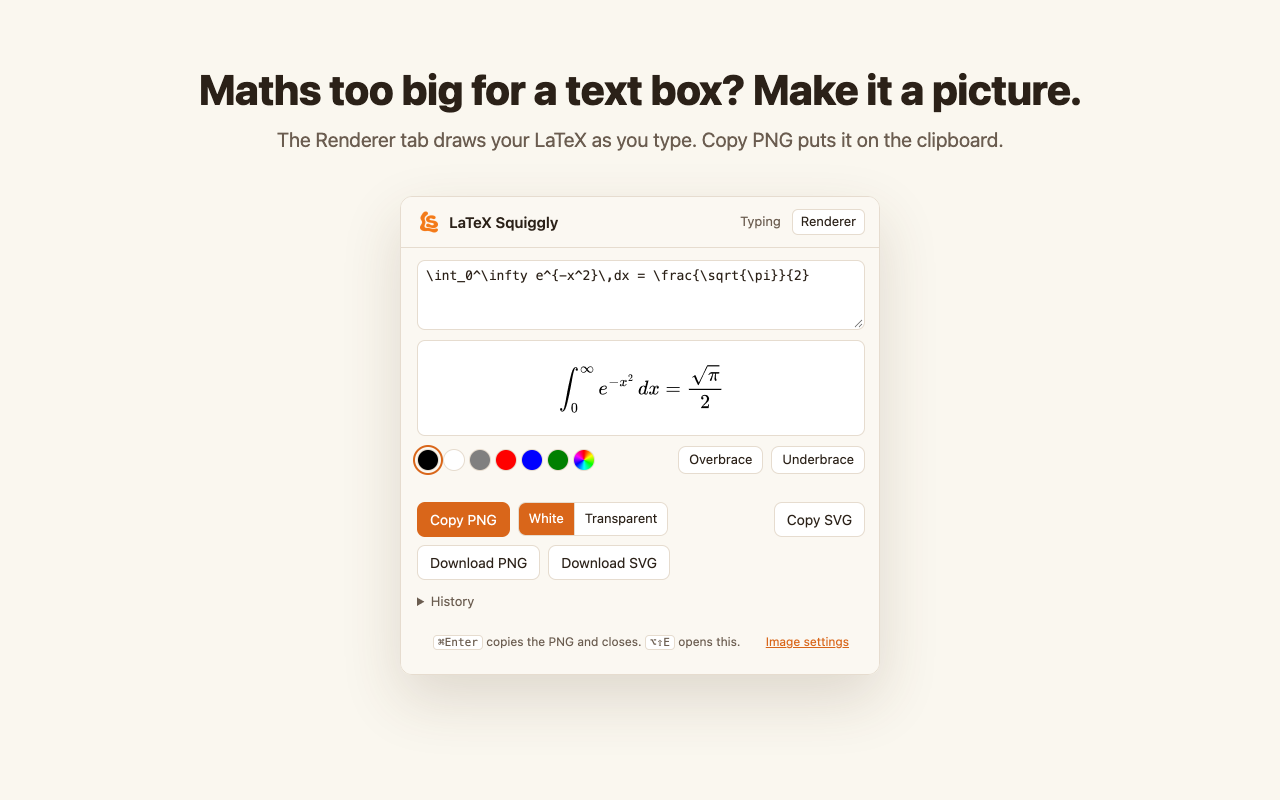
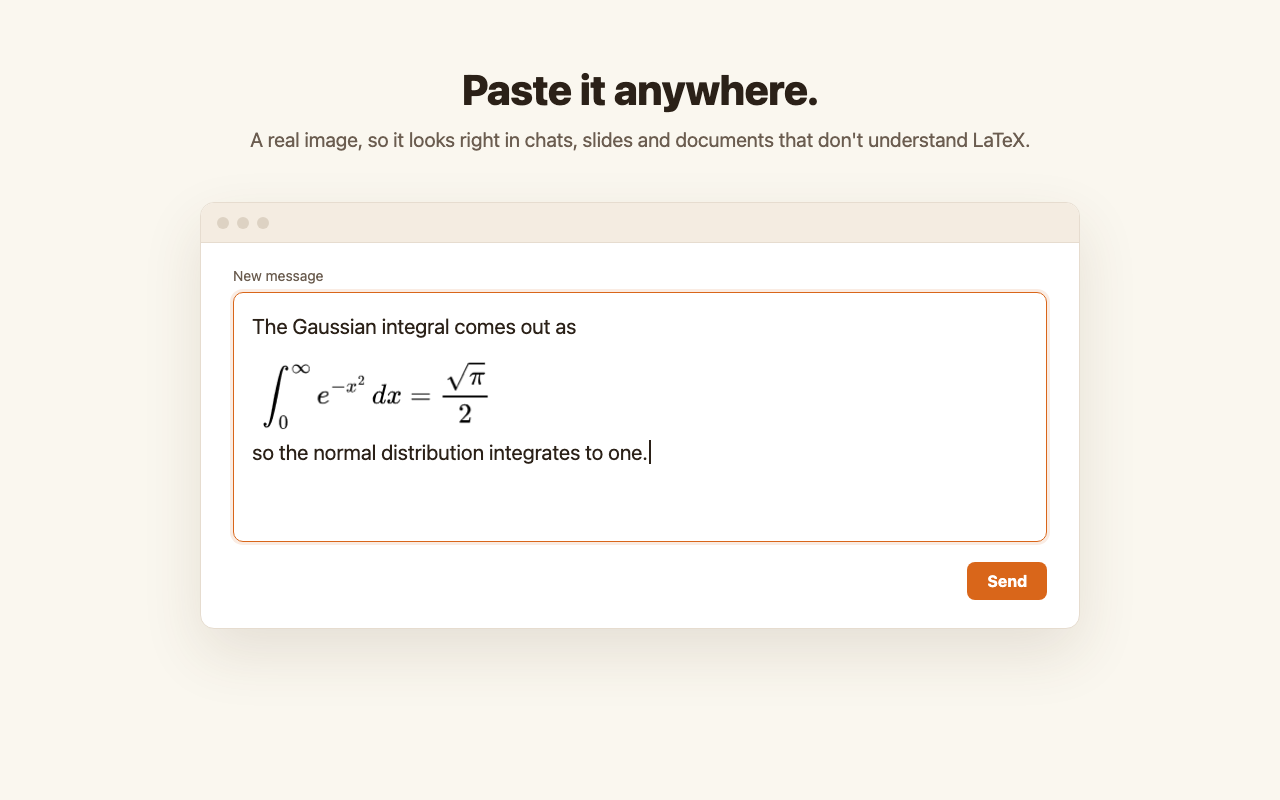
Press ⌃⌥⌘L from any app, or choose Render LaTeX as Image… from the menu bar. Type maths-mode LaTeX and it is drawn as you type. Then:
- Copy PNG, or ⌘Enter, puts the image on the clipboard, closes the window and takes you back to the app you were in, so ⌘V pastes it where you were.
- The PNG pastes at the size you saw in the preview and stays sharp, because the app tells the clipboard its real size. (A browser cannot, which is why a 3× image from Chrome pastes three times too large.)
- Download PNG and Download SVG save through the usual save dialog. SVG is for design tools and web pages; most apps paste it as code, not a picture.
- Esc closes without copying.
It also has autocomplete for commands, closing braces, text colours, Overbrace and Underbrace helpers, and a history of your last 10 equations. Image settings chooses the scale (1× to 4×), a white or transparent background, and your own \newcommand definitions, added to every image.
The shortcut needs no permission and works with conversion switched off. If another app already uses ⌃⌥⌘L, the menu item still works.
On Windows, press Win+Alt+L from any app, or choose Render LaTeX as Image... from the tray menu. Ctrl+Enter copies and goes back to the app you were in, and Word, PowerPoint and OneNote paste the image at the size you saw. It needs the Microsoft Edge WebView2 Runtime, which Windows 11 has and Windows 10 has had through updates since 2021; if it is missing, the app says where to get it. The shortcut is Win+Alt+L because Ctrl+Alt is AltGr on most European keyboards.
In Chrome, it is the toolbar icon's Renderer tab, or Alt+Shift+E, or select LaTeX on a page, right-click, and choose Render selection as image.
MathJax 3.2.2 is included in the app and the extension. The renderer fetches nothing from the internet.
The warning you will see
"cannot be opened". The app is signed, but not notarized, which needs a paid Apple Developer account. Try to open it, then go to System Settings → Privacy & Security, scroll down, and click Open Anyway.
Nothing you type is stored, logged, or sent anywhere. The app holds the last 64 characters in memory only long enough to recognise a command, then forgets them. The renderer keeps your last 10 equations and your image settings on your Mac, and nowhere else.
Windows: "Windows protected your PC". The exe is not code-signed, so SmartScreen warns about it. Click More info, then Run anyway. Your antivirus may also take an interest: the app installs a low-level keyboard hook, the same mechanism a keylogger uses.
On a Mac you can build it yourself in a minute, and an app built on your own Mac is never downloaded, so Gatekeeper never blocks it:
xcode-select --install                  # Apple's Command Line Tools, not Xcode
git clone https://github.com/SuperWalrus01/LaTeX-Squiggly.git
cd LaTeX-Squiggly
scripts/setup-mac-signing.sh            # once, BEFORE the first install
scripts/install-mac-app.sh
Upgrading on macOS, from 0.2.1
Quit from the menu bar, drag the old app to the Trash, install this one. Your settings and exclusions survive: they live in UserDefaults, not in the bundle.
macOS ties Accessibility and Input Monitoring to the code signature, so you may be asked to grant both again. Remove the old LaTeX Squiggly entries from both lists in System Settings first. Left in place they stay ticked and grant nothing, which looks exactly like the new build being broken.
Upgrading on Windows, from 0.2.0
Right-click the tray mark and choose Quit LaTeX Squiggly, then replace the old .exe with this one. Windows will not let you overwrite a running exe. Your settings live in %APPDATA%\LaTeXSquiggly, not next to the exe, so they survive. This build also has the fix for the keyboard hang from 8 September in its source, so building from the repository now gives the same app.
LaTeX Squiggly 0.2.1
A macOS-only release. Windows is unchanged and stays on 0.2.0 — nothing here touches the tray app.
Try it in the browser first: https://superwalrus01.github.io/LaTeX-Squiggly/
Download
| Platform | File | Needs |
|---|---|---|
| macOS 13+ | LaTeX-Squiggly-0.2.1.dmg |
nothing |
| Windows 10+ (beta) | take it from 0.2.0 | nothing |
Open the .dmg and drag LaTeX Squiggly onto Applications. The disk image is a nicer place to do that than it was: a fixed window with the two icons arranged, an arrow between them, and a proper icon on the mounted volume.
Scripts Unicode cannot make
Unicode has a raised n and a raised 2. It has no raised ∞, no raised α, and no way to nest one raised character inside another. So \Sigma_{i=1}^\infty{a_i} is correct LaTeX with no honest inline form, and the app refuses it whole and tells you which character was the problem.
That is still what happens by default, and it is still the right answer. Settings → General → Scripts now offers the other one. On, every part that has a Unicode form gets one, and only the script that has none keeps the way you typed it:
\Sigma_{i=1}^\infty{a_i}   ->  Σᵢ₌₁^∞aᵢ
\int_0^\infty              ->  ∫₀^∞
x^{a^b}                    ->  x^(aᵇ)
It reports itself as a fallback, so the notice still fires and nothing is substituted silently. Three rules it does not bend:
- All or nothing within one script.
x^{1q}givesx^(1q), neverx¹q. Half a script raised and half not reads as a typo. - Parenthesised past one character, for the reason
\fracparenthesises:x^(n+1)says somethingx^n+1does not. - Scripts only.
\vec{v}and\begin{matrix}are still refused outright. A script can be written back in the notation you typed; an accent over a letter and a two-dimensional layout cannot.
Off by default, and worth understanding before you turn it on: the output puts converted characters and raw LaTeX on the same line. Text left alone is always honest about what happened. Mixed text is only sometimes what you wanted.
On the command line it is latex-squiggly -k.
One thing it does not fix
With the switch off, a long expression that cannot convert can still have a fragment of it replaced. \Sigma_{i=1}^\infty{a_i} becomes \Sigma_{i=1}^∞aᵢ, with no message: the whole expression is refused, but the \infty{a_i} tail on its own converts, and the tail wins. Turning the switch on avoids it, because then the whole expression converts and the tail is never reached. Making the refusal final is a separate change and is not in this release.
Excluded Apps and Sites has left the menu bar
The list editor was already in Settings → Exclusions, and a second front door to it only made "what is this configured to do" a question with two places to look. It is now in Settings and nowhere else.
Do not convert in ‹app› stays in the menu. It is the one exclusion that needs the app in front of you to mean anything: a default list cannot know about every TeX editor, and the moment you notice a miss is the moment you are looking at the wrong app.
Under it
The engine now takes a ConversionOptions rather than reading a global, so it stays a pure function of its input and the setting is passed in from the app on every keystroke. It defaults off, which means the 2,030-fragment conformance corpus the Windows port is diffed against regenerates byte-identical: the ported engine is untouched and still in agreement.
40 new checks cover the new path, the rules it must keep, and everything it must not reach. The suite is now 1,749 checks, up from 1,709.
The warning you will see
"cannot be opened". The app is signed, but not notarized — that needs a paid Apple Developer account. Try to open it, then go to System Settings → Privacy & Security, scroll down, and click Open Anyway.
Nothing you type is stored, logged, or sent anywhere. The app holds the last 64 characters in memory only long enough to recognise a command, then forgets them. There is no networking code in the project at all, so there is nowhere for anything you type to go.
You can build it yourself in a minute, and an app built on your own Mac is never downloaded, so Gatekeeper never blocks it:
xcode-select --install                  # Apple's Command Line Tools, not Xcode
git clone https://github.com/SuperWalrus01/LaTeX-Squiggly.git
cd LaTeX-Squiggly
Scripts/setup-signing.sh                # once, BEFORE the first install
Scripts/install.sh
Upgrading from 0.2.0
Quit from the menu bar, drag the old app to the Trash, install this one. Your settings and exclusions survive: they live in UserDefaults, not in the bundle.
macOS ties Accessibility and Input Monitoring to the code signature, so you will be asked to grant both again. Remove the old LaTeX Squiggly entries from both lists in System Settings first — left in place they stay ticked and grant nothing, which looks exactly like the new build being broken.
LaTeX Squiggly 0.2.0
Type \alpha, press space, get α — in any app, now on Windows as well as macOS.
Try it in the browser first: https://superwalrus01.github.io/LaTeX-Squiggly/
The Windows app is a beta
macOS is the build that has been used in anger. Windows is new, has been tested on far fewer machines, and the parts that touch the operating system are a genuine rewrite rather than a port — the keyboard hook, the text replacement and the per-app rules are all different code. The conversion engine underneath is the same one, checked fragment by fragment against the macOS build.
The Windows executable on this release was replaced on 8 September with a build that fixes a hang. If you downloaded it before then, take it again: the earlier one could stop responding and take the system's keyboard with it while it did.
The small Windows build below has not had that fix and should not be used. Please report anything odd, with
%APPDATA%\LaTeXSquiggly\log.txtattached.
Download
| Platform | File | Needs |
|---|---|---|
| macOS 13+ | LaTeX-Squiggly-0.2.0.dmg |
nothing |
| Windows 10+ (beta) | LaTeX-Squiggly-0.2.0-windows-x64.exe |
nothing |
| Windows, small build (beta, outdated — see above) | LaTeX-Squiggly-0.2.0-windows-x64-small.exe |
the .NET 8 Desktop Runtime |
On macOS, open the .dmg and drag LaTeX Squiggly onto Applications. On Windows, double-click the .exe — there is no installer and it needs no admin rights. Take the big Windows build unless the size is a problem; it carries its own copy of .NET, which is why it is 63 MB and why it needs nothing installed. Both Windows builds run on an ARM laptop through the x64 emulation Windows does for itself.
macOS users on 0.1.0 should update
Four bugs in 0.1.0 could damage the text you were typing. All four are fixed here.
- Commands inside commands were mangled. A candidate started at the last backslash, so
\frac{\alpha}{2}was read as\alpha}{2}and you were told your correct LaTeX had a stray brace.\alpha\betareplaced only the beta, leaving\alphaβ, and\left(\alpha\right)was left as\left(\alpha). A fragment now starts at the first backslash of what you have typed since the last space, so it converts whole. - Clicking elsewhere did not clear the buffer. Type
\alpha, click somewhere else in the document, press space, and six backspaces fired at the new cursor and ate your text. Both READMEs claimed a click cleared it. Now it does. - Option-backspace desynced the buffer. It deletes a whole word; the app dropped one character, leaving the delete count larger than the text actually in front of it.
\sqrt[]{8}produced8^(1/)and\sqrt[0]{8}produced8^(1/0). Both are refused now, with a reason.\sqrt[n]{x}still works, because a letter index is a real fractional power.
Plus three that could not damage anything: a notification observer removed by the wrong token, so every enable/disable cycle leaked one; an exclusion list that any future added field would have silently wiped, restoring apps you had removed; and notices appearing on whichever display macOS called main rather than the one you were typing on.
35 new checks cover the gap that let the first bug ship: every trigger test in the suite was a single-command fragment, which is exactly the shape that cannot catch it. The suite is now 1,709 checks.
The warnings you will see, on both platforms
macOS: "cannot be opened". The app is signed, but not notarized — that needs a paid Apple Developer account. Try to open it, then go to System Settings → Privacy & Security, scroll down, and click Open Anyway.
Windows: "Windows protected your PC". The exe is not code-signed, so SmartScreen warns about it. Click More info, then Run anyway.
Windows: your antivirus may take an interest. The app installs a low-level keyboard hook. That is the same mechanism a keylogger uses, so a scanner that judges by behaviour has a fair reason to look twice.
You should be sceptical of any app that asks you to click past a security warning, particularly one that can see your keystrokes. So, plainly:
Nothing you type is stored, logged, or sent anywhere. The app holds the last 64 characters in memory only long enough to recognise a command, then forgets them — the instant one completes, and also whenever you click, press Return, move the cursor, switch app, or change browser tab. There is no networking code in the project at all: it never opens a connection, so there is nowhere for anything you type to go. Nothing is written to disk except your own settings.
You don't have to take that on trust. The source is in this repository, and on macOS you can build it yourself in a minute — an app built on your own Mac is never downloaded, so it is never quarantined and Gatekeeper never blocks it:
xcode-select --install                  # Apple's Command Line Tools, not Xcode
git clone https://github.com/SuperWalrus01/LaTeX-Squiggly.git
cd LaTeX-Squiggly
Scripts/setup-signing.sh                # once, BEFORE the first install
Scripts/install.sh
New: Windows
The same app, in the system tray. Type \alpha and press space.
\alpha            ->  α
\int_5^6          ->  ∫₅⁶
\frac{1}{2}       ->  ½
\frac{\alpha}{2}  ->  α∕2, with a notice saying why it had to go on one line
$x^2$             ->  x²
\vec{v}           ->  nothing at all, and a notice saying why not
It stays quiet where LaTeX source is written: TeX editors, code editors, every terminal, and Overleaf and its cousins in any browser. Anything missed is one click to fix, from Do not convert in ‹app› in the tray menu.
The engine is not a rewrite
It cannot be, or the two platforms drift and the Windows build is quietly wrong about \varsigma until somebody types \varsigma.
The tables are generated, not transcribed: all 202 symbols, 40 superscripts, 32 subscripts, 19 fractions, 33 operators and 49 refusal messages come from the tables the macOS engine uses at runtime. And the port is diffed against the original — 2,030 LaTeX fragments covering every symbol, every script character, every refusal, every fraction shape, the dollar rule, and everything that must stay silent, with both engines required to give the identical answer down to the delete count.
PASS  engine       4060 checks over 2030 fragments,
                   every answer identical to the macOS engine
PASS  suppression    30 checks on the Windows rules
      4090 checks passed.
The build refuses to publish if any of that disagrees.
What is genuinely different on Windows
No permissions to grant. macOS needs Accessibility and Input Monitoring. Windows needs neither, so that whole flow is gone. The cost is that it cannot type into a window running as administrator, because Windows does not let a normal program send input to an elevated one. That is the right trade for something that reads your keystrokes.
Apps are identified by their executable, texstudio.exe, which is what you see in Task Manager and what an installer cannot quietly change.
Browser tabs are identified by window title, not URL. There is no cheap, reliable way to read a URL across every Windows browser, so the window title does the work — an Overleaf tab still says "Overleaf" in its title. This is the same path the macOS app already takes for Firefox, and the same trade: a title match can fire on a page that merely mentions Overleaf, which costs one unconverted command, far less than the miss it prevents.
One thing is better there. macOS has to space out its synthetic keystrokes; Windows takes a whole replacement as a single SendInput call, so there are no pauses and no window in which your next keystroke can land in the middle of one.
What it does, on both
- 202 symbols, plus scripts (
$x^2$→ x²), fractions (\frac{3}{7}→ ³⁄₇) and named operators - Stays quiet in TeX editors and on Overleaf, in any browser, so it never rewrites your source
- Knows the difference between maths and money:
I have $5$ leftis left exactly as typed - Tells you why when something has no plain-text form, instead of silently mangling it
LaTeX Squiggly 0.1.0
Type \alpha, press space, get α — in any app on your Mac.
Try it in the browser first: https://superwalrus01.github.io/LaTeX-Squiggly/
Requires macOS 13 or later.
Download
Get LaTeX-Squiggly-0.1.0.dmg below, open it, and drag LaTeX Squiggly onto the Applications folder.
The app is signed, but not notarized — that needs a paid Apple Developer account. macOS will refuse to open it the first time. To get past that:
- Try to open the app. macOS will say it cannot be opened.
- Go to System Settings → Privacy & Security, scroll down, and click Open Anyway next to the message about LaTeX Squiggly.
That warning exists for a good reason, and you should be sceptical of any app that asks you to click past it — particularly one that can see your keystrokes. So, plainly:
Nothing you type is stored, logged, or sent anywhere. The app holds the last few characters in memory only long enough to recognise a command, then forgets them — the instant one completes, and also whenever you move the cursor, switch app, or change browser tab. There is no networking code in it at all: it never opens a connection, so there is nowhere for anything you type to go. Nothing is written to disk except your own settings.
You don't have to take that on trust. The source is in this repository, and you can build it yourself in a minute.
Or build it yourself — no warnings at all
An app built on your own Mac is never downloaded, so macOS never quarantines it and Gatekeeper never blocks it.
xcode-select --install                  # Apple's Command Line Tools, not Xcode
git clone https://github.com/SuperWalrus01/LaTeX-Squiggly.git
cd LaTeX-Squiggly
Scripts/setup-signing.sh                # once, BEFORE the first install
Scripts/install.sh
open "/Applications/LaTeX Squiggly.app"
Run Scripts/setup-signing.sh first. macOS ties permissions to an app's code signature, and without a stable one you have to re-grant them on every rebuild.
Then: two permissions
The app asks for Input Monitoring (to notice when you type a command) and Accessibility (to replace the text). It needs both — with only the first it could watch you type and do nothing about it.
Stuck? Ask the app what it sees:
"/Applications/LaTeX Squiggly.app/Contents/MacOS/LaTeX Squiggly" --diagnoseWhat it does
- 202 symbols, plus scripts (
$x^2$→ x²), fractions (\frac{3}{7}→ ³⁄₇) and named operators - Stays quiet in TeX editors and on Overleaf, in any browser, so it never rewrites your source
- Knows the difference between maths and money:
I have $5$ leftis left exactly as typed - Tells you why when something has no plain-text form, instead of silently mangling it