Releases: SylonZero/CodePlans
Release list
v0.5.3 — Product archive & hardened authorization

Products can now be archived instead of hard-deleted — the last and most guarded step in the deletion & audit initiative that started in v0.5.1. Every core entity in CodePlans (Task, WorkItem, CodePlan, Release, Asset, Product) now has consistent, authorized, audited deletion: hard-delete where safe, reversible archive where the blast radius is too large to risk getting wrong.
What's new
- Product archive/soft-delete: replaces Product's hard delete — previously cascading to every asset, plan, release, work item, and spec beneath it — with a reversible
archivedAt/archivedById/archivedByKindtombstone, the same pattern proven for Assets in v0.5.2. Archiving touches nothing beneath the product; everything simply stops resolving through the shared access check until restored. - Hardened authorization:
canDeleteProduct— org owner/admin, or the product's creator — now actually gates the archive/restore path. An archived product also stops accepting new writes via MCP. - New MCP tools:
archive_product/restore_product, each disclosing the full blast radius (asset, plan, release, work item, and spec counts) in the response. - UI: the products list's card menu swaps "Delete" for an "Archive" confirmation that shows the real counts and requires typing the product's name before the button enables — the largest blast radius in the schema gets the most explicit confirmation. Archived products move into a collapsible "Archived products" section with a Restore action; the product detail page shows an archived banner with its own Restore button.
- Closed an access-control gap:
updateAssetActionauthenticated the caller but never checked the asset was actually accessible to them — now uses the same accessible-asset guard already used elsewhere in the codebase.
Upgrading
One additive, schema-only migration (0022) adding three nullable columns to products. No backfill needed — existing products are simply unarchived.
pnpm install --frozen-lockfile
pnpm db:migrate
Validation
297 tests passing (10 new this release), pnpm exec tsc --noEmit clean of anything this release touched, pnpm build, and the new migration verified against a real, previously-populated local dev DB — including a live end-to-end pass against real seeded org data (owner/admin/editor authorization checked against real membership rows, archive/restore exercised through the actual mutation path with page renders confirmed against a running dev server).
Implemented in #74, version-tagged in #75.
Full changelog: v0.5.2...v0.5.3
v0.5.2 — Asset archive & attribution visibility
Assets can now be archived instead of hard-deleted: a reversible tombstone that hides an asset from lists, pickers, and Atlas without touching anything that references it. And a gap from v0.5.1 is closed — creator/updater attribution was correctly backfilled in the database but never actually surfaced to anyone reading it.
What's new
- Asset archive/soft-delete: replaces Asset's hard delete with
archivedAt/archivedById/archivedByKind— the same pattern already proven for asset capabilities. Archiving hides an asset from default listing/picker views and Atlas, but never nulls out or unlinks anything pointing at it: work items, tasks, dependency edges, and plan/release links all keep working. Reversible via restore. - New MCP tools:
archive_asset/restore_asset, each disclosing accurate reference counts (work items, tasks, dependency edges, plan targets, release stamps) in the response — so an agent caller can see exactly what still points at an asset before or after archiving it. - New shared authorization rule:
canDeleteAssetinlib/db/authz.ts— org owner/admin, the asset's creator, or a declared asset owner — enforced identically by the UI and MCP, following the same shared-policy pattern established in v0.5.1. - UI: the product page's asset editor now shows an accurate, non-destructive "Archive" confirmation (no more "cannot be undone" language for something that can be undone), plus a collapsible "archived assets" section with a Restore action.
- Attribution now visible, not just stored:
createdById/updatedByIdare exposed through the query layer for plans, tasks, work items, and releases — v0.5.1 backfilled this data correctly, but noget_*/list_*query or MCP tool ever returned it, confirmed live against production.
Upgrading
One additive, schema-only migration (0021) adding three nullable columns to assets. No backfill needed — existing assets are simply unarchived.
pnpm install --frozen-lockfile
pnpm db:migrate
Validation
287 tests passing (13 new this release), pnpm exec tsc --noEmit clean of anything this release touched, pnpm build, and the new migration verified against a real, previously-populated local dev DB.
Implemented across #70–#71, version-tagged in #73.
Full changelog: v0.5.1...v0.5.2
v0.5.1 — Deletion, cascade safety & audit trail
Every core entity in CodePlans can now be deleted safely: consistent confirmation with blast-radius disclosure in the UI, matching delete tools in the MCP API, a real audit trail behind every mutation, and role-based authorization — so deleting something you don't own or didn't create isn't just discouraged by the UI, it's actually blocked, identically, whether the request comes from a person clicking a button or an agent calling a tool.
What's new
- MCP delete tools:
delete_task,delete_work_item,delete_code_plan,delete_release— each returns the affected-row counts (unlinked plans, detached assets, etc.) so an agent caller isn't surprised by a cascade it can't see. - Confirmation everywhere: wired the previously dead-code
deleteCodePlanAction/deleteReleaseActioninto real UI buttons, and added confirmation dialogs to every join/edge removal (asset dependencies, plan-asset targets, release-plan/asset links) that had none before. Every confirm dialog states what else will be affected, not just "are you sure?" - Centralized audit log: every mutation — create, update, delete — now writes to the activity log from one shared place in the mutation layer, so both the web UI and MCP tools are covered automatically. Previously only one code path (WorkItem delete) logged anything, and MCP had zero audit coverage at all.
- Standardized attribution:
createdBy/updatedBynow exist on tasks, products, organizations, and the join tables that lacked them, plus a data migration backfilling attribution on existing rows (from already-reliable legacy fields where available; an explicit org-owner approximation only where nothing else exists, for tasks). - Delete authorization: a new shared library (
lib/db/authz.ts) enforces one rule everywhere — an org owner or admin can delete anything in their org; everyone else can only delete what they created or what's assigned to them. - Fixed a privilege-escalation bug: role-change actions had no server-side authorization check at all — any org member could promote themselves to owner/admin. Now gated to the organization's actual owner.
Upgrading
Run pnpm db:migrate before deploying to apply two additive migrations: attribution columns (0019) and a one-time backfill of created_by_id for existing rows (0020, data-only, no schema change). Both were verified against a real, previously-unmigrated, populated database — not just a fresh schema.
pnpm install --frozen-lockfile
pnpm db:migrate
Validation
270 tests passing (30 new this release), pnpm build, and a disposable real-data migration/backfill verification (confirmed 100% accurate attribution backfill, no foreign-key violations).
Implemented across #60–#68, version-tagged in #69.
Full changelog: v0.5.0...v0.5.1
v0.5.0 — Product Wiki: a searchable story of your system
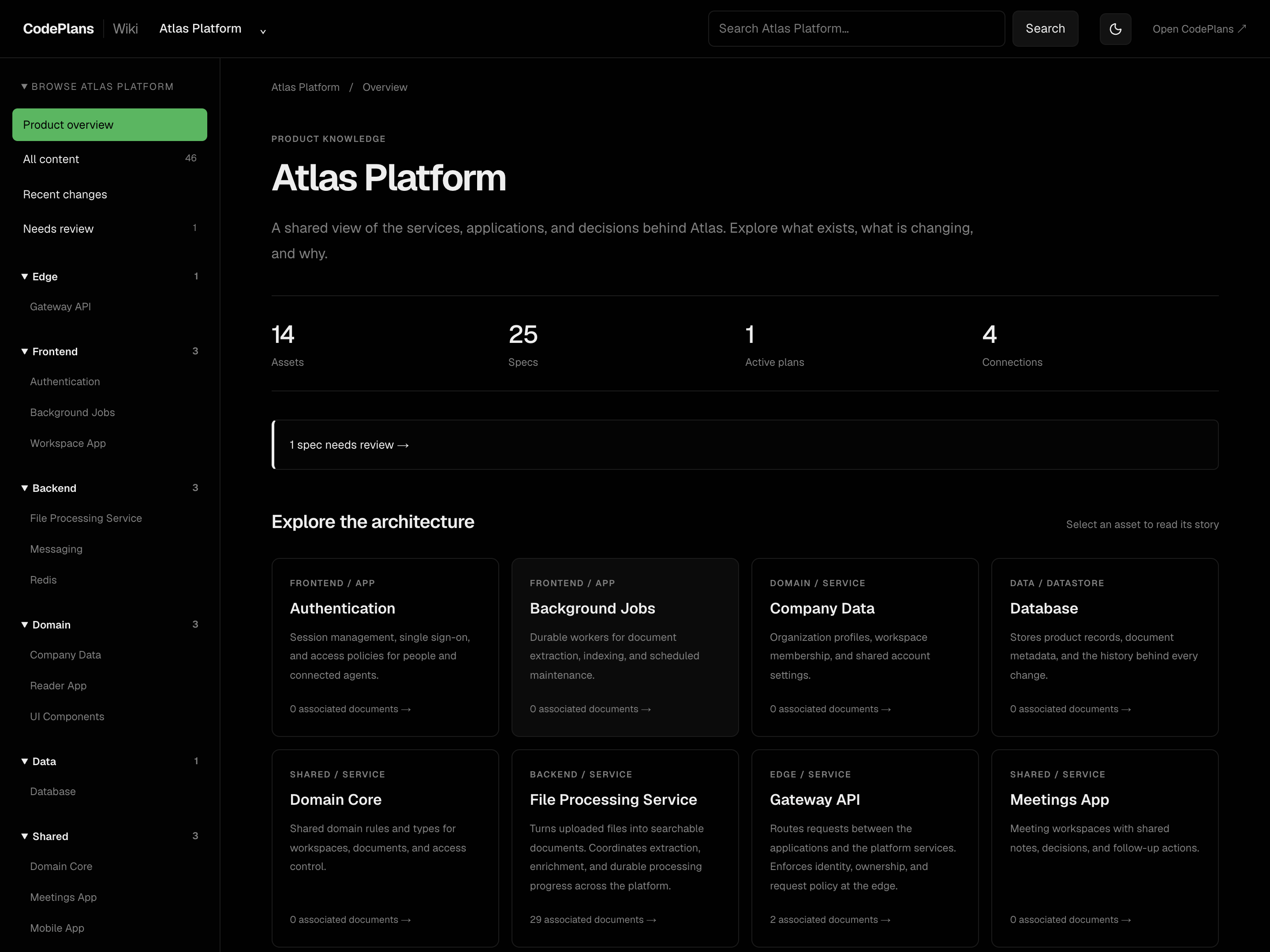
The Product Wiki brings the story of your system into one searchable reading experience: its assets, specifications, decisions, delivery history, and outstanding work.
What's new
- Open Wiki from the main navigation in a separate browser tab, with full-window product overviews, asset pages, and canonical document readers.
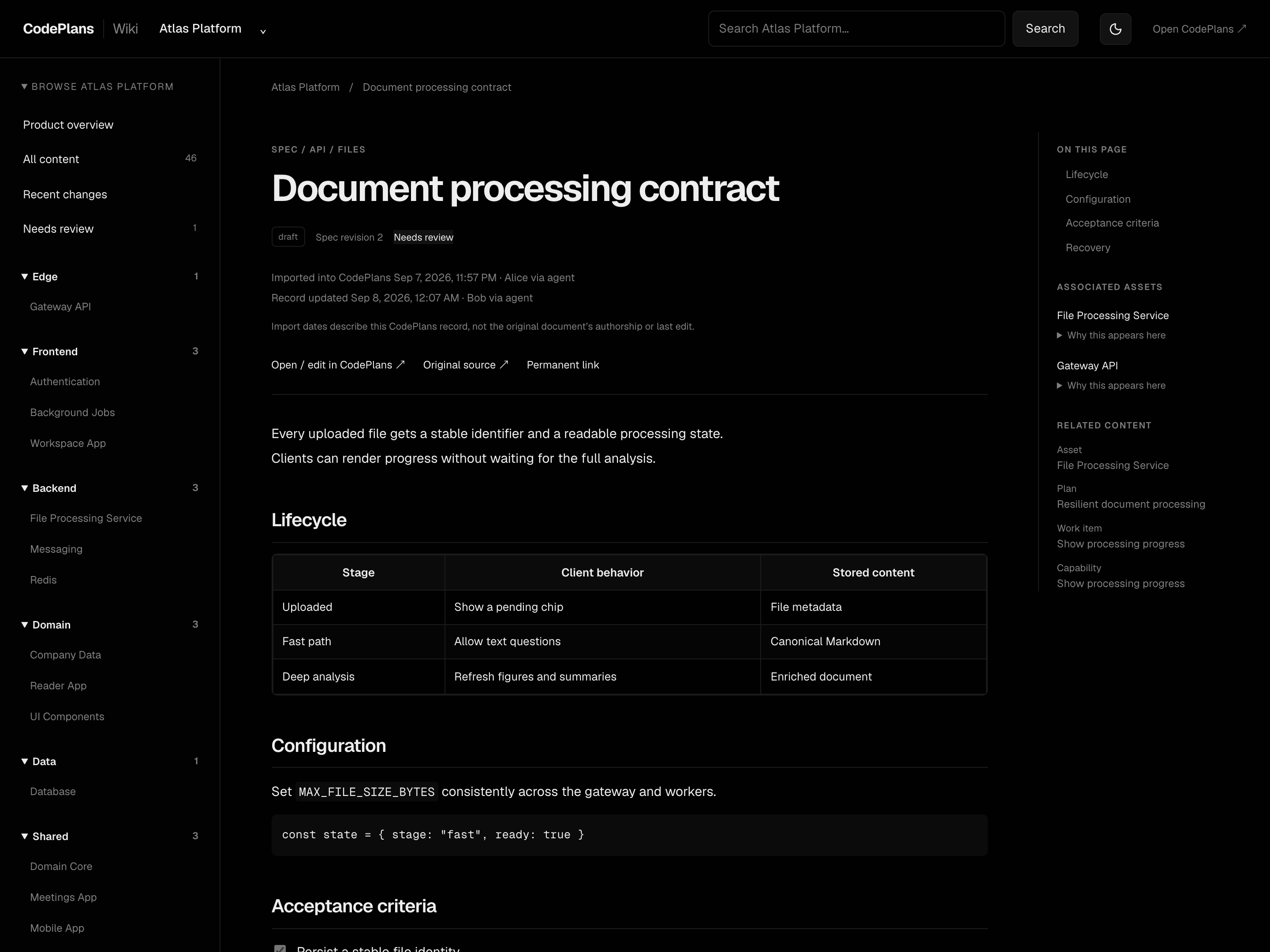
- Explore associated specs, capabilities, notes, plans, work items, tech debt, releases, dependencies, and history, with links explaining how shared documents relate to each asset.
- Search full document content and technical identifiers with ranked excerpts, highlights, pagination, and filters for asset, type, status, area, date, review, and archive state.
- Read formatted GFM tables, paragraphs, line breaks, code, and task lists, with section navigation, heading anchors, and source-relative links.
- See creator and last-editor attribution, timestamps, spec revisions, and delivery receipts. Missing historical attribution is labelled explicitly; shipped asset versions come from explicit shipped-release stamps.
- Browse the updated GitHub Pages walkthrough and README, with four real browser screenshots captured from synthetic Atlas demo data.
Upgrading
Install dependencies and apply the journaled 0018_wiki_attribution migration for SQLite or PostgreSQL before starting the new application:
pnpm install --frozen-lockfile
pnpm db:migrate
Upgrading directly from v0.4.6 also applies the Native Specs migration introduced in v0.4.7. The optional legacy spec URL importer is separate from schema migration.
See the Product Wiki guide. Search currently ranks each authorized product corpus in process. Attribution records creation and the last edit, not a full per-edit audit log or historical body archive.
Validation
The merged feature passed all 233 tests, pnpm build, a disposable real PostgreSQL migration/behavior verification (including repeat migration), and desktop/mobile browser checks. Standalone TypeScript checking retains the same five documented baseline errors; no new Wiki errors were introduced.
Implemented in #55. This release tags the Wiki merge commit and includes Native Specs.
Full changelog: v0.4.7...v0.5.0
v0.4.7 — Native Specs: versioned documents and delivery lineage
Native Specs makes specifications first-class, versioned documents in CodePlans, connecting intended behavior to the capabilities actually delivered.
What's new
- Author and edit product-owned specs with draft, active, and archived states, typed associations, supersession, and optimistic revision checks.
- Link specs to assets, work items, and plans. Capability graduation pins the source spec revision, keeping delivered coverage distinct from newer intent.
- Use native spec readers, editors, asset tabs, and plan/work-item panels, plus seven new MCP tools (49 total).
- Render Markdown consistently across full pages and side panels, including paragraphs, line breaks, GFM tables, task lists, and fenced code.
- Import legacy spec URLs with product-scoped deduplication, provenance, review flags, failed-fetch placeholders, and safe reruns that preserve later native edits.
Upgrading
Install dependencies and apply the journaled 0017_native_specs migration for your configured SQLite or PostgreSQL database before starting the new application:
pnpm install --frozen-lockfile
pnpm db:migrate
Existing URL-based specs remain readable. To import them into native documents, preview the report first, replacing YOUR_PRODUCT_ID with the product ID:
pnpm specs:migrate --product=YOUR_PRODUCT_ID --dry-run
# After reviewing the report:
pnpm specs:migrate --product=YOUR_PRODUCT_ID --apply
See the Native Specs guide. Native Spec v1 retains the current body and revision; historical body diffs and Git write-back are not included.
Validation
The merged feature passed 222 tests, a production build, browser checks, and a disposable real PostgreSQL migration/behavior verification, including a second migration run. Standalone TypeScript checking retains five previously documented baseline errors; the feature introduced no new ones.
Implemented in #54. This release tags its merge commit, before the Wiki feature.
Full changelog: v0.4.6...v0.4.7
v0.4.6 — Layers & model boundaries

Between a product and its assets there is room for interpretation — and a well-modeled single-product instance (one product, 40 assets) got a one-column Atlas and no way to refactor its model. v0.4.6 fixes that with a rule, a field, and a tool.
The rule (now in the concepts guide and inside the MCP modeling guide): a product is something you ship, version, and grant access to as a unit; an asset is something you change. When in doubt, fewer products with more assets — assets are movable, products are commitments.
Highlights
- Asset layers — a
layerfield describing where an asset sits inside its product (taxonomy: edge / frontend / backend / domain / data / infra / shared). Unset layers display a sensible default from asset type — no migration, no backfill - Atlas layer columns — a Columns: Product | Layer toggle on the map, auto-switching to layers when a single product is in scope. Deep single-SaaS systems now get a real architecture map instead of one tall column
move_asset— model refactoring with honest semantics: blocked while open plans target the asset (the error lists them), work items follow the asset, and history — release stamps, completed-plan links, capabilities — is preserved untouched- MCP guidance —
get_modeling_guidenow carries the boundary rule, worked examples, the layer taxonomy, and a model-refining recipe; boundary heuristics live in the create_product / create_asset descriptions. 42 tools total - Layer surfaced in the asset edit panel, detail header, Atlas grid cards, and a sortable table column; demo seed ships explicit layers
- 5 new tests (206 total)
Also since v0.4.5: the concepts guide ("How CodePlans Thinks") and the Asset Atlas + layers-and-boundaries specs joined the docs site.
Next (v0.4.7): agent-driven reconciliation proposals — the asset record verified against the code it describes.
v0.4.5 — Asset Atlas: a live system map of your architecture
Assets are the main work surface in CodePlans, but they were only reachable through a product. v0.4.5 gives them a first-class home.
Highlights
- Assets in the sidebar — a new top-level view of every asset across your architecture, respecting the global product scope
- The Map — a system diagram drawn live from your inventory and dependency edges: products as columns, assets as nodes with shipped-version chips, edges styled per dependency type. No diagramming tool to keep in sync — it is your data
- Lenses — recolor the same map by Health, Debt, or Activity; one diagram, three instruments
- Blast radius on hover — hovering an asset lights up its dependency edges and neighbors and dims everything else; click through to the asset's record
- Grid & Table views — cards with debt-score bars and capability counts, and a sortable table (name, product, debt, active plans, last shipped)
- Search by name/tag plus type and health filters, with a stats strip up top
- New
getAssetInventoryquery powering it all; 3 new tests (201 total)
Also in this release line since v0.4.4: the Overview-tab pattern rolled out to asset, plan, and release detail pages, and app screenshots + an interactive tour on the docs site.
Next (v0.4.6): agent-driven reconciliation proposals — the asset record verified against the code it describes.
v0.4.4 — Asset Record Phase A: the capabilities register
Phase A of the Asset Record spec: every asset now carries a Record — a register of what it actually does today, built only from delivered work.
Highlights
- Record tab on asset detail — capabilities with delivery lineage chips (work item → plan → release version), verification freshness dots, expandable markdown descriptions, and derived Known issues / Debt register sections
- Graduation — resolved feature/enhancement work items graduate into the record with one click (a candidates banner surfaces them); graduation is idempotent and carries full lineage receipts
- Tombstones, not deletes — removing a capability moves it to a struck-through Previously section with a reason; "used to do X" is record too
asset_capabilitiestable (PG + SQLite) — origin FKs areSET NULLon delete, but theoriginSummarytext lineage survives- 2 new MCP tools —
get_asset_recordandgraduate_work_item(41 tools total), so coding agents can read an asset's current-state record and keep it complete - Demo seed — graduates two resolved features with full lineage (one verified, one not)
- 8 new tests (198 total)
Next up (v0.4.5): agent-driven reconciliation proposals — the record verified against the code it describes.
v0.4.3 — AI drafting (feature-flagged)
Phase D of the releases-and-asset-history spec — the final phase.
- AI drafting, off unless
ANTHROPIC_API_KEYis configured (AI_ENABLED=falseforce-disables; model viaAI_MODEL, defaultclaude-opus-5). - Draft release notes: composes the release's derived rollup (assets/versions, plans, work items) into grounded markdown — opened in an editor and saved to the description only on explicit confirm.
- Draft design note from plan: fills the design-note panel's title/body from a completed plan's context for review before adding.
- Drafts always land in an editor, never auto-published; refusals and empty drafts surface as errors.
See docs/specs/releases-and-asset-history-spec.md (Phase D) and PR #39.
v0.4.2 — Version-structured history, design log & MCP release tools
Phase C of the releases-and-asset-history spec, plus the Phase-B deferrals.
- Version-structured history: shipped releases render as version tick marks in the asset History timeline, with a sticky version ladder; the asset header shows the current version.
- Asset design log (
asset_design_log): curated notes on what a change meant for an asset's design, anchored to a release and/or plan, with user/agent attribution (agent badge), expandable markdown, and an authoring side panel. - Plan-side release picker: "ships in" selector on plan detail.
- MCP: 28 → 39 tools: release lifecycle management,
get_asset_history, andrecord_design_note— whose description guides coding agents to record a design note per significantly changed asset after completing a plan. Shipped releases are rejected for mutation at the tool layer.
See docs/specs/releases-and-asset-history-spec.md (Phase C) and PR #38.