Repository navigation
Home
Русская версия: Home-RU
This tool is for personal automation and testing on your own machine. Do not use it for unauthorized access.
Give the agent "this" — and it gets a real PC.
Screen, mouse, keyboard, your browser, files, terminal, SSH — via the model's native tools.




RU README: Russian version · Skills: SKILL.md · IDE matrix: docs/IDES.md
Video overview · direct link
- What it is
- Why AiPC
- Read this first: risks
- Quick start
- The
aipcmenu - 70 tools
- Token efficiency
- MCP connection
- Self-update
- Safety
- What can go wrong
- Troubleshooting
- Project structure
- Build from source
- License
AiPC is a local service + console utility that gives any AI agent full access to your computer over the open MCP (Model Context Protocol) standard.
[ Agent in any IDE ] --MCP/stdio--> [ AiPC-Core: one local service ]
                                            |
        +------------------+----------------+------------------+
        |                  |                |                  |
      Vision            Control          Browser           System/Net
   screenshots,      mouse+keyboard,  your Chrome via    files, terminal,
   UI tree,           apps,            CDP + history,     processes, SSH,
   windows            clipboard        JS eval           search, sysinfo
The agent stops being "text in a chat" and starts working like a human at the PC: it looks at the monitor, clicks, types, opens apps, googles in your browser, runs commands, uses SSH — and verifies every step with a new screenshot.
If a model says "I have no computer access", the built-in system prompt
(aipc/server.py:SYSTEM_PROMPT, also served as the aipc_instructions MCP prompt)
tells it to use the tools when they are available — or honestly say what's missing.
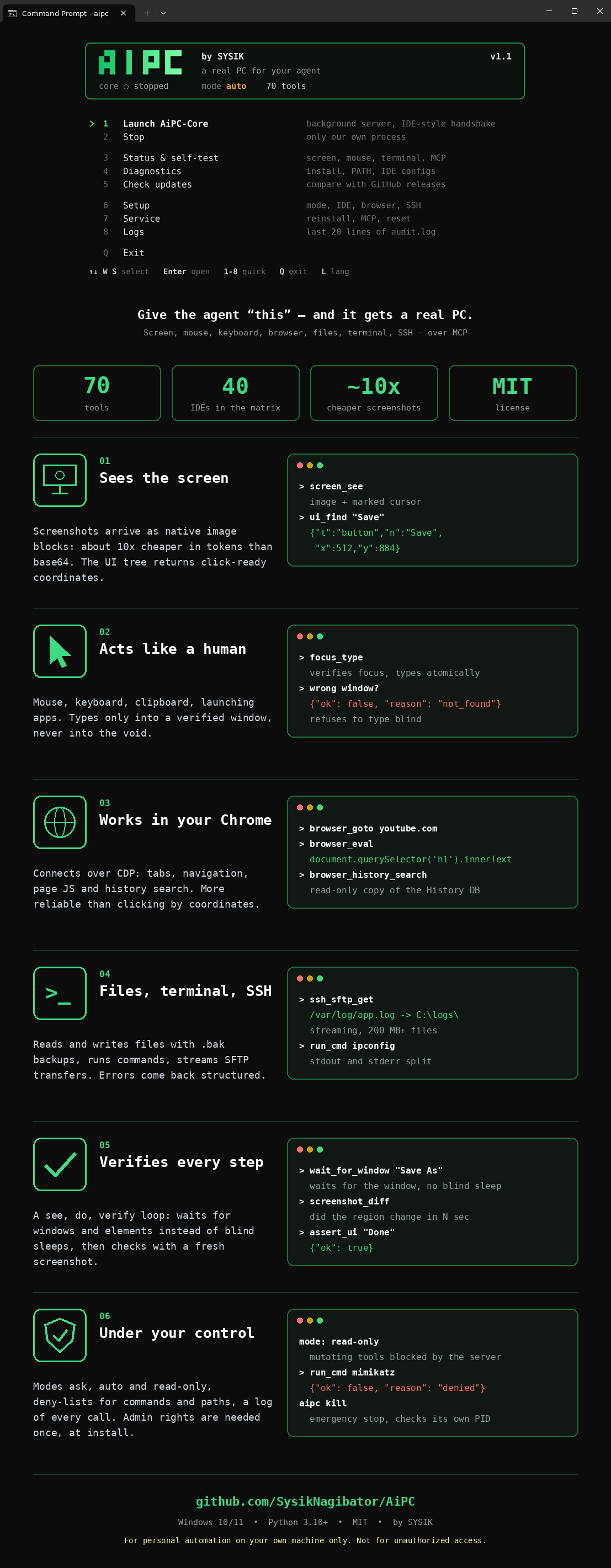
| Usual agent limits | With AiPC |
|---|---|
| Blind: no screen |
screen_see — screenshot as a native image block, cursor marked |
| Clicks by guessing |
ui_snapshot / ui_find — ready-made x/y coordinates (0–1000) |
| Typing into the void |
focus_type — verified focus + atomic typing; refuses to type blind |
| Sleeps and hopes |
wait_for_window / wait_for_ui_element / wait_for_change
|
| "Did it work?" unknown |
screenshot_diff, assert_ui, logs_tail, audit.log
|
| No machine access | Files, terminal, processes, SSH/SFTP, browser, clipboard |
| Token burn on screenshots | Native image blocks (~65 chars + image vs 55K chars of base64) |
AiPC gives an AI model real control over your PC: it sees the screen, moves the mouse, types, runs terminal commands, reads files, uses SSH. That is the point — and the risk.
- Keep the default
askmode: the server shows you a Yes/No dialog for every dangerous action. The model cannot click "Yes" for you. - Never switch to
autofor tasks involving strangers' files, links or email attachments — prompt injection is real (seedocs/THREAT_MODEL.md). - Know the kill switch:
aipc panicor Ctrl+Alt+Shift+K freezes everything. - This tool is for your own machine (see the note at the top).
Windows: download AiPC_Win_1.1.exe from Releases and double-click it.
| Step | What to do |
|---|---|
| 1 | On first run it sets everything up itself: asks for admin once (UAC) → copies itself to C:\Program Files\AiPC\ → adds the aipc command to PATH → opens the menu (MCP registration into IDEs is explicit: aipc install --ide cursor or menu → Settings → Connect IDE) |
| 2 | In your IDE refresh MCP servers (Refresh / restart) and give the agent a plain-language task |
macOS / Linux: binaries come from the same Releases page (AiPC_macOS_*, AiPC_Linux_*), or install from source:
pip install git+https://github.com/SysikNagibator/AiPC.git   # or: pipx install git+https://github.com/SysikNagibator/AiPC.git
aipc mcp                 # MCP command for your IDE
aipc install --dry-run   # preview IDE changes before applying
The exe above is just the convenient bundle. On macOS grant Accessibility + Screen Recording when asked; on Linux prefer an X11 session (Wayland blocks synthetic input) — details in
docs/PLATFORM.md.
Example tasks:
look at my screen, what is this error?
open YouTube and find a review of ...
connect via SSH to 192.168.1.10 and fetch yesterday's log
Works with any tool-capable 2026 model: claude-opus-5-5, gpt-6-astra,
gpt-6-sol / luna, gemini-3.8-flash, claude-fable-5-1.
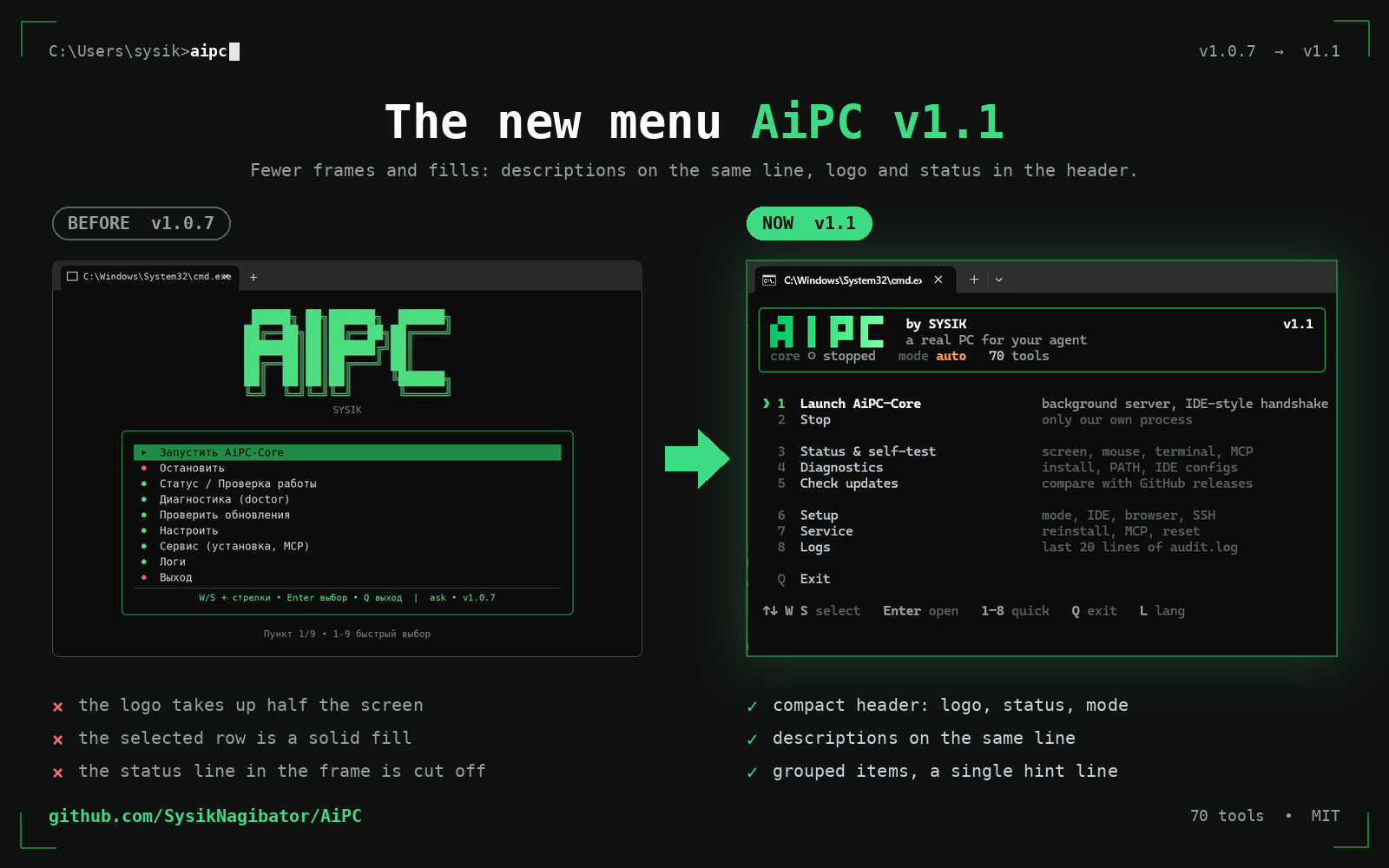
Open a regular cmd and type aipc. One rich.Live frame in an alternate
buffer, redrawn only on events — no flicker, no leftover lines. A rounded card
holds the logo, slogan and status (core ● running, mode, tools count);
below it a frameless numbered list with inline descriptions, groups split by
blank lines, the ❯ marker on the selection (danger items turn red when
selected, no fills anywhere). One dim footer line with the keys.
Controls: W/S, arrows ↑/↓, Home/End, Enter open, digits 1–8
quick select, Q exit, L toggles language (wraps around the edges).
Russian layout works by key position. Themes: green/mono/amber
(Setup → Theme), NO_COLOR and ASCII fallback respected. Narrow windows hide
descriptions automatically; a background check notifies about new releases.
| Item | What it does |
|---|---|
| Launch AiPC-Core | Background server, IDE-style handshake |
| Stop | Only our own process |
| Status & self-test | Screen, mouse, terminal, MCP |
| Diagnostics | Install, PATH, IDE configs |
| Check updates | Compare with GitHub releases |
| Setup | Mode ask/auto/read-only, IDE, browser (CDP flag), SSH hosts, language, theme |
| Service | Reinstall + PATH, reconfigure MCP, kill Core, where-am-I info |
| Logs | Last 20 lines of audit.log
|
| Exit | — |
No menu at hand? Same actions as commands:
aipc update, aipc doctor, aipc kill, aipc keys (keyboard diagnostics),
aipc status, aipc selftest, aipc setup, aipc install, aipc mcp.
Vision (18): screen_see, screen_region, screen_burst, window_shot, pixel_color, ui_snapshot (active window by default:
0.69s / 17 nodes vs 1.7s / 200 desktop), ui_find, assert_ui, windows_list,
window_focus (verified), window_manage, window_find, get_active_window,
wait_for_window, wait_for_ui_element, wait_for_change, screenshot_diff, screen_info.
Mouse & keyboard (19): mouse_move/click/drag/double_click/right_click/middle_click, mouse_position
(drag with ctrl/shift/alt), scroll, type_text (auto-chunked, Cyrillic-safe),
press_key, key_down/up, clipboard_set/get (+images), sleep, open_app,
focus_type (verified focus + atomic type — the only correct way to type).
Browser (6): browser_tabs, browser_goto, browser_eval (JS via CDP —
more reliable than coordinate clicks), browser_active_tab, browser_close_tab,
browser_history_search (read-only copy of the History DB).
Files & system (13): fs_list/read/write/find/stat/mkdir/delete/move
(atomic writes + .bak, binary guard, pagination, deny-lists),
run_cmd (split stdout/stderr, Russian OEM decoding, deny-list),
process_list/find, wait_for_process, download_file (streamed, no size cap).
Network & machine (7): web_search_pc, ssh_exec, ssh_sftp_get/put
(200 MB+ friendly streaming), sys_info (battery/memory/CPU/disks),
net_check, env_get (refuses secret-like names).
Human & debug (4): notify_user (popup, non-blocking), ask_user (Yes/No,
blocks for a human decision), aipc_status, logs_tail.
Audio (1): audio_listen (loopback — system sound, or mic; 1-30 s, WAV,
native audio block or saved file).
Video (2): video_info (duration/size/fps/codec), video_frames
(1-12 frames as image blocks — watch a clip frame by frame).
Agent loop: see (screen_see) → do → re-see to verify.
Errors are structural: {"ok": false, "reason": "not_found|timeout|denied|..."}.
Every call runs exactly once, serialized; every call lands in ~/.aipc/audit.log
(2 MB rotation).
- Screenshots travel as native MCP image blocks: ~65 chars of JSON + image
instead of ~55K chars of base64 text (~10x cheaper per screenshot).
raw=truereturns legacy base64 if a client can't render images. - UI nodes are compact:
{"t","n","x","y"}instead of long keys. -
ui_snapshotdefaults to the active window; role/name filters cut tokens further. - Prefer search over listing:
ui_find/window_find/fs_find/process_find. - All tool descriptions fit in one short line.
-
Profiles (
aipc mcp --profile ...):minimal(12 tools: see→do→verify loop),browser(20 tools: + web),full(70, default). Measured tool-schema size: full ~12.9K chars, browser ~3.8K, minimal ~2.5K (−81% vs full).
AiPC registers itself on every menu launch (19 configs across 14 IDE families). Manual reference format:
{
  "mcpServers": {
    "aipc": {
      "command": "C:\\Program Files\\AiPC\\AiPC_Win_1.1.exe",
      "args": ["mcp"]
    }
  }
}
Full 40-IDE matrix (auto / preset / bridge): docs/IDES.md. Ready-made files: mcp_presets/. Skill-style install: SKILL.md.
Cloud IDEs without localhost access (Claude.ai, Manus, Devin, Bolt, v0, Lovable,
Replit…) can't reach 127.0.0.1 — see the "Bridge" section in docs/IDES.md.
Menu → "Check updates" (or aipc update): compares with the latest GitHub release,
shows the changelog, and only with your explicit Yes downloads and reinstalls
itself (UAC). Version is always visible in the menu title; aipc doctor flags
a stale install in Program Files.
| Mode | File writes/deletes | Commands/SSH | Typing in password managers | Who decides |
|---|---|---|---|---|
ask (default) |
popup to YOU | popup to YOU | popup to YOU | human, every time |
auto |
allowed | allowed | allowed | model (except after untrusted input — taint-guard asks) |
read-only |
blocked server-side | blocked server-side | blocked server-side | nobody |
- Modes:
ask(default — the server pops a Yes/No dialog to YOU for every file-write/delete, command, SSH, download, browser-JS call; the model cannot bypass it; silence for 120 s = denied),auto(no dialogs),read-only(all mutating tools blocked server-side, not just by prompt). - Risk classes: every tool is tagged
read/interact/mutate/exec/network(policy.TOOL_RISK). read-only passes onlyread; ask confirmsmutate/exec/network; typing/clicking inside password-manager, crypto-wallet or banking windows also asks. The dialog offers time choices — once, 10 min, 1 hour (safety.allow_presets) — never forever. -
Honest note: deny-lists only reduce risk, they are not a security
boundary (obfuscation always evolves). The real boundary is modes +
server-side confirmations. For strict setups use
run_cmd_policy: allowlist— only listed command prefixes run, everything else asks. - Admin rights needed once — copying into Program Files + writing PATH.
- Deny-lists for commands (mimikatz, ransomware patterns, encoded PowerShell,
quotes/
^/env-var/chain-obfuscation normalized) and paths (browser secrets, private keys, hives,System32) live in~/.aipc/config.yamland auto-upgrade (safety.version) without wiping your additions. Paths insiderun_cmd(type ...\Login Data) are checked too. - Typing goes only into a verified foreground window (
focus_type). - Secrets guard:
env_getrefuses*KEY/*TOKEN/*SECRET/*PASSWORD*names. - Emergency stop: menu → Stop, or
aipc kill(verifies the PID is ours first).
-
Prompt injection: a web page, document or chat message tells the agent
to delete/send/run something. Mitigations:
untrustedmarkers, taint-guard confirmations,askby default. Still — read the confirmation dialogs. -
Wrong window, wrong click: the agent acts on what it sees; a changed
layout means a wrong button.
focus_typerefuses to type blind, but stay nearby for destructive tasks. -
Update without signature:
aipc updatedownloads an exe checked only for the MZ header. Don't update over hostile networks. -
Secrets in context: the agent may paste a token it read into chat.
audit.log,env_getandfs_readmask known patterns; everything else is your eyes on the screen.
Full version: docs/THREAT_MODEL.md.
| Symptom | Fix |
|---|---|
| Model says "no PC access" | Reconnect MCP (Refresh / restart IDE), remind: "you have aipc.* tools, start with screen_see" |
| Menu doesn't respond to keys | Run aipc keys, press W/S/arrows/Enter/Esc — paste the 5 lines to us |
aipc command unknown |
Open a new cmd (PATH applies to new shells); reinstall via dist\aipc.exe
|
| Right wall of the menu drifts | Update: frames render only via fixed-width rich.Panel since 1.0.4.4 |
| Chrome tabs invisible | Menu → Setup → Browser (adds --remote-debugging-port=9222), restart Chrome |
| Old version in Program Files |
aipc doctor tells you; run fresh dist\AiPC_Win_1.1.exe → UAC → updated |
| MCP not in IDE | Run aipc install --list-ides, then aipc install --ide cursor (or --all); preview with --dry-run
|
| Remove AiPC |
aipc uninstall (removes our MCP entries, PATH, Program Files copy; --yes for scripts) |
| GitHub page/API 404s or rate-limits | Wait a minute and retry; check your token scopes and proxy; if the outage persists, open an issue with the timestamp |
AiPC/
  aipc/            # server.py (MCP) · vision/control/os_ops/browser/net/sysinfo
                   # notify · installer (self-install + 19 IDE configs)
                   # maintenance (update/doctor/kill) · menu · policy/audit
  mcp_presets/     # ready-made MCP configs (16 files)
  assets/          # logo (AiPC_Logo.svg/png) + app icons: AiPC.ico (Windows),
                   # AiPC.icns (macOS) — visible on light and dark themes;
                   # AiPC_promo*.mp4 — video overviews (EN/RU) for README
  tools/           # build_exe.bat · build_icon.py · sign.bat · version_info.txt
  tests/           # pytest: policy, installer merge, server (19 tests)
  docs/            # IDES.md (40 IDEs) · SIGNING.md (SmartScreen)
  SKILL.md         # one-file skill install · CHANGELOG.md · LICENSE (MIT)
python -m pip install -r requirements.txt
python -m pytest tests -q
python -m aipc selftest
tools\build_exe.bat
Output: dist\AiPC_Win_1.1.exe (~36 MB, icon + publisher version-info) and dist\AiPC-Setup.exe.
Signing away the blue SmartScreen: see docs/SIGNING.md (needs
a code-signing certificate: Certum Open Source ~€25/yr is the cheapest start).
MIT. Author — SYSIK. See LICENSE.