Getting Help
If the wiki didn't answer your question, here is where to ask, and how to ask so you get a fast, useful answer. Before opening a new issue, please check the FAQ, Troubleshooting-Common, and Troubleshooting-Settings-Startup-GPU — most problems are already covered there.
- Where to get help
- How to file a good bug report
- How to collect logs
- Reporting a crash
- Requesting a feature
- Security issues
| Channel | Best for | Where |
|---|---|---|
| GitHub Issues | Reproducible bugs, with logs attached | https://github.com/Taiizor/Sucrose/issues |
| GitHub Discussions | Questions, ideas, "how do I…", general help | https://github.com/Taiizor/Sucrose/discussions |
| Discord | Real-time community chat and support | Linked from the project README / _Footer
|
| The Store | Finding and reporting community wallpapers | In-app Store (see Using-Store) |
| Official website | Downloads, news, mirrors |
https://sucrose.soferity.com and https://taiizor.github.io/Sucrose
|
Notes:
- Blank issues are disabled. Use one of the issue templates (Bug report / Feature request). For open-ended questions use Discussions instead of Issues. See Contributing.
- For contribution questions (building, conventions, PRs) start with Contributing and Building-From-Source.
A good report lets a maintainer reproduce the problem without a back-and-forth. Include:
-
Sucrose version, framework & architecture. The Portal's bottom status bar shows the release channel, framework (e.g.
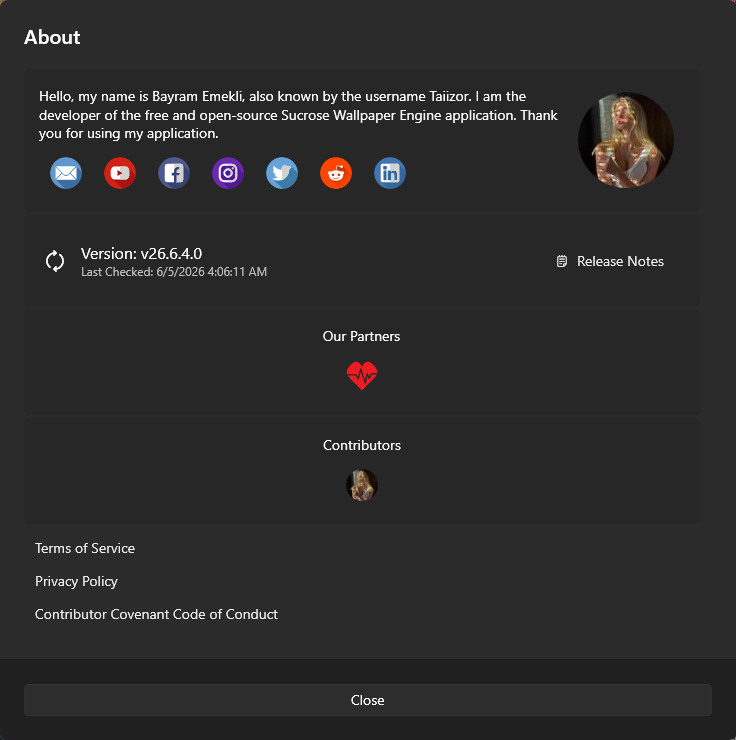
.NET 10.0), architecture (e.g.x64), and version (yy.MM.dd.0) together. The About dialog (top toolbar → Other Options → About) also shows the version, the last-checked time, and a Release Notes link — but not the framework/architecture. - Windows version & architecture. e.g. Windows 11 24H2, x64 (or ARM64).
- What you did, expected, and got. Exact steps to reproduce, the expected result, and the actual result.
- The wallpaper involved. Its type (Gif/Url/Web/Video/YouTube/Application) and the engine in use for that type (Settings → Wallpaper). Many issues are engine-specific. See Engine-Comparison.
- Whether a different engine helps. Trying the alternate engine for the type narrows the cause fast. See Choosing-Engines.
- Logs. Attach the log bundle (next section). This is the single most helpful thing you can include.
- Screenshots/recording if it's a visual problem (black screen, layout, flicker).

Sucrose writes a per-process log file per day to %AppData%\Sucrose\Log\<Process>-yy.MM.dd.log (for example Portal-yy.MM.dd.log, CefSharpLive-yy.MM.dd.log, Backgroundog-yy.MM.dd.log). To package them for a report:
- Open Settings → System → Log Temporary → Create. This saves a zip (named
sucrose_log_yyyyMMdd_HHmmss.zip) of yourLogandSettingfolders. The sensitiveObjectionable.json(which holds your Personal Access Token) is excluded from the bundle. - Attach the resulting zip to your GitHub issue.
You can also open the log folder directly to grab a single engine's log. See Logs-Diagnostics for the log line format and the full process list, and Data-Locations for where everything lives.
When a Sucrose process throws an unhandled exception, the Watchdog shows a themed error dialog and writes a structured crash report to %AppData%\Sucrose\Cache\Report\<Guid>.json. If you have opted in to Report Data (ExceptionData, on by default), the Reportdog service uploads and deletes those reports automatically.
To help diagnose a crash:
- Note the message shown in the Watchdog error dialog (it includes the log/source/help text).
- If the dialog mentions a missing VC++ Redistributable or .NET Desktop Runtime, see Runtime-Dependencies.
- Attach the relevant log and, if asked, the
Report\<Guid>.jsonfile (note it can contain device/OS identifiers — see Privacy-Telemetry).
See Crash-Reporting for the full crash pipeline.
Use the Feature request issue template on GitHub. Helpful things to include:
- The problem you're trying to solve (not just the proposed solution).
- Whether it relates to a wallpaper type, an engine, settings, or creation/publishing.
- Any prior art (how Lively/Wallpaper Engine does it), if relevant.
For larger ideas, open a Discussion first to gauge interest before filing an issue. See Contributing and Extending-Sucrose.
Do not open a public issue for a security vulnerability. Report it privately by email to taiizor@vegalya.com, keep it confidential, and do not disclose it publicly until it has been fixed. See Security-Policy.