Using Store
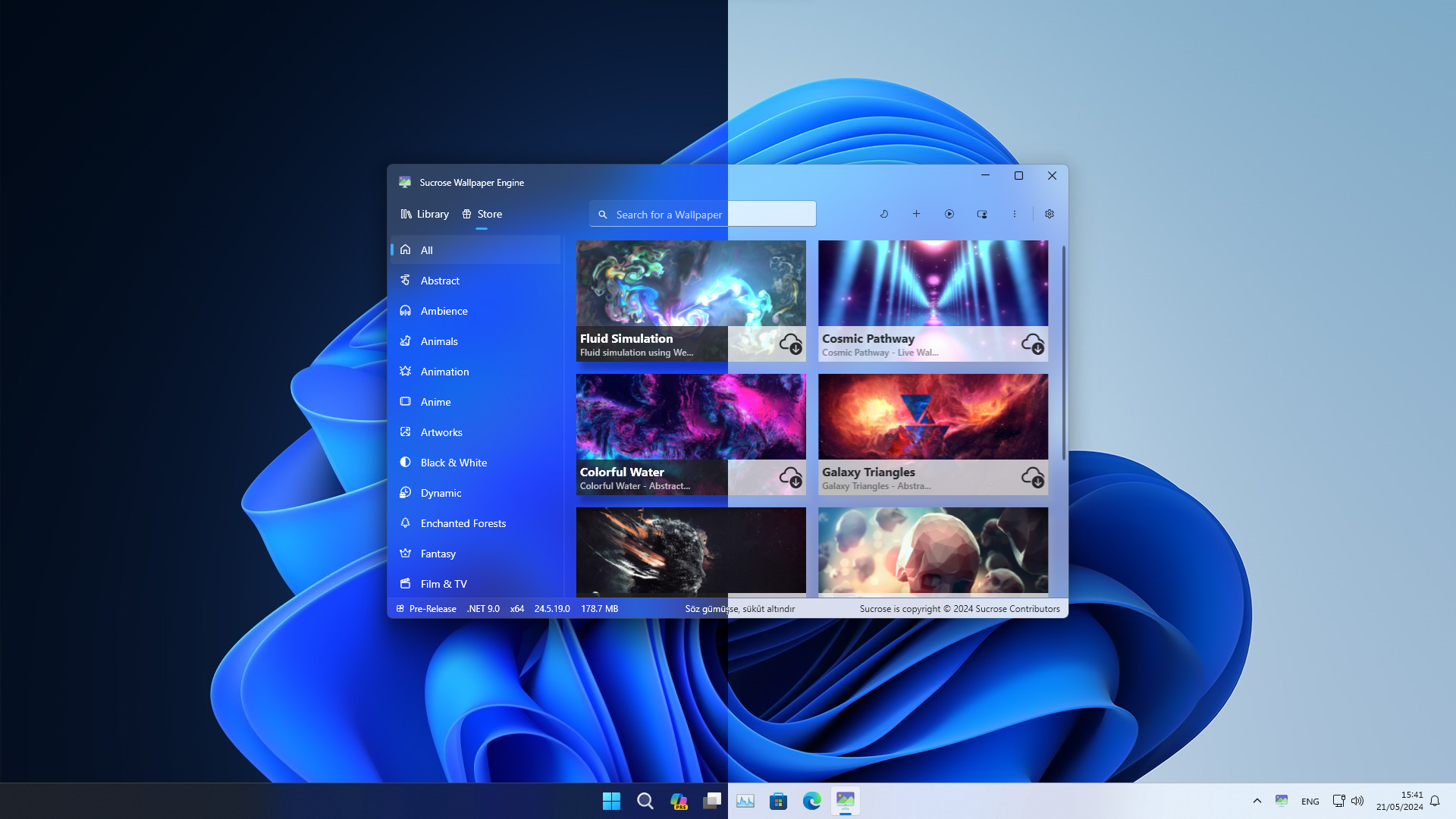
The Store is the in-app catalog of community-published wallpapers. You browse it by category, search it, preview wallpapers on hover, and install them with one click into your library. Sucrose offers two interchangeable backends — Soferity (the default custom backend) and GitHub — that serve the same catalog. This page covers the three page states you may see (Full / Unknown / Broken), the browse/search/filter/paginate controls, the install flow with its progress reporting, where Store data is cached, the difference between the two backends, and the adult-content filter.
- Opening the Store
- The two backends
- Page states: Full, Unknown, Broken
- Browsing, categories and search
- Hover preview
- Adult-content filter
- Installing a wallpaper
- Incompatible versions
- Where the Store caches data
- Reporting a wallpaper
- Store settings
- See also
The Store is the second item in the top navigation (menu item General2, icon Gift16), next to the Library. The Portal always opens to the Library page on launch. The related Settings → Personal → Auto Start (StoreStart, default true) controls whether a wallpaper downloaded from the Store is automatically set as the active wallpaper and launched right after installing.
The backend is chosen with Settings → Personal → Store Server (StoreServerType, default Soferity):
| Backend | Base | Capabilities |
|---|---|---|
| Soferity (default) | https://sucrose.soferity.com |
Byte-accurate download progress, search-pattern data (Pattern.json), publishing/uploading new wallpapers, and reporting wallpapers. |
| GitHub |
github.com/Taiizor/Store (branch develop) |
Read-only catalog browsed via the GitHub Contents API; downloads stream raw files from raw.githubusercontent.com. No upload endpoint — publishing always targets Soferity. Searches against the wallpaper title only (no pattern file). |
Switching the server clears the Store cache (Store.json, Pattern.json) so the new backend's catalog is fetched fresh.
When the Store page loads it runs a connectivity and catalog check, then routes you to one of three child pages (StoreStageType):
| State | Page | When it appears |
|---|---|---|
| Full | FullStorePage |
The catalog downloaded and parsed successfully — the normal browsing experience. |
| Unknown | UnknownStorePage |
The server is reachable but the catalog fetch failed (no usable data). |
| Broken | BrokenStorePage |
You are offline — the connectivity check (GetHostEntry()) returned false. |
If you see Broken, check your internet connection; if you see Unknown, the backend is up but returned no catalog — try switching the Store Server backend or clearing the Store cache (Settings → System → Store Temporary).
FullStorePage builds a left-hand category navigation from the catalog's categories, alphabetically, with an "All" item placed first. Each category has its own Fluent icon (from SPMI.CategoryIcons, falling back to SPMI.DefaultIcon).
-
Pagination — wallpapers are shown in pages of
StorePaginationitems (default30, range 1–100). -
Search — type in the top toolbar search box (max 20 characters, 500 ms debounce). On the Soferity backend, results are ranked by how many of the search words match each wallpaper's
Patterntext (falling back to the lowercased title), ordered by descending match count. The GitHub backend matches against the title only. -
Grid layout — uses the same Adaptive margin (
AdaptiveMargin, 5–25) and Adaptive layout (AdaptiveLayout, max items per row) settings as the library.
Each card can show an animated live preview when you hover over it. This is gated by Settings → Personal → Store preview (StorePreview, default false); the related Store preview hide (StorePreviewHide, default false) hides the static cover while the live preview plays. On first hover the live-preview GIF is downloaded into the Store cache at %AppData%\Sucrose\Cache\Store\Temporary and reused from disk on subsequent hovers; the cache entry expires after the Store Refresh interval (StoreDuration, default 3 hours, range 1–24).
Wallpapers may be flagged as adult (the Adult field in the catalog). A wallpaper is shown only if it is not adult, or if Settings → Personal → Adult content (StoreAdult, default true) is enabled. A category whose every wallpaper is adult is hidden entirely while the filter is off.
Click the download glyph on a card to install. The flow is:
- A unique random 25-character key is generated; it becomes both the new library folder name and the progress key.
- A progress record is registered in the
StoreService. - The full wallpaper folder is downloaded into a temporary path,
%AppData%\Sucrose\Cache\Store\Temporary\<key>.-
Soferity reports byte-accurate progress when the catalog records a non-zero
Size(capped at 99.99% until completion); otherwise it falls back to file-count progress. - GitHub counts the files first, then downloads each one, reporting file-count progress.
-
Soferity reports byte-accurate progress when the catalog records a non-zero
- On success the temporary folder is copied into the real library at
<library>\<key>, an emptySucroseStore.jsonmarker is written to flag it as Store-sourced, and — if Store start is enabled and your performance rules allow — it is set as the active wallpaper and launched.
The card icon reflects the state with Fluent glyphs:
| Glyph | Meaning |
|---|---|
CloudArrowDown24 |
Idle / ready to download |
| (spinner ring) | Downloading |
CloudCheckmark24 (green) |
Installed successfully |
CloudDismiss24 |
Offline |
CloudOff24 |
Download error |
📷 Screenshot needed: A StoreCard mid-download showing the progress ring.
If a wallpaper's AppVersion is newer than your installed Sucrose version, the card shows IncompatibleVersion and offers an Update action that launches Sucrose Update (via Commandog Update). Update the app, then install the wallpaper.
| Path | Contents |
|---|---|
%AppData%\Sucrose\Cache\Store\Store.json |
The downloaded catalog. |
%AppData%\Sucrose\Cache\Store\Pattern.json |
The Soferity search-pattern catalog (Soferity backend only). |
%AppData%\Sucrose\Cache\Store\<Category>\<WallpaperTitle> |
Per-card cache: just the SucroseInfo.json and the cover image. |
%AppData%\Sucrose\Cache\Store\Temporary\<key> |
In-flight download staging folder, copied into the library on success. |
The catalog and per-card caches are time-boxed: they are re-downloaded only if older than the Store Duration (StoreDuration, default 3 hours, range 1–24) or if the cached JSON fails validation. You can clear the Store cache any time from Settings → System → Store Temporary. See Cache Management and Data Locations.
A Store card's menu includes a report action (ThemeReport) with these reasons: Spam, Other (default), Nudity, Harmful, Violence, Malicious, CopyrightViolation, MisleadingInformation.
The report dialog always offers both actions, regardless of the selected Store backend:
- A Report action posts to the Soferity backend API (requires a valid email contact and a non-empty description).
- A GitHub action opens a pre-filled issue using the
wallpaper_report.yamltemplate with thewallpaperlabel.
All of the Store-related options live on Settings → Personal:
| Setting | Key | Default | Range / options |
|---|---|---|---|
| Store Server | StoreServerType |
Soferity |
GitHub, Soferity
|
| Adult content | StoreAdult |
true |
show NSFW wallpapers |
| Store preview | StorePreview |
false |
animated hover preview |
| Store preview hide | StorePreviewHide |
false |
hide static cover during live preview |
| Store duration | StoreDuration |
3 |
cache TTL hours, 1–24 |
| Store pagination | StorePagination |
30 |
items per page, 1–100 |
| Auto Start | StoreStart |
true |
auto-apply (set as active + launch) a wallpaper downloaded from the Store after install |
Publishing your own wallpaper to the Store (the other half of the ThemeShare dialog) is documented separately in Create: Sharing & Publishing.