Repository navigation
Releases: TeaYololo/orange-for-maya
Release list
Orange 1.0.0

First stable release. Download Orange-1.0.0.zip, unzip it and drag drag_drop_install.py onto a Maya viewport. If you already have 0.9.0 installed, the same drag-and-drop replaces it; from this version on Orange can also update itself from the Orange menu.
What's new since 0.9.0
Updates from inside Maya. Orange checks GitHub Releases when Maya starts. A new version shows up as a short notice and an "Update to ..." entry at the top of the Orange menu, nothing pops up over your work. The update window shows the release notes, downloads with a progress bar you can cancel, and the new version is installed the next time Maya opens. You can skip a version, turn the check off, or run it by hand. If the download or install fails, you get a plain message and your current version stays in place.
Modifier panel. Mirror and Array cards can now be switched off like the others. Clicking a card header selects it; the arrow (or a double click) collapses it. The panel follows undo/redo and scene changes, shows errors at the bottom instead of only in the script editor, and stops drawing the blue drop line when a card can't go there. Object Offset is set with "Use selected" instead of a list of every transform in the scene, which made large scenes stall. Number fields apply on Enter or when they lose focus rather than on every keystroke. Closing the panel (Esc or the dock's X) cleans up properly, and Maya restores the dock on restart instead of leaving an empty control. Mirror's Merge toggle actually turns merging off now (it never did before, because polyMirror uses 3 for "off"). Switching a mirror axis off no longer freezes the card, applying a card no longer leaves the mesh's upstream history orphaned, and renaming or reloading while in edit mode no longer leaves the mesh stuck in reference display. 1 / 2 / 3 and Ctrl+0..5 work on meshes that have a modifier cage.
Array node. Moving an object with an Array no longer recomputes the whole array every frame unless Object Offset is in use. With Merge off, edge smoothing is copied correctly on edited meshes. A merge distance longer than an edge collapses the affected faces instead of raising an error. Meshes without history (FBX imports, Delete History) get a proper material on the Array result and on the edit cage instead of showing up green. Shift+D copies no longer carry a dead cage. The Windows .mll is rebuilt from the current source.
Speed. Edge slide, multi-cut loop slide and Alt+S write all vertices in one call per frame instead of one command per vertex (400 vertices: 86 → 27 ms; 20k vertices: 11 s → 50 ms), still as a single undo step. G / R / S no longer compute face normals at start unless the orientation is Normal. The axis line and the on-screen hints only redraw when something changed. Keys that aren't bound to anything no longer query the panel under the mouse. Vertex snapping searches all meshes through one array. numpy loads on first use instead of at startup.
Interface. The mouse no longer gets stuck after Alt+Tab while the middle button is held. Settings and the F3 palette close cleanly with Esc; the shortcut editor keeps your scroll position, selection and expanded groups while you edit; key capture is cancelled when the window loses focus (it used to leave every Orange shortcut dead). Changing the language reopens any open Orange windows in the new language. The Turkish UI no longer has stray English labels. F9 shows readable attribute names. Popups opened at the mouse (F3, pie menus, F9, the rename line) stay on screen, and pie menus widen to fit long labels. F1 lost its duplicate rows and gained the Language menu, updates and the shortcut card; the printable card's UV / Graph / Sculpt sections are readable now.
Installer. The install is atomic (if copying fails you keep the old version), install errors are reported instead of swallowed, a loaded orangeArray.mll is renamed aside instead of failing the copy, and installing on macOS / Linux no longer trips over the Windows-only plug-in path. If Orange fails halfway through starting up it unwinds itself instead of staying half-on.
Also in this release: a Language submenu in the Orange menu (Auto / English / Türkçe) and Shift+A primitives with Blender's default sizes and segment counts.
Compatibility
Developed and tested on Maya 2027 / Windows. Maya 2022–2026 are supported in code but haven't been tried on real machines; the same goes for the macOS and Linux key tables. If something doesn't work on your setup, Orange → Report an issue... collects the details.
Full list of changes: CHANGELOG.md (Turkish).
Orange 0.9.0: Maya, the Blender way

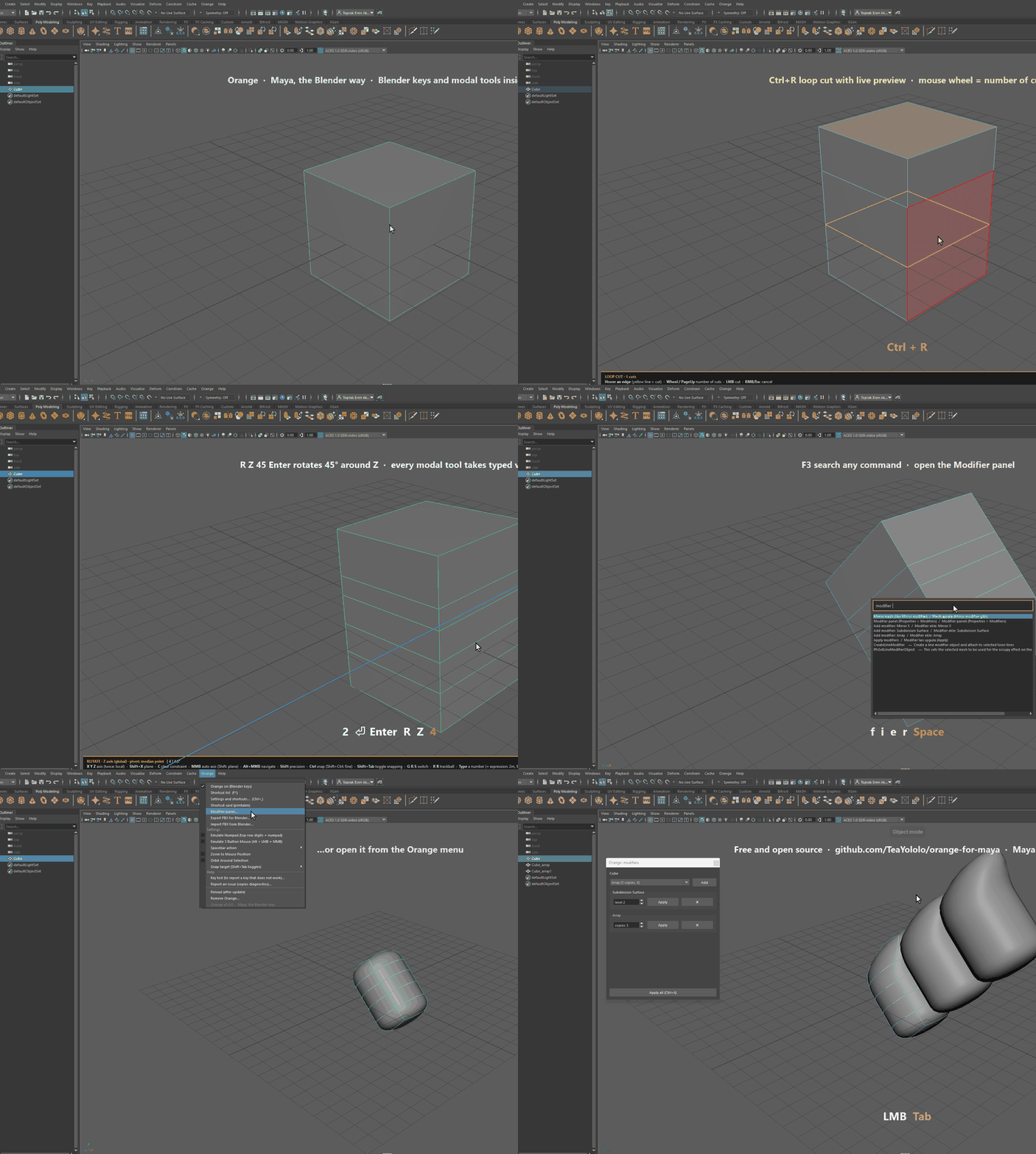
Orange: Maya, the Blender way. Blender's keys and modal tools inside Autodesk Maya. Free and open source (Apache 2.0).
Install
- Download Orange-0.9.0.zip below and unzip it.
- Drag
drag_drop_install.pyinto Maya's 3D viewport. - Orange installs as a Maya module, starts with Maya every time and adds an Orange shelf button and menu. Your own
userSetup.pyis not touched.
Orange-0.9.0-bundle.zip is the Autodesk App Store layout (Orange.bundle). Unzip it into %ProgramData%\Autodesk\ApplicationPlugins (Windows) or /Users/Shared/Autodesk/ApplicationAddins (macOS) if you prefer that route.
Turn Orange off from the Orange menu and Maya is back to its defaults. Orange never edits Maya's hotkey sets.
Highlights
- Modal G / R / S with axis lock and typed values (G X 2, R Z 45, expressions like
2m,90d), Ctrl snap, Shift precision. - Edit mode the Blender way: Tab, 1 / 2 / 3, E extrude, I inset, Ctrl+R loop cut with live preview, Ctrl+B bevel, G G edge slide, K, F, J, M, P, V.
- Pie menus for shading, pivot, orientation, snapping and tools; 3D cursor; F3 command search; F9 adjust last operation.
- Modifier panel: Subdivision Surface (smooth preview), Mirror and Array as live instances, Bevel / Solidify / Triangulate / Weld as history nodes. Ctrl+A applies them in one undo step.
- One undo step per modal tool: undoing a long drag on a 160k-vertex mesh takes 0.05 s instead of 2 s.
- UV editor with modal G / R / S; FBX export / import tuned for Blender.
- Every Orange command is listed in Maya's Hotkey Editor under "Orange".
- Keys are read by physical position, so any keyboard layout works. English and Turkish UI.
Compatibility
Tested on Maya 2027 / Windows (70 pure, 122 headless and 332 live checks). Maya 2022-2026, macOS and Linux are supported in code but not yet tested on real machines. Reports are very welcome: Orange menu → Key test shows exactly what to send.
Full change log: CHANGELOG.md (Turkish).
Orange is free and will stay free. If it saves you time, you can support it on Patreon.