Example of adding a book to the project
In this wiki page we will demonstrate how we added שולחן ערוך to our project.
In order to be able to recognize the sources in the articles, we need first to understand in which form they usually appear, and what we have to try to find.
Here is examples of שולחן ערוך soources we found in Wikipedia:
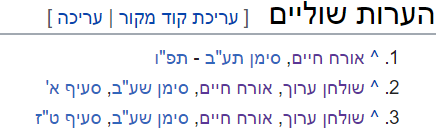
We can see the pattern, and we can guess that sometimes the words סימן, סעיף won't appear. Now We are ready for the next step:
After we understand the formation of our relevant sources, we need to translate it into regular expressions that can find them. We will use the RefExtractor class for this, and you can see the example of Shulchan Aruch in here
We have to convert the Hebrew label to uri. We will ues the UriConverter class for that. First, we will check the form of the lables in the DB (You can find the DB file under the jbs-text project). If the label matches the string of the source we have - we are done, the class will do the rest.
If there are differences, we need to make some manipulations on the string so it will match the DB label. Here we can see what we found for שולחן ערוך:
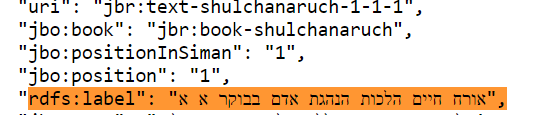
For the first time we encountered a new problem - there is a big difference between our string and the DB string. We understood that we should now soppurt partial matching strings, which led us to change the converting query to use regex and not the exact strings.
After the change, by using wild card after the book name, we were able to catch all previos books AND the new book we wanted to have.