Repository navigation
Releases: TekRantGaming/king-kong-recompiled
Release list
v1.9.11

Peter Jackson's King Kong PC Port v1.9.11
What's new
- See how many people are playing. The top right of the launcher shows how many players are online. It's on by default: the setup screen explains it, players who already have the game are told once, and you can switch it off at any time on the About page. To count you, the launcher sends a tiny anonymous check-in every 5 minutes with just four things: a random number that isn't linked to you, the port's version (stable or beta), Windows or Linux, and whether you're in the game. No name, account, IP address or anything from your PC is kept, and switching it off deletes the random number.
- A clearer setup screen. A Supported disc card says exactly which disc image works: a full image (7,834,892,288 bytes) that you made from your own Xbox 360 disc of Peter Jackson's King Kong: The Official Game of the Movie, the USA and Europe release (title ID
555307D3, version0.0.0.1), with its SHA-1 to check it against. An Online players card beside it explains the player count, and the button prompts now show how to change each setting. - The Steam panel stays on Home. Once the game is in your Steam library, it says In your Steam library and opens Steam, instead of disappearing.
Full changelog
See CHANGELOG.md. rexruntime.dll and rexgpu-xenos.dll are the same as in v1.9.5 to v1.9.10.
How to update
If you have v1.4.0 or later, the launcher offers this update when it opens: click Update now. Otherwise download KingKong-v1.9.11-windows-x64.zip below and copy everything in it over your KingKong folder. Your settings stay as they are.
New install (Windows)
- Unzip KingKong-v1.9.11-windows-x64.zip anywhere and run king_kong.exe. The shader pack downloads by itself.
- Choose Select disc image and pick the disc image you made from your own King Kong disc (USA/Europe, title ID
555307D3, version0.0.0.1). - Press PLAY.
Linux and Steam Deck: the same download runs through Steam's Proton as an experimental Proton build (see the README for the steps). This is not native Linux support; a native Linux version is in development and will come in a future update.
No game files are included. See the README for details.
Requires Windows 10 or 11 (64-bit) and a DirectX 12 graphics card, or Linux with Steam and Proton (experimental). Native Linux version in development.
This port was made with AI (Claude Code). See the README for details.
v1.9.10
Peter Jackson's King Kong PC Port v1.9.10
What's new
- Fixed: the screen shaking non-stop in the V-Rex chapter (#39). Above 30 FPS, the camera shake from the V-Rex's footsteps could stop fading out and keep going until you died. The shake now fades the same way at any frame rate, as it does on the Xbox 360 at 30 FPS. Thanks to MustopuhGgi for the report.
- Camera shake settings. Camera shake (on or off) and Camera shake strength (10% to 200%) are on the Gameplay page.
- The best upscaler for your graphics card, by default. The launcher checks which graphics card you have (your dedicated card if you have one, otherwise your integrated graphics): NVIDIA NIS at Quality on an NVIDIA card, AMD FSR 1 at Quality on AMD, Intel or anything else. If you've picked an upscaler yourself, it stays as you set it.
- Every graphics preset uses that upscaler. Low draws at Performance, Medium at Quality, and High, Ultra and Steam Deck at Native. Supersampling is now its own setting, and FXAA Extreme is gone (Ultra uses FXAA).
- Join the official Discord and Add to Steam are now panels at the bottom right of the Home screen. Press Y for Discord and X for Add to Steam (R and Del on the keyboard), or press right to move to them.
- Stable or beta. Change version on the About page switches between the stable version and the beta, for early test builds of upcoming features. Betas can have bugs and support for them is limited; your saves and settings are kept either way, and you can switch back at any time. There's no beta build yet.
- Button prompts that match your controller. Button prompts has a new Automatic setting, now the default: Xbox 360, Xbox Series, PlayStation and Steam Deck controllers each get their own buttons, in the game and in the launcher. Pick any style yourself and it stays as you set it. Steam Deck prompts are new too.
- Steam style achievement pop-ups. Pop-up style on the Achievements page picks between the Xbox 360 pop-up and a Steam style one.
Full changelog
See CHANGELOG.md. rexruntime.dll and rexgpu-xenos.dll are the same as in v1.9.5 to v1.9.9.
How to update
If you have v1.4.0 or later, the launcher offers this update when it opens: click Update now. Otherwise download KingKong-v1.9.10-windows-x64.zip below and copy everything in it over your KingKong folder. Your settings stay as they are.
New install (Windows)
- Unzip KingKong-v1.9.10-windows-x64.zip anywhere and run king_kong.exe. The shader pack downloads by itself.
- Choose Select disc image and pick your own King Kong disc image (USA/Europe, title ID
555307D3, version0.0.0.1). - Press PLAY.
Linux and Steam Deck: the same download runs through Steam's Proton as an experimental Proton build (see the README for the steps). This is not native Linux support; a native Linux version is in development and will come in a future update.
No game files are included. See the README for details.
Requires Windows 10 or 11 (64-bit) and a DirectX 12 graphics card, or Linux with Steam and Proton (experimental). Native Linux version in development.
This port was made with AI (Claude Code). See the README for details.
v1.9.9
Peter Jackson's King Kong PC Port v1.9.9
What's new
- Stronger vibration if you want it (#35). Vibration strength on the Controls page now goes up to 200%. The game's own rumble is gentle: each machine gun, revolver or sniper rifle shot runs the controller's big motor at about half speed, and the shotgun at about three quarters. At 160% the other guns kick about as hard as the shotgun does at 100%, and the shotgun reaches the controller's full strength. 100% is still the default, as on the Xbox 360. Thanks to tedwards75 for the suggestion.
Full changelog
kk_vibration_strengthtakes 10 to 200; each motor's speed is capped at its maximum. The game's own values are now put back after each rumble call, so a vibration it sends again is never scaled twice.rexruntime.dllandrexgpu-xenos.dllare the same as in v1.9.5 to v1.9.8.
How to update
If you have v1.4.0 or later, the launcher offers this update when it opens: click Update now. Otherwise download KingKong-v1.9.9-windows-x64.zip below and copy everything in it over your KingKong folder. Your settings stay as they are.
New install (Windows)
- Unzip KingKong-v1.9.9-windows-x64.zip anywhere and run king_kong.exe. The shader pack downloads by itself.
- Choose Select disc image and pick your own King Kong disc image (USA/Europe, title ID
555307D3, version0.0.0.1). - Press PLAY.
Linux and Steam Deck: the same download runs through Steam's Proton as an experimental Proton build (see the README for the steps). This is not native Linux support; a native Linux version is in development and will come in a future update.
No game files are included. See the README for details.
Requires Windows 10 or 11 (64-bit) and a DirectX 12 graphics card, or Linux with Steam and Proton (experimental). Native Linux version in development.
This port was made with AI (Claude Code). See the README for details.
v1.9.8
Peter Jackson's King Kong PC Port v1.9.8
What's new
- Fixed: settings not being kept (#37). If the path to the game's folder, or to your Windows user folder, had a letter like á, é or ñ in it, the game couldn't read its settings file (
king_kong.toml), so every start went back to the default settings, the language included, and saved them over yours. The same problem could also stop achievement names and your unlocked achievements from loading. Thanks to ulyssesaot for the report and the video.
Full changelog
- The exe's manifest makes UTF-8 its code page (Windows 10 version 1903 and later), so the runtime's text paths are UTF-8. It opens its settings and achievement files with toml++, which reads a path as UTF-8, and in the system code page a path with an accented letter couldn't be opened.
- The settings migration no longer saves over a settings file it couldn't read; it keeps a copy (
king_kong.toml.bak) and logs an error. rexruntime.dllandrexgpu-xenos.dllare the same as in v1.9.5 to v1.9.7.
How to update
If you have v1.4.0 or later, the launcher offers this update when it opens: click Update now. Otherwise download KingKong-v1.9.8-windows-x64.zip below and copy everything in it over your KingKong folder. If your settings were reset by this problem, set them again once after updating; from then on they stay.
New install (Windows)
- Unzip KingKong-v1.9.8-windows-x64.zip anywhere and run king_kong.exe. The shader pack downloads by itself.
- Choose Select disc image and pick your own King Kong disc image (USA/Europe, title ID
555307D3, version0.0.0.1). - Press PLAY.
Linux and Steam Deck: the same download runs through Steam's Proton as an experimental Proton build (see the README for the steps). This is not native Linux support; a native Linux version is in development and will come in a future update.
No game files are included. See the README for details.
Requires Windows 10 or 11 (64-bit) and a DirectX 12 graphics card, or Linux with Steam and Proton (experimental). Native Linux version in development.
This port was made with AI (Claude Code). See the README for details.
v1.9.7
Peter Jackson's King Kong PC Port v1.9.7
What's new
- Real mouse look. The mouse now turns the camera directly: the same movement always turns it the same amount, however fast you move, as in other first-person games. Before, the mouse was treated like a thumbstick, so small movements did nothing and fast ones were capped at the stick's top speed. Mouse sensitivity (1.00x is 0.066 degrees per count) and a new Mouse vertical setting (to invert it) are on the Controls page.
- A modern keyboard and mouse layout. Left mouse button shoots (and takes, uses and repels), right mouse button aims, R reloads, C or Ctrl crouches, middle mouse button or Z zooms, WASD moves, F calls your companion, Space checks your reserve bullets, G drops the spear and Esc pauses. As Kong: F hits, Space jumps, dodges and climbs, Q grabs and throws, G pushes back, bites and goes into fury mode. In the menus: Enter selects, Space or Backspace goes back and the arrow keys move around. Any key you changed yourself stays as you set it; Reset to defaults on the Keyboard bindings page gives you the whole new layout.
- Mouse buttons can be bound. The Keyboard bindings page now takes the left, right and middle mouse buttons, and each binding says what its button does in the game, for Jack and for Kong.
- Choosing Keyboard & mouse sets things up. It switches the game's button prompts to Keyboard, so hints show your keys and mouse buttons, and turns Mouse camera on. Going back to Controller brings your controller's prompts back.
| Key | Jack | Kong |
|---|---|---|
| Left mouse button, E | Shoot, take, use, repel | |
| Right mouse button | Aim (raise the gun) | |
| R | Reload | |
| C, Ctrl | Crouch | |
| Middle mouse button, Z | Zoom | |
| W A S D | Move | Move |
| F | Call your companion | Hit |
| Space | Check reserve bullets | Jump, dodge, climb |
| Q | Grab, throw, take Ann | |
| G | Drop the spear | Push back, bite, fury |
| Esc | Pause | Pause |
Full changelog
- Mouse look:
mouse_look.cppadds up the window's raw mouse movement and gives Jack's camera (CM_Cam,sub_8246F180) the angle the mouse moved through its yaw and pitch turns (sub_82711950,sub_82712300). CM_Cam only turns an axis whose stick is past its 15% deadzone, so while the mouse moves, its stick read is nudged just past it. The runtime's own mouse-to-stick path is kept at its lowest (mnk_sensitivity0.01), where it never gets past that deadzone. While Jack aims, the game turns about 75% as far. - Settings:
kk_mouse_sensitivity,kk_mouse_invert_yandkk_pad_prompts(the controller prompts to bring back). The newkeybind_*defaults andmnk_mouseon are set with the port's other defaults. - Prompt pictures
LMB,RMBandMMBinglyphs/keyboard. - Launcher: key capture takes mouse buttons (a click on Cancel still cancels).
rexruntime.dllandrexgpu-xenos.dllare the same as in v1.9.5 and v1.9.6.
How to update
If you have v1.4.0 or later, the launcher offers this update when it opens: click Update now. Otherwise download KingKong-v1.9.7-windows-x64.zip below and copy everything in it over your KingKong folder. Your settings stay as they are.
New install (Windows)
- Unzip KingKong-v1.9.7-windows-x64.zip anywhere and run king_kong.exe. The shader pack downloads by itself.
- Choose Select disc image and pick your own King Kong disc image (USA/Europe, title ID
555307D3, version0.0.0.1). - Press PLAY.
Linux and Steam Deck: the same download runs through Steam's Proton as an experimental Proton build (see the README for the steps). This is not native Linux support; a native Linux version is in development and will come in a future update.
No game files are included. See the README for details.
Requires Windows 10 or 11 (64-bit) and a DirectX 12 graphics card, or Linux with Steam and Proton (experimental). Native Linux version in development.
This port was made with AI (Claude Code). See the README for details.
v1.9.6
Peter Jackson's King Kong PC Port v1.9.6
Linux players: this is an experimental Proton build, not native Linux support. It's the Windows download running through Steam's Proton, so you can play on Linux and the Steam Deck now. A native Linux version is in development and will come in a future update.
What's new
- Play on Linux and Steam Deck now, through Proton (experimental). The Windows download runs on Linux with Steam's Proton: add king_kong.exe to Steam as a non-Steam game and set it to use Proton Experimental (steps below). Tested on a ROG Ally (Z1 Extreme) with Bazzite: the launcher, installing from a disc image and the game all work, and it held 120 FPS on the 10 W power profile. The first start takes about half a minute while Steam sets Proton up for the game; after that it starts straight away. Under Proton the launcher uses your system's font, and Add to Steam is hidden, since the game is already in Steam.
- Fixed: the game could freeze on the black LOADING screen as the main menu loads. When a load starts, the loading screen and the game's frame presenter both need the graphics device, and if the loading screen got it first, each waited for the other forever. It happened often on Linux; on Windows the presenter nearly always got there first, but it could happen there too.
- Fixed: one controller press counting twice in the launcher while Steam is open. Steam's desktop controller layout also types keys for the controller's buttons (arrow keys, Enter), so the selection moved two places and switches flipped twice and stayed as they were. A press and the key Steam types for it now count once.
- Fixed: the Home menu running into the status line in a small window. Its entries now shrink to fit.
Linux and Steam Deck (experimental Proton build)
- Unzip KingKong-v1.9.6-windows-x64.zip anywhere, for example in your home folder.
- In Steam (in desktop mode on a Steam Deck), choose Games > Add a Non-Steam Game to My Library, browse to king_kong.exe and add it.
- Right-click it in your library, choose Properties > Compatibility, tick Force the use of a specific Steam Play compatibility tool and pick Proton Experimental.
- Start it from Steam (Game Mode works too). The first start takes about half a minute. Pick your disc image as on Windows: your Linux home folder is on the Z: drive.
Native Linux: in development, and coming in a future update. A native build already runs the launcher on Linux, but its renderer still draws some scenes wrong (black screens in some chapters), so until that's fixed, Proton is the way to play on Linux.
Full changelog
- Loading screen:
loading_fix.cpphooks the present that the graphics device's worker thread makes each frame (sub_8278D0C8). While the loading screen thread (sub_8278E450) is up, it skips that present, since the loading screen draws every frame itself. Found by tracing the handshake between the two (KK_DEV_LOAD_TRACEin developer builds). - Launcher input:
launcher_ui.cppreads the controllers before the keyboard and treats a key and a controller press of the same action within 0.25 s as one press. - Proton: when Windows' fonts aren't there (Wine), the launcher loads Noto Sans (or DejaVu Sans, or Liberation Sans) from the Linux system through Wine's
Z:drive. Proton plays videos it can't convert as colour bars, so stills that are colour bars are no longer used as backdrops; the launcher takes its artwork again once (a few seconds) to drop any it already took. - Native Linux version (in development, not in this release): the launcher no longer swallows the window's paint events when it reads controllers, draws at 60 FPS (it used 72% of a CPU core), downloads with curl, takes its stills with ffmpeg and can update its AppImage.
tools/rexglue-patches0011 frees the game's memory however it ends (a crash or kill left it all in/dev/shmuntil a reboot), and 0012 adds the frame log to the Vulkan backend. rexruntime.dllandrexgpu-xenos.dllare the same as in v1.9.5.
How to update
If you have v1.4.0 or later, the launcher offers this update when it opens: click Update now. Otherwise download KingKong-v1.9.6-windows-x64.zip below and copy everything in it over your KingKong folder. Your settings stay as they are.
New install (Windows)
- Unzip KingKong-v1.9.6-windows-x64.zip anywhere and run king_kong.exe. The shader pack downloads by itself.
- Choose Select disc image and pick your own King Kong disc image (USA/Europe, title ID
555307D3, version0.0.0.1). - Press PLAY.
No game files are included. See the README for details.
Requires Windows 10 or 11 (64-bit) and a DirectX 12 graphics card, or Linux with Steam and Proton (experimental). Native Linux version in development.
This port was made with AI (Claude Code). See the README for details.
v1.9.5
Peter Jackson's King Kong PC Port v1.9.5
What's new
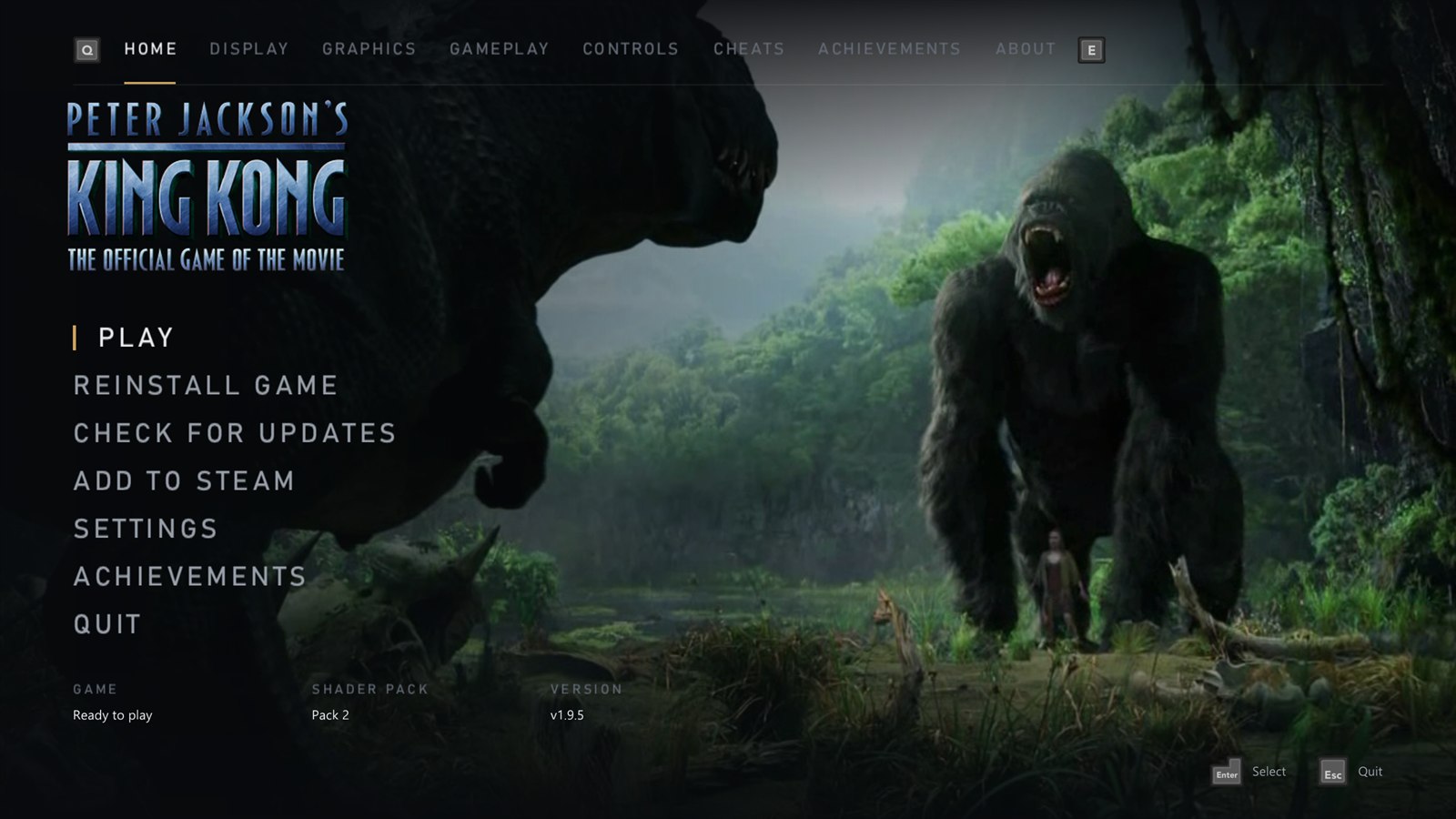
- A new launcher. Rebuilt from scratch with a cleaner look, and it now works fully with a controller: move with the stick or D-pad, change pages with the bumpers, and the button pictures follow your Button prompts setting (Xbox 360, Xbox Series, PlayStation 5, PlayStation 2 or keyboard). Keyboard and mouse work everywhere too, and the text is sharp at any Windows display scale.
- The game's own artwork. The launcher takes the King Kong logo and stills from the movie trailer from your copy of the game, and the Home screen shows them as a slow slideshow. Nothing from the game is in the download. On a new install the launcher starts on a setup screen: pick your disc image, it installs, prepares the artwork, then opens.
- The game's menu music and sounds. The main menu music plays in the launcher, and moving around makes the game's own menu sounds. Both come from your copy of the game, and each has a switch and a volume slider under About > Launcher.
- Add to Steam. A new Add to Steam entry on the Home screen adds the port to your Steam library as a non-Steam game, with artwork from SteamGridDB, so you can start it from Steam, Big Picture or a Steam Deck. Steam closes for a moment while it's added and opens again afterwards. Steam Input is switched off for the game, so your controller keeps working.
- Updates. Check for updates is on the Home screen, and an update now downloads on a screen of its own with a progress bar.
- The launcher in your language. It follows the game's Language setting (English, French, German, Spanish or Italian), and the setup screen lets you pick it before you install.
- New defaults. New installs start with AMD FSR 1 at Quality, and the Medium preset now uses it. If you're updating, your picture settings stay as they were. The startup logos are now skipped by default; turn them back on on the Gameplay page.
- Shader preparing is always Balanced. The setting is gone: Wait could pause the game for up to 2 seconds the first time an effect appeared, and Background could make objects vanish or flash.
Full changelog
- Launcher: rewritten (
launcher.cppand a small toolkit inlauncher_ui.cpp), with controllers read through SDL3 while it's open (let go before the game starts) and button pictures from theglyphsfolder, plus the Xbox 360 set cut from the game's own button sheet. - Sharp text:
rexruntime.dllis rebuilt withtools/rexglue-patches0010, which lets ImGui 1.92 bake its fonts at the size they're drawn. - Artwork:
launcher_art.cppreads the front end's texture pack inKKTextures.bf(LZO1X chunks; the logo is a tiled 8:8:8:8 texture, the button sheet DXT5) and takes keyframes fromVideo/Trailer.wmvwith Windows Media Foundation. It's kept inDocuments\king_kong\cache\art. - Music and sounds: from
Sound/Sound_Common.bfthroughSoundHeaders.db(Xbox ADPCM,game_sound.cpp). The menu music is key 0x060002C9; the move, select and back sounds are 0x87003BF2, 0x87003BF4 and 0x87003D8A, the ones the game's main menu plays. - Add to Steam:
steam_shortcut.cppadds the shortcut touserdata/<account>/config/shortcuts.vdf(binary VDF; every other entry is kept byte for byte) and setsUseSteamControllerConfigto 0 inlocalconfig.vdf, while Steam is closed, keeping a.kk-backupof each. The artwork is the top-scored grid, wide grid, hero, logo and icon of SteamGridDB game 5249080. - Settings:
kk_launcher_music,kk_launcher_music_volume,kk_launcher_sounds,kk_launcher_sounds_volume.kk_settings_version2 keeps the old upscaler defaults (present_effectbilinear,kk_render_qualitynative) for settings files from earlier versions.kk_skip_introsdefaults to on. Shader preparing is fixed at Balanced (async_shader_compilationon, the defaultasync_shader_wait_ms). - Translations: the launcher's 370 lines of text in German, Spanish, French and Italian.
How to update
If you have v1.4.0 or later, the launcher offers this update when it opens: click Update now. It restarts into the new launcher, which takes its artwork from your installed game the first time (a few seconds). Otherwise download KingKong-v1.9.5-windows-x64.zip below and copy everything in it over your KingKong folder. Your settings stay as they are.
New install
- Unzip KingKong-v1.9.5-windows-x64.zip anywhere and run king_kong.exe. The shader pack downloads by itself.
- Choose Select disc image and pick your own King Kong disc image (USA/Europe, title ID
555307D3, version0.0.0.1). - Press PLAY.
No game files are included. See the README for details.
Requires Windows 10 or 11 (64-bit) and a DirectX 12 graphics card. Linux version in development.
This port was made with AI (Claude Code). See the README for details.
v1.9.2
Peter Jackson's King Kong PC Port v1.9.2
What's new
- Fixed: Necropolis and Brontosaurus looking low resolution (#32). Those levels turn on one of the game's own effects, a light blur over the whole picture (any other level that uses it is fixed too). The blur is sized for the Xbox 360's 720p, so whatever resolution you played at, those levels came out about as sharp as 720p. It's a new Screen blur setting on the Graphics page, off by default, so those levels are as sharp as the rest of the game. The Original Xbox 360 look keeps it on. Thanks to GrummelFritz and leocmp for sticking with this one and sending logs and screenshots.
Full changelog
- Screen blur:
kk_big_blur(off by default). The game's "BigBlur" after effect averages four slightly offset copies of the frame, with offsets for 1280 x 720; off skips it. Found by turning the game's after effects off one at a time in Necropolis and identifying the draw it adds by its shader key.
If Necropolis, Brontosaurus or another level looked low resolution for you, please update and let us know in #32 whether it's sharp now.
How to update
If you have v1.4.0 or later, the launcher offers this update when it opens: click Update now. Otherwise download KingKong-v1.9.2-windows-x64.zip below and copy everything in it over your KingKong folder. Your settings stay as they are, and Screen blur starts off.
New install
- Unzip KingKong-v1.9.2-windows-x64.zip anywhere and run king_kong.exe. The shader pack downloads by itself.
- Click Install from disc image... and pick your own King Kong disc image (USA/Europe, title ID
555307D3, version0.0.0.1). - Press PLAY.
No game files are included. See the README for details.
Requires Windows 10 or 11 (64-bit) and a DirectX 12 graphics card. Linux version in development.
This port was made with AI (Claude Code). See the README for details.
v1.9.1
Peter Jackson's King Kong PC Port v1.9.1
What's new
- Fixed: the whole game drawing at low resolution for some players (#32). The game picks its picture size from the TV it thinks it's connected to, and the port was giving it your window size. Windows display scaling shrinks the size the launcher saves (a 1280 x 720 window at 125% is kept as 1024 x 576), and below 720 lines the game falls back to standard definition: 640 x 480, stretched to widescreen, even in fullscreen and whatever your Render quality. It now always sees a 720p TV, as on an Xbox 360, and Render quality scales that up as intended. Thanks to GrummelFritz and leocmp for the reports and the log.
Full changelog
- Video mode: the port sets
video_mode_widthandvideo_mode_heightto 1280 x 720 each time it starts (they aren't saved toking_kong.toml). Before, the runtime reportedwindow_widthandwindow_heightas the console's video mode whenever a window size was set. The log now notes the video mode at startup (KK: video mode 1280x720 (window ...)).
If the game looked low resolution for you, in Necropolis, Brontosaurus or anywhere else, please update and let us know in #32 whether it's sharp now.
How to update
If you have v1.4.0 or later, the launcher offers this update when it opens: click Update now. Otherwise download KingKong-v1.9.1-windows-x64.zip below and copy everything in it over your KingKong folder. Your settings stay as they are.
New install
- Unzip KingKong-v1.9.1-windows-x64.zip anywhere and run king_kong.exe. The shader pack downloads by itself.
- Click Install from disc image... and pick your own King Kong disc image (USA/Europe, title ID
555307D3, version0.0.0.1). - Press PLAY.
No game files are included. See the README for details.
Requires Windows 10 or 11 (64-bit) and a DirectX 12 graphics card. Linux version in development.
This port was made with AI (Claude Code). See the README for details.
v1.9.0
Peter Jackson's King Kong PC Port v1.9.0
What's new
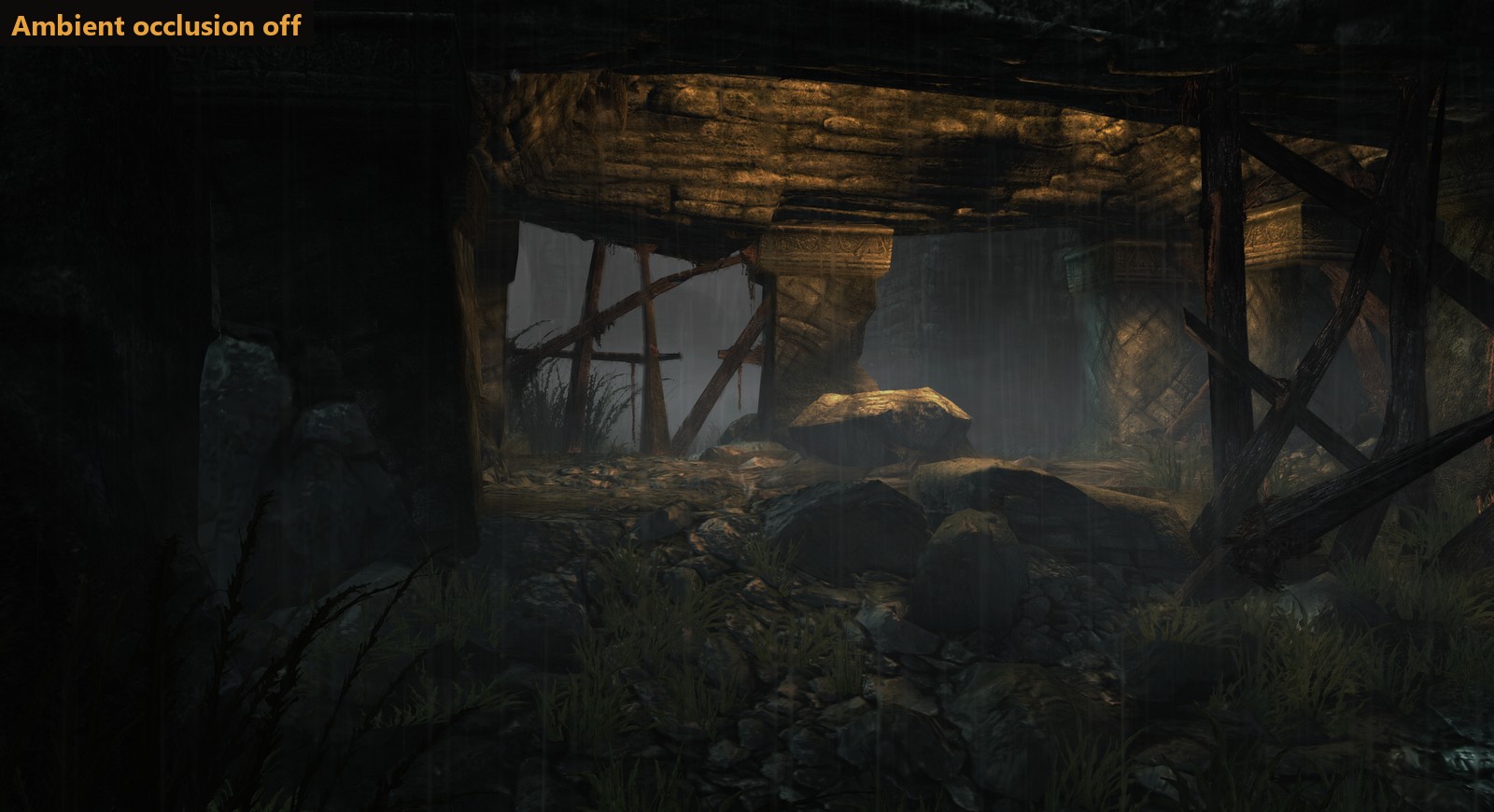
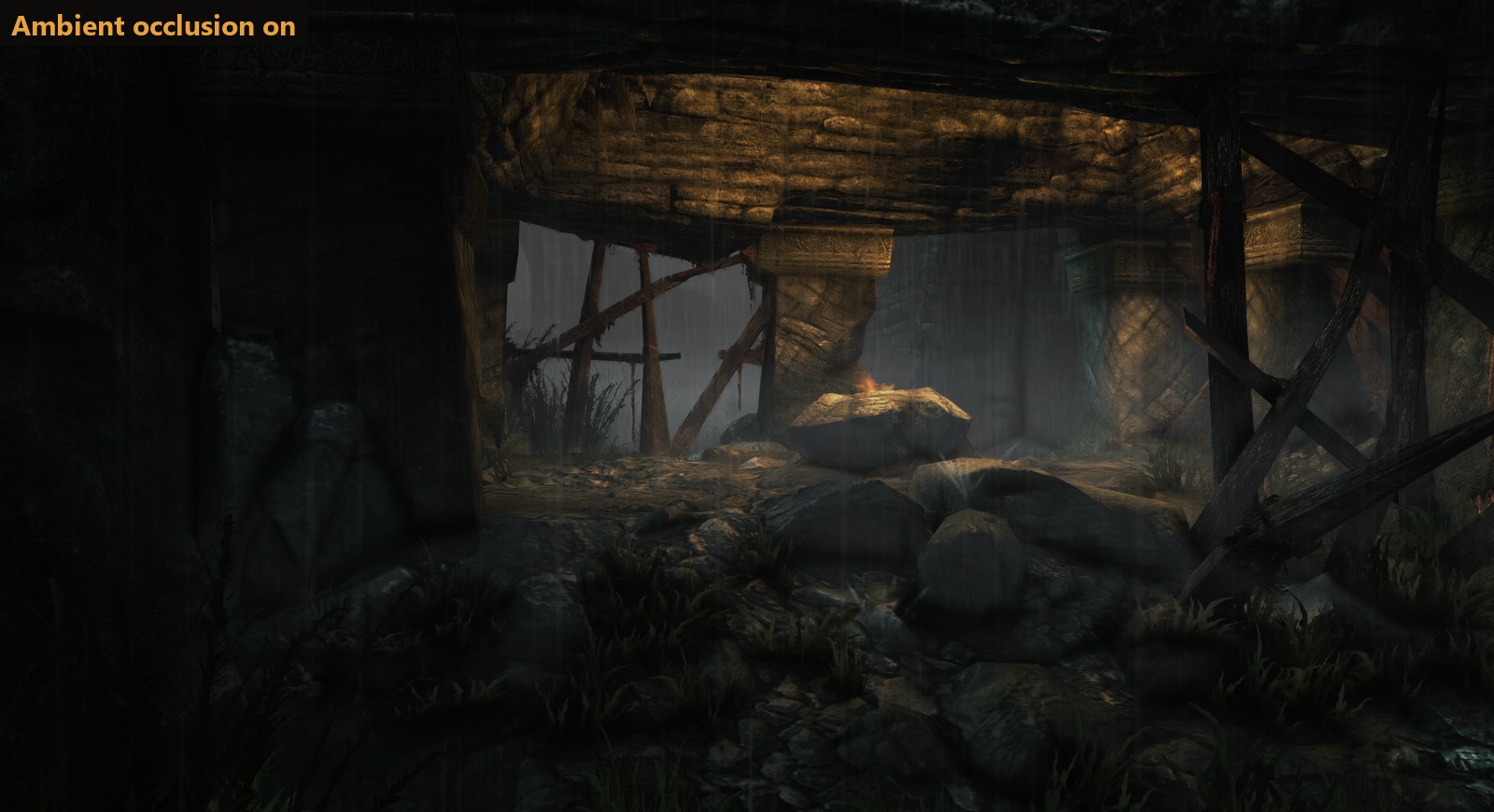
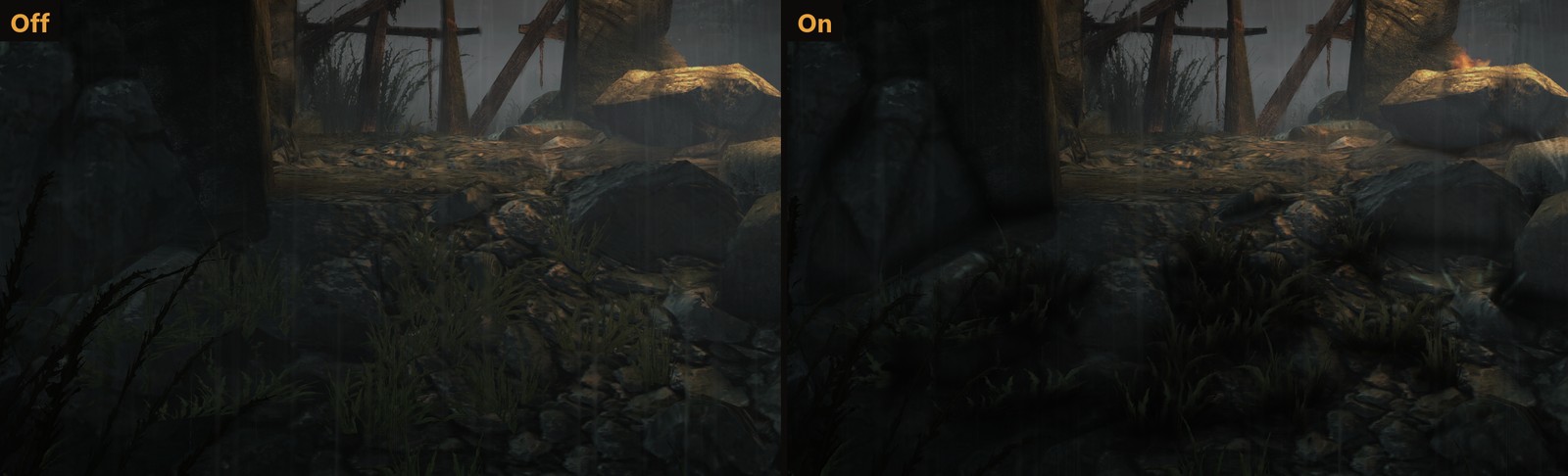
- Ambient occlusion. A new setting on the Graphics page adds soft shading where surfaces meet: in corners and creases, and on the ground under rocks, grass and people. It's off by default. Choose strength 1 (recommended), 2 or 3. It stays under the game's distance fog, so far-off walls don't show through the haze. It costs about 1 ms a frame at 4K, and works with NVIDIA and AMD graphics for now (not Intel yet) (#24).
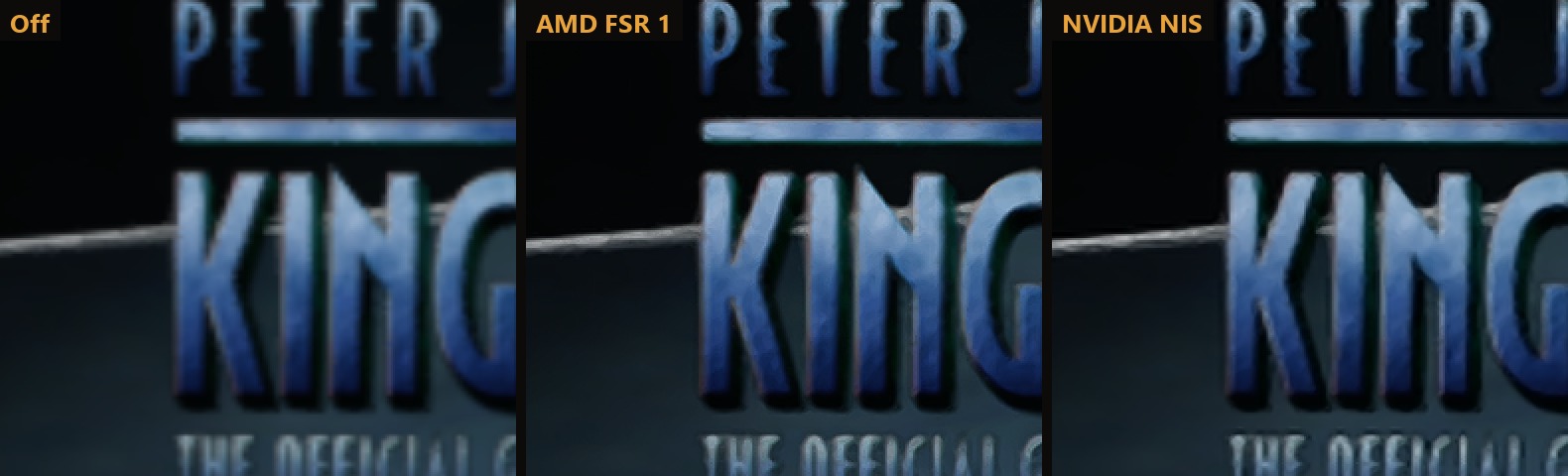
- AMD FSR 1 and NVIDIA Image Scaling. A new Upscaler setting: Off (the default), AMD FSR 1 or NVIDIA NIS. Both work on any graphics card. Each has Native, Quality, Balanced and Performance modes, and the launcher shows the resolution the game draws at in each one. They scale the picture up to your screen and sharpen it, so a lower resolution still looks crisp.
- Original Xbox 360 or Modern. A new Look setting at the top of the Graphics page. Original is the game as it was on the console: 720p at 30 FPS, the console's own anti-aliasing and texture filtering, the 69° field of view, motion blur and fog, no ambient occlusion and no upscaler. Modern gives you every setting, and switching back to it puts your own settings back.
- Graphics presets. Low, Medium (the default settings), High, Ultra and Steam Deck set the upscaler, render quality, anti-aliasing, texture filtering and ambient occlusion in one click. Change any of them yourself and it shows Custom.
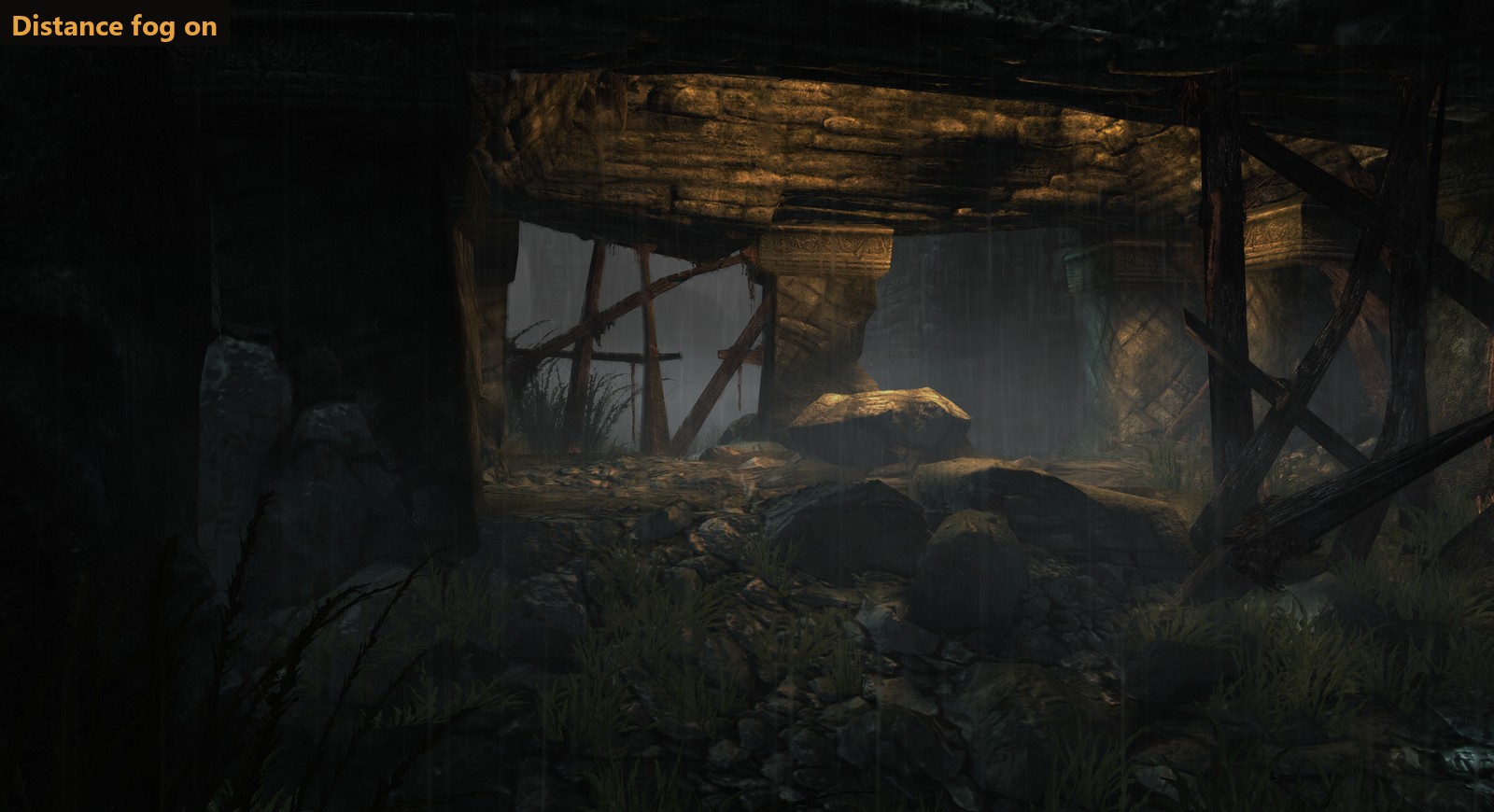
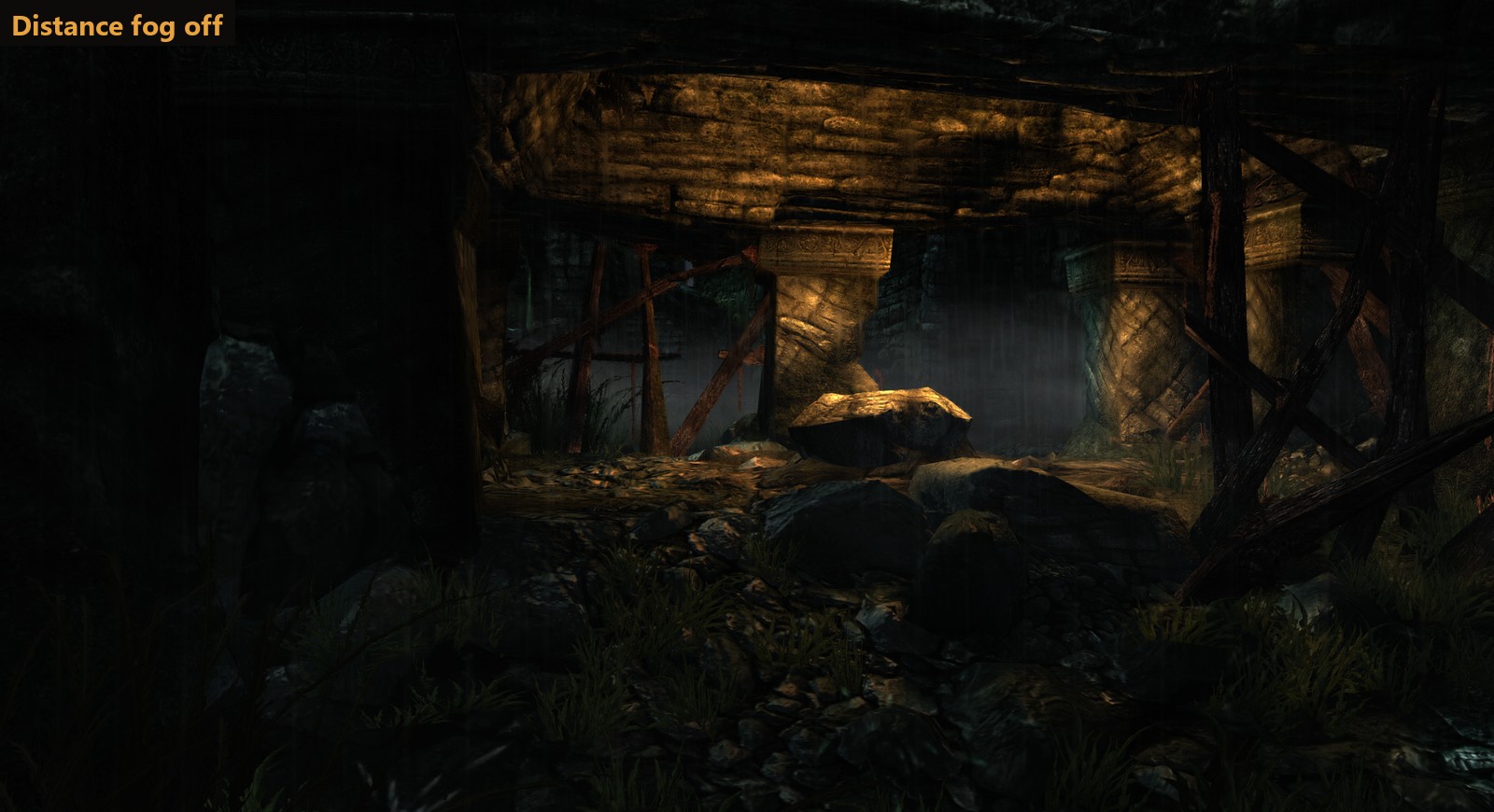
- Distance fog on or off. Off clears the haze over far scenery. It's on by default, as the fog is part of Skull Island's look and also hides the edges of each area, so some empty backdrops can show with it off.
- Performance draws one step lower. The game draws in steps of its original 720p, so on a 4K screen Performance used to come out the same as Quality (1440p). It now goes one step lower where there is one: 720p at 4K, 2160p at 8K.
Before and after
Ambient occlusion off and on, in the V-Rex chapter (strength 1):
 |
 |
Distance fog on and off:
 |
 |
The title screen at 1920 x 1080 in Performance mode (drawn at 1280 x 720), zoomed 2x: plain scaling, AMD FSR 1 and NVIDIA NIS.
Graphics presets
| Preset | Upscaler | Render quality | Anti-aliasing | Texture filtering | Ambient occlusion |
|---|---|---|---|---|---|
| Low | AMD FSR 1 | Performance | FXAA | 2x | off |
| Medium (default) | off | Native | FXAA | 4x | off |
| High | off | Native | FXAA | 8x | on |
| Ultra | off | Supersample | FXAA Extreme | 16x | on |
| Steam Deck | off | Native | FXAA | 2x | off |
Full changelog
- Ambient occlusion: built into the GPU plugin (
rexgpu-xenos.dll, patches 0003 to 0007 intools/rexglue-patches), set withao_mode(0 off, 1 on) andao_strength(1 to 3). Once a frame, at half resolution, it reads the scene depth the game copies out before lighting, works out the occlusion from 10 samples, blurs it and scales it up to full resolution. It's applied to the scene before the game's post effects, so the HUD isn't touched, and it uses the game's own fog values so only the part of the scene in front of the fog is darkened. Measured at 0.7 to 1.0 ms a frame at 3840 x 2160 on an RTX 4070 Ti. It needs the host render target path that NVIDIA and AMD graphics use; Intel graphics use a different path that isn't supported yet. - Distance fog:
kk_fog(on by default). Off skips the game's fog pass. - Look:
kk_original_look. While it's on, your Modern settings are kept inkk_modern_settings, and the Original values are set again each time the game starts in case the settings file was edited. - Upscalers:
present_effect(bilinearfor Off,fsr,nis) andpresent_nis_sharpness(0.5).rexruntime.dllis now built from the ReXGlue SDK source with patch 0008: AMD FSR 1 and CAS without the AMD SDK, and the NVIDIA Image Scaling SDK v1.0.3 as a compute pass, run more than once for scale factors over 2x like FSR's own passes. The patch also fixes a heap in the presenter that only had room for two in-between images, too few for FSR from 720p to 8K. Their MIT licences are inTHIRD-PARTY-NOTICES.txt. - Upscaler mode: sets
kk_render_quality(native,quality,balanced,performance). While an upscaler is on, it replaces the Render quality setting.performancenow goes one 720p step belowqualitywhere there is one, with or without an upscaler. - Presets: the Graphics page shows which preset your settings match. Motion blur and fog aren't part of them.
How to update
If you have v1.4.0 or later, the launcher offers this update when it opens: click Update now. Otherwise download KingKong-v1.9.0-windows-x64.zip below and copy everything in it over your KingKong folder. Your settings stay as they are: ambient occlusion and the upscalers start off, and your preset shows as whichever one your settings match (or Custom).
New install
- Unzip KingKong-v1.9.0-windows-x64.zip anywhere and run king_kong.exe. The shader pack downloads by itself.
- Click Install from disc image... and pick your own King Kong disc image (USA/Europe, title ID
555307D3, version0.0.0.1). - Press PLAY.
No game files are included. See the README for details.
Requires Windows 10 or 11 (64-bit) and a DirectX 12 graphics card. Linux version in development.
This port was made with AI (Claude Code). See the README for details.