
RepoVibes is a web tool that "checks the vibes" of any public GitHub repository. It analyzes repository data across six different axes—Activity, Community, Responsiveness, Documentation, Stability, and Popularity—to generate a score.
These scores are visualized as a unique, hand-drawn hexagon chart. A key feature is the ability to generate a dynamic, embeddable SVG badge of this chart for use in your project's README file. The entire application embraces a fun, sketchy, crayon-and-paper aesthetic.
- Paste a Repo URL: Go to the RepoVibes website and enter a public GitHub repository URL or a shorthand like
owner/repo. - Vibe Check: The tool fetches public data from the GitHub API, analyzing commit history, issue management, community contributions, and more.
- Get Your Hexagon: RepoVibes generates a visual hexagon chart and a shareable Markdown snippet. You can paste this snippet directly into your
README.mdto display the live vibe chart.
RepoVibes evaluates repositories on the following six "vibe-o-meters":
- Activity: How recently and how often code gets pushed.
- Community: The number of different people contributing to the project.
- Responsiveness: How well maintainers keep up with and close issues.
- Documentation: The presence and depth of a README, a license file, project description, and topics.
- Stability: The use of tagged releases and how recent the latest release is.
- Popularity: The number of stars and forks, adjusted for the age of the repository to measure growth.
You can embed a dynamic SVG in your own README.md file. The badge will automatically update. Just copy the Markdown snippet provided after analyzing a repository.
Here is an example for facebook/react:
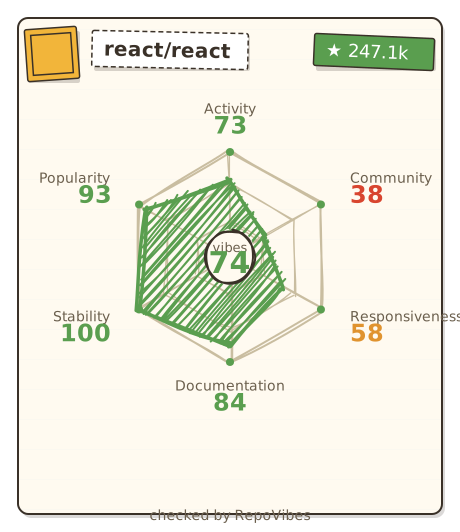This will render the following SVG directly in your GitHub profile or repository:


To run RepoVibes on your local machine:
-
Clone the repository:
git clone https://github.com/Terminay/repovibes.git cd repovibes -
Install dependencies:
npm install
-
Run the development server: This command starts both the Express backend server and the Vite frontend client concurrently.
npm run dev
-
Open your browser and navigate to
http://localhost:3000. The backend API will be available athttp://localhost:3001.
npm run build: Builds the React frontend for production.npm start: Starts the Express server to serve the pre-built frontend (use after runningnpm run build).