









Note
Not affiliated with Valve. Every mod here is client-side: nobody else sees them, and no other player's game is touched. Safe mode is on by default and keeps the app out of Dota's own files entirely; the one feature that changes them asks first and reverts byte for byte.
Why not just copy the files yourself? You can, and people do. What the app adds is everything after that: switching a mod off before a match without deleting it, free cosmetics read from the game's own item table, a setup you send as one link, and a game that still works after a Dota patch.
| The whole catalog | 1000+ mods in 41 categories, read live from the D2PFX repository, so a mod added today installs today |
| One click in, one click out | The app downloads it, picks a free pak slot and cleans up after itself. Categories that must load early get low slots by themselves |
| Switch off, don't delete | Turn a mod off before a match and back on after. Your library stays, the game folder stays clean |
| Free cosmetics | Weather, couriers, wards, loading screens, announcers, mega-kills, read from the game's own item table, so anything Valve adds appears by itself |
| It says when mods collide | Two mods carrying the same file cannot both win. The app names the file, says which mod the game loads it from, and lets you reorder |
| Setups by link | Save what you run as a preset and send it in one message. The other side opens it and gets the same look |
| It survives Dota patches | The app notices a game update when it lands and puts back what the patch wiped, without ever writing while Dota is running |
And the rest
| An install list | Put mods aside while you browse and install them all at once. The list has its own search, because people were installing eighty mods one at a time |
| Filters and search | Chips for what a mod changes, a dropdown for the item slot, a list of heroes, and one search across the whole catalog |
| Fonts and cursors | Installed into the game files with a backup of the originals; removing them restores vanilla |
| Combined packs | Merge several mods into one pak slot, and take them apart again |
| Your own files | Import a .vpk, or adopt what somebody else's tool left in the folder. The app fingerprints it against the catalog and tells you what it is |
| Auto-updates | The app checks GitHub Releases and installs new versions itself |
| Windows and Linux | Both ship with every release: an installer and a portable build for Windows, an AppImage for Linux. Steam is found wherever your distribution keeps it, flatpak included |
| No account, no telemetry | Nothing is collected and nothing is sent. Signing in with Discord is optional and only puts your name on a setup you share |


- Download Dota 2 Mod Manager Setup — direct link, always the latest version
- Run it. The app installs, creates a shortcut and starts
- It finds Dota on its own. No launch options, no Steam properties to edit
On Linux the same app ships as an
AppImage:
chmod +x it and run it.
Important
Windows will call the publisher unknown, because the installer carries no paid signature. Click More info, then Run anyway. Every release is built from this source by a public workflow rather than uploaded from anybody's desktop, and the build log for the exact file you downloaded is open to read.
Nothing is injected into Dota's process, and no file of the game is opened while it runs.
- Dota mounts one folder, named after its voice language. The app sets that language in the game's own settings and installs there — no launch option involved, which is the part worth reading twice. Why that works
- VPK mods go in as
pakNN_dir.vpk, slots 10 to 99. Categories that must load first getpak02topak09. Slots and load order - Switching a mod off renames its file to
.off. The game skips it, the file stays - Fonts and cursors go into the game's own folders, with the originals backed up first
- Everything that writes to the game folder is one transaction: if a step fails, the whole change rolls back, displaced files included
- Safe mode, on by default, means the app never touches Dota's own files. Turning it off adds
one line to
gameinfo_branchspecific.giand a signature todota.signatures— both backed up before the first edit, both restored byte for byte when it goes back on. What that buys and costs
Downloads live in %APPDATA%/dota2-mod-manager/downloads, the install manifest beside them.
The full picture is in ARCHITECTURE.md, and every module is listed in
docs/API.md, which is generated from the source rather than written.
Dota2 Minify is a different kind of tool by a different author: it builds mods by patching the game where this installs finished ones from a catalog. Run both. This app installs into whichever folder the game will really mount — including the one Minify picked — never hands out the pak slots Minify writes, and leaves its files alone. Minify since v1.14rc7 checks ownership before clearing the map folder, so a terrain installed here survives its uninstall.
What Minify is, and how the two share a game.
| Installing mods | The whole route, by hand and with the app |
| The language folder | Why -language is not needed, and what it does when it is there |
| VPK and load order | Pak slots, which mod wins, and gameinfo.gi |
| Safe mode | What the app writes into the game, and what it does not |
| Free cosmetics | The item table, and what it can and cannot give you |
| After a Dota patch | What breaks, and what the app puts back |
| Every fact, checkable | Version, platforms, counts, and how to verify each one |
| ARCHITECTURE.md · docs/API.md | Which file owns which decision, and every module's exports |
| CONTRIBUTING.md · AGENTS.md · SECURITY.md | How to work on it, with or without an assistant, and how to report a hole |
| PRIVACY.md | What is collected (nothing), and every address the app can contact |
| DECISIONS.md | What was decided on purpose, what is genuinely missing, and the command that checks each one |
| CHANGELOG.md · CHANGELOG.ru.md | What changed in each release |
| Bug report | Something is broken. Settings → Diagnostics → Export report puts everything needed in one file |
| Feature request | An idea for how the app should work |
| Discussions | Questions, setups worth showing, and anything that is not yet a bug |
| Discord | Quick help, in the catalog's own community |
| Security | Vulnerabilities, privately — never a public issue |
Two things first: make sure you are on the latest version, and if Dota updated recently, open the app and let it put the patch back.
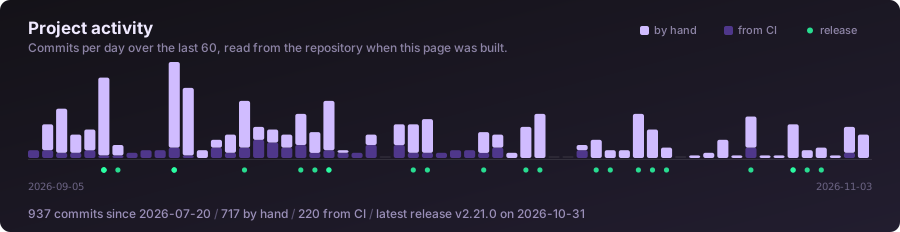
Drawn from this repository's own git log when the site rebuilds,
which it does daily and after every release. No third-party widget, so nobody reading this page
is loading a tracker, and nothing has to be committed for the picture to move.
What runs on every push:
| Tests | eslint first, then the full suite with a coverage floor, on Linux and on Windows. Several of the tests hold the project against itself rather than testing a module: every IPC channel has a handler and every handler runs, every renderer import resolves, every Russian string has an English twin, the version and both changelogs agree, docs/API.md still matches the source, and DECISIONS.md still matches the repository |
| CodeQL | Security and quality analysis, plus a weekly scheduled run |
| Release | On a tag only: builds the Windows installer, the portable build and the Linux AppImage from that commit, and publishes them with the changelog section for that version |
| Site | Rebuilds the documentation site so its counts, its version and this card stay true |
| Mirror | Pushes the same history to GitLab, so the code outlives this repository |
Nothing here commits back to main. Workflows that need to remember something between runs
keep it in the Actions cache, because a bot commit per run is how a log stops being readable.
npm install
npm start                 # run the app
npm test                  # the whole suite, no framework, no mocks library
npm run test:coverage     # the same with the floor CI enforces
npm run docs              # regenerate docs/API.md from src/
npm run sandbox:seed      # a throwaway game tree with real mods in it
npm run start:sandbox     # the app against it, never your own game
Node 24, Electron 43, no bundler — the renderer is plain HTML, CSS and JavaScript. Every release
is produced by release.yml from the commit its tag names.
Open an issue before building anything larger than a fix. It costs one message and saves the case where two people solve the same thing twice, or where the answer was "that is deliberate, and here is why". CONTRIBUTING.md has the rest; AGENTS.md is the same ground for anyone working with a coding assistant.
This project has been written with Claude Code since its first
commit on 20 July 2026, and still is. Commits carry a Co-Authored-By trailer saying so.
It says so here because guessing is worse. Everything that would tell you whether the code is any good is already in the open: every commit, more than forty test files, a linter and a coverage floor that CI enforces on two operating systems, and DECISIONS.md, which answers the questions reviewers keep asking with a command you can run yourself.
Send a change written with an assistant and keep the trailer on it. AGENTS.md is what the project asks for in return.
Everything third-party the app ships or fetches, with the licence it comes under. The NOTICE file has the full text and the two additional terms this project adds under section 7 of the GPL.
| What for | Licence | |
|---|---|---|
| Electron | The window and the process behind it | MIT |
| electron-updater | Update checks and installing them | MIT |
| adm-zip | Reading mod archives, behind our own size and path guards | MIT |
| Source 2 Viewer | Decoding Dota's own textures for item icons. Downloaded on demand, never bundled | MIT |
| Inter, Exo 2, Material Symbols | The typefaces and icons, shipped inside the app rather than fetched | OFL-1.1, Apache-2.0 |
| Astro | The documentation site, not the app | MIT |
package.json lists exactly four: adm-zip and electron-updater ship inside the app,
electron and electron-builder only build it. The tests and everything under tools/ use no
dependencies at all. The VPK reader and writer, the KeyValues parser, the zip guards and the
update logic are written here, because every dependency is a stranger with write access to a
game folder on tens of thousands of machines.
Valve's own vpk.exe is deliberately not here and must not be added: it is proprietary, and
a project that bundles it is not open source in the sense SignPath's terms mean. Reading and
writing VPK archives is done by this repository's own code, which is why src/vpk.js exists.
- All mods, previews, guides and catalog data come from the open-source D2PFX repository by h6rd and the Dota 2 modding community. This app is a desktop client for their catalog, and every mod card in it credits its author.
- Community tools (VPKMerge, Background Changer, Compiler, ItemsFix) belong to their authors.
- hanta filmed a walkthrough in Russian, which answers more questions than this page does for anyone who would rather watch than read.
GPL-3.0. Copyright (C) 2026 Mykhailo Lynnyk.
Fork it, change it, ship your own. GPL-3.0 asks you to keep the copyright line, to say that you changed the code and when, and to open your version under the same license. Section 7 lets an author add two more, and this repository does: keep the credit the app shows, and pick your own name for your version. NOTICE puts all of it in plain words.
Catalog content belongs to h6rd and the mod authors, under the license in their repository.