Debug Mode
Debug mode lets you create new enchantment descriptions or override the existing ones by adding translation keys through a resource pack — no code required.
Enable it in the config:
{
  "debug": true
}Ench Tell automatically generates a translation key for every enchantment, following this pattern:
enchantment.<namespace>.<path>.desc
For example, the description for vanilla Looting uses the key:
"enchantment.minecraft.looting.desc": "Increases mob loot drops."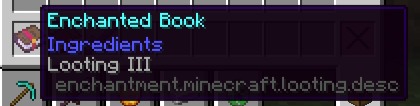
The mod ships with default descriptions for vanilla enchantments under assets/minecraft/lang.
- Create a new resource pack.
- Inside it, create a language file at:
assets/minecraft/lang/en_us.json
(replace en_us with whichever language you're targeting)
3. Add your enchantment description using the key pattern above:
   {
     "enchantment.minecraft.looting.desc": "Increases mob loot drops."
}- Enable the resource pack in-game.
To override a default description, create a resource pack the same way and add a translation key that matches an existing entry. Your resource pack's value will take priority over the mod's built-in default.
Because the key pattern is based on the enchantment's namespace and path, it works with enchantments from any mod that follows the same convention — not just vanilla Minecraft:
enchantment.<modid>.<enchant_path>.desc
For example, an enchantment added by another mod might use:
"enchantment.somemod.enchants.desc": "Description here."As long as the enchantment's namespace and path match, Ench Tell will pick up the description automatically.