Repository navigation
Releases: TheeHorse/SAGE-Unlocked
Release list
SAGE Unlocked v1.9.6 (beta)

Beta: tested on RA3, Uprising, Tiberium Wars and Kane's Wrath, but it changes a lot of effect timing. If something looks off, post it with your SAGEUnlocked.log. 1.9.5 stays the main download until this has had some play.
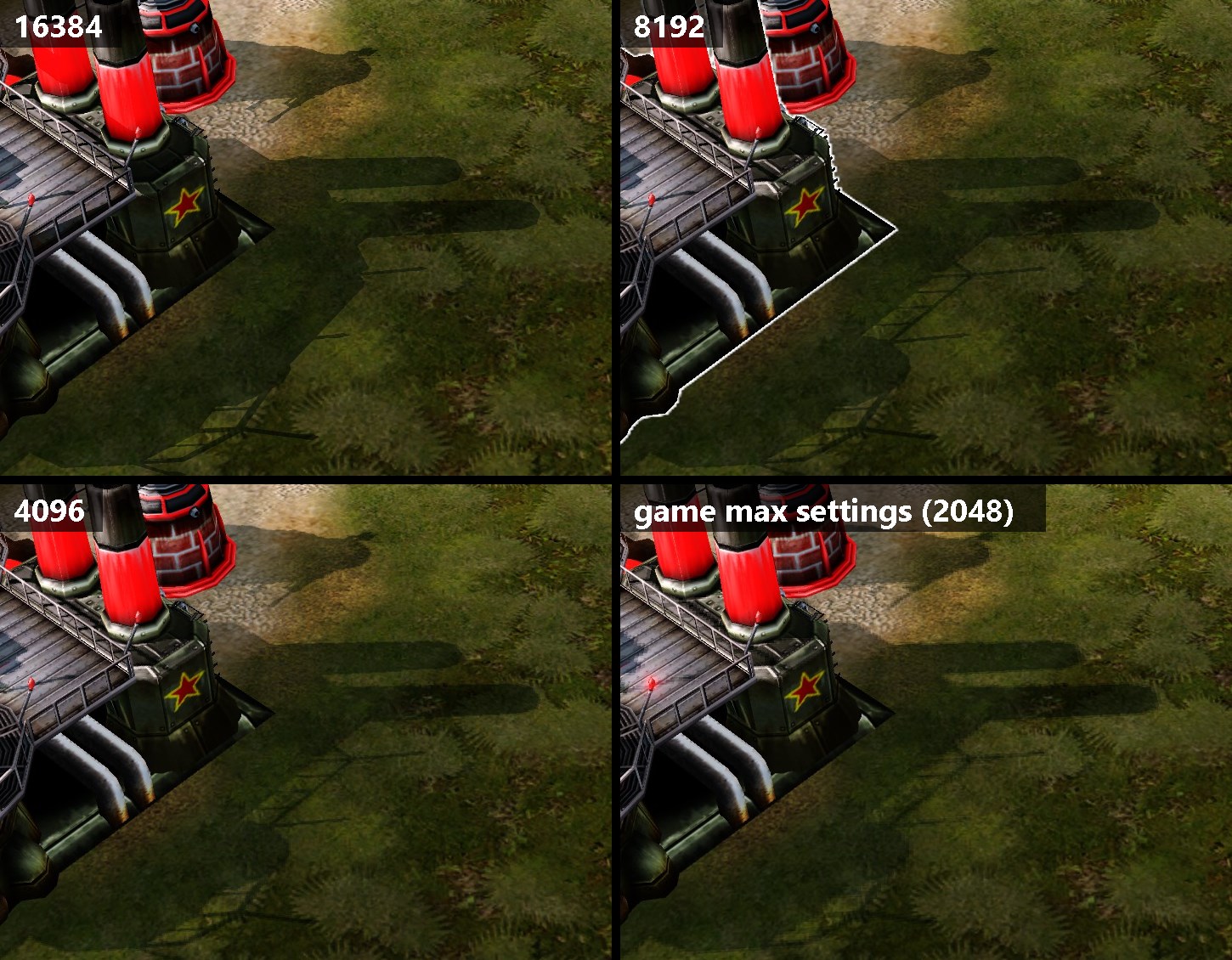
New (experimental): sharper shadows. Raises the shadow map from the game's 2048 (what you get at max settings) to 4096, 8192 or 16384, so shadows are a lot crisper. Pick it in the setup, or put shadowmap=4096 (or 8192, 16384) in SAGEUnlocked.ini. 8192 uses about 512 MB of video memory, 16384 about 2 GB. Off by default. Works in Red Alert 3, Uprising, Tiberium Wars and Kane's Wrath, tested in RA3 and TW.
New: camera zoom-in (RA3/Uprising). Lets you zoom in further, 0.75x or 0.5x. Pick it in the setup or put zoomin=0.5 in SAGEUnlocked.ini. Skirmish and campaign only, same as zoom-out.
Glows don't flicker anymore. The Soviet reactor and the Instant Generator glow in RA3/Uprising flickered at high fps (#29). Two causes: glow particles expired a frame before their replacement showed up, and the game's effect clock ran a few percent slow above 30 fps. Both fixed.
Fixes
- TW/KW: tracers (rifles, machine guns, Gun Walker, Stormrider) move every frame instead of 30 times a second
- TW/KW: the selection glow on units and buildings plays at normal speed again (it was 4x+ too fast) (#31)
- Effects, animations and particles that use the game's effect clock now run at true speed (they were 2.5-4% slow above 30 fps)
- Radar and group markers fade at normal speed (they faded 4x too fast), all four games
- Effect delays and trails/ribbons last as long as stock (they ended early at high fps), all four games
- RA3/Uprising: credit popups (#25) and fade-ins like the turret hub lines (#28) at normal speed, same fix TW/KW got in 1.9.5
- TW/KW: vehicle body sway at normal speed (#12), same fix RA3 already had
- TW/KW: unit fade and blend effects last as long as stock
Known issue: the Soviet ore refinery shows its glow while it's still building. Stock RA3 does this too, it's not the mod.
SAGE Unlocked v1.9.5
Linux works now. Same files as Windows, same folders, no launch option, no protontricks. The dll was asking Proton for the wrong name the whole time, one line fix (#16). Tested on Proton Experimental and Proton-CachyOS.
Fixes
- Invisible units and seeing through fog (#22), a 1.9.4 bug
- Game logic no longer misses its "new tick" check (also a 1.9.4 bug, made units look stale)
- TW/KW: money tick sound (#24) and credit popups (#25) at normal speed
- Replay fast forward works again (#26)
- Hub lines for turrets fade in at the right speed (#28)
Changed
- The ini and log are now
SAGEUnlocked.ini/SAGEUnlocked.log(#23). An oldRA3HighFps.inistill works and the setup renames it for you
Known issue: the Soviet reactor flickers in RA3, looking into it.
Install: run SAGE-Unlocked-Setup.exe, or copy the files from SAGE-Unlocked.zip by hand (see the README).
v1.9.4 - online desync fix
Fixed online desyncs. The game logic now runs in the same order as the stock game no matter what fps you play at, so players with different fps (or one player without the mod) stay in sync.
Fixed lag in online games. The game speed now matches stock exactly, so one player's game doesn't keep waiting for the other's.
Turrets turn smoothly instead of wobbling (#11).
Falling trees, lamp posts and other props topple smoothly (#14).
Fixed the flamethrower crash in Tiberium Wars and Kane's Wrath (#21).
Various animations and timers that ran too fast at high fps now run at normal speed.
v1.9.3 - BFME power menu fix
You can buy powers again in BFME2 and Rise of the Witch-king at high fps. Above 30 fps the power menu ignored clicks and the powers you could buy didn't flash (other fps unlockers have the same problem). Works with Age of the Ring too.
Works with the BFME All In One Launcher setup now. The launcher swaps lotrbfme2.exe / lotrbfme2ep1.exe for the full game, and the mod didn't load in that. It does now. (The launcher can still delete the mod's files from the game folder, so if it stops working check the 3 files are still there.)
The setup finds those installs too (RotWK or BFME2 folders where the launcher exe is the whole game and there's no game.dat).
Run the setup again, or grab the zip.
v1.9.2 - Rise of the Witch-king
Rise of the Witch-king support (new, not tested much yet). The setup finds RotWK on its own, or copy the files from the "Battle for Middle-earth II" folder in the zip next to RotWK's game.dat.
If you have the RotWK 2.02 patch: it changes two spots in game.dat that fight with the unlocker's timing and made units hitch. The unlocker now puts the original code back in memory while it runs (your game.dat isn't touched).
Also:
- If the game isn't supported, the log shows the right file size again (was wrong in 1.9.1)
- On Linux, the log now shows an error code when .NET fails to run the mod, so it says why
- Reminder for BFME players: the BFME All In One Launcher / Competitive Arena delete the mod's files from the game folder. Start the game with lotrbfme2.exe / lotrbfme2ep1.exe instead, or copy the files back after.
Run the setup again, or grab the zip.
v1.9.1 - BFME2 1.06 fix
Fixes "Unsupported game build (frame limiter not found)" on Battle for Middle-earth II 1.06.
Heads up if you use the BFME All In One Launcher: it deletes dinput8.dll, CnCFpsUnlocker.dll and RA3HighFps.ini from the game folder when it starts the game. Start the game with lotrbfme2.exe instead, or copy the files back after.
Run the setup again, or grab the zip and copy the files next to game.dat.
v1.9 - Battle for Middle-earth II, new name
New name: SAGE Unlocked (was C&C FPS Unlocker). It's not just C&C anymore, everything it supports runs on EA's SAGE engine. Old links still work.
BFME2 support is brand new and hasn't been tested much yet, so expect some rough edges. If something looks off let me know.
- Battle for Middle-earth II: unlocked fps with normal game speed, smooth units, animations/water at the right speed, normal mouse scroll speed
- Setup finds BFME2 on its own (or use Add game folder and pick the folder with game.dat)
Just run the setup again, or grab the zip and copy the BFME2 files next to game.dat.
v1.8.2 - Ion Cannon effect, mod versions in setup
Only tested at 240 fps so far. More testing at other frame rates will follow.
- TW/KW: should fix the Ion Cannon strike effect disappearing too fast. Fading stuff (the ground ripple, dying units) faded way too quick at high fps (#5)
- Setup also installs into TW 1.9 and KW 1.2, the versions a lot of mods use (thanks to the tester who pointed that out!)
- README: RA3 on Linux needs runme.exe in the launch option, not RA3.exe (#16)
Just run the setup again, or copy the new files from the zip over the old ones.
v1.8.1 - turret wobble fix, Linux log fixes
Only tested at 240 fps so far. More testing at other frame rates will follow.
- Turrets don't wobble/snap back anymore (RA3, Uprising, TW, KW) (#11)
- Linux: the dll no longer overwrites RA3HighFps.exe's log, and the log now says exactly what got started, so problems on modded installs are easier to track down (#16)
Just run the setup again, or copy the new files from the zip over the old ones.
v1.8 - Uprising Desolator crash, vehicle/boat sway, Linux
240fps Support! More testing at other frame rates will follow.
- Fixed the Uprising crash when a Desolator kills infantry (#18)
- Vehicles and boats don't shake/wiggle too fast anymore at high fps (RA3 + Uprising) (#12)
- Linux: works under Proton again, no dotnet48 needed. Put
RA3HighFps.exe(in the zip's Linux folder) in the main game folder and use the launch option from the README (#16) - Setup shows all installed games on the last page
Just run the setup again, or copy the new files from the zip over the old ones.