Releases: Tim-Schaller/ClaudeDisplay
Release list
Claude-Usage-Display v2.7.0

Self-Update direkt vom Display: neues Release antippen, Firmware und Collector aktualisieren sich.
Session-Detailblatt bei langem Druck (Status, Projekt, Branch, Modell, Kontext, Start).
Collector-Logmeldungen auf Englisch.
Sicherheit: vom Display empfangene Serial-Felder werden vor dem Loggen entschaerft (keine Log-Injection).
Firmware 2.7.0.
Claude-Usage-Display v2.6.0
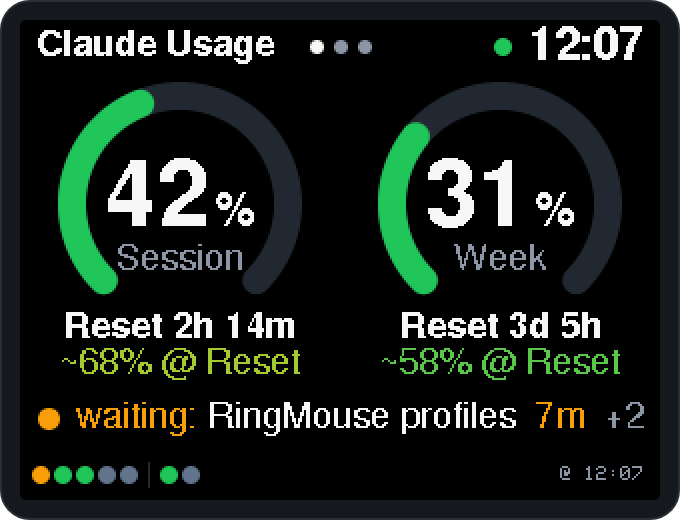
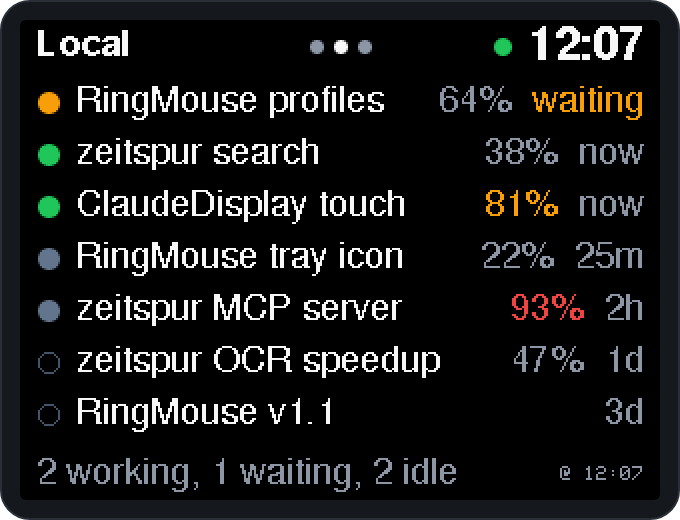
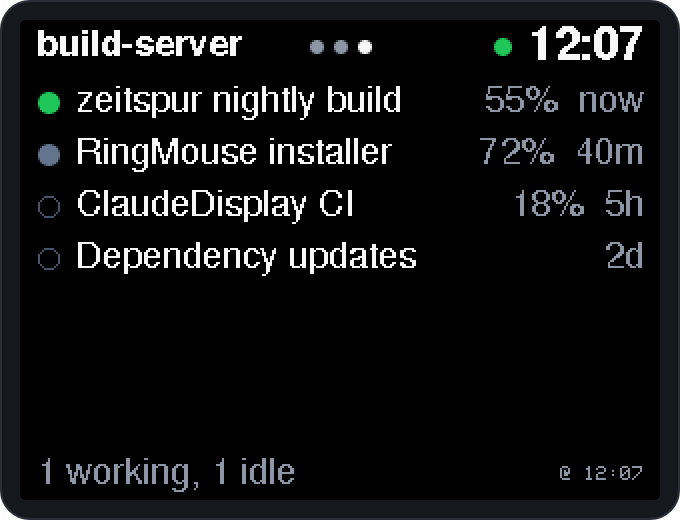
Plug & play: download one ZIP, plug in your CYD, double-click Setup.cmd, done.
Made for the Claude Desktop app on Windows (Code tab) with a claude.ai subscription (Pro, Max, Team or Enterprise). Not meant for CLI-only setups. Unofficial community project, not affiliated with Anthropic.
What's new in 2.6.0
- Context fill per session: the Local and Remote pages show how full each session's context window is ("64%", orange from 75 %, red from 90 %). The value comes from the Remote Control session list, so it needs Remote Control on that session.
- "Done" flash: when a session that worked for at least 10 s finishes or starts waiting for you, the whole screen inverts for a quarter of a second, so you notice from the corner of your eye. Remote sessions (fetched every 30 s) flash after about 30 s of work, up to 30 s late. Not while Windows is locked.
- English display texts: "~68% @ Reset", "waiting: …", "Week", "Reset 2h 14m", "2d", "@ 12:07"; error messages on the display are English too (the collector's log stays German).
- New logo and real screenshots in the README.
- Protocol: list items gain
c(context in %); new host → board messagedone.
Install (3 steps)
- Download
ClaudeDisplay-Setup-v2.6.0.zipbelow and unpack it to a folder you keep (e.g.Documents\ClaudeDisplay). - Plug the ESP32-2432S028 "Cheap Yellow Display" into your PC with a USB data cable.
- Double-click
Setup.cmdand follow the prompts (if Windows asks: "More info" → "Run anyway").
The setup assistant checks Claude Desktop and PowerShell 7 (offers to install PowerShell 7 from the Microsoft Store, no admin rights needed), finds the board, downloads Espressif's official esptool 4.12.0 (SHA256-checked, removed afterwards), optionally backs up the board's original firmware, flashes the firmware (ST7789 or ILI9341 panel, it asks whether the picture looks right) and installs the background service with a one-time browser login to Claude. A few seconds later the display shows your usage. Uninstall.cmd removes the background service again.
Updating from an earlier version: run Setup.cmd from the new ZIP; your own page titles in config.json are kept. Firmware and background service must both be updated, the setup does both.
What it shows
- Home: 5-hour session and 7-day week as ring gauges with reset countdowns, a forecast ("Limit ~HH:MM" or "~XX% @ Reset"), the session line (the session waiting for you, or the one working, with the waiting time), and one animated dot per running session (green = working, orange = waiting for you, gray = idle).
- Local: your Claude Desktop sessions with status, context fill and last activity.
- Remote: sessions on other machines that use Remote Control.
- Touch: tap a session to open it in Claude Desktop, swipe sideways to switch pages.
- "Waiting" matches what Claude Desktop marks yellow. Full brightness, backlight off while Windows is locked.
Assets
| File | |
|---|---|
ClaudeDisplay-Setup-v2.6.0.zip |
Everything you need (setup assistant, firmware, background service) |
claude-display-st7789-v2.6.0.bin, claude-display-ili9341-v2.6.0.bin |
Firmware images only (flash at 0x0), for manual installs |
test-st7789-v2.6.0.bin, test-ili9341-v2.6.0.bin |
Test images to identify the panel type |
Full documentation, troubleshooting and the serial protocol: README.
Notes
- Usage numbers come from the
get_usagerequest of the Claude Code CLI bundled with Claude Desktop (uses no quota); the remote session list (and context fill) comes from an internal, undocumented Anthropic endpoint, and opening sessions uses Claude Desktop'sclaude://deep links. Any of these may change without notice. - Only titles, status and times are shown, never chat content. No token ever reaches the device; the log never contains session titles.
- License: MIT with Commons Clause (no selling).