Repository navigation
Releases: TonT-wilshere/macos-screenshot-clipboard
Release list
SnapKeep 1.0.0 for Mac / Mac 截屏即贴

SnapKeep 1.0.0 for Mac / 截屏即贴 1.0.0(macOS)
Mac 原生截图,截完就能粘贴。/ Take a Mac screenshot. Then just paste it.
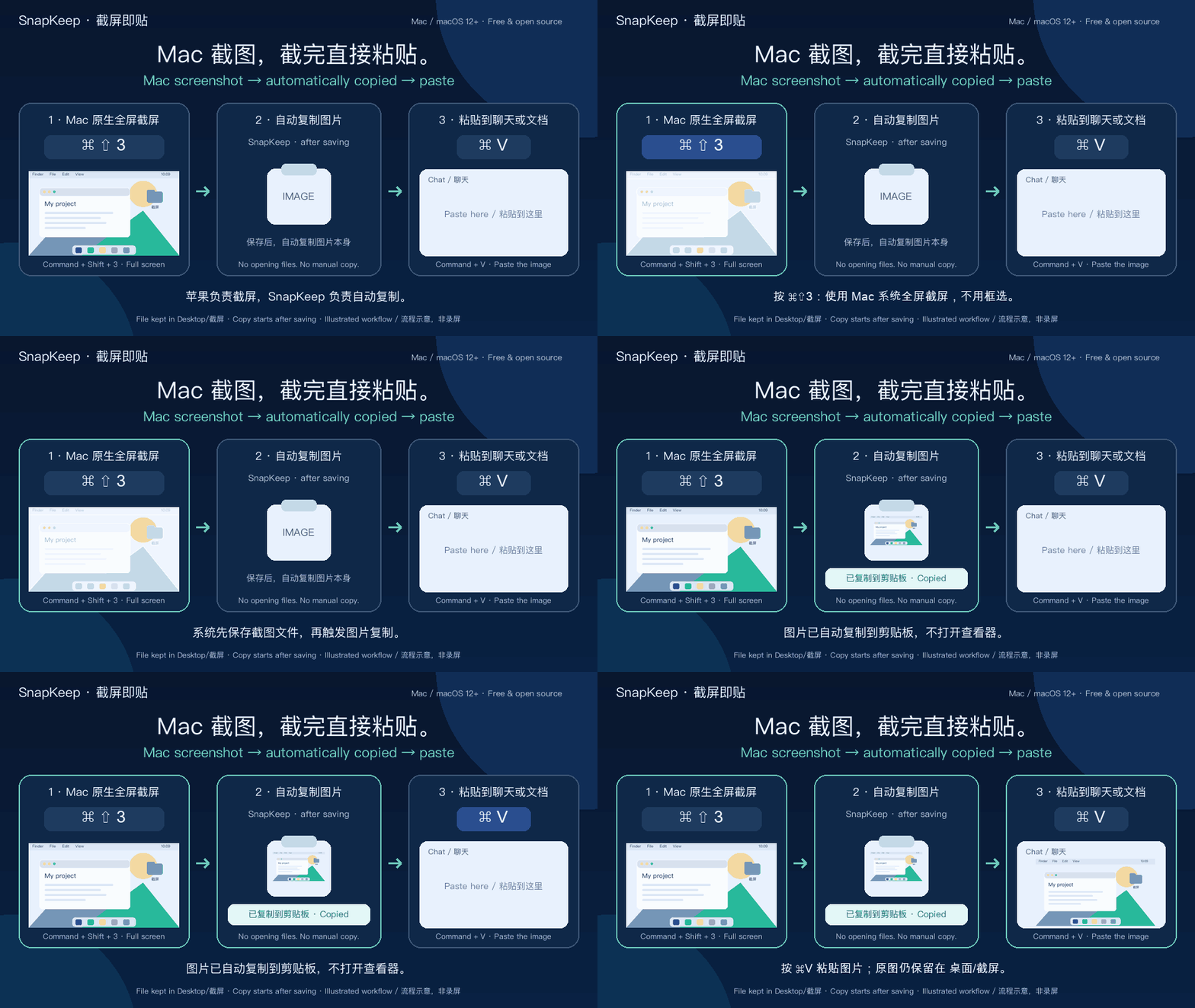
按 Command + Shift + 3 全屏截屏,SnapKeep 在文件保存后自动把图片复制到剪贴板;再按 Command + V 粘贴到支持图片的应用。截图文件同时保留在桌面“截屏”文件夹。
Press Command + Shift + 3 for a native macOS full-screen screenshot. After the file is saved, SnapKeep automatically copies the image to the clipboard. Press Command + V to paste it into an app that accepts images. The file stays in Desktop/截屏.
中文 · English · Agent Skill / 技能安装
中文
给 Mac 原生截图补上自动复制这一步。 不用先找截图文件再复制;它不是另一个截屏器,也不提供框选界面。
- 使用 macOS 原生
⌘⇧3全屏截屏;文件存入桌面“截屏”后,图片自动进入剪贴板,再用⌘V粘贴。 - 复制成功后轻提示“已复制到剪贴板”,不弹出查看器询问。
- 中英文原生界面,一键启用、更新或卸载。
- Apple Silicon + Intel 通用版,最低 macOS 12;当前功能在 macOS 15 验证。
- 完全本机运行,无账户、无上传、无遥测。
- 卸载保留全部图片,恢复安装前的保存设置;尊重后来手动更改的位置。
下载 DMG(推荐)或 ZIP → 打开 SnapKeep.app → 点击启用 → 允许 System Events。 配置后可退出应用。
复制在文件实际保存后发生,原生悬浮缩略图可能使它延后数秒。⌘⇧4 / ⌘⇧5 等其他原生截屏模式保存图片到同一文件夹时也适用。粘贴目标需要支持图片;通知可能受系统设置和专注模式影响。上方动画为流程示意,不是实机录屏。
当前发行未经 Apple 公证。首次打开若被拦截,请按 Apple 官方指引在“隐私与安全性”中选择“仍要打开”,不要关闭 Gatekeeper 或系统完整性保护。
如果它省下了你的一步,欢迎 Star 这个项目。⭐
English
Automatic copying for native Mac screenshots. No need to find the screenshot file and copy it yourself. SnapKeep is a clipboard helper, not a separate capture or selection tool.
- Take a full-screen screenshot with native macOS
⌘⇧3; once the file is saved inDesktop/截屏, the image is copied automatically. Paste it with⌘V. - A quiet “Copied to clipboard” notification, without a viewer prompt.
- Native Chinese / English setup, update, and uninstall controls.
- Universal Apple Silicon + Intel build targeting macOS 12+; behavior verified on macOS 15.
- Local-only processing: no account, upload, or telemetry.
- Uninstall keeps images and restores previous settings while respecting later destination changes.
Download DMG (recommended) or ZIP → open SnapKeep.app → click Enable → allow System Events. Quit the setup app afterward if you like.
Copying starts after the file is saved; the native floating thumbnail can delay it by several seconds. Other native screenshot modes, such as ⌘⇧4 or ⌘⇧5, work when they save an image to the same folder. The destination app must accept images; notifications depend on macOS settings and Focus. The animation above illustrates the workflow and is not a screen recording.
This release is not Apple-notarized. If blocked, follow Apple's Open Anyway instructions. Do not disable Gatekeeper or System Integrity Protection.
If it saves you a step, please Star the project. ⭐
Agent Skill / 技能安装
For compatible Codex and Claude Code skill workflows, the macos-screenshot-save-copy Agent Skill guides setup and troubleshooting for macOS screenshot-to-clipboard automation. / 适用于兼容的 Codex、Claude Code 技能工作流,帮助配置和排查 Mac 截屏自动保存、图片复制到剪贴板的问题。
npx skills add TonT-wilshere/macos-screenshot-clipboard --skill macos-screenshot-save-copy -gThe skill adds agent instructions; the app performs the local automation after setup. / Skill 安装的是代理操作说明,仍需配置应用才能启用本机自动复制功能。
SKILL.md · Skill catalog / 技能目录
Files / 下载文件
SnapKeep-1.0.0-macOS-Universal.dmg— recommended installer / 推荐SnapKeep-1.0.0-macOS-Universal.zip— app archive / 应用压缩包SHA256SUMS.txt— artifact checksums / 校验值