Repository navigation
Docker Puck Configurator
-
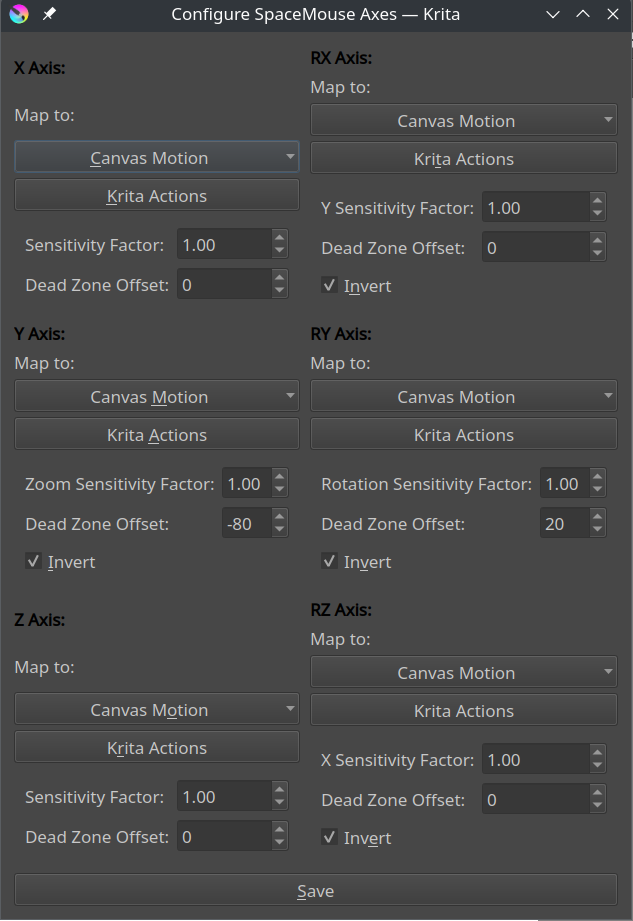
The Puck Configurator is divided into 6 sections, one for each physical axis of the SpaceMouse. Each section can be toggled between two modes: A Motion Mode, and an Action Mode.
-
The Motion Mode allows the axis to be mapped to one of the canvas' four motion axes: X (or Horizontal panning), Y (or Vertical panning), Rotation, and Zoom. Motion Mode provides adjustment of the Sensitivity (motion speed) and Dead Zone (a deliberately dead area near center-stick, useful for avoiding accidental motion input). These values are per-axis offsets to the Global Sensitivity and Dead Zone settings under the Advanced Tab. Clicking the "Krita Actions" button will exit Motion Mode and toggle the axis to Action Mode.
-
The Action Mode allows for assigning Krita Actions to Positive and Negative inputs for that axis. For example you could map axes not used for canvas motion to Increase/Decrease brush size, Undo/Redo, or whatever fits your work flow. Over 600 internal Krita actions are available for binding. A per-axis Dead Zone offset is provided to avoid accidental activation. Clicking the "Canvas Motion" button will exit Action Mode and toggle the axis to Motion Mode.