Releases: TriliumNext/Trilium
Release list
v0.105.0

a0908a6  eliandoran
Elian Doran
eliandoran
Elian Doran
v0.105.0
Important
If you enjoyed this release, consider showing a token of appreciation by:
- Pressing the “Star” button on GitHub (top-right).
- Considering a one-time or recurrent donation to the lead developer via GitHub Sponsors or PayPal.
The release that makes Trilium lighter, more visual and easier to organise: images shrink themselves, attributes get a home of their own, and your backups can finally be restored.
🚨 For ARM64 Docker users
The arm64 image is now based on Debian 13 "trixie", as Debian 11 reaches end of life on 2026-08-31. Your host needs a libseccomp new enough to know the clone3 syscall (roughly 2.5+), or the container will fail to start. If it does, add:
services:
  trilium:
    security_opt:
      - seccomp:unconfined
Updating Docker itself will not help since runc links the host's libseccomp. The 32-bit linux/arm/v7 and linux/arm/v8 images and the native ARM builds are unaffected.
Warning
Before you upgrade. This release contains changes that can break an existing setup.
- MCP now requires authentication and can optionally be accessed over the network. → Reconfigure your existing MCP clients with credentials.
- General HTML support in text notes is now disabled by default. This makes copy-paste from websites behave well, without grabbing unwanted tags such as input boxes. → Re-enable via Options → Text notes → Preserve unsupported HTML tags.
**<div>**s in text notes are now unwrapped instead of being preserved as-is, regardless of settings. This prevents broken behaviour when entering new paragraphs, and bugs such as being unable to exit a code block.
✨ Highlights
Know what's in your database — and take it back
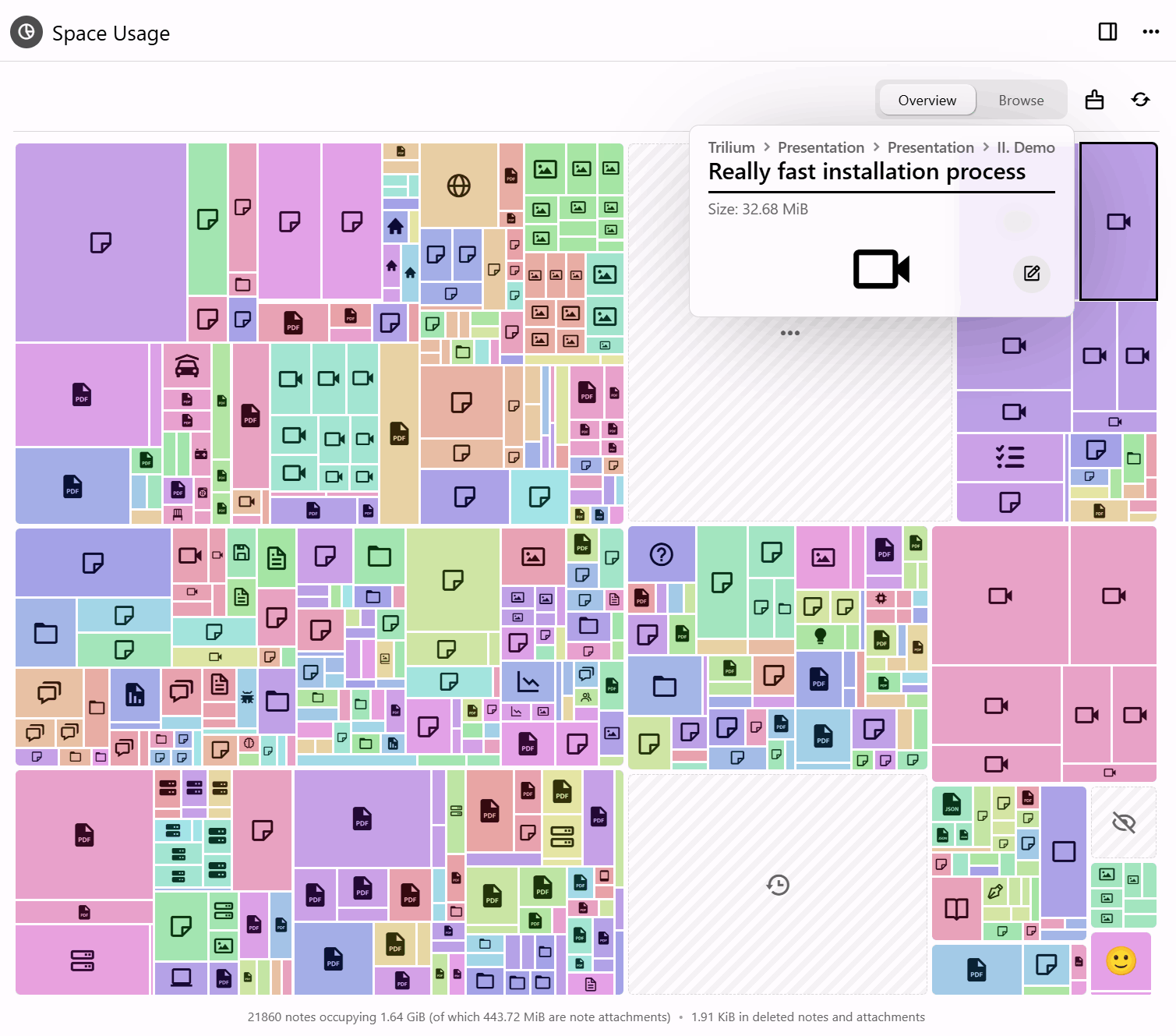
Two new tools answer the same question from opposite ends: what is actually taking up all that room?
- Space Usage draws it as a treemap — notes, revisions and attachments sized by how much space they take — so the thing quietly eating your disk is visible at a glance instead of guessed at. The cleanup tool then acts on what you find: erase deleted notes, trim old revisions, drop unused attachments and compact the database.
- Compress images goes after the usual culprit, resizing oversized pictures and re-saving them smaller — from a note, the tree, the attachments list, the image viewer or the cleanup run itself. It tells you what it found before it starts and what it saved when it finishes.
Automatic compression on upload, paste and import now keeps PNGs as PNGs, leaves already-compressed pictures alone, and runs off the thread serving the app, so a large import no longer freezes Trilium. (@adoriandoran)
Attributes finally have a home
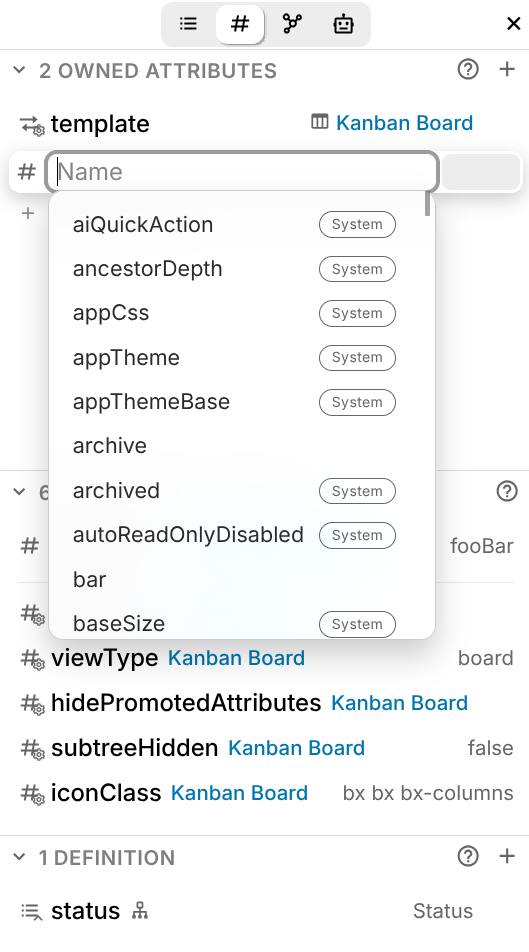
A dedicated Attributes sidebar tab shows owned, inherited and promoted attributes in one clear list, and lets you edit them in place. System attributes are marked with an icon in the sidebar and a badge in autocompletion, and every one of them now has a description. Their values are edited with the right control for the job — colour pickers, URL fields, date selectors.
Mobile gains an attribute editor with the same interface, and the classic attribute editor and its configuration modal received a round of fixes.
Backups you can lock, and actually restore
Backups can now be compressed and encrypted. Encryption uses AES-256-GCM with a password of your own, held in the operating system's keyring, so a backup written to a synced or shared folder cannot be read by whoever else can reach it — and later tampering or damage is detected. Both are off by default.
More to the point, Trilium can now restore one. Setting up an instance offers restoring from a backup as a fourth path, alongside a new knowledge base, syncing from a server and pairing with a desktop app; a running instance reaches the same screen from Options → Backup, and is offered a copy of what is already there first. The candidate is checked before anything is replaced, and a restore that fails rolls back — so an unusable backup leaves your notes exactly as they were. Backups measured in gigabytes are handled properly: a browser sends one in resumable pieces, and the desktop app reads it where it already sits. (@adoriandoran)
See everything your database is running
Databases collect scripts, themes and widgets over the years, and until now there was no single place to see them — or to tell which one was responsible for the odd behaviour you've been living with.
The content manager lists them all, grouped by category, and lets you switch any of them off without deleting it. Turn something off, see whether the problem goes away, turn it back on. (@adoriandoran)
Ask the editor to do the writing
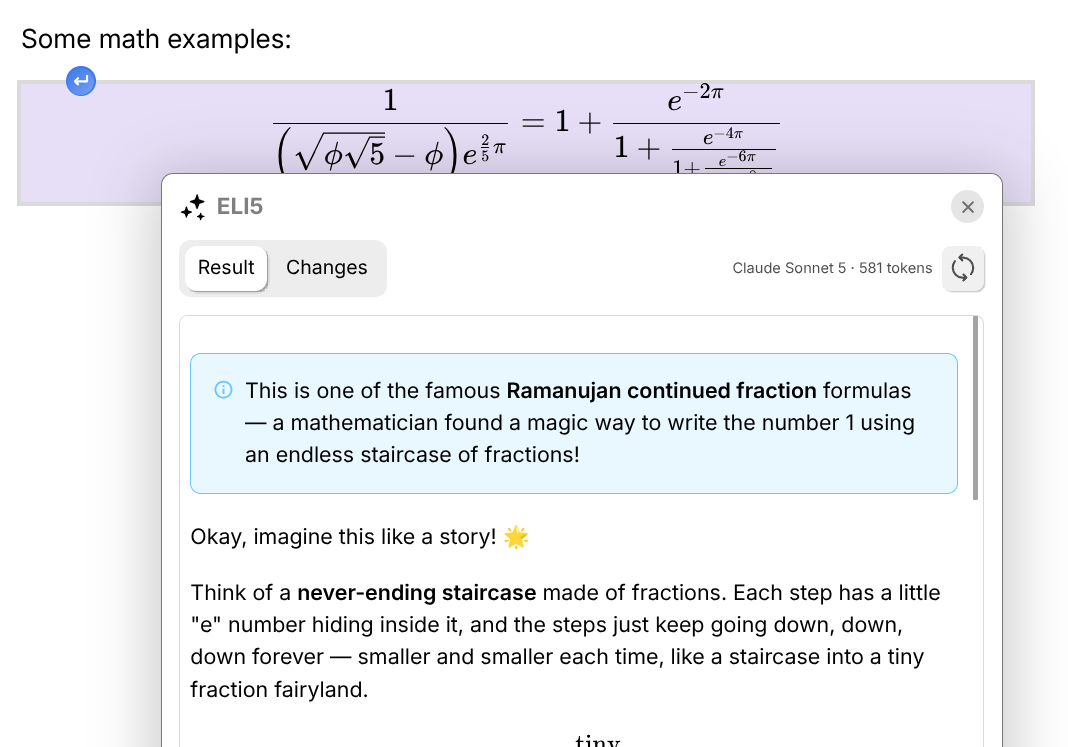
Trilium's LLM support has moved out of the chat panel and into the text editor. Select anything and hand it to a model — proof-read it, tighten it, summarise it — and take the result inline, without copying text into a chat window and back. Custom prompts let you keep the operations you run often. Requires an LLM provider to be configured; a GitHub Copilot subscription now works as one, alongside the existing providers.
Settings you can search, on a screen that fits
Every settings page has been rebuilt on a shared card component — a card per subject, one setting per row, its explanation under the name rather than beside it — and a search field now looks through all of them at once. It shows the settings themselves, live and operable where they stand, grouped under the page each one belongs to, and finds a page's own commands too: back up now, restore a backup, create an ETAPI token. (@adoriandoran)
🎁 Also new
- Geo Map on MapLibre — WebGL rendering, 3D terrain, marker clustering, full-screen mode and a floating info panel for each marker, with full GPX track support.
- Mind Map node panel — colours, fonts, icons, images and a rich-text memo, from a side panel.
- Calendar face lift — a new theme and layout, and a friendlier popup for creating and editing events.
- Connections sidebar tab — backlinks, note paths and the note map in one place.
- Office & EPUB previews —
.docx,.xlsx,.pptx, ODF, RTF and EPUB open in Trilium. - An important memory leak that accumulated components and event listeners has been fixed, and consistency checks no longer take minutes on databases with 20k+ notes.
📋 What else changed
Backups
- New: backups can be compressed, encrypted or both, written as a
.tnbackupcontainer. The password is kept in the OS keyring and is offered on the desktop application only, where there is somewhere safe to hold it. - Improved: the backup settings page opens by saying how many backups exist and how long ago the most recent one was written, with "Backup now" beside it.
- Improved: a backup can be given a name and a password of its own when taken by hand, rather than following the scheduled-backup settings.
- Fixed: a backup that fails part-way is deleted, so a half-written file is never listed or offered for download.
Database & maintenance
- New: Options → Database is where the knowledge base as a whole is now looked after. It opens with a summary — location, note and attachment counts, creation date, size, and how the backups stand — followed by everything that acts on the database: cleanup, space analysis, integrity check and repair, compaction, and anonymized copies.
- New: a cleanup tool that erases deleted notes, unused attachments and excess revision snapshots, honouring
#versioningLimit, and compacts the database. - New: a Keep named revisions option, so revisions you have named survive a cleanup.
- New: Start over returns an instance to the setup wizard without reinstalling. On a server it asks for your password, and your second factor where one is configured, so an instance reachable from outside stays closed while it waits.
- Improved: an anonymized database copy can be deleted once it has been handed over, and the folder holding them opens in the file manager.
Settings
- N...
Contributors


Assets 22
- 87.4 MB
2026-08-19T18:19:07Z - 89.8 MB
2026-08-19T18:19:07Z - 176 MB
2026-08-19T18:19:07Z - 145 MB
2026-08-19T18:19:07Z - 131 MB
2026-08-19T18:19:07Z - 153 MB
2026-08-19T18:19:07Z - 188 MB
2026-08-19T18:19:07Z - 179 MB
2026-08-19T18:19:07Z - 147 MB
2026-08-19T18:19:07Z - 137 MB
2026-08-19T18:19:07Z -
2026-08-19T17:57:23Z -
2026-08-19T17:57:23Z - Loading
v0.104.1
744646d
eliandoran
Elian Doran
v0.104.1
Note
If you enjoyed this release, consider showing a token of appreciation by:
- Pressing the “Star” button on GitHub (top-right).
- Considering a one-time or recurrent donation to the lead developer via GitHub Sponsors or PayPal.
💡 Key highlights
- Significant improvements to the OneNote import:
- Survive sustained Graph throttling by @perfectra1n
- Handle 504 errors instead of crashing.
- Skip pages that could not be downloaded and report them.
- Add device-code flow to allow imports from the web app (not just from desktop).
- Refresh token so multi-hour imports are possible.
- Better support for screen clippings, table sizing and backgrounds, drawings with light/dark theme support, improved creation date processing.
- Preserve
newNotesOnTop. - Improved selector for notebooks.
- Creation dates are now preserved better by taking into account the meta-information, not just the creation date returned by the API.
- Encrypted sections are properly tolerated and reported.
- Improvements to the LLM
- LLM model selection has been redesigned: instead of having a fixed list of models, the models are dynamically retrieved from the provider (ChatGPT, Gemini) and the list of models can now be customized.
- If you are migrating from a previous version, the list of models will appear as empty. Simply press the Edit button corresponding to your provider in the model dropdown.
- The LLM can now read the user guide that comes bundled in with the application and can answer questions about Trilium's features.
- Improved the provider setup process.
- Added support for DeepSeek, but without web search capability.
- First-hand support for custom OpenAI-compatible providers
- Add support for Ollama and LM Studio, as well as any self-hosted provider (@Kureii & @eliandoran)
- LLM model selection has been redesigned: instead of having a fixed list of models, the models are dynamically retrieved from the provider (ChatGPT, Gemini) and the list of models can now be customized.
🐞 Bugfixes
- Migration fails if the hidden notes were protected.
- Desktop sync behind multi-cookie reverse proxies fails.
- Claude Code integration not working on Windows if installed via
npm. - Spellcheck seems to automatically reactivate whenever Trilium is restarted.
- Turning off smooth scrolling in options does not work
- Sync fails if the reverse proxy contains its own cookies
- Initial sync would not properly display errors.
- Some tooltips still showing [protected] after unlocking the protected session
- The tooltip on the sync status button remains always visible
- Disabled TOTP from previous versions becomes active again
- First setup unreadable on Windows 10 due to background effects
- Image viewer's shortcuts block full-app shortcuts by @adoriandoran
- Can't scroll down to media player controls by @adoriandoran
- Docker upgrade v0.103.0 to v0.104.0 fails on CentOS 7 (SQLITE_IOERR_SHMSIZE)
- New instance resets editor toolbar option
- Link on a single paragraph is not deleted properly
- "Redirect bare domain to Share page" also redirects login page to share root
- On bigger notes, the content of the note tends to "refresh"
- HTML attachments opened in Safari instead of being downloaded.
- Fix uneven tab spacing when left pane is visible by @StevenDoesStuffs
- Fixes to collapsible blocks by @adoriandoran
1. Fixed being unable to drag-select across multiple paragraphs inside a collapsible block on Chromium-based browsers.
2. Expanding/collapsing a block is no longer undoable, so Ctrl+Z after reading a note doesn't re-collapse what you just opened.
3. All collapsible blocks are forced open when printing or exporting to PDF, so their content isn't lost.
4. Newly inserted collapsible blocks start expanded.
5. Fixed a collapsed block's state being incorrectly written back when a temporary search reveal was stripped.
6. Collapsible list items now temporarily expand to reveal find-in-note matches nested inside them, and follow the highlight as you step through results.
7. Fixed the collapse arrow still pointing "collapsed" while an item was temporarily revealed. - Media player fixes by @adoriandoran
1. Attachments opened in full detail now use the full media player UI instead of the compact preview.
2. Added previous/next navigation between an owner note's playable attachments, restricted to media the player can actually play (audio siblings for an audio player, not everyfile-role attachment).
3. Fixed the media player and image viewer swallowing global Trilium shortcuts that overlap with their own bare-key bindings (Ctrl/Cmd/Alt chords now pass through).
4. Fixed keyboard-shortcut hints from standalone media players leaking into every other context's hint list.
5. Fixed the attachment viewer/player continuing to show the old content after an attachment was replaced. - Fixed keyboard shortcut hints overlapping with the floating buttons.
- Spellcheck custom words not editable in the options modal.
- Link previews are badly rendered in image captions.
✨ Improvements
- Auto-formatting for extended to-do list states
- OAuth: Improved error management
- OCR now supports EPUB format.
- Added support for indenting tables in text notes. by @adoriandoran
- Search improvements by @adoriandoran
- Link previews are now searchable — their title, URL and description are indexed instead of being stripped away.
- Link-preview metadata now appears in quick-search snippets (URL, title and description on separate lines).
- Quick-search snippets now decode HTML entities, so you see
<,&and real spaces instead of<,&and .
- Improvements to collapsible blocks by @adoriandoran
- Collapsible blocks now remember their expanded/collapsed state.
- Collapsible blocks expand automatically when a search result is highlighted in their body.
- Improved the alignment of custom task checkbox glyphs and labels by @adoriandoran
- Desktop: Added an option to disable GPU acceleration
🛠️ Technical updates
- Nix flake fixes by @FliegendeWurst
Contributors


Assets 22
v0.104.0
97860e2
eliandoran
Elian Doran
Note
If you enjoyed this release, consider showing a token of appreciation by:
- Pressing the “Star” button on GitHub (top-right).
- Considering a one-time or recurrent donation to the lead developer via GitHub Sponsors or PayPal.
This release is the largest in Trilium's history, built around two big themes: security and interoperability. The attack surface has been dramatically reduced across the desktop app, the server, and shared notes — with 16 dedicated security fixes and a few deliberate breaking changes (backend scripting and the SQL console are now disabled by default), so please review the Breaking changes section before upgrading.
Getting notes in and out of Trilium is also much easier: new importers for OneNote, Notion, Google Keep, Anytype and Obsidian join a faster, more memory-efficient import/export pipeline and Spreadsheet now has XLSX and CSV import & export.
On top of that come a redesigned setup and login experience, better AI integration (including being able to use your Claude Code subscription), richer text editing (multi-state TODO lists, collapsible blocks, link previews), dashboard collections, and a huge wave of polish — roughly 86 bugfixes and 68 smaller improvements touching nearly every corner of the app. The sections below have the full details.
💡 Key highlights
- Setup was redesigned from scratch to be more modern (see details below).
- The LLM integration can now use your Claude Code subscription, without the need of an API key or additional cost.
- Text notes: Customizable multi-state TODO lists by @adoriandoran
- Collapsible blocks by @adoriandoran
- Link previews by @stexz01, @eliandoran and @adoriandoran
- Toggle List (aka Accordion) by @adoriandoran
- Text notes: Collapsible bullets
- Spreadsheet gains XLSX and CSV import & export
- A new experimental Dashboard collection.
- Auto theme switching for code blocks and code notes
- Autocompletion (e.g. Intellisense) for Frontend & Backend code notes
- Significant hardening of the desktop and server app by @perfectra1n and @eliandoran.
- A new import mechanism allows importing from multiple applications: OneNote notebooks using the cloud API, Notion, Google Keep, Anytype, Obsidian
- Significant improvements to the import/export process
1. Use a better buffering system so that the memory consumption never increases proportionally to the number of notes exported.
2. Display the progress of import/export.
3. Use a native mechanism on desktop so that the files being imported are not copied in memory.
4. Server now uses the disk to store imported files, reducing memory pressure.
5. Improved compression time by skipping already compressed files.
6. Improved import performance. - Significant improvements to the LLM UI by @adoriandoran: Quote content, save AI responses as subnote, regenerate responses, delete & rename chats, printing, note-tooltip, scroll-to-bottom & performance tweaks.
🚨 Breaking changes
- Backend scripting is now disabled by default.
- If you make use of these scripts, see the documentation (
config.inichange for server or desktop settings). - The goal of this change is to strengthen Trilium's security posture since backend scripts have dangerously powerful levels of access (e.g. full FS access). Front-end scripts are unaffected.
- If you make use of these scripts, see the documentation (
- SQL console access is disabled by default.
- Similar to backend scripting, it can be reactivated from
config.ini.
- Similar to backend scripting, it can be reactivated from
- The desktop application (based on Electron) has been hardened against potential RCE attacks. You might have to adapt your scripts if you have front-end scripts that depend on Electron remote or the Node.js integration.
- The desktop application now no longer opens its port on the local network by default.
- This can generally affect you only if you are using ETAPI or desktop-to-desktop sync with your desktop client (servers are unaffected).
- This option can be changed in Options → Security.
- OPML v1 export was dropped from this release, v2 which preserves basic formatting has been kept instead. The v1 is still supported for import.
🐞 Bugfixes
This release lands roughly 86 bugfixes, with a strong focus on data integrity: several issues that could overwrite note content, corrupt the database during ZIP import, or leave sync in an inconsistent state have been resolved. The remainder is steady polish across the text editor, spreadsheets, Markdown import/export, canvas notes, sharing, authentication and mobile.
All 86 bugfixes
- Backend log doesn't respect the code color theme.
- Search: Wrong escape of highlighted tokens
- Desktop layout doesn't respect the bottom safe area.
- When refreshing the page, the sidebar shows up animated.
- “Upload attachment” not working on mobile.
- Text notes: Moving lines using keyboard shortcut sometimes not working
- Flickering note save indicator on desktop.
- Revisions: “Diff isn't available” when viewing revisions of an empty note.
- Code block tries to link/create note when typing @, and suggests slash-commands when typing /
- Recovered notes appear after interrupting a sync from a device that was long offline
- Relation map:
share*labels are not filtered out during safe import.- Geomap rendering raw HTML
- Text Notes can not add lists that are not numbered (i.e. letters) by @adoriandoran
- ETAPI YAML endpoint not accessible.
- Status bar: Code language switcher not showing the language if it was not enabled in settings.
- Spreadsheet:
- Ctrl+R copies to the right, intercepting page refresh / Unnecessary save on refresh
- Can't edit the same note in a split.
- Save is sometimes done before recalculation, causing potential incorrect values.
- Unnecessary save when first showing some spreadsheets.
- Exporting as a single file results in a .undefined file with zero content.
- Calendar collection not occupying 100% height.
- Formatting toolbar not showing after temporarily editing a note in the old layout.
- New layout: Note map not visible on text notes
- Not all notes in a split loading after a refresh.
- Background effects interfere with shadow on Linux.
- AI: Extended thinking not working in some models
- Markdown: colspans and rowspans are not preserved during editing
- Read-only Mermaid diagrams not always rendering
- Notes being overwritten with another note
- Changes to AI providers not refreshing the sidebar.
- Markdown: wrong escape of dollar signs
- TOTP: Entering a wrong password uses up the recovery code
- OIDC credentials are not checked for
- Current OpenID Connect Implementation is not compatible with Authelia
- New checkbox rows are already prechecked when previous row was checked
- Spreadsheet not localized
- Move line up...
Contributors


Assets 22
v0.103.0
44f5be8
eliandoran
Elian Doran
v0.103.0
Note
If you enjoyed this release, consider showing a token of appreciation by:
- Pressing the “Star” button on GitHub (top-right).
- Considering a one-time or recurrent donation to the lead developer via GitHub Sponsors or PayPal.
Important
Due to the introduction of new note types (spreadsheet) and the OCR feature, the database and sync versions have been increased. This means that both the desktop and the server need an upgrade in order to continue syncing.
Warning
The Windows binary has received a certificate upgrade which means that you might get SmartScreen warnings depending on how you install the application. This is already a known issue, the workaround is to right click the installer → Properties and check the security box at the bottom of the window.
💡 Key highlights
- A long-awaited note type is now supported: Spreadsheets, allowing for a familiar (Excel-like) editing experience with formulas, powered by Univer Sheets.
- Support for it is considered beta and it might face some changes along the way.
- See the documentation for important aspects to consider when using spreadsheets.
- Basic Markdown support with preview and sync scrolling.
- Built-in OCR support for images, but also PDF and Office (Word, PowerPoint, Spreadsheet) text extraction which integrates with the search function. See the Media page in Options for configuration.
- Custom dictionary is now synchronized across instances
- New deployment for Linux under test: AppImage
- Bookmarks in text notes were overhauled
- Bookmarks were renamed to Anchors in order not to overlap with the concept of bookmarked notes in Trilium.
- Anchors can now be used across notes as they are integrated into the Add link feature. See documentation for more information.
- Added a corresponding slash command to make it easy to introduce new anchors.
- We are reintroducing an LLM chat functionality with full-size chats as well as a sidebar with tools that allow it to alter your notes or even create scripts.
🚨 Breaking changes
- Back-end scripting:
api.axioshas been removed. It has already been marked as deprecated for more than two years now and given the recent security compromise and the fact that it's not actually used in the Trilium code base we took the decision to remove it completely. Please update your scripts to use the built-infetch()instead.api.cheeriohas been marked as deprecated, but not removed. As an alternative we providenode-html-parserwhich has a more DOM-oriented syntax.
🐞 Bugfixes
- Save indicator not showing in quick edit popup.
- Grid of child notes does not clear floats.
- Open tabs would load in the background, causing a slight performance impact.
- New layout:
- Save indicator would not disappear if reduced motion was activated.
- Table of contents would not refresh on formatting changes and sometimes it missed some updates.
- Missing empty icon from the default icon pack.
- Board collection:
- Scrolling horizontally was clipped.
- Add button not snappable to on mobile.
- Invalid canvas note crashes full-text search
- Protecting or un-protecting notes does not refresh the state of the tree.
- Collections will show the note list even if a protected session is not available.
- Notes created from within a collection don't respect the protected state.
- Long-standing issue with CSRF errors on mobile, which required a refresh.
- Setup text in DarkMode is hardly legible
- Share: Browsing to "/share" on uninitialized setup causes crash
- Large Equations Render over editor using Latex align environment in Display Mode
- New layout: attribute detail modal not visible
- The first attribute value fails to pop up the label details window correctly
- Thumbnail images in version v0.102.1 are too small
- PDF previews can fail between software updates due to caching issues
- Can't print or export to PDF on Linux Wayland
- Browsing to "/share" on uninitialized setup causes crash by @argusagent
- Refresh content for SPAs with "query string" in hash by @contributor
- Import file with Chinese char in file name cause random char in file name after import
- Share: Webviews occupy too little height, making them hard to see
- Events in calendar show as light even when dark theme is selected
- Scripting: Preact's useContext is exported, but createContext isn't
- Share Function - Translation not being used
- Changing the note icon does not change the icon in the tab
- Cannot open quick search results in new tab
- Server & desktop not running properly if placed in a hidden directory (e.g.
~/.local/share). - Collections:
* Not reacting to changes in note reordering.
* Clicking on a URL promoted attribute in board will also open quick edit. - Performance issues when typing caused by saving the document too many times (addresses Significant input lag and UI freezing during continuous drawing/writing (Mouse & Pen) but also other note types as well)
- Unnecessary attribute setting when editing a note in a calendar's quick edit.
- Title is no longer auto-selected when creating a new note
- Note Map view of Hidden Notes freezes Trilium
- Search: Some user-facing error messages were not translated.
- Uncaught TypeError shown in logs when switching notes with bottom-right attribute window open
- Demo spacing and formatting issues
- Setup doesn't support trailing slash for sync
- "Open Command Palette" shortcut opens with the '>' symbol highlighted
- Unable to set column value to zero in table view
- Displaying deep child notes in the Journal calendar view
- Titles of Options are renamable
- New layout sidebar
* Table of contents sometimes renders math equations multiple times
* Highlights list does not show equations. - Deleting a not displayed note will change the displayed note
- Demo notes: statistics not working due to missing Chart.js
- Disable "Internal trilium link (Ctrl+L)" on code-block text selection
- Orphaned keyboardShortcuts* options after upgrade
- Scripting: Logging complex entities such as
api.startNotewould show[object Object] - Import from HTML does not restore indentation
- Mermaid:
* Mermaid diagram copy reference to clipboard button is broken
* Issue with Chinese Paths on Windows - Add an error when link couldn't be opened
- UI overlap in attribute editing by @ZAKIURREHMAN
- Some launch bar context menus were intercepted by the browser.
- ENEX import: Attachments should not be converted into separate pages
- Exporting code of type Markdown resulted in a
.mkdor.code(for GFM). - Importing a Markdown file with “Import as text note” disabled would import as the wrong format (File) instead of Code.
- Text notes would print with a different font than the one in
body. - [The hidden notes hiearchy becomes apparent after importing a ...
Contributors


Assets 22
v0.102.2
bf23439
eliandoran
Elian Doran
v0.102.2
Important
This release contains important security fixes. All users are strongly encouraged to update immediately.
Several vulnerabilities affecting content handling and the desktop application have been addressed. We recommend upgrading before the next scheduled release to ensure your installation is protected.
Note
If you enjoyed this release, consider showing a token of appreciation by:
- Pressing the “Star” button on GitHub (top-right).
- Considering a one-time or recurrent donation to the lead developer via GitHub Sponsors or PayPal.
- If you are interested in an official mobile application (#7447) or multi-user support (#4956), consider offering financial support via IssueHunt (see links).
🔒️ Security improvements
-
Content Handling
- Improved request handling for SVG content in share routes
- Improved request handling for SVG content in the main API
- Enhanced content rendering in the Mermaid diagram editor
- Fixed toast notifications to properly escape content
- Added validation for the
docNameattribute in the document renderer - Marked
docNameas a sensitive attribute in the commons module
-
Desktop Application (Electron)
- Added Electron fuses to harden the desktop application against external abuse
- Improved application integrity checks
-
API & Import
- Added MIME type validation for image uploads via ETAPI
- Aligned attachment upload validation with note upload validation
- Import no longer preserves named note IDs to prevent potential conflicts
-
Authentication
- OpenID Connect now uses a more secure random number generator
We've also updated our SECURITY.MD file to detail our security practices and how to report vulnerabilities.
v0.102.1
8ac9daa
eliandoran
Elian Doran
v0.102.1
Note
If you enjoyed this release, consider showing a token of appreciation by:
- Pressing the “Star” button on GitHub (top-right).
- Considering a one-time or recurrent donation to the lead developer via GitHub Sponsors or PayPal.
- If you are interested in an official mobile application (#7447) or multi-user support (#4956), consider offering financial support via IssueHunt (see links).
Important
This is a hotfix of v0.102.0, addressing some blocking issues. For more information about the previous major version, see v0.102.0 changelog.
🐞 Bugfixes
- Mind Map feature breaks rendering in v0.102.0
- Fixes for the PDF viewer:
- PDF view is '403 Forbidden' on Nginx Proxy Manager
- PDF: address some layout issues by @adoriandoran
- Cache not properly invalidated across versions.
🛠️ Technical updates
Contributors
Assets 20
v0.102.0
3e0ddd9
eliandoran
Elian Doran
v0.102.0
Important
LLM integration was removed due to the complexity of maintaining this feature. For more information, see #8797. This means that the database needs migration (downgrades will not be possible without restoring from backup), but it will not affect the sync with the server.
Note
If you enjoyed this release, consider showing a token of appreciation by:
- Pressing the “Star” button on GitHub (top-right).
- Considering a one-time or recurrent donation to the lead developer via GitHub Sponsors or PayPal.
- If you are interested in an official mobile application (#7447) or multi-user support (#4956), consider offering financial support via IssueHunt (see links).
💡 Key highlights
- Trilium now has support for custom icon packs that can be used for note icons. See Icon Packs - User Guide for more info and a list of official icon packs.
- New layout now provides a save indicator near the note title.
- Trilium now uses its own PDF renderer (based on PDF.js viewer from Mozilla). This allows for more features such as annotations, search (within the current file), filling forms as well as remembering last reading position. See documentation for more info.
- Some Collections will hide their children in the note tree by default. See the documentation for details.
- jQuery has been updated to v4.0.0 which introduces breaking changes that could potentially affect your scripts.
- Desktop app: background effects (Vibrancy) are now available for macOS.
📱 Mobile improvements
- Collections now show the “Collection properties” toolbar, allowing to switch views and configure the collection.
- The tab row was removed in favor of a more browser-like tab switcher, displayed as a modal with note preview.
- The title row was significantly changed:
- The note icon is now displayed with the possibility of changing the icon.
- Inherited from the new layout on desktop: the note badges (read-only, shared), save indicator.
- Icons should now be easier to press.
- The inline title for text and code notes from new layout is now available.
- The note actions menu (right of note title):
- All the features that are available on the desktop on the new layout are now available, allowing features such as search, toggling share/template/bookmark, changing note type/editability and even import/export/print.
- Some components from the status bar were also relocated here for mobile: backlinks, note paths, attachments, note info, similar notes and text/code language switchers.
- Custom note actions (note-specific) were also ported, with buttons such as “Run active note”, “Toggle read-only”, “Upload new revision”.
- Launch bar improvements
- New split (empty tab): added button to close the split.
- Promoted attributes are no longer fixed at the top and are part of the scrollable area, including a way to collapse it.
- Background effects are now enforced to be disabled, to avoid performance issues. This also fixes grayish menus due to the black backdrop.
- Virtual keyboard detection not working properly on iOS
- Search for notes is now available for mobile, either via the launch bar or the global menu. The layout was optimized slightly for mobile.
- Recent notes are also available, via the launch bar or a dedicated entry in the global menu.
- Editor format bar not visible after clicking button to edit 'readOnly' note in mobile view
- Support Saved Search Notes on Mobile UI
- Oversized note title and editor toolbar is cut off.
- Web clipper "save link with a note", cannot see the link in android mobile view
- Add note attachment functionality to mobile web UI
- Improved the layout of Shortcut options page.
- Added scroll padding to text and code notes (same as desktop).
- Improved the fit of empty tab.
- Fixed some usability issues with the side bar tree: too easy to close, tooltip remained stuck, sometimes cut at the bottom on some browsers.
- Search in full text in Jump to note is overlapped by text
- Keyboard shortcut plus symbol shown on some buttons
- Virtual keyboard detection not working on Android
- Toast not respecting safe area
- iOS viewport shifting in split notes
- Issues with formatting toolbar on iOS (Background, positioning, dragging)
🐞 Bugfixes
- Status bar: Attribute count counts internal links as well.
- Various UI fixes by @adoriandoran
- Boxicons:
border-righticon missing. - Share export:
- ZIP attachments having wrong extension.
- JS frontend files having the wrong extension by @kalbasit
- Prevent crashing if candidate note is null by @kalbasit
- PDF: clicking on the document doesn't focus the note in the note tree.
- Colors with upper case or invalid colors can cause a crash
- New Layout performance issue: excessive calls to custom widget refresh/reload API by @lzinga
- Exporting a note as a static website (format == share) should support ~shareJs by @kalbasit
- Toggling right pane visibility incorrectly affects all windows by @SiriusXT
- Revisions not displaying meta info (mime and file size) for
filetypes. - Solved some performance issues regarding the tree, especially if hoisted notes are involved:
- Tree is updated on content changes.
- Batch update causing a reduction in performance.
- Slow rendering of nodes.
- Keyboard combinations with Alt not working properly on macOS by @chloelee767
- Markdown export not preserving HTML entities correctly.
- Error when printing presentations.
- Syntax highlighting tooltip in Settings → Code Options not indicating correct information.
- Render notes not refreshing on attribute change
- Promoted attributes: check boxes not displaying initial value correctly
- Race condition in syntax highlight in the note list
- Mermaid graphs only render once unlocked and relocked
- Quick edit not working properly if “Keep content centered” is checked
- Canvas background color is not saved
- Calendar collection not respecting default formatting locale and casing
- Missing "Note Paths" in new layout if note is partially in hidden notes
- New layout: Note type switcher shown in non-standard view modes (e.g. view source)
- Keep content centered does not center "Notes edited on this day"
- Search error tooltips are not displayed in user interface
- RelationMap crashes when switching an empty note to Map view (TypeError: Cannot read properties of undefined (reading 'map'))
- Cannot select option in advanced sub-menu in some language
- web-clipper page 404 on triliumnotes.org
- web view note in second window does not load content by @contributor
- Wrong sync status tooltip
- Code notes:
- Clicking at the bottom of a note would change the view port and affect all splits.
- Missing Node globals in linter for backend notes.
- Breadcrumb would split on multiple lines when width is constrained.
- Clicking on a web view would not activate the split.
- When using the legacy theme, the window cannot be dragged in vertical layout
- Fixed some issues with promoted attributes:
- Typing sometimes misses characters.
- Duplicate auto-complete instances.
- Flicker when applying autocomplete suggestion.
- Potential refresh issue in inherited attribute list.
- Calendar: creating a note in an unhoisted
#workspaceCalendarRootwould create it in the#calendarRoot...
Contributors


Assets 20
Web Clipper v1.1.0
bbf090e
eliandoran
Elian Doran
- Web clipper: Addon does not seem to work in Chrome
- Web clipper: Chrome Extension options menu cuts off part of the options
- Spacing issue in “Already visited”.
- Fixed minor typos
- Solve warnings regarding permissions
Web Clipper v1.1.0
241147c
eliandoran
Elian Doran
This is the first release of Web Clipper since Trilium switched maintainership. This version contains the previously unreleased features and fixes, as well as support for Manifest v3.
Note
These are “preview” ZIPs which are unsigned. We have already submitted this version to both the Firefox and Chrome store and they are pending validation.
Feel free to report any bugs you might have along the way.
For more information, see https://docs.triliumnotes.org/user-guide/setup/web-clipper.
- Corrected
modifiedDateto use the correct date value (previously incorrectly usedpublishedDate) - Fixed duplicate context menu entry.
- Reintroduced support for Chrome, by supporting Manifest V3.
- Capture location.hash into pageUrl attribute by @contributor
- Check if the current page is already saved in trilium by @manto89
- Keep the title when adding notes by @manto89
- Check if the current page is already saved in trilium by @manto89
- Send published/modified date when saving whole page by @jrao1
- Technically, switched to the WXT framework.
Contributors


Assets 5
v0.101.3
f5e8822
eliandoran
Elian Doran
v0.101.3
Note
If you are interested in an official mobile application (#7447) or multi-user support (#4956), consider offering financial support via IssueHunt (see links).
Important
If you enjoyed this release, consider showing a token of appreciation by:
- Pressing the “Star” button on GitHub (top-right).
- Considering a one-time or recurrent donation to the lead developer via GitHub Sponsors or PayPal.
This is a re-release of v0.101.2, which had a cache invalidation issue.
🐞 Bugfixes
- SQL Console: cannot copy table data by @SiriusXT
- Title is not selected when creating a note via the launcher by @SiriusXT
- Popup editor closing after inserting a note link by @SiriusXT
- New Mermaid diagrams do not save content by @lzinga
- Can't scroll mermaid diagram code
- Max content width is not respected when switching between note types in the same tab
- Crash When a Note Includes Itself
- Severe Performance Degradation and Crash Issues Due to Recursive Inclusion in Included Notes
- is not a launcher even though it's in the launcher subtree
- Archived subnotes of direct children appear in grid view without #includeArchived