Diagnostics
This page gives information about the Diagnostic application provided by Safecor
The Diagnostic app shows the capabilities of the hardware it runs on. These capabilities determine whether a system based on Safecor will be able to start and what level of security it will benefit.
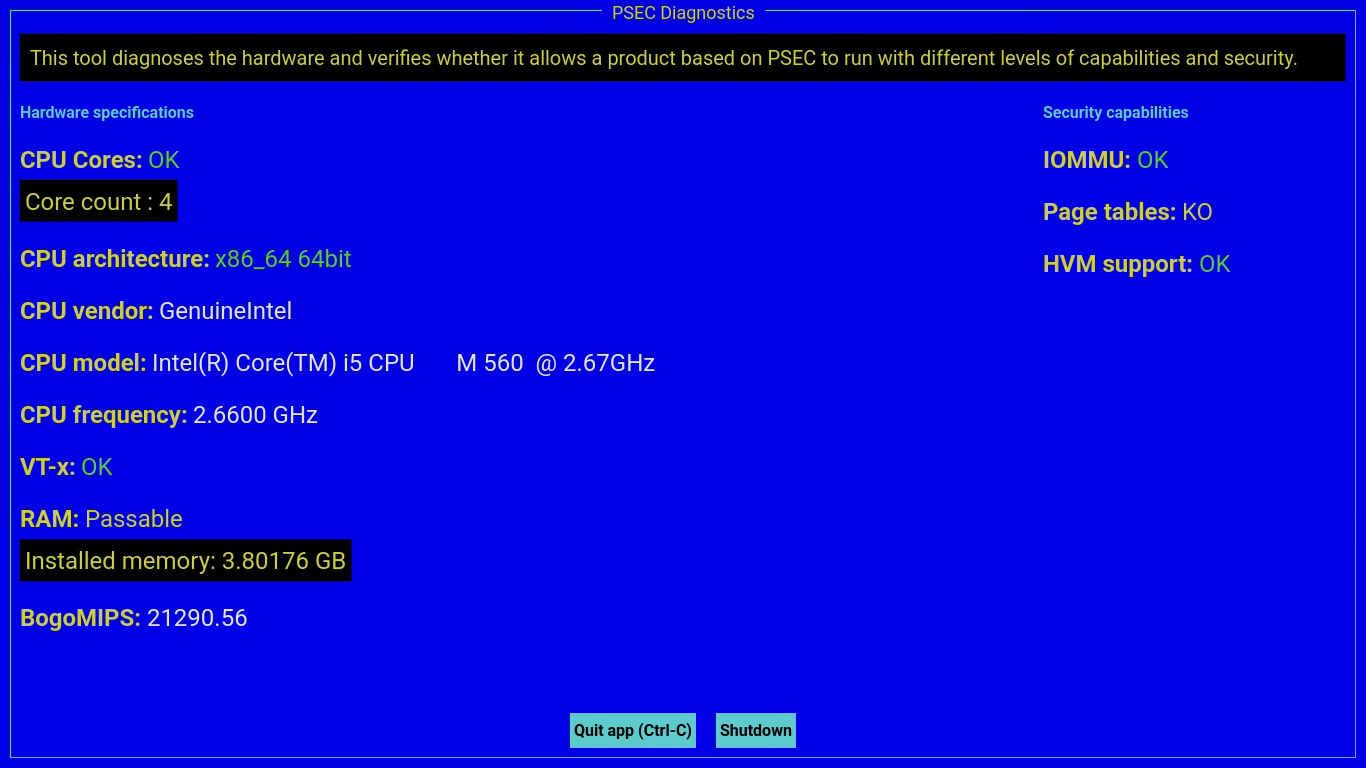
The screen is divided into categories:
- Hardware specificifations. It shows the information about the hardware and virtualization capabilities.
- Security capabilities. It shows the information about the security elements that enable a good isolation of the components of the system.
The minimum hardware capabilities needed to run a Safecor based product are:
| Capability / Specification | Minimum value | Comment |
|---|---|---|
| VT-x | OK | |
| CPU Cores | 2 | |
| RAM | 1 GB | 4 GB for a large system |
| IOMMU | OK | This enables a good isolation of the peripherals |
| HVM Support | OK | This enables a good isolation of the system components |
Some options can be enabled or disabled by providing parameters on the kernel command line.
| Parameter | Description | Default value |
|---|---|---|
| splash=no | Disables the splash | enabled |
| serial-debug | Enables the serial TTY console. The parameter debug-passwd must be used to define the password of the root user. CAUTION: All these parameters should be defined only inline in the grub menu. |
disabled. |
| debug-passwd | The password for the user root if the serial-debug mode is activated | A random value |
During the boot no message will appear from the Linux kernel. There will be no TTY console unless serial-debug is enabled on the kernel command line.
The debug console and the GUI are integrated in a different way:
- The debug console is started as an
openrc initd script(debug.initd). - The GUI is started from inittab. It is ran once and when the app quits, the system automatically halts.